Xerox C235dni Wireless Color Laser or Xerox C320dni Wireless Color Laser Printer? Which Xerox Model to Buy
As an Amazon Associate we earn from qualifying purchases. Links on this page are affiliate links.
The xerox c235dni wireless color laser vs c320dni wireless color laser comparison helps you choose the right machine for your office. Both models are Xerox wireless color laser printers that deliver vibrant text and graphics. They share wireless connectivity and mobile printing support. The main difference is performance. The C320 offers faster print speeds and higher monthly duty cycles. The C235 is designed for smaller workloads. You need to weigh speed against volume to decide.
Key differences
| Aspect | Xerox Wireless Color Laser All-in-One | Xerox Wireless Color Laser Printer |
|---|---|---|
| Print Speed | 24 ppm | 35 ppm |
| Supported Functions | Print, scan, copy | |
| Starter Toner Yield | 500 pages | 1500 black, 1000 color |
| Connectivity | Wi-Fi, USB, AirPrint, Mopria | Wi-Fi, AirPrint, Mopria |
| Weight | 35 pounds | 45 pounds |
Which one should you choose?
Choose Xerox Wireless Color Laser All-in-One if
- You need a multifunction device with scanning and copying capabilities.
- Your monthly print volume stays under 1,500 pages.
- You require a direct USB connection for setup.
Choose Xerox Wireless Color Laser Printer if
- You need faster output for busy office environments.
- Your monthly print volume reaches up to 2,500 pages.
- You want higher starter toner yields to reduce immediate cartridge changes.
Verdict: Choose the Xerox C235dni if you need scanning and copying functions for a small office. Pick the Xerox C320dni if you prioritize speed and higher monthly page volumes. The C320 is a dedicated printer, while the C235 is an all-in-one unit.
Xerox C235dni vs C320dni Specs
Print Speed
The Xerox C320dni delivers a faster print speed of 35 pages per minute, while the Xerox C235dni offers 24 pages per minute. This difference matters when you have larger jobs to finish quickly. The C320dni is built for busy offices that need high-speed productivity. The C235dni is suitable for smaller offices with lighter workloads. If you print many documents daily, the faster model saves time. For occasional use, the slower speed is adequate. Choose based on your volume needs.
Supported Functions
The Xerox C235dni is an all-in-one device that includes print, scan, and copy functions. The Xerox C320dni is listed as a printer only in its key specifications. While both support wireless scanning attributes, the C235dni explicitly bundles scanning and copying hardware. If you need to copy documents or scan papers directly, the C235dni is the complete solution. The C320dni focuses solely on printing. Check if your workflow requires integrated scanning and copying capabilities before deciding.
Monthly Duty Cycle
The Xerox C235dni is designed for small offices printing up to 1,500 pages per month. The Xerox C320dni supports up to 2,500 pages per month. This capacity difference reflects the intended workload for each machine. The C320dni handles higher volumes with heavy-duty reliability. The C235dni is ideal for lower-volume tasks. If your office generates more than 1,500 pages monthly, the C320dni is the better choice. For lighter duties, the C235dni is sufficient and cost-effective.
Starter Toner Yield
The Xerox C235dni includes a starter toner cartridge with a 500-page yield. The Xerox C320dni includes starter toner with 1,500 pages for black and 1,000 pages for color. The C320dni provides significantly more initial printing capacity. This means you can print more documents before needing to replace cartridges. The higher yield reduces the frequency of cartridge changes. Both models support high-yield cartridges for ongoing costs. The C320dni offers more value in the initial setup with its higher included page count.
Connectivity
Both models feature built-in Wi-Fi, Apple AirPrint, and Mopria support for wireless mobile printing. The Xerox C235dni also includes USB connectivity for direct wired connections. The Xerox C320dni data does not explicitly list USB in its key specs, though it may exist. Both support wireless scanning. The C235dni offers more explicit connectivity options with USB. If you need a wired connection, the C235dni is the safer choice. For wireless-only setups, both models are equivalent in their core wireless capabilities.
Physical Dimensions
The Xerox C235dni measures 16.2 inches wide, 13.6 inches high, and 15.5 inches long. It weighs 35 pounds. The Xerox C320dni is wider at 17.9 inches, shorter at 12.5 inches, and deeper at 16.6 inches. It weighs 45 pounds. The C235dni is more compact in width and height. The C320dni is heavier and has a different footprint. Consider your desk or floor space. The C235dni fits better in tighter spaces. The C320dni requires more width and depth.
Which Xerox Color Laser Is Right for You
Small office needing scanning
Choose the Xerox C235dni if you need an all-in-one device. It includes print, scan, and copy functions in a single unit. This model supports monthly volumes up to 1,500 pages. The 24 ppm speed handles standard small office tasks. You get wireless connectivity and mobile printing support without needing separate hardware.
Busy office needing speed
Select the Xerox C320dni for higher throughput. It prints at 35 pages per minute, significantly faster than the 24 ppm alternative. This machine handles monthly volumes up to 2,500 pages. It includes higher-yield starter toner for black and color. The robust build supports busy offices requiring consistent, high-speed performance for documents and graphics.
Budget-conscious small team
The Xerox C235dni offers lower ongoing costs for light users. It includes starter toner with a 500-page yield and supports high-yield cartridges. The device fits well for teams printing up to 1,500 pages monthly. You get wireless setup via the Easy Assist App. This model provides essential print and scan functions without the premium cost of higher-volume machinery.
The products compared

Xerox Wireless Color Laser All-in-One
Best for: small offices needing color printing and scanning
- Print Technology
- Laser
- Print Output
- Color
- Printer Type
- All-in-One
- Supported Functions
- Print, scan, copy, fax
- Print Speed
- 24 ppm
- Connectivity
- Wireless, Wi-Fi, USB
View on Amazon: Xerox Wireless Color Laser All-in-One Affiliate link
The Xerox C235dni is a wireless color laser all-in-one printer designed for small offices. It prints at 24 pages per minute and supports scanning and copying. You get built-in Wi-Fi, Apple AirPrint, and Mopria for mobile printing. The unit includes starter toner for 500 pages and measures 16.2 by 15.5 by 13.6 inches. It weighs 35 pounds. This model suits users needing reliable color output and multi-device connectivity.
Pros
- 24 ppm print speed for standard office tasks
- Built-in Wi-Fi, Apple AirPrint, and Mopria support
- All-in-one functions include print, scan, and copy
- Includes starter toner cartridge with 500-page yield
Cons
- Print speed is lower than the Xerox C320dni
- Starter toner cartridge has a low 500-page yield
- Requires 2.4 GHz Wi-Fi network for setup
Good fit if
- You need a compact color laser printer for a small office
- You frequently print from smartphones or tablets via AirPrint
- You require scanning and copying alongside printing
Skip if
- You need faster print speeds than 24 pages per minute
- You require high-volume monthly printing beyond 1,500 pages
- You prefer a printer that supports 5 GHz Wi-Fi only
Verdict: Xerox C235dni Color Laser All-in-One is a solid choice for small offices needing reliable color printing and mobile connectivity. It fits users who prioritize versatility and ease of setup over high-speed throughput.
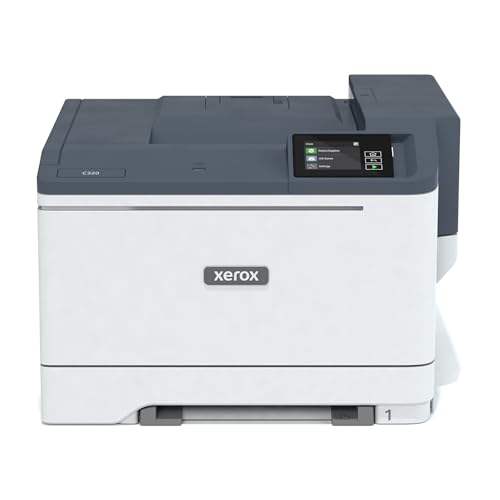
Xerox Wireless Color Laser Printer
Best for: fast color printing without scanning
- Print Technology
- Laser
- Print Output
- Color
- Print Speed
- 35 ppm
- Connectivity
- Wireless, Wi-Fi
- Duplex Printing
- Duplex printing
- Ink/Toner System
- Toner cartridges
View on Amazon: Xerox Wireless Color Laser Printer Affiliate link
The Xerox C320dni is a compact wireless color laser printer designed for busy offices. It delivers print speeds of 35 pages per minute and supports Apple AirPrint and Mopria for mobile convenience. The unit includes starter toner for initial use and measures 17.9 by 16.6 by 12.5 inches. It weighs 45 pounds and is built for monthly volumes up to 2,500 pages. This model suits teams needing reliable color output without a scanner.
Pros
- 35 ppm print speed for high productivity
- Built-in Wi-Fi, AirPrint, and Mopria support
- Compact footprint at 17.9 inches wide
- Includes starter toner cartridges
Cons
- No integrated scanner or copier function
- Starter toner yields only 1,500 black and 1,000 color pages
- Maximum monthly duty cycle limited to 2,500 pages
Good fit if
- You need fast color printing without scanning
- You want mobile printing from iOS or Android devices
- You have limited desk space for a compact unit
Skip if
- You require scanning or copying capabilities
- You print more than 2,500 pages per month
- You need a multifunction all-in-one device
Verdict: Xerox C320dni Wireless Color Laser is a focused printing solution for teams that prioritize speed and mobile connectivity over multifunction features. It fits offices needing reliable color output in a compact form factor.
Specifications side by side
| Spec | Xerox Wireless Color Laser All-in-One | Xerox Wireless Color Laser Printer |
|---|---|---|
| Print Technology | Laser | Laser |
| Print Output | Color | Color |
| Printer Type | All-in-One | not stated |
| Supported Functions | Print, scan, copy, fax | not stated |
| Print Speed | 24 ppm | 35 ppm |
| Connectivity | Wireless, Wi-Fi, USB | Wireless, Wi-Fi |
| Duplex Printing | not stated | Duplex printing |
| Ink/Toner System | Toner cartridge | Toner cartridges |
| Features | Scanner, Copier, Fax | Duplex Printing |
| Scanning | Wireless Scanning | Wireless Scanning |
| Duplex Scanning | not stated | Duplex |
| Dimensions | 15.5 × 16.2 × 13.6 inches | 16.6 × 17.9 × 12.5 inches |
| Weight | 35 pounds | 45 pounds |
| Size | Standard | Compact |
| Color | White | White/Blue |
| Model | C235DNI | C320/DNI |
Frequently asked questions
Does the Xerox C235dni support wireless scanning?
Yes, the Xerox C235dni supports wireless scanning. It is an all-in-one device that includes print, scan, and copy functions. This model is ideal for small offices that need versatility. You can connect it wirelessly to your network for easy access to documents.
Is the Xerox C320dni a color printer?
Yes, the Xerox C320dni is a color laser printer. It delivers vibrant text and graphics for your documents. This model focuses on fast color printing without the need for scanning features. It is a focused solution for teams that prioritize speed and reliable output.
Which Xerox model is smaller in size?
The Xerox C320dni has a compact size, while the C235dni is standard. The C320dni measures 17.9 inches wide and 12.5 inches high. The C235dni measures 16.2 inches wide and 13.6 inches high. You should choose the C320dni if space is a tight constraint.
How much does the Xerox C235dni weigh?
The Xerox C235dni weighs 35 pounds. It is lighter than the C320dni, which weighs 45 pounds. This weight difference may matter if you need to move the printer frequently. Both models are designed for stable placement on a desk or floor in an office.
Can I use the Xerox C320dni for mobile printing?
Yes, the Xerox C320dni supports mobile connectivity. It features wireless connectivity for easy setup and access. This model fits users who need reliable color output from mobile devices. It is designed for teams that prioritize speed and wireless convenience over multifunction features.
What is the best use case for the Xerox C235dni?
The Xerox C235dni is best for small offices needing color printing and scanning. It is a solid choice for users who prioritize versatility and ease of setup. This all-in-one unit handles print, scan, and copy tasks. It is ideal for lower volume environments up to 1,500 pages monthly.
Does the Xerox C320dni include scanning capabilities?
The Xerox C320dni is described as a focused printing solution. While its attributes list wireless scanning, its verdict emphasizes fast color printing without scanning. It is built for teams prioritizing speed. If you need dedicated scanning, the C235dni all-in-one might be a better fit for your workflow.