Best Receipt Document Scanners: 6 Spec-Based Picks
As an Amazon Associate we earn from qualifying purchases. Links on this page are affiliate links.
Finding the best receipt document scanners requires focusing on the specs that matter for your workflow. We compared 6 models based on published listings to help you choose. The Epson RapidReceipt RR-60 Mobile Receipt Scanner leads because its compact 1.3-inch height and 1-pound weight make it ideal for portable receipt digitization and data extraction. This guide helps you decide which scanner fits your space and volume needs.
Quick picks
The best fit for you
- You need the most portable receipt scanner Epson RapidReceipt RR-60 Mobile Receipt Scanner It weighs just 1 pound and measures 1.3 inches high for easy transport.
- You want to scan double-sided receipts Doxie Pro Compact Duplex Scanner The Doxie Pro supports duplex scanning in a compact 3.94-inch wide footprint.
- You handle high volumes of receipts daily Canon imageFORMULA R40 Duplex Scanner The Canon R40 offers 40 ppm speed and an automatic document feeder.
- You prefer a stable wired connection ScanSnap iX1400 Desktop Color Scanner The ScanSnap iX1400 provides a sturdy desktop design with automatic duplex scanning.
Our 6 picks
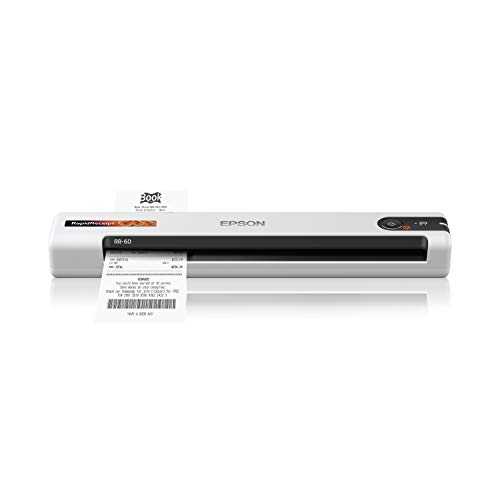
Epson RapidReceipt RR-60 Mobile Receipt Scanner
Best for: portable receipt digitization and data extraction
- Scanner Type
- Receipt (what this guide is about)
- Scan Speed
- 10 ppm
- Portability
- Mobile, portable
- Media Types
- Receipts, invoices, business/ID cards
- Power Source
- USB-powered
- Features
- Mobile Printing, Scanner
View on Amazon: Epson RapidReceipt RR-60 Mobile Receipt Scanner Affiliate link
The Epson RR-60 is a compact, USB-powered scanner designed for receipts. It scans at 10 pages per minute and weighs under 10 oz. Its ScanSmart AI PRO extracts data for apps like QuickBooks. HyperClear optics enhance image quality. This small device fits easily on a desk. You get searchable PDFs and cloud export options. It suits users needing portable, fast receipt digitization.
Pros
- Scans up to 10 pages per minute
- Weighs under 10 oz for portability
- ScanSmart AI PRO extracts digital data
- HyperClear Technology enhances scan resolution
Cons
- Single-page automatic feeding mode only
- No built-in battery; requires USB power
- Limited to receipt-sized documents
Good fit if
- You need a lightweight scanner for travel
- You want automated data extraction for accounting
- You scan small stacks of receipts quickly
Skip if
- You require high-volume batch scanning
- You need to scan large legal documents
- You want a standalone wireless device
Verdict: The Epson RR-60 Compact Mobile Receipt Scanner fits small businesses and freelancers who prioritize portability and automated data extraction for their receipts.

ScanSnap iX1600 Receipt Edition Duplex Scanner
Best for: Automated receipt processing and QuickBooks integration
- Scanner Type
- Receipt (what this guide is about)
- Media Types
- Invoices, receipts
- Touchscreen
- 4.3-inch
- Print Output
- Color
- Features
- Duplex Printing, Scanner
- Ideal For
- Documents
View on Amazon: ScanSnap iX1600 Receipt Edition Duplex Scanner Affiliate link
The ScanSnap iX1600 Receipt Edition is a color duplex scanner designed for invoices and receipts. It features a 4.3-inch touchscreen and Wi-Fi connectivity for direct cloud or device scanning without a PC. The device supports 30 customizable profiles and integrates with QuickBooks Online. Its compact footprint measures 6 by 6.3 by 11.5 inches. This model suits users who need automated data extraction and wireless flexibility for financial document management.
Pros
- Color duplex scanning capability
- 4.3-inch touchscreen interface
- Wi-Fi connectivity for wireless operation
- Direct QuickBooks Online integration
- Supports 30 customizable scanning profiles
Cons
- Heavier at 7.5 pounds compared to compact mobile scanners
- Requires cloud or device connection for wireless scanning
- Limited to invoices and receipts media types
Good fit if
- You need direct integration with QuickBooks Online
- You prefer a touchscreen interface over button-only controls
- You require color duplex scanning for receipts
Skip if
- You need a portable scanner for travel
- You want a budget-friendly entry-level device
- You only scan black and white documents
Verdict: The ScanSnap iX1600 Receipt Edition is a robust solution for users who prioritize automated financial data extraction and wireless convenience. It fits best for offices managing high volumes of color receipts and invoices.

Doxie Pro Compact Duplex Scanner
Best for: small spaces and duplex receipts
- Scanner Type
- Receipt (what this guide is about)
- Portability
- Compact wired
- Features
- Duplex Printing, Scanner
- Ideal For
- Documents
- Use Case
- Office, Home
- Dimensions
- 12 × 3.94 × 2.95 inches
View on Amazon: Doxie Pro Compact Duplex Scanner Affiliate link
The Doxie Pro is a compact wired scanner designed for home and office use. It features duplex scanning capabilities for two-sided documents. The unit measures 12 by 3.94 by 2.95 inches and weighs 3 pounds. It includes software for text recognition and automatic cropping. This device suits users who need portable, high-quality scans of receipts and invoices without a bulky footprint.
Pros
- Duplex scanning for two-sided documents
- Compact wired design fits small spaces
- Software includes text recognition and auto-cropping
- Lightweight at 3 pounds
Cons
- Wired connection limits mobility
- 1-year warranty is shorter than industry standard
- No mention of automatic document feeder capacity
Good fit if
- You need duplex scanning for receipts
- You have limited desk space
- You prefer simple software without complex drivers
Skip if
- You require wireless connectivity
- You need high-volume batch scanning
- You want a warranty longer than one year
Verdict: The Doxie Pro Compact Receipt Scanner offers duplex scanning in a small footprint. It is best for users who value portability and simple setup over high-speed continuous scanning.
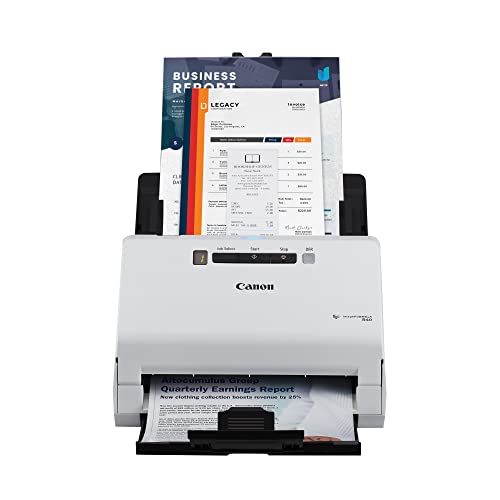
Canon imageFORMULA R40 Duplex Scanner
Best for: High-volume receipt digitization and accounting
- Scanner Type
- Receipt (what this guide is about)
- Scan Speed
- Up to 40 ppm
- Media Types
- Receipts, invoices
- Print Output
- Color
- Supported Functions
- Scan
- Features
- Duplex Printing, Automatic Document Feeder, Scanner
View on Amazon: Canon imageFORMULA R40 Duplex Scanner Affiliate link
The Canon imageFORMULA R40 is a duplex receipt scanner with a 40 ppm speed and an automatic document feeder. It processes receipts and invoices into searchable files. The device includes software to extract data and upload it to QuickBooks Online. This white unit measures 15 by 12.5 by 9.5 inches and weighs 6.17 pounds. It suits users who need fast, automated digitization for office or home use.
Pros
- Scans up to 40 pages per minute
- Supports duplex scanning for two-sided documents
- Includes automatic document feeder for batch processing
- Extracts data directly to QuickBooks Online
Cons
- Limited to scanning receipts and invoices only
- No mention of mobile app support
- Requires PC or Mac connection
Good fit if
- You process high volumes of receipts daily
- You need automatic data extraction for accounting
- You prefer duplex scanning for invoices
Skip if
- You need to scan photos or cards
- You require a portable or mobile scanner
- You want to scan without a computer
Verdict: The Canon imageFORMULA R40 Receipt Scanner is a solid choice for offices handling large stacks of receipts and invoices. Its 40 ppm speed and QuickBooks integration make it ideal for users prioritizing automated data entry over portability.

Canon imageFORMULA R40II Receipt Edition
Best for: QuickBooks users with high receipt volume
- Scanner Type
- Receipt (what this guide is about)
- Scan Speed
- Up to 45 ppm
- ADF Capacity
- 60 sheets
- Connectivity
- USB-C
- Media Types
- Receipts, invoices, business cards
- Features
- Scanner
View on Amazon: Canon imageFORMULA R40II Receipt Edition Affiliate link
The Canon imageFORMULA R40II Receipt Edition is a compact office scanner built for high-volume receipt processing. It scans both sides of documents in color at up to 45 pages per minute. The 60-sheet automatic feeder reduces manual loading. It connects via USB-C and includes a QuickBooks Online plugin. This model suits businesses needing fast, reliable digitization of invoices and business cards.
Pros
- Scans at up to 45 pages per minute
- 60-sheet automatic document feeder
- Color duplex scanning capability
- Includes QuickBooks Online plugin
Cons
- Supports only USB-C connectivity
- Does not support TWAIN or ISIS drivers
- Requires proprietary CaptureOnTouch software
Good fit if
- You process large volumes of receipts daily
- You need fast color duplex scanning
- You use QuickBooks Online for accounting
Skip if
- You need wireless or network connectivity
- You require standard TWAIN or ISIS driver support
- You prefer third-party scanning software
Verdict: The Canon imageFORMULA R40II Receipt Edition delivers rapid, high-capacity scanning for offices that rely on QuickBooks. It fits teams that prioritize speed and specific accounting integration over flexible driver support.

ScanSnap iX1400 Desktop Color Scanner
Best for: Desktop receipt scanning with wired USB
- Scanner Type
- Receipt (what this guide is about)
- Connectivity
- USB
- Print Output
- Color
- Features
- Automatic Document Feeder, Scanner
- Scanning
- Auto Document Feeder
- Auto Document Feeder
- ADF
View on Amazon: ScanSnap iX1400 Desktop Color Scanner Affiliate link
The ScanSnap iX1400 is a color duplex receipt scanner designed for high-volume document management. It features a reliable wired USB connection and an automatic document feeder for batch scanning. The unit measures 11.5 by 6.3 by 6 inches and weighs 7.1 pounds. It uses ScanSnap Home software to organize receipts, business cards, and photos. This model suits users who need stable, one-touch scanning for mixed paper types.
Pros
- Color duplex scanning with automatic document feeder
- Wired USB connection for stable performance
- One-touch button for quick scanning and organization
- Automatic document size and color detection
Cons
- No wireless or mobile connectivity options
- Larger footprint at 11.5 inches wide
- Heavier build at 7.1 pounds
Good fit if
- You need reliable wired USB scanning
- You scan mixed document types like receipts and business cards
- You prefer one-touch button operation
Skip if
- You require mobile or wireless scanning
- You need a compact portable scanner
- You prefer lightweight equipment
Verdict: ScanSnap iX1400 Receipt Scanner is a sturdy desktop scanner for users who prioritize stable wired connections and automatic color duplex processing for receipts and documents.
Specifications side by side
| Spec | Epson RapidReceipt RR-60 Mobile Receipt Scanner | ScanSnap iX1600 Receipt Edition Duplex Scanner | Doxie Pro Compact Duplex Scanner | Canon imageFORMULA R40 Duplex Scanner | Canon imageFORMULA R40II Receipt Edition | ScanSnap iX1400 Desktop Color Scanner |
|---|---|---|---|---|---|---|
| Scan Speed | 10 ppm | not stated | not stated | Up to 40 ppm | Up to 45 ppm | not stated |
| ADF Capacity | not stated | not stated | not stated | not stated | 60 sheets | not stated |
| Connectivity | not stated | not stated | not stated | not stated | USB-C | USB |
| Portability | Mobile, portable | not stated | Compact wired | not stated | not stated | not stated |
| Media Types | Receipts, invoices, business/ID cards | Invoices, receipts | not stated | Receipts, invoices | Receipts, invoices, business cards | not stated |
| Touchscreen | not stated | 4.3-inch | not stated | not stated | not stated | not stated |
| Power Source | USB-powered | not stated | not stated | not stated | not stated | not stated |
| Print Output | not stated | Color | not stated | Color | not stated | Color |
| Supported Functions | not stated | not stated | not stated | Scan | not stated | not stated |
| Features | Mobile Printing, Scanner | Duplex Printing, Scanner | Duplex Printing, Scanner | Duplex Printing, Automatic Document Feeder, Scanner | Scanner | Automatic Document Feeder, Scanner |
| Ideal For | Documents | Documents | Documents | Documents | Documents | Documents |
| Use Case | Office | not stated | Office, Home | Office, Home | Office | not stated |
| Scanner Type | Receipt | Receipt | Receipt | Receipt | Receipt | Receipt |
| Scanning | not stated | not stated | not stated | Auto Document Feeder | not stated | Auto Document Feeder |
| Duplex Scanning | not stated | Duplex | Duplex | Duplex | not stated | not stated |
| Auto Document Feeder | not stated | not stated | not stated | ADF | not stated | ADF |
| Dimensions | 10.7 × 10.7 × 1.3 inches | 11.5 × 6 × 6.3 inches | 12 × 3.94 × 2.95 inches | 9.5 × 15 × 12.5 inches | 14.9 × 12 × 9.3 inches | 6.3 × 11.5 × 6 inches |
| Weight | 1 pounds | 7.5 pounds | 3 pounds | 6.17 pounds | 7.05 pounds | 7.1 pounds |
| Size | 10.7 x 1.8 x 1.3 Inch | ScanSnap iX1600 Receipt Edition | Doxie Pro | One Size | Small | not stated |
| Color | White | Black | White | White | White | Black |
| Model | B11B252204 | PA03770-B675 | DX400 | 4229C009 | 7292C009 | PA03820-B235 |
How to choose the right receipt scanner
-
Check duplex scanning needs
If you frequently scan double-sided receipts, ensure the device supports duplex scanning. The Doxie Pro Compact and Canon imageFORMULA R40 both offer this feature, allowing you to process both sides of a document in one pass. This saves time compared to manual flipping. Models like the Epson RapidReceipt RR-60 are mobile units that may not emphasize high-volume duplexing. Verify the specification in the product listing to confirm automatic two-sided processing is included for your workflow.
-
Evaluate portability requirements
Your mobility needs dictate the scanner's weight and dimensions. The Epson RapidReceipt RR-60 weighs only one pound and measures 1.3 inches high, making it ideal for travel or small desks. In contrast, desktop units like the ScanSnap iX1600 weigh 7.5 pounds and require more space. If you work remotely or travel, prioritize the lighter, compact model. For a fixed office location, the larger footprint of a desktop scanner is acceptable and often provides more robust features.
-
Consider print output color
Determine if you need color scanning capabilities. The ScanSnap iX1400 and Canon imageFORMULA R40 support color print output, which is useful for preserving the visual details of color-coded receipts or invoices. The Epson RR-60 is listed primarily as a scanner for documents without explicit color output emphasis in its attributes. If accurate color representation of your financial documents is important, check the attributes for color support before purchasing.
-
Review auto document feeder
High-volume users should look for an Automatic Document Feeder (ADF). The Canon imageFORMULA R40 and ScanSnap iX1400 both include an ADF, allowing you to scan multiple receipts without placing each one individually. This is essential for offices handling large stacks of paper. The Epson RR-60 is a mobile scanner that likely uses a different feeding mechanism suited for single passes. Check the supported functions to confirm the presence of an ADF for efficient batch processing.
-
Assess connectivity options
Connectivity type affects your setup flexibility. The ScanSnap iX1400 is described as a desktop scanner with wired USB, ensuring a stable connection without wireless interference. The Epson RR-60 is marketed as a mobile printer and scanner, suggesting wireless or portable connectivity. If you prefer a fixed, reliable link to your computer, choose the wired USB model. If you need to move the device easily, the mobile option with wireless capabilities may be more suitable for your environment.
Frequently asked questions
Which receipt scanner is best for mobile use?
The Epson RapidReceipt RR-60 is the top choice for portability. It weighs just one pound and measures 10.7 by 1.3 inches. This compact size fits easily into a bag. It is designed for small businesses and freelancers who need to digitize receipts on the go. The device supports mobile printing and automatic data extraction.
Do I need a scanner with duplex scanning?
Duplex scanning is useful if you handle double-sided receipts. The Doxie Pro Compact and Canon imageFORMULA R40 both support this feature. They allow you to scan both sides of a document in one pass. This saves time and reduces manual handling. The ScanSnap iX1400 also offers automatic color duplex processing for desktop use.
Which scanner integrates with QuickBooks?
The ScanSnap iX1600 Receipt Edition and Canon imageFORMULA R40II are optimized for QuickBooks users. They provide automated financial data extraction. The Canon R40II is specifically designed for high-volume teams relying on this accounting software. These models streamline the entry process by directly feeding data into your financial records.
What is the fastest receipt scanner for high volumes?
The Canon imageFORMULA R40 is built for speed. It scans at 40 pages per minute. This makes it ideal for offices handling large stacks of receipts and invoices. Its automatic document feeder processes continuous batches efficiently. While heavier and larger, it prioritizes throughput over portability, making it a solid choice for busy accounting departments.
Is there a compact desktop receipt scanner?
The Doxie Pro Compact offers a small footprint for desktop use. It measures 3.94 by 2.95 inches and weighs three pounds. It supports duplex scanning without taking up much desk space. This model is best for users who value simplicity and portability. It avoids the bulk of larger high-speed scanners while still handling double-sided documents.
Which scanner is best for wired connections?
The ScanSnap iX1400 Desktop Color Scanner is designed for stable wired connections. It uses a USB link to ensure consistent performance. This model is sturdy and suitable for desktop environments. It supports automatic color duplex processing for receipts and documents. If you prefer a reliable wired setup over wireless convenience, this is a strong option.