Best Laser Printers with Duplex: 15 Spec-Based Picks
As an Amazon Associate we earn from qualifying purchases. Links on this page are affiliate links.
Finding the best laser printers with duplex capabilities requires looking at published specifications rather than marketing claims. We compared 15 models to identify options that handle two-sided printing and scanning efficiently. The Brother All-in-One Monochrome Laser Printer leads this list because it combines duplex scanning with 36 ppm output for fast document processing. Each pick is based strictly on the specs provided by the manufacturers. This guide helps you decide which machine fits your office workflow based on speed, connectivity, and physical footprint.
Quick picks
The best fit for you
- You need the most compact footprint for tight spaces Brother Compact Monochrome Duplex Laser Printer This Brother model has a 14.2-inch length, making it the smallest device on the list.
- You want the fastest two-sided monochrome processing speed Brother All-in-One Monochrome Laser Printer The Brother DCPL2640DW delivers 36 ppm, the highest speed among the monochrome duplex options.
- You need color printing with duplex scanning capabilities Canon imageCLASS Duplex Color All-in-One Laser Printer The Canon MF5455C010 offers 35 ppm color output and single-pass two-sided scanning.
- You prefer a direct wired connection without network setup HP LaserJet M209d USB Duplex Printer The HP M209d provides automatic duplex printing via a direct USB link to one computer.
Our 15 picks

Brother All-in-One Monochrome Laser Printer
Best for: fast two-sided monochrome printing and scanning
- Duplex Scanning
- Duplex (what this guide is about)
- Print Technology
- Laser
- Print Output
- Monochrome
- Supported Functions
- Print, copy, scan
- Print Speed
- 36 ppm
- Connectivity
- Wireless, Ethernet, USB
This monochrome multifunction laser printer handles two-sided jobs with built-in duplex printing and duplex scanning. You get print speeds up to 36 pages per minute and a 50-sheet auto document feeder for multi-page documents. It connects over dual-band wireless, Ethernet, or USB. This machine suits you if you need fast black-and-white output, automated two-sided digitization, and versatile office networking without handling color prints.
Pros
- Print speeds reach up to 36 ppm
- Equipped for duplex printing and duplex scanning
- Includes a 50-page auto document feeder
- Dual-band wireless, Ethernet, and USB connectivity
Cons
- Prints only in black and white
- Lacks built-in fax capability
Good fit if
- You need automatic two-sided scanning alongside duplex printing.
- You produce monochrome documents at speeds up to 36 ppm.
- You process multi-page packets through a 50-sheet feeder.
Skip if
- You require color print output.
- You need standalone fax hardware.
Verdict: Brother Compact Monochrome Multifunction Laser pairs duplex scanning and printing with 36 ppm output for efficient document processing. It handles multi-page monochrome workflows across flexible wired and wireless setups.

Brother Compact Monochrome Duplex Laser Printer
Best for: fast two-sided monochrome document printing
- Duplex Scanning
- Duplex (what this guide is about)
- Print Technology
- Laser
- Print Output
- Monochrome
- Printer Type
- Single-function
- Print Speed
- 36 ppm
- Connectivity
- Wireless, Ethernet, USB
View on Amazon: Brother Compact Monochrome Duplex Laser Printer
This Brother monochrome laser printer delivers automatic duplex printing at speeds up to 36 pages per minute. You can connect it via dual-band wireless, Ethernet, or USB to fit your workspace. A 250-sheet paper tray handles standard print runs, while a manual feed slot accommodates envelopes. It suits you if you need fast, double-sided black-and-white printing in a compact desktop footprint without color output.
Pros
- Print speed up to 36 pages per minute
- Automatic duplex printing
- 250-sheet paper tray and manual feed slot
- Dual-band wireless, Ethernet, and USB interfaces
Cons
- Monochrome printing only
- Single-function printer without built-in flatbed copying
Good fit if
- You need automatic two-sided black-and-white printing at up to 36 ppm.
- You want multiple connection options including dual-band Wi-Fi, Ethernet, and USB.
- You require a 250-sheet paper capacity for regular document output.
Skip if
- You need color printing capabilities.
- You want an all-in-one unit with integrated flatbed copying.
Verdict: Brother Compact Monochrome Duplex Laser Printer provides fast two-sided monochrome printing with flexible wired and wireless connections. Its compact 14.2-inch footprint fits easily into tight office spaces.

HP LaserJet Pro MFP 3101sdw All-in-One
Best for: fast double-sided black-and-white office workflows
- Duplex Scanning
- Duplex (what this guide is about)
- Print Technology
- Laser
- Print Output
- Monochrome
- Printer Type
- All-in-One
- Supported Functions
- Print, Copy, Scan
- Print Speed
- Up to 35 ppm
The HP LaserJet Pro MFP 3101sdw is a monochrome all-in-one laser printer built for office paperwork. It features automatic two-sided printing and duplex scanning, supported by a 50-sheet automatic document feeder. With print speeds reaching up to 35 ppm and a 250-sheet input tray, it suits you if you need fast, continuous double-sided document processing without color output.
Pros
- Print speeds up to 35 ppm
- Automatic two-sided printing and duplex scanning
- 50-sheet automatic document feeder and 250-sheet input tray
- Built-in wireless connectivity with wireless scanning
Cons
- Monochrome output only with no color printing
- Blocks toner cartridges that lack HP chips
- Does not include built-in fax functionality
Good fit if
- You need automatic two-sided scanning and printing for black-and-white documents.
- You want print speeds up to 35 ppm paired with a 50-sheet document feeder.
Skip if
- You require color printing capabilities.
- You plan to use third-party toner cartridges without HP chips.
Verdict: HP LaserJet Pro MFP 3101sdw All-in-One delivers duplex scanning, auto two-sided printing, and 35 ppm speeds for office paperwork. It provides efficient monochrome handling as long as you do not need color prints.

HP LaserJet M207dw Monochrome Duplex Printer
Best for: small office black-and-white duplex tasks
- Duplex Scanning
- Duplex (what this guide is about)
- Print Technology
- Laser
- Print Output
- Monochrome
- Print Speed
- Up to 28 ppm
- Connectivity
- Wireless, Wi-Fi, Ethernet
- Duplex Printing
- Automatic two-sided printing
View on Amazon: HP LaserJet M207dw Monochrome Duplex Printer
The HP LaserJet M207dw is a monochrome laser printer with automatic duplex printing and scanning. It prints up to 28 pages per minute and includes dual-band Wi-Fi with self-reset capabilities. The unit measures 14 by 11 by 8.07 inches and weighs 12.4 pounds. It supports Ethernet and mobile devices. This model suits small offices needing reliable black-and-white output with two-sided document handling.
Pros
- Automatic duplex printing and scanning
- Up to 28 pages per minute print speed
- Dual-band Wi-Fi with self-reset
- Built-in Ethernet connectivity
Cons
- Monochrome output only
- No color printing capability
- Smaller footprint may limit large paper handling
Good fit if
- You need fast black-and-white duplex printing
- You require reliable wireless connectivity for small teams
- You want a compact monochrome laser printer
Skip if
- You need color printing for graphics
- You require high-volume industrial printing
- You need a large format paper tray
Verdict: The HP LaserJet M207dw Monochrome Duplex Printer fits small offices that prioritize speed and two-sided black-and-white document handling over color features.

HP LaserJet M209d USB Duplex Printer
Best for: direct single-computer monochrome duplex printing
- Duplex Scanning
- Duplex (what this guide is about)
- Print Technology
- Laser
- Print Output
- Monochrome
- Connectivity
- USB
- Duplex Printing
- Automatic two-sided
- Ink/Toner System
- Cartridge
The HP LaserJet M209d is a dedicated black-and-white laser printer built for straightforward desktop printing. It offers automatic two-sided printing, a 150-sheet input tray, and smart-guided buttons for direct control. Because it relies exclusively on a wired USB connection with an included cable, it avoids network setup entirely. This model suits you if you need reliable monochrome duplex printing connected directly to a single office or home computer.
Pros
- Automatic two-sided printing
- USB cable included in the box
- 150-sheet paper input tray
- Compact dimensions at 14 by 8.07 by 11 inches
Cons
- Wired USB connection only with no wireless networking
- Prints only in monochrome
- Firmware blocks print cartridges that lack HP chips
Good fit if
- You want a direct wired USB connection to a single computer.
- You need automatic two-sided monochrome document printing.
- You prefer a compact footprint for limited desk space.
Skip if
- You require wireless connectivity or network sharing.
- You need color document printing.
- You plan to use toner cartridges without HP chips.
Verdict: HP LaserJet M209d USB Laser Printer delivers automatic two-sided monochrome printing through a direct wired connection. It is a solid choice when you need fast local output without network configuration.

Canon imageCLASS Duplex Color Laser Printer
Best for: dedicated two-sided wireless color printing
- Duplex Scanning
- Duplex (what this guide is about)
- Print Technology
- Laser
- Print Output
- Color
- Printer Type
- Single-function (print only)
- Supported Functions
- Print Speed
- 22 ppm (color and black)
This Canon imageCLASS is a single-function wireless color laser printer built for office and home use. It delivers print speeds up to 22 pages per minute in both color and black-and-white. You get automatic two-sided printing, a 250-sheet paper cassette, and a single-sheet multipurpose tray. It suits you if you need reliable duplex document output without the extra bulk of an integrated copy or fax machine.
Pros
- Prints up to 22 pages per minute in color and monochrome
- Standard automatic two-sided printing
- 250-sheet main paper cassette
- Chromebook compatible and mobile ready
Cons
- Multipurpose tray capacity is limited to 1 sheet
- Single-function unit dedicated to printing only
- Heavier footprint at 35.3 pounds
Good fit if
- You need automatic two-sided color laser printing up to 22 ppm.
- You want a dedicated print-only machine with a 250-sheet cassette.
- You print frequently from wireless mobile devices or Chromebooks.
Skip if
- You require built-in scanning, copying, or faxing capabilities.
- You need a multipurpose feeder that holds more than one sheet at a time.
Verdict: Canon imageCLASS Wireless Color Laser Printer provides steady 22 ppm duplex color output for workstations needing dedicated print functionality. Its 250-sheet cassette and wireless connectivity handle standard document tasks without multifunction clutter.
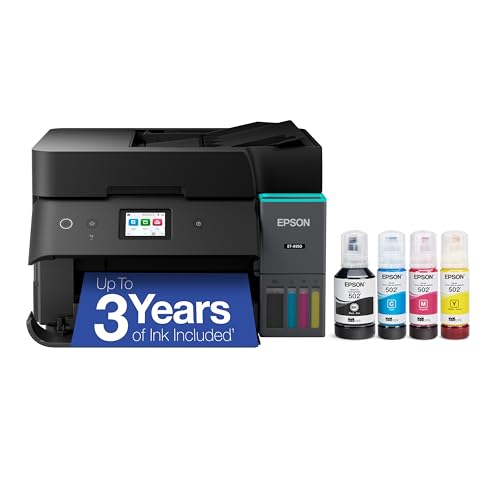
Epson EcoTank ET-4950 All-in-One Printer
Best for: High-volume two-sided scanning and color printing
- Duplex Scanning
- Duplex (what this guide is about)
- Print Technology
- Inkjet
- Print Output
- Color
- Supported Functions
- Print, Copy, Scan, Fax
- Print Speed
- 18 black/9 color ISO ppm
- Connectivity
- Wireless
This Epson EcoTank is an all-in-one inkjet printer featuring automatic duplex scanning, auto duplex printing, and a built-in fax. It delivers ISO print speeds of up to 18 ppm for black and 9 ppm for color. Equipped with a 250-sheet paper tray, a 2.4-inch color display, and a refillable ink tank system, it suits you if you need two-sided scanning alongside high-capacity color document handling in a compact office footprint.
Pros
- Automatic duplex scanning, copying, and printing
- High-capacity ink tanks yield up to 6,600 black and 5,500 color pages
- 250-sheet paper tray with auto document feeder and fax
- Zero warmup time with 18 black and 9 color ISO ppm speeds
Cons
- Inkjet speeds of 18 black and 9 color ppm are slower than standard laser engines
- Uses liquid refill bottles instead of dry toner cartridges
Good fit if
- You need automatic duplex scanning and two-sided printing in one unit.
- You want high-yield bottle refills providing up to 6,600 black pages.
- You handle standard office paper capacity needs with a 250-sheet tray.
Skip if
- You require laser toner technology rather than refillable liquid ink.
- You need faster print output than 18 black or 9 color ppm.
Verdict: Epson EcoTank Duplex All-in-One Printer delivers automatic duplex scanning, faxing, and high-yield ink tanks for high-volume document workflows. It is a capable option if you require two-sided scanning without relying on laser toner.
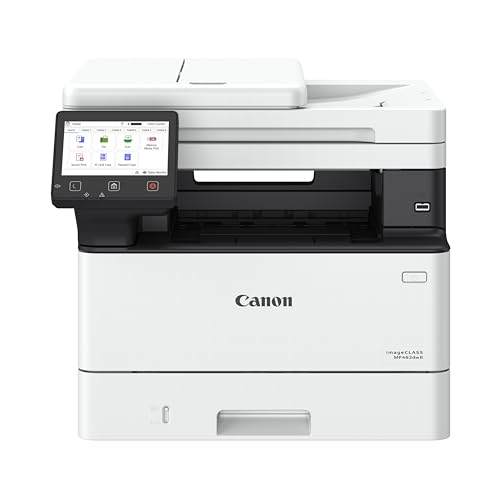
Canon imageCLASS Wireless All-in-One Laser Printer
Best for: High-volume monochrome duplex scanning and faxing
- Duplex Scanning
- Duplex (what this guide is about)
- Print Technology
- Laser
- Print Output
- Monochrome
- Printer Type
- All-in-One
- Supported Functions
- Print, scan, copy, fax
- Print Speed
- Up to 37 ppm
View on Amazon: Canon imageCLASS Wireless All-in-One Laser Printer
The Canon imageCLASS MF462dw II is a monochrome wireless laser printer with duplex scanning. It prints at 37 pages per minute with a 5-second first print time. The device includes print, scan, copy, and fax functions. A 50-sheet duplex automatic document feeder handles two-sided scanning. You get a 5-inch color touchscreen and mobile printing support. This unit suits offices needing fast, high-volume monochrome output with comprehensive multi-function capabilities.
Pros
- 37 pages per minute print speed
- 50-sheet duplex automatic document feeder
- 5-inch color touchscreen interface
- Print, scan, copy, and fax functions
Cons
- Monochrome output only
- Large footprint at 22.5 inches wide
- Heavy at 44 pounds
Good fit if
- You need fast duplex scanning for large document batches
- You require fax capabilities alongside printing
- You prefer a color touchscreen for navigation
Skip if
- You require color printing
- You have limited desk space for a medium-sized unit
- You need a compact single-function printer
Verdict: Canon MF462dw II Monochrome MFP delivers high-speed duplex scanning and faxing for busy offices. It fits teams that prioritize monochrome volume and multi-function utility over color or compact size.

Canon imageCLASS Duplex Color All-in-One Laser Printer
Best for: offices needing rapid duplex scanning and printing
- Duplex Scanning
- Duplex (what this guide is about)
- Print Technology
- Laser
- Print Output
- Color
- Printer Type
- Multifunction (all-in-one)
- Supported Functions
- Print, scan, copy, fax
- Print Speed
- 35 ppm (bw / color, letter)
View on Amazon: Canon imageCLASS Duplex Color All-in-One Laser Printer
This Canon imageCLASS Color Laser All-in-One combines printing, copying, scanning, and faxing into a single wireless machine. You get automatic two-sided printing and one-pass two-sided scanning through its 50-sheet automatic document feeder. It prints up to 35 pages per minute in black and color, drawing from a 250-sheet cassette and a 50-sheet multipurpose tray. It suits busy offices needing rapid two-sided color output and two-sided document scanning without manual sheet flipping.
Pros
- One-pass two-sided scanning via 50-sheet automatic document feeder
- Prints up to 35 pages per minute in color and black-and-white
- Automatic two-sided printing
- Expandable paper capacity up to 850 sheets with optional cassette
- Includes a 3-year limited warranty
Cons
- Heavy build weighing 48.5 pounds
- Requires purchasing an optional cassette to reach 850-sheet capacity
Good fit if
- You need single-pass duplex scanning alongside automatic two-sided printing.
- You require print speeds up to 35 pages per minute for both color and black-and-white jobs.
- You want an all-in-one unit that handles printing, scanning, copying, and faxing.
Skip if
- You need a lightweight machine that is easy to move by yourself.
- You want maximum paper capacity out of the box without buying add-on hardware.
Verdict: Canon imageCLASS Duplex Color Laser All-in-One delivers 35 ppm print speeds and convenient single-pass two-sided scanning for document-heavy workloads. It provides complete four-in-one functionality with room to expand paper capacity up to 850 sheets.

HP Color LaserJet Pro Wireless All-in-One
Best for: two-sided scanning and color office printing
- Duplex Scanning
- Duplex (what this guide is about)
- Print Technology
- Laser
- Print Output
- Color
- Printer Type
- All-in-One
- Supported Functions
- Print, scan, copy
- Print Speed
- 26 ppm
The HP Color LaserJet Pro Duplex All-in-One gives you automatic two-sided printing and duplex scanning in a single color unit. It delivers print speeds up to 26 ppm in black and color, fed by a 250-sheet input tray and an automatic document feeder for multi-page handling. You get wireless connectivity for office network tasks. It suits small teams that need steady two-sided document capture and color output.
Pros
- Automatic document feeder with duplex scanning
- Print speeds up to 26 ppm in black and color
- Automatic two-sided printing
- 250-sheet paper input capacity
Cons
- Blocks cartridges without original HP chips or circuitry
- No fax functionality listed
- Substantial desk footprint at 37.7 pounds
Good fit if
- You need duplex scanning paired with automatic two-sided printing.
- You run color and monochrome jobs at up to 26 ppm.
- You want an automatic document feeder for multi-page copy and scan tasks.
Skip if
- You plan to use third-party toner cartridges without HP chips.
- You require a built-in fax function.
Verdict: HP Color LaserJet Pro Duplex All-in-One pairs duplex scanning with auto two-sided printing for efficient multi-page document processing. It provides balanced 26 ppm color output and wireless access for team use.

Canon Color imageCLASS All-in-One Laser
Best for: Color duplex scanning and faxing
- Duplex Scanning
- Duplex (what this guide is about)
- Print Technology
- Laser
- Print Output
- Color
- Printer Type
- All-in-One
- Supported Functions
- Print, scan, copy, fax
- Print Speed
- Up to 26 ppm
The Canon MF665Cdw is a color laser all-in-one that prints, scans, copies, and faxes. It delivers 26 ppm for both color and monochrome jobs with a 10.3-second first print time. It features automatic duplex printing and a 50-sheet duplex automatic document feeder. The 5-inch color touchscreen simplifies operation, while wireless connectivity supports mobile printing via the Canon PRINT app.
Pros
- 26 ppm print speed for color and monochrome
- 50-sheet duplex automatic document feeder
- 5-inch color touchscreen interface
- Wireless mobile printing support
Cons
- 250-sheet standard paper capacity is modest
- 50 pounds weight makes it bulky
- Fax functionality adds complexity you may not need
Good fit if
- You need reliable duplex scanning for multi-page documents
- You want color output with wireless convenience
- You prefer a physical touchscreen for navigation
Skip if
- You require high-volume paper handling beyond 250 sheets
- You need a compact footprint for tight spaces
- You only print monochrome text
Verdict: Canon MF665Cdw Color Wireless AIO suits teams needing color duplex scanning and faxing, though its size limits placement options.

Brother All-in-One Color Laser Printer
Best for: moderate color printing and duplex scanning
- Duplex Scanning
- Duplex (what this guide is about)
- Print Technology
- Laser
- Print Output
- Color
- Supported Functions
- Print, Scan, Copy, Fax
- Print Speed
- 19 ppm
- Connectivity
- Wireless, USB 2.0, Wi-Fi Direct
This Brother color laser all-in-one handles printing, copying, faxing, and duplex scanning for your office. You get automatic two-sided printing, a 50-sheet automatic document feeder, and print speeds up to 19 ppm in color. A 250-sheet adjustable paper tray manages everyday media loading. It suits you if you need two-sided scanning, color output, and dual-band wireless connections in one complete desktop machine.
Pros
- Automatic duplex printing and duplex scanning
- 50-sheet automatic document feeder
- 250-sheet adjustable paper tray capacity
- Dual-band wireless (2.4GHz/5GHz) and Wi-Fi Direct
- 3.5-inch color touchscreen with customizable shortcuts
Cons
- Print speed capped at 19 ppm
- No Ethernet connectivity listed
- Substantial weight at 44 pounds
Good fit if
- You need automatic two-sided printing alongside duplex scanning.
- You want a 50-sheet document feeder for multi-page copy and scan jobs.
- You prefer dual-band Wi-Fi or Wi-Fi Direct connectivity without network cables.
Skip if
- You need print speeds exceeding 19 ppm for high-volume batches.
- You require a wired Ethernet network connection.
- You need a lightweight machine that is easy to relocate.
Verdict: Brother All-in-One Color Laser Printer pairs duplex scanning with automatic two-sided color printing and versatile wireless options. It is a capable choice for daily office workflows that do not require high-speed output.

Lexmark MS622de All-in-One Laser Printer
Best for: wired office duplex scanning
- Duplex Scanning
- Duplex (what this guide is about)
- Print Technology
- Laser
- Print Output
- Monochrome
- Supported Functions
- Scan, Copy
- Connectivity
- Ethernet
- Duplex Printing
- Duplex Printing
The Lexmark MS622de is a monochrome laser all-in-one designed for networked offices. It supports duplex printing and duplex scanning, allowing you to handle two-sided documents efficiently. Connectivity is limited to Ethernet, so you will need a wired connection. The unit measures 17 by 18 by 18 inches and includes scan and copy functions alongside printing.
Pros
- Supports automatic duplex printing
- Features automatic duplex scanning
- Includes integrated scanner and copier
- Ethernet network connectivity
Cons
- No wireless or Wi-Fi capability
- Only monochrome output
- Requires wired Ethernet connection
Good fit if
- You have a wired Ethernet network available
- You need reliable duplex scanning for contracts
- You prefer monochrome laser printing
Skip if
- You require wireless printing from mobile devices
- You need color printing capabilities
- You want a compact desktop footprint
Verdict: Lexmark MS622de Monochrome All-in-One suits offices that prioritize wired stability and duplex scanning over wireless convenience.

HP Color LaserJet Pro 3201dw Duplex Printer
Best for: small teams needing color duplex printing
- Duplex Scanning
- Duplex (what this guide is about)
- Print Technology
- Laser
- Print Output
- Color
- Printer Type
- Single Function
- Print Speed
- Up to 26 ppm
- Connectivity
- Wireless, Wi-Fi
The HP Color LaserJet Pro 3201dw is a wireless color laser printer designed for small teams. It delivers print speeds up to 26 pages per minute in both black and color. The unit includes auto two-sided printing and a 250-sheet input tray. It also supports duplex scanning. Dual-band Wi-Fi with self-reset helps maintain connectivity. This model suits users needing reliable color output and two-sided document handling.
Pros
- Print speeds up to 26 ppm for black and color documents
- Auto two-sided printing reduces paper usage
- Supports duplex scanning for efficient document digitization
- Dual-band Wi-Fi with automatic connection reset
Cons
- No wired Ethernet port listed in specifications
- Blocks third-party toner cartridges via firmware
- Print speed is lower than high-volume office models
Good fit if
- You need automatic two-sided color printing
- You require duplex scanning for document workflows
- You want wireless connectivity with self-reset features
Skip if
- You need wired Ethernet connectivity
- You prefer open cartridge compatibility
- You require high-volume speeds over 26 ppm
Verdict: The HP Color LaserJet Pro 3201dw fits small teams needing reliable color duplex printing and scanning. It is ideal for users who value wireless convenience and automatic two-sided output over high-volume speed.

Canon imageCLASS All-in-One Monochrome Laser Printer
Best for: small offices needing fast monochrome duplex
- Duplex Scanning
- Duplex (what this guide is about)
- Print Technology
- Laser
- Print Output
- Monochrome
- Printer Type
- All-In-One
- Supported Functions
- Print, scan, copy, fax
- Print Speed
- 30 ppm
View on Amazon: Canon imageCLASS All-in-One Monochrome Laser Printer
The Canon imageCLASS MF275dw is a monochrome all-in-one laser printer with automatic duplex printing. It prints up to 30 pages per minute with a first page out time of approximately 5.3 seconds. The unit includes a 35-sheet automatic document feeder for duplex scanning and a 150-sheet paper cassette. You get wireless connectivity and mobile printing support. This model suits small offices needing fast, two-sided output without color.
Pros
- Prints up to 30 pages per minute
- Automatic 2-sided printing saves paper
- 35-sheet automatic document feeder supports duplex scanning
- First page out in approximately 5.3 seconds
- Wireless connectivity with mobile printing support
Cons
- Monochrome output only
- 24.7 pounds build is heavier than compact competitors
- No Ethernet port listed in specifications
Good fit if
- You need fast monochrome duplex printing
- You require automatic duplex scanning for multi-page documents
- You want wireless mobile printing without a computer
Skip if
- You need color printing capabilities
- You require a compact footprint under 20 inches wide
- You need wired Ethernet network connectivity
Verdict: The Canon imageCLASS MF275dw delivers reliable monochrome duplex printing for small teams. It fits buyers who prioritize speed and automatic two-sided scanning over color features.
Specifications side by side
| Spec | Brother All-in-One Monochrome Laser Printer | Brother Compact Monochrome Duplex Laser Printer | HP LaserJet Pro MFP 3101sdw All-in-One | HP LaserJet M207dw Monochrome Duplex Printer | HP LaserJet M209d USB Duplex Printer | Canon imageCLASS Duplex Color Laser Printer | Epson EcoTank ET-4950 All-in-One Printer | Canon imageCLASS Wireless All-in-One Laser Printer | Canon imageCLASS Duplex Color All-in-One Laser Printer | HP Color LaserJet Pro Wireless All-in-One | Canon Color imageCLASS All-in-One Laser | Brother All-in-One Color Laser Printer | Lexmark MS622de All-in-One Laser Printer | HP Color LaserJet Pro 3201dw Duplex Printer | Canon imageCLASS All-in-One Monochrome Laser Printer |
|---|---|---|---|---|---|---|---|---|---|---|---|---|---|---|---|
| Print Technology | Laser | Laser | Laser | Laser | Laser | Laser | Inkjet | Laser | Laser | Laser | Laser | Laser | Laser | Laser | Laser |
| Print Output | Monochrome | Monochrome | Monochrome | Monochrome | Monochrome | Color | Color | Monochrome | Color | Color | Color | Color | Monochrome | Color | Monochrome |
| Printer Type | not specified | Single-function | All-in-One | not specified | not specified | Single-function (print only) | not specified | All-in-One | Multifunction (all-in-one) | All-in-One | All-in-One | not specified | not specified | Single Function | All-In-One |
| Supported Functions | Print, copy, scan | not specified | Print, Copy, Scan | not specified | not specified | Print, Copy, Scan, Fax | Print, scan, copy, fax | Print, scan, copy, fax | Print, scan, copy | Print, scan, copy, fax | Print, Scan, Copy, Fax | Scan, Copy | not specified | Print, scan, copy, fax | |
| Print Speed | 36 ppm | 36 ppm | Up to 35 ppm | Up to 28 ppm | not specified | 22 ppm (color and black) | 18 black/9 color ISO ppm | Up to 37 ppm | 35 ppm (bw / color, letter) | 26 ppm | Up to 26 ppm | 19 ppm | not specified | Up to 26 ppm | 30 ppm |
| Connectivity | Wireless, Ethernet, USB | Wireless, Ethernet, USB | Wireless, Wi-Fi | Wireless, Wi-Fi, Ethernet | USB | Wireless | Wireless | Wireless | Wireless | not specified | Wireless | Wireless, USB 2.0, Wi-Fi Direct | Ethernet | Wireless, Wi-Fi | Wireless |
| Duplex Printing | not specified | Automatic | Automatic two-sided | Automatic two-sided printing | Automatic two-sided | Automatic 2-sided printing | Auto duplex | Automatic 2-sided printing | Automatic 2-sided printing | not specified | Automatic 2-sided printing | Automatic | Duplex Printing | Auto 2-sided | Automatic 2-sided printing |
| First Page Out | not specified | not specified | not specified | not specified | not specified | not specified | not specified | Approximately 5 seconds | not specified | not specified | Approximately 10.3 seconds | not specified | not specified | not specified | Approximately 5.3 seconds |
| Ink/Toner System | Toner cartridge | Toner cartridge | Cartridge, toner | not specified | Cartridge | Toner 067 / 067 High-Capacity | Ink tank, cartridge-free | Toner | Toner 069 / 069 High Capacity | not specified | Toner | Toner | not specified | Cartridge, toner | not specified |
| Features | Duplex Printing, Mobile Printing, Scanner, Copier | Duplex Printing, Mobile Printing | Duplex Printing, Scanner, Copier | Duplex Printing | Duplex Printing | Duplex Printing, Mobile Printing | Duplex Printing, Fax | Duplex Printing, Mobile Printing, Scanner, Copier, Fax | Duplex Printing, Scanner, Copier, Fax | Duplex Printing | Duplex Printing, Mobile Printing, Automatic Document Feeder, Scanner, Copier, Fax | Duplex Printing, Scanner, Copier, Fax | Duplex Printing, Scanner, Copier | Duplex Printing, Mobile Printing | Duplex Printing, Mobile Printing, Scanner, Copier, Fax |
| Ideal For | not specified | not specified | not specified | not specified | not specified | not specified | not specified | not specified | not specified | not specified | Documents | not specified | not specified | Documents | not specified |
| Use Case | not specified | not specified | not specified | not specified | not specified | Office, Home | not specified | Office, Home | not specified | not specified | Office, Home | not specified | not specified | Office, Home | not specified |
| Scanner Type | Portable | Portable | not specified | not specified | not specified | Portable | not specified | Portable | not specified | not specified | Portable | not specified | not specified | Portable | Portable |
| Scanning | Wireless Scanning | Wireless Scanning | Wireless Scanning | Wireless Scanning | not specified | Wireless Scanning | Wireless Scanning | Wireless Scanning | Wireless Scanning | Wireless Scanning | Auto Document Feeder | Wireless Scanning | not specified | Wireless Scanning | Wireless Scanning |
| Compatibility | not specified | Alexa | not specified | not specified | not specified | not specified | not specified | not specified | not specified | not specified | not specified | not specified | not specified | not specified | not specified |
| Duplex Scanning | Duplex | Duplex | Duplex | Duplex | Duplex | Duplex | Duplex | Duplex | Duplex | Duplex | Duplex | Duplex | Duplex | Duplex | Duplex |
| Auto Document Feeder | not specified | not specified | not specified | not specified | not specified | not specified | not specified | not specified | not specified | not specified | ADF | not specified | not specified | not specified | not specified |
| Scan Speed | not specified | not specified | not specified | not specified | not specified | not specified | not specified | not specified | not specified | not specified | not specified | not specified | not specified | not specified | 30 ppm |
| Dimensions | 15.7 × 16.1 × 12.5 inches | 14.2 × 14 × 7.2 inches | 15.7 × 16.5 × 12.3 inches | 11 × 14 × 8.07 inches | 14 × 8.07 × 11 inches | 16.5 × 17 × 11.3 inches | 13.7 × 14.8 × 9.4 inches | 21.3 × 22.5 × 20.5 inches | 18.2 × 16.8 × 17 inches | 16.5 × 13.4 × 16.5 inches | 21.5 × 20.5 × 23 inches | 16.1 × 17.5 × 15.8 inches | 18 × 17 × 18 inches | not specified | 18.4 × 21.8 × 19.5 inches |
| Weight | 25 pounds | 15.6 pounds | 23.1 pounds | 12.4 pounds | not specified | 35.3 pounds | 16.1 pounds | 46.6 pounds | 48.5 pounds | 37.7 pounds | 50 pounds | 44 pounds | not specified | 33 pounds | 24.7 pounds |
| Size | Standard | Standard | one size | one size | Standard | One Size | not specified | Medium | One Size | standard | Medium | Standard | 1 | 15.35 x 16.5 x 10.0 | One Size |
| Color | Black | Black | White | Black | White | white | Black | White | white | White | White | White | Grey | white | Black |
| Model | DCPL2640DW | HLL2460DW | 9D2X4F#BGJ | 8J9K9F#A62 | 8J9L0F#BGJ | 5159C003 | C11CL40201 | 7188C015 | 5455C010 | 499Q3F#BGJ | 6928C005 | MFCL3720CDW | MS622de | 499Q9F#BGJ | 5621C004 |
Is Automatic Two-Sided Scanning Worth It?
Duplex scanning lets you feed a stack of paper once, and the machine flips pages automatically. This saves time on multi-page documents. You avoid stopping to turn sheets over manually. The feature is standard across these 15 picks. If you process long reports or contracts, this automation reduces handling effort. It keeps your workflow steady without interruption. Most listed models include this capability natively.
Worth it if
- You regularly scan multi-page documents
- You want to reduce manual paper handling
- You need efficient office workflows
Skip it if
- You only scan single-page items
- You prefer manual page turning
If you need workshop cutting capabilities alongside office printing, review specifications for the best 40W laser engravers.
How we selected duplex scanners
We identified printers with duplex scanning by checking Amazon listings for that specific feature in titles or descriptions. We only included one size variant per product family. All details come from published specifications and feature lists. We did not handle these devices or test them ourselves. Every claim here relies on the data provided by the manufacturer on the listing page. We excluded products that did not explicitly state they support two-sided scanning. This ensures every pick on the list actually performs the function you need. We focused strictly on the technical capabilities listed by the seller. Our goal is to give you accurate specs without guesswork. You can trust that each model supports the duplex scanning feature we highlighted. The selection process remains transparent and based entirely on visible product data. This method keeps the guide practical and free from subjective testing results.
Choose by Output and Speed Needs
-
Select Monochrome for Speed
Most duplex laser printers in this list are monochrome. This choice typically delivers higher speeds, often 35 to 36 pages per minute. If you need color, expect slower rates around 22 to 26 ppm. Select monochrome models for faster document processing. The Brother DCPL2640DW offers 36 ppm, while the HP LaserJet Pro MFP 3101sdw provides 35 ppm. Color models like the Canon imageCLASS 5159C003 run at 22 ppm. Match your speed needs to the output type.
-
Check Print Output Type
Decide if you need black-and-white or color printing. The list includes both monochrome and color options. Monochrome printers like the Brother HLL2460DW are efficient for text documents. Color printers like the HP Color LaserJet Pro 3201dw handle graphics and images. If you only print text, monochrome models are usually faster and more cost-effective. If you need color charts or logos, choose a color model. Ensure the printer supports your required output type for your specific workflow.
-
Verify Connectivity Options
Check if the printer supports wireless or wired connections. Most models here offer wireless connectivity for easy team access. The Brother DCPL2640DW and HP LaserJet M207dw both support wireless setups. However, the HP LaserJet M209d uses a direct USB connection. Choose wireless models for flexibility in shared office spaces. Select wired options if you prefer stable, direct connections without network configuration. Verify the connectivity type matches your office infrastructure and usage patterns.
-
Consider Supported Functions
Determine if you need scanning, copying, or faxing. Multifunction models like the Brother DCPL2640DW include scan and copy features. Some models, like the Epson EcoTank ET-4950, also support faxing. If you only need printing, a dedicated printer like the Canon imageCLASS 5159C003 might suffice. Multifunction devices save space but may be larger. Check the supported functions list to ensure the printer meets all your office requirements without unnecessary clutter.
-
Assess Physical Footprint
Measure your available space before buying. Printer dimensions vary significantly. The Brother HLL2460DW has a compact 14.2-inch length, fitting tight spaces. In contrast, the Canon imageCLASS MF462dw II is much larger at 22.5 inches wide. Ensure the printer fits your desk or shelf. Check width, height, and length specifications. Larger models may offer more paper capacity but require more room. Plan your workspace layout around the physical size of the chosen printer.
-
Review Duplex Scanning
Confirm the printer supports automatic two-sided scanning. This feature saves time on multi-page documents by flipping pages automatically. All models in this list support duplex scanning. This is a standard feature across the selected picks. You avoid stopping to turn sheets over manually. This efficiency is crucial for processing long reports or contracts. Ensure the duplex scanning mechanism is included to streamline your document workflow and reduce manual effort.
Frequently asked questions
Which laser printer has the fastest duplex printing speed?
The Brother DCPL2640DW leads with 36 pages per minute. This speed supports efficient two-sided monochrome document processing. The HP LaserJet Pro MFP 3101sdw and Canon imageCLASS Duplex Color All-in-One follow closely at 35 ppm. Higher speeds reduce wait times for large batches of double-sided pages.
Can I find a compact laser printer with automatic two-sided printing?
Yes, the Brother HLL2460DW offers a compact 14.2-inch length. It fits easily into tight office spaces while providing automatic duplex printing. The HP LaserJet M207dw is another small option with a 11-inch length. These models prioritize space efficiency without sacrificing core printing features.
Do these printers support wireless connectivity for duplex tasks?
Most models on this list support wireless connections. The Brother DCPL2640DW, HLL2460DW, and Canon MF462dw II all include wireless capabilities. This allows you to send two-sided print jobs from various devices. The Lexmark MS622de is an exception, relying on wired stability for duplex scanning.
Which model is best for high-volume monochrome duplex work?
The Canon MF462dw II is designed for busy offices. It delivers high-speed duplex scanning and faxing for monochrome volume. Weighing 44 pounds, it handles demanding workloads better than lighter models. It suits teams that prioritize utility and speed over compact size or color output.
Are there color laser printers with automatic two-sided scanning?
Several color options include duplex scanning. The Canon imageCLASS 5159C003 provides steady 22 ppm color output with two-sided scanning. The HP Color LaserJet Pro 499Q3F#BGJ pairs duplex scanning with 26 ppm color printing. These models suit teams needing color documents with efficient multi-page scanning.
Which printer is the lightest on this list?
The HP LaserJet M207dw is the lightest at 12.4 pounds. Its compact design aids easy placement in small offices. The Brother HLL2460DW is slightly heavier at 15.6 pounds but remains portable. Heavier models like the Canon MF665Cdw weigh up to 50 pounds for high-volume stability.
Does the top pick include a scanner for two-sided documents?
Yes, the Brother DCPL2640DW includes duplex scanning. It combines this feature with 36 ppm printing for efficient workflow. The HP LaserJet Pro MFP 3101sdw also offers duplex scanning at 35 ppm. These all-in-one models handle multi-page documents by flipping pages automatically during the scan process.