11 Best Document Scanners with USB, Compared
As an Amazon Associate we earn from qualifying purchases. Links on this page are affiliate links.
Finding the best document scanners with USB requires matching your workflow to the right hardware. We compared 11 models based strictly on published specifications. Our top pick is the ScanSnap iX1600 Wireless Document Scanner, which leads due to its 40 ppm duplex scanning speed. This guide helps you decide between portable units and high-volume desktop scanners. You will see how connectivity, weight, and feed capacity differ across the list. Use these specs to choose the device that fits your space and volume needs.
Quick picks
The best fit for you
- You need fast duplex scanning with wireless convenience ScanSnap iX1600 Wireless Document Scanner The ScanSnap iX1600 offers 40 ppm duplex speed and wireless connectivity for busy offices.
- You want the most compact model on the list Xerox D35 Office Document Scanner The Xerox D35 measures just 6.7 inches wide, making it the smallest desktop unit.
- You need to scan large A3 format documents VIISAN S21 A2/A3 USB Document Scanner The VIISAN S21 supports A3 paper size for digitizing large or bound materials.
- You want the lightest portable scanner available Epson WorkForce DS-30 Portable Scanner The Epson WorkForce DS-30 weighs only 11.3 ounces, ideal for travelers carrying it.
Our 11 picks

ScanSnap iX1600 Wireless Document Scanner
Best for: fast duplex scanning with wireless convenience
- Connectivity
- Wireless, USB (what this guide is about)
- Scan Speed
- 40 ppm
- Media Types
- Receipts, business cards, photos
- Touchscreen
- Large color touchscreen
- Features
- Automatic Document Feeder, Touch Screen, Scanner
- Scanning
- Auto Document Feeder
The ScanSnap iX1600 is a wireless or USB document scanner featuring a 40 ppm duplex scan speed. It includes a large color touchscreen and supports up to 30 scanning profiles. You can send documents to PCs, Macs, Chromebooks, and mobile devices. This model suits users who need fast, high-volume scanning with flexible connectivity options for home or small business use.
Pros
- 40 ppm duplex scanning speed
- Large color touchscreen interface
- Wi-Fi and USB connectivity
- Supports 30 scanning profiles
Cons
- 7.5 pounds weight is heavy for portability
- No mention of mobile app control
- Lacks built-in battery for cordless use
Good fit if
- You need fast duplex scanning for large batches
- You want wireless connectivity without a computer
- You prefer a touchscreen interface for setup
Skip if
- You require a lightweight portable scanner
- You only need single-sided scanning
- You prefer a compact desktop footprint
Verdict: ScanSnap iX1600 Wireless Document Scanner fits users who prioritize speed and wireless convenience over portability. Its 40 ppm duplex capability and touchscreen make it ideal for busy home offices.

ScanSnap iX1300 Wireless Color Document Scanner
Best for: small desk duplex scanning
- Connectivity
- Wireless, USB (what this guide is about)
- Scan Speed
- Up to 30 ppm
- Media Types
- Documents, photos, receipts, cards
- Print Output
- Color
- Features
- Automatic Document Feeder, Scanner
- Scanning
- Auto Document Feeder
View on Amazon: ScanSnap iX1300 Wireless Color Document Scanner
The ScanSnap iX1300 is a compact document scanner supporting USB and Wi-Fi connections. It scans up to 30 pages per minute in duplex mode. The device handles documents, photos, and plastic cards. Its small footprint fits easily on desks. You get automatic deskew and blank page removal. The included software manages your scanned files.
Pros
- 30 ppm duplex scanning speed
- USB and Wi-Fi connectivity
- Scans plastic cards and photos
- Compact 4.5-inch width design
Cons
- Weighs 4.4 pounds, heavier than portable sheet-fed models
- Requires dedicated ScanSnap software for full features
- No native mobile app scanning without computer
Good fit if
- You need fast duplex scanning in a small space
- You want to scan plastic cards and photos
- You prefer wireless or USB connection options
Skip if
- You need a lightweight portable scanner under 2 pounds
- You only scan single-sided documents
- You want a purely hardware-based solution without software
Verdict: ScanSnap iX1300 Compact Wireless Scanner fits users who need fast duplex scanning in a small footprint. It suits those who scan mixed media like cards and photos.

Canon imageFORMULA R10 Portable Duplex Scanner
Best for: Lightweight duplex scanning of mixed media
- Connectivity
- USB (what this guide is about)
- Scan Speed
- 12 ppm
- ADF Capacity
- 20 sheets
- Portability
- Portable
- Daily Duty Cycle
- 500 scans
- Power Source
- USB powered
View on Amazon: Canon imageFORMULA R10 Portable Duplex Scanner
The Canon imageFORMULA R10 is a compact, portable document scanner powered directly via USB. It features a 20-sheet automatic document feeder and scans at 12 pages per minute. You get duplex scanning in color or black-and-white. The built-in software updates automatically without installation. It suits users needing a lightweight, space-saving tool for converting receipts, cards, and reports into searchable PDFs.
Pros
- USB-powered for convenient portability
- Duplex scanning at 12 ppm
- 20-sheet automatic document feeder
- Built-in, auto-updating software
Cons
- Single-sided scanning only
- 20-sheet ADF capacity is limited
- 500 scans daily duty cycle
Good fit if
- You need a lightweight, portable scanner
- You want duplex scanning without external power
- You scan moderate volumes of mixed media
Skip if
- You require wireless connectivity
- You need high-volume daily scanning
- You must scan double-sided documents
Verdict: The Canon imageFORMULA R10 Portable Scanner fits users who prioritize portability and duplex speed over high-volume capacity. It is a practical tool for small offices or travelers who need to digitize mixed media quickly.

Brother DS-640e Portable USB Scanner
Best for: mobile single-sided document scanning
- Connectivity
- USB (what this guide is about)
- Scan Speed
- Up to 16 ppm
- Portability
- Portable
- Media Types
- Invoices, receipts, business cards
- Power Source
- USB-C
- Supported Functions
- Scan
The Brother DS-640e is a compact, portable document scanner designed for mobile use. It connects via USB-C and draws power directly from your computer. You can scan at speeds up to 16 pages per minute. The unit handles various media types, including receipts, business cards, and plastic ID cards. It includes OCR software to create searchable PDFs. This model suits users who need a lightweight, bus-powered solution for travel or small office tasks.
Pros
- Scans up to 16 pages per minute
- USB-C connectivity with bus power
- Supports documents up to 72 inches long
- Includes OCR technology for searchable text
- Auto-deskew and blank page skip features
Cons
- Single-sided scanning only
- No wireless or battery operation
- Lacks a built-in display
Good fit if
- You need a lightweight scanner for travel
- You require bus-powered operation without a wall adapter
- You frequently scan receipts and business cards
Skip if
- You need automatic duplex scanning
- You require wireless connectivity
- You need to scan large format documents
Verdict: The Brother DS-640e Portable USB Scanner is a practical option for users who prioritize portability and bus power. It fits buyers who travel often and need to scan single-sided documents quickly without carrying extra power bricks.

HP Portable USB Document Scanner
Best for: Travelers scanning single-sided documents
- Connectivity
- USB (what this guide is about)
- Scan Speed
- 15 ppm
- Portability
- Portable
- Power Source
- USB bus power
- Features
- Scanner
- Ideal For
- Documents
The HP HPPS100 is a portable, single-sided document scanner powered directly via USB 2.0. It scans at 15 pages per minute with a resolution of 1200 dpi. The device weighs only 3 ounces and measures 1.4 inches in height, making it highly portable. It supports paper sizes from 2x2.9 inches up to 8.5x14 inches. You can use it with Windows or Mac computers for home or office tasks.
Pros
- Scans at 15 pages per minute
- Weighs only 3 ounces for portability
- Powered directly via USB bus power
- 1200 dpi resolution for clear scans
Cons
- Single-sided (simplex) scanning only
- No wireless or battery power option
- Requires installation of HP WorkScan software
Good fit if
- You need a lightweight scanner for travel
- You primarily scan single-sided documents
- You want a USB-powered device with no extra power brick
Skip if
- You need to scan double-sided documents automatically
- You require wireless connectivity without a cable
- You need to scan large format paper like A3
Verdict: HP HPPS100 Lightweight Portable Scanner is a compact option for users who prioritize portability and speed for single-sided pages. It fits those who travel frequently and need a simple USB connection for quick digital conversion.

Fujitsu Color Duplex Document Scanner
Best for: High-volume office duplex scanning
- Connectivity
- USB (what this guide is about)
- Scan Speed
- 60 ppm
- ADF Capacity
- 80 sheets
- Daily Duty Cycle
- 4,000 scans
- Print Output
- Color
- Print Resolution
- Up to 600 dpi
The Fujitsu Fi-7160 is a high-performance duplex scanner designed for heavy office use. It connects via USB 3.0 and features an 80-sheet automatic document feeder. With a scan speed of 60 pages per minute and a daily duty cycle of 4,000 scans, it handles large volumes efficiently. This model suits users who need fast, reliable scanning for standard documents without wireless requirements.
Pros
- 80-sheet automatic document feeder capacity
- 60 ppm scan speed for high throughput
- USB 3.0 connectivity for fast data transfer
- 4,000 scans daily duty cycle
Cons
- USB 3.0 connection only, no wireless option
- 10-inch width makes it less portable
- 9.3-pound weight limits easy transport
Good fit if
- You need to scan large batches of double-sided documents quickly
- You prefer a wired USB 3.0 connection for stability
- You require a high daily duty cycle for office environments
Skip if
- You need wireless scanning capabilities
- You require a compact, portable scanner for travel
- You have limited desk space for a larger footprint device
Verdict: The Fujitsu Fi-7160 USB Document Scanner is a robust choice for offices needing high-speed duplex scanning via a stable wired connection. It fits teams processing large document volumes daily who do not require wireless features.
Xerox D35 Office Document Scanner
Best for: High-volume USB office scanning
- Connectivity
- USB (what this guide is about)
- Scan Speed
- Up to 45 ppm / 90 ipm
- ADF Capacity
- 50 pages
- Media Types
- Photos, documents, receipts, cards
- Daily Duty Cycle
- 8,000 pages/day
- Features
- Automatic Document Feeder, Scanner
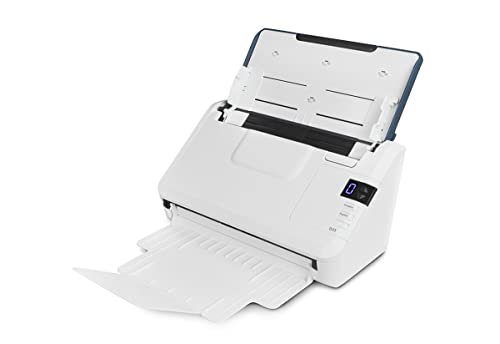
The Xerox D35 is a desktop duplex scanner designed for office environments. It connects via USB and features a 50-page automatic document feeder. You get scan speeds of up to 45 pages per minute at 200 to 300 dpi. The unit handles photos, documents, and cards. With an 8,000-page daily duty cycle, it suits high-volume users who need reliable USB connectivity without wireless options.
Pros
- 45 ppm scan speed at 200 to 300 dpi
- 50-page automatic document feeder for duplex scanning
- 8,000 pages per day duty cycle
- One-touch scanning to chosen destinations
Cons
- USB connectivity only; no wireless option
- Single-sided scanning not supported
- No mention of mobile app support
Good fit if
- You need high-volume USB scanning
- You require duplex scanning for documents
- You want a dedicated desktop scanner
Skip if
- You need wireless or mobile scanning
- You require portable or compact design
- You scan fewer than 8,000 pages monthly
Verdict: The Xerox D35 USB Document Scanner is a high-speed desktop unit for offices needing 45 ppm duplex scanning via USB. It fits teams processing large document batches daily.

VIISAN S21 A2/A3 USB Document Scanner
Best for: Large format and book scanning
- Connectivity
- USB (what this guide is about)
- Portability
- Portable
- Media Types
- Books, documents, business cards
- Features
- Scanner
- Compatibility
- A3
- Dimensions
- 14.2 × 8.27 × 18.7 inches
The VIISAN S21 is a portable overhead scanner designed for large formats up to A2. It connects via USB and captures 26MP images. The unit features adjustable height for A2 and A3 media, along with a 90-degree foldable hinge. It includes software for auto-flattening curved pages and OCR conversion. This device suits users who need to digitize books, maps, or manuscripts that exceed standard A4 sizes.
Pros
- Supports large A2 format scanning up to 594x420 mm
- Adjustable height and foldable hinge for A2 and A3 media
- 26MP resolution with software-enhanced 600 DPI detail
- Built-in LED lighting for clear capture in low light
- Software automatically flattens curved pages and removes fingers
Cons
- Not compatible with ARM-based devices like Surface Pro X
- Overhead design is bulkier than flatbed sheetfed scanners
- Requires specific x64/x86 Windows or macOS software
Good fit if
- You need to scan large format items like maps or manuscripts
- You frequently digitize bound books or fragile documents
- You require a portable solution for overhead scanning
Skip if
- You only scan standard A4 or letter-sized paper
- You use ARM-based computers or mobile devices
- You need high-speed automatic duplex scanning
Verdict: The VIISAN S21 A2/A3 USB Document Scanner is a practical tool for digitizing large or bound materials. It fits users who prioritize format size and gentle handling over speed.

HP Compact Duplex Mobile Document Scanner
Best for: desktop duplex scanning with AC power
- Connectivity
- USB (what this guide is about)
- Scan Speed
- 25 ppm
- Portability
- Mobile, desktop, portable
- Media Types
- Cards, photos, invoices, contracts
- Power Source
- AC wall adapter
- Features
- Duplex Printing, Mobile Printing, Scanner
This HP unit is a compact desktop scanner that connects to your computer via USB. It captures single-pass two-sided documents at up to 25 pages per minute with an optical resolution of 1200 dpi. With an auto-feed tray handling sheets up to 8.5 by 14 inches, it suits home desks needing multi-page processing.
Pros
- Scans up to 25 pages per minute in color and black-and-white
- Single-pass duplex scanning captures both sides automatically
- High optical resolution up to 1200 dpi
- Handles media sizes from 2 by 2.9 inches up to 8.5 by 14 inches
Cons
- Requires an AC wall adapter for power instead of running on USB bus power
- Weighs 3.14 pounds, making it heavier than ultra-compact mobile wands
Good fit if
- You need double-sided scanning up to 25 pages per minute at 1200 dpi.
- You process multi-page stacks using a folding automatic feed tray.
- You scan various paper sizes ranging from small cards up to legal documents.
Skip if
- You need a scanner powered directly through a computer USB port without a wall outlet.
- You need to scan materials larger than 8.5 by 14 inches.
Verdict: HP Compact Duplex USB Document Scanner fits office workers and tax preparers who need dedicated 25 ppm double-sided scanning with an AC-powered automatic feed tray. It gives you 1200 dpi file output for contracts and cards up to legal size.

Epson WorkForce DS-30 Portable Scanner
Best for: lightweight mobile document scanning
- Connectivity
- USB (what this guide is about)
- Portability
- Portable
- Media Types
- Business cards, plastic ID cards
- Power Source
- USB
- Features
- Mobile Printing, Scanner
- Ideal For
- Documents
The Epson Workforce DS-30 is a lightweight, USB-powered sheet-fed scanner designed for portability. Weighing just 11.3 ounces, it connects directly to your computer without a separate power adapter. It handles documents up to 8.5 x 14 inches, as well as business cards and plastic ID cards. The unit includes OCR software for creating searchable PDFs and supports cloud scanning via included applications.
Pros
- Weighs under 1 lb for easy travel
- USB powered with no external adapter needed
- Scans documents, business cards, and ID cards
- Includes OCR and cloud scanning software
Cons
- Single-sided scanning only
- No built-in Wi-Fi in this USB model
- Maximum scan speed of 4 pages per minute
Good fit if
- You need a scanner that fits in a laptop bag
- You primarily scan standard paper documents
- You want to avoid carrying extra power bricks
Skip if
- You require double-sided scanning capability
- You need high-speed scanning for large batches
- You prefer wireless connectivity without a cable
Verdict: Epson Workforce DS-30 Portable Scanner is a compact solution for travelers who need to digitize single-sided documents and cards on the go. It fits users who prioritize portability and USB convenience over speed or duplex features.

Brother DS-740De Compact Mobile Scanner
Best for: portable duplex scanning via USB
- Connectivity
- USB (what this guide is about)
- Scan Speed
- 16 ppm
- Portability
- Mobile
- Power Source
- USB bus power
- Driver Support
- TWAIN, WIA, ICA, SANE
- Features
- Duplex Printing, Mobile Printing, Scanner
The Brother DS-740De is a mobile duplex scanner designed for portability. It scans at 16 ppm for both color and black-and-white documents. The device is powered via USB bus power, requiring no external outlet. It measures 2.5 inches in length and weighs 1.43 pounds. This unit suits users who need a compact, single-sided feed scanner for travel or small desks.
Pros
- Scans single and double-sided documents in a single pass
- Maintains 16 ppm speed for color and black-and-white scans
- Powered by USB bus power for outlet-free use
- Supports TWAIN, WIA, ICA, and SANE drivers
Cons
- Limited to USB connectivity without wireless options
- No built-in battery for cordless operation
- Small paper input capacity typical of mobile scanners
Good fit if
- You need a scanner that fits in a bag or pocket
- You scan documents on the go without power outlets
- You require duplex scanning in a compact form factor
Skip if
- You need wireless connectivity for multiple devices
- You require high-volume desktop scanning
- You need a built-in battery for portable use
Verdict: Brother DS-740De Compact Mobile Scanner is a practical choice for travelers who need duplex scanning in a pocket-sized device. It fits users who prioritize portability and USB power over wireless features.
Specifications side by side
| Spec | ScanSnap iX1600 Wireless Document Scanner | ScanSnap iX1300 Wireless Color Document Scanner | Canon imageFORMULA R10 Portable Duplex Scanner | Brother DS-640e Portable USB Scanner | HP Portable USB Document Scanner | Fujitsu Color Duplex Document Scanner | Xerox D35 Office Document Scanner | VIISAN S21 A2/A3 USB Document Scanner | HP Compact Duplex Mobile Document Scanner | Epson WorkForce DS-30 Portable Scanner | Brother DS-740De Compact Mobile Scanner |
|---|---|---|---|---|---|---|---|---|---|---|---|
| Scan Speed | 40 ppm | Up to 30 ppm | 12 ppm | Up to 16 ppm | 15 ppm | 60 ppm | Up to 45 ppm / 90 ipm | not specified | 25 ppm | not specified | 16 ppm |
| ADF Capacity | not specified | not specified | 20 sheets | not specified | not specified | 80 sheets | 50 pages | not specified | not specified | not specified | not specified |
| Connectivity | Wi-Fi, USB | USB, Wi-Fi | USB | USB-C | USB 2.0 | USB 3.0 | USB | USB | USB | not specified | not specified |
| Portability | not specified | not specified | Portable | Portable | Portable | not specified | not specified | Portable | Mobile, desktop, portable | Portable | Mobile |
| Media Types | Receipts, business cards, photos | Documents, photos, receipts, cards | not specified | Invoices, receipts, business cards | not specified | not specified | Photos, documents, receipts, cards | Books, documents, business cards | Cards, photos, invoices, contracts | Business cards, plastic ID cards | not specified |
| Touchscreen | Large color touchscreen | not specified | not specified | not specified | not specified | not specified | not specified | not specified | not specified | not specified | not specified |
| Daily Duty Cycle | not specified | not specified | 500 scans | not specified | not specified | 4,000 scans | 8,000 pages/day | not specified | not specified | not specified | not specified |
| Power Source | not specified | not specified | USB powered | USB-C | USB bus power | not specified | not specified | not specified | AC wall adapter | USB | USB bus power |
| Driver Support | not specified | not specified | not specified | not specified | not specified | not specified | not specified | not specified | not specified | not specified | TWAIN, WIA, ICA, SANE |
| Print Output | not specified | Color | not specified | not specified | not specified | Color | not specified | not specified | not specified | not specified | not specified |
| Supported Functions | not specified | not specified | not specified | Scan | not specified | not specified | not specified | not specified | not specified | not specified | not specified |
| Print Resolution | not specified | not specified | not specified | not specified | not specified | Up to 600 dpi | not specified | not specified | not specified | not specified | not specified |
| Features | Automatic Document Feeder, Touch Screen, Scanner | Automatic Document Feeder, Scanner | Duplex Printing, Mobile Printing, Scanner | Scanner | Scanner | Duplex Printing, Automatic Document Feeder, Scanner | Automatic Document Feeder, Scanner | Scanner | Duplex Printing, Mobile Printing, Scanner | Mobile Printing, Scanner | Duplex Printing, Mobile Printing, Scanner |
| Ideal For | Documents | Documents | Documents | Documents | Documents | Documents | Documents | Documents | Documents | Documents | Documents |
| Use Case | not specified | not specified | not specified | not specified | Office, Home | not specified | Office | not specified | Office, Home | not specified | not specified |
| Scanner Type | not specified | not specified | Portable | Portable | Portable | not specified | not specified | not specified | Portable | Portable | Portable |
| Scanning | Auto Document Feeder | Auto Document Feeder | not specified | not specified | not specified | Auto Document Feeder | Auto Document Feeder | not specified | not specified | not specified | not specified |
| Compatibility | not specified | not specified | not specified | not specified | not specified | not specified | not specified | A3 | not specified | not specified | not specified |
| Duplex Scanning | not specified | not specified | Duplex | not specified | not specified | Duplex | not specified | not specified | Duplex | not specified | Duplex |
| Auto Document Feeder | ADF | ADF | not specified | not specified | not specified | ADF | ADF | not specified | not specified | not specified | not specified |
| Dimensions | 6.3 × 11.5 × 6 inches | 11.7 × 4.5 × 3.3 inches | 3.75 × 11.2 × 1.57 inches | 2 × 11.9 × 1.45 inches | 2 × 11.6 × 1.4 inches | 12 × 10 × 9 inches | 11.2 × 6.7 × 6.5 inches | 14.2 × 8.27 × 18.7 inches | 4.1 × 11.8 × 2.9 inches | 10.9 × 1.97 × 1.45 inches | 2.5 × 11.9 × 1.8 inches |
| Weight | 7.5 pounds | 4.4 pounds | 2.2 pounds | 1.03 pounds | 3 ounces | 9.3 pounds | 5.1 pounds | 2.2 pounds | 3.14 pounds | 11.3 ounces | 1.43 pounds |
| Size | ScanSnap iX1600 Black Photos & Documents | not specified | Compact | New DS640e | not specified | not specified | not specified | A2 book scanner | not specified | not specified | DS-740De (Single Pack) |
| Color | ScanSnap iX1600 Black Photos & Documents | ScanSnap iX1300 White | White | white | White | not specified | White | a2 | white | Black | White |
| Model | PA03770-B635 | PA03805-B005 | 4861C001 | DS640e | HPPS100 | Fi-7160 | XD35-U | S21-V | HPPS200 | B11B206201 | DS740De |
If you also configure desktop audio, compare the best amplifiers with USB using their connection specifications.
How to choose the right one
-
Check duplex capability
Determine if you need to scan both sides of a page automatically. Duplex scanners like the ScanSnap iX1600 and Fujitsu Fi-7160 flip pages internally, saving significant time for large batches. Single-sided models, such as the Brother DS-640e, are lighter and simpler but require you to turn each sheet manually. If you process contracts or books often, automatic duplex is essential for efficiency. Choose based on your daily volume and whether manual flipping is acceptable.
-
Match color needs
Decide if you need to capture color details or if black and white is sufficient. The ScanSnap iX1300 and Fujitsu Fi-7160 support color output, which is vital for photos, graphics, or color-coded documents. Most other models in this list focus on standard text documents. If you only scan tax forms or plain text, monochrome scanning is faster and requires less processing power. Select a color-capable unit only if your documents contain essential visual data beyond simple text.
-
Evaluate portability
Assess how much weight and bulk you can carry. Portable scanners like the HP Portable USB Document Scanner weigh only 3 ounces and fit in a bag. The Brother DS-640e weighs just over 1 pound, making it easy to transport for travel. Desktop units like the Xerox D35 or Fujitsu Fi-7160 are heavier and designed for stationary use. If you travel frequently or work in multiple locations, prioritize lightweight, bus-powered models. For a fixed desk, weight is less critical than stability.
-
Consider page size
Verify the maximum document width the scanner accepts. Most models handle standard letter or legal size paper. However, the VIISAN S21 supports A2 and A3 formats, making it suitable for large blueprints, maps, or bound books. If you only scan standard office documents, a standard feeder is sufficient. For larger formats, you must choose a specialized flatbed or large-format scanner. Check the width specifications carefully to ensure the device fits your largest physical documents without cropping.
-
Review scan speed
Look at the pages per minute (ppm) rating for high-volume work. The ScanSnap iX1600 and Xerox D35 offer speeds around 40 to 45 ppm, ideal for busy offices processing hundreds of pages daily. Slower models are adequate for occasional home use. Higher speeds reduce wait times significantly when digitizing large archives. If you scan infrequently, speed matters less. For daily bulk processing, choose a model with a high ppm rating to maintain productivity and reduce manual handling time.
Frequently asked questions
Which USB document scanner is best for high-volume office work?
The Xerox D35 is designed for high-volume tasks with a 45 ppm scan speed. It features an automatic document feeder for efficient batch processing. The Fujitsu Fi-7160 is another robust option for teams needing stable wired connections and high-speed duplex capabilities without wireless features.
What is the lightest portable USB scanner available?
The HP Portable USB Document Scanner is the lightest option, weighing only 3 ounces. It is a compact, single-sided scanner ideal for travelers. The Epson WorkForce DS-30 is also very lightweight at 11.3 ounces, offering a simple USB connection for on-the-go digitizing of documents and cards.
Can I scan double-sided documents with a USB scanner?
Yes, many USB scanners support duplex scanning. The ScanSnap iX1600 and Fujitsu Fi-7160 handle double-sided pages automatically. The Brother DS-740De and HP HPPS200 also offer duplex capabilities, allowing you to scan both sides of a page in a single pass for faster workflow efficiency.
Is there a USB scanner that supports A3 paper size?
The VIISAN S21 is designed for large formats, including A2 and A3 documents. It is suitable for digitizing bound materials or large plans. Most other models on the list are optimized for standard letter or legal sizes, so you must check specifications if you need to handle larger media.
Do I need an external power adapter for portable USB scanners?
Some portable models draw power directly from the USB port, eliminating the need for extra bricks. The Brother DS-640e is bus-powered, making it convenient for travel. Other portable units like the HP HPPS200 may require AC power for dedicated desktop use, so check the specific power requirements for your model.
Which scanner has the highest resolution for detailed documents?
The HP HPPS200 provides up to 1200 dpi output, which is useful for contracts and cards. The Fujitsu Fi-7160 also supports high-resolution scanning up to 600 dpi. Higher resolution ensures clearer text and image quality, which is important for legal documents or small print that needs to remain legible in digital files.
Are there wireless USB document scanners?
Yes, some models offer both USB and wireless connectivity. The ScanSnap iX1600 and ScanSnap iX1300 support wireless scanning alongside USB connections. This flexibility allows you to connect via cable for stability or use wireless convenience. Other models like the Xerox D35 rely strictly on USB for their connection.