8 Best Document Scanners Under $300, Compared
As an Amazon Associate we earn from qualifying purchases. Links on this page are affiliate links.
Finding the best document scanners under $300 requires comparing core specifications rather than marketing claims. We analyzed 8 models based strictly on the data published on their listings. The ScanSnap iX1300 Wireless Color Document Scanner leads this list because its compact 4.5-inch width fits small spaces and mixed media scanning tasks effectively. Its wireless connectivity and duplex scanning capabilities make it a practical choice for most users. This guide helps you decide which scanner matches your office volume and connectivity needs without overspending.
Quick picks
The best fit for you
- You need the most compact wireless scanner ScanSnap iX1300 Wireless Color Document Scanner It measures 4.5 inches wide and weighs 4.4 pounds, making it the smallest wireless option.
- You want the fastest USB scanning speed Xerox D35 Office Document Scanner It offers a 45 ppm scan speed for rapid document processing via USB connection.
- You require portable duplex scanning for travel HP Compact Duplex Mobile Document Scanner Weighing only 3.14 pounds, it is the lightest model designed for mobile use.
- You need to scan books and photos Xerox Visioneer Duplex Combo Flatbed Scanner It combines a flatbed and an automatic document feeder for mixed media tasks.
Our 8 picks

ScanSnap iX1300 Wireless Color Document Scanner
Best for: Small spaces and mixed media scanning
- Scan Speed
- Up to 30 ppm
- Connectivity
- USB, Wi-Fi
- Media Types
- Documents, photos, receipts, cards
- Print Output
- Color
- Features
- Automatic Document Feeder, Scanner
- Scanning
- Auto Document Feeder
View on Amazon: ScanSnap iX1300 Wireless Color Document Scanner
The ScanSnap iX1300 is a compact wireless document scanner designed for small workspaces. It scans up to 30 pages per minute in duplex mode. The unit connects via USB or Wi-Fi. It handles documents, photos, and plastic cards. The software includes automatic deskew and blank page removal. This model suits users who need fast, reliable scanning without taking up much desk space.
Pros
- Scans up to 30 pages per minute
- Supports duplex (double-sided) scanning
- Connects via USB or Wi-Fi
- Handles plastic cards and thick items
- Compact dimensions: 4.5 x 3.3 x 11.7 inches
Cons
- No automatic document feeder listed for bulk loads
- Weighs 4.4 pounds, making it less portable
- Limited to single-sheet feeding for thick media
Good fit if
- You have limited desk space
- You need to scan plastic cards or photos
- You want wireless connectivity options
Skip if
- You need to scan high-volume stacks automatically
- You require a lightweight portable device
- You only use wired USB connections
Verdict: The ScanSnap iX1300 Compact Wireless Scanner fits small offices needing fast duplex scans. It is ideal for users who value wireless flexibility and compact size over high-volume automation.

Fujitsu Duplex Desktop Document Scanner
Best for: high-volume office document digitization
- Scan Speed
- 60 ppm
- ADF Capacity
- 80 sheets
- Connectivity
- USB 3.0
- Daily Duty Cycle
- 4000 scans per day
- Power Source
- Power adapter
- Features
- Duplex Printing, Automatic Document Feeder, Scanner
The Fujitsu FI-7160 is a desktop document scanner built for volume. It scans up to 60 pages per minute in duplex mode and holds an 80-sheet ADF. With a 4,000 scans per day duty cycle, it suits busy offices. USB 3.0 ensures fast data transfer. The 600 DPI resolution captures clear text. It is a practical tool for high-volume digitization.
Pros
- Scans up to 60 pages per minute
- 80-sheet automatic document feeder capacity
- 4,000 scans per day duty cycle
- Duplex scanning in a single pass
Cons
- USB 3.0 only, no Wi-Fi
- 10.5 pounds, heavier than compact models
- No built-in display for navigation
Good fit if
- You process large batches of documents daily
- You need duplex scanning without manual flipping
- You have a dedicated desk space for the unit
Skip if
- You require wireless connectivity for mobile use
- You need a lightweight portable scanner
- You only scan a few pages occasionally
Verdict: The Fujitsu FI-7160 High-Speed Desktop Scanner is ideal for offices that need to digitize high volumes of paper quickly. Its speed and duty cycle make it a workhorse for administrative teams.

Canon imageFORMULA DR-C225 II Upright Scanner
Best for: Small offices needing space-saving duplex scanning
- Scan Speed
- Up to 25 ppm
- ADF Capacity
- 30 sheets
- Media Types
- Receipts, photos, cards, long documents
- Driver Support
- TWAIN
- Features
- Duplex Printing, Automatic Document Feeder, Scanner
- Use Case
- Office
View on Amazon: Canon imageFORMULA DR-C225 II Upright Scanner
The Canon imageFORMULA DR-C225 II is a compact, upright document scanner designed for office use. It scans duplex documents at up to 25 pages per minute with a 30-sheet automatic feeder. The device supports cloud destinations like Dropbox and OneDrive, and handles various media including receipts and business cards. Its small footprint and top-feed design save desk space while delivering reliable digital conversion for standard office workflows.
Pros
- Scans at 25 pages per minute
- 30-sheet automatic document feeder
- Upright design with top feed and eject
- Supports direct cloud scanning to Dropbox and OneDrive
Cons
- 30-sheet ADF capacity is lower than competitors with 50-sheet trays
- No mention of Ethernet or network connectivity
- Limited to USB connection for PC/Mac
Good fit if
- You need a small footprint for a tight desk
- You primarily scan receipts and business cards
Skip if
- You require high-volume batch scanning with a 50-sheet feeder
- You need to scan directly from a network share
Verdict: The Canon imageFORMULA DR-C225 II Compact Scanner fits users who prioritize space-saving design and reliable duplex scanning for moderate daily volumes. It is a solid choice for small offices needing cloud integration without network hardware.
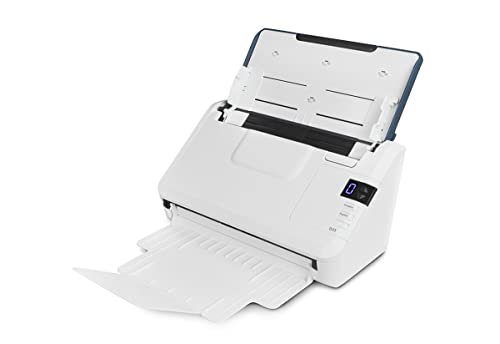
Xerox D35 Office Document Scanner
Best for: fast USB duplex scanning
- Scan Speed
- Up to 45 ppm / 90 ipm
- ADF Capacity
- 50 pages
- Connectivity
- USB
- Media Types
- Photos, documents, receipts, cards
- Daily Duty Cycle
- 8,000 pages/day
- Features
- Automatic Document Feeder, Scanner
The Xerox D35 is a USB office document scanner with a 50-page automatic document feeder. It delivers up to 45 pages per minute at 200 to 300 dpi. The unit supports duplex scanning for color, grayscale, and black-and-white documents. It includes Visioneer VAST cloud technology for searchable PDFs. This scanner suits users needing fast throughput for daily office paperwork.
Pros
- Scans up to 45 ppm
- 50-page automatic document feeder
- Supports color, grayscale, and black-and-white
- Visioneer Acuity image enhancement
Cons
- USB connectivity only
- 8,000-page daily duty cycle
- No wireless or network options
Good fit if
- You need fast duplex scanning
- You prefer simple USB connection
- You scan up to 50 pages at once
Skip if
- You require Wi-Fi connectivity
- You need high-volume enterprise duty cycles
- You want network scanning capabilities
Verdict: The Xerox D35 Desktop Scanner offers solid speed for small offices. It fits users who prioritize fast USB scanning over wireless flexibility.

Epson DS-C330 Compact Desktop Scanner
Best for: Small offices with limited desk space
- Scan Speed
- 30 ppm / 60 ipm
- ADF Capacity
- 20 sheets
- Portability
- Desktop
- Media Types
- Paper, cards, passports
- Daily Duty Cycle
- 5,000 pages
- Driver Support
- TWAIN, ISIS
The Epson DS-C330 is a vertical desktop scanner designed to save desk space while handling standard office tasks. It scans at 30 pages per minute and supports duplex output at 60 images per minute. The 20-sheet auto feeder handles various media, including cards and passports. With a 5,000-page daily duty cycle, it suits small teams needing reliable, compact document digitization.
Pros
- Scans two sides at once at 60 images per minute
- Compact vertical design saves desk space
- Handles paper, cards, and passports
- Includes automatic cropping and skew correction
Cons
- 20-sheet auto feeder is smaller than competitors
- 5,000-page daily duty cycle is modest
- No wireless connectivity listed in specs
Good fit if
- You need a small footprint for tight desks
- You scan mixed media like cards and passports
- You prefer a simple desktop workflow
Skip if
- You need to scan large batches daily
- You require wireless scanning options
- You need a high-speed professional scanner
Verdict: Epson DS-C330 Compact Desktop Scanner fits small offices with limited desk space. It works well for users who scan moderate volumes and need to handle non-standard documents like passports.

HP Compact Duplex Mobile Document Scanner
Best for: portable mobile and travel scanning
- Scan Speed
- 25 ppm
- Connectivity
- USB
- Portability
- Mobile, desktop, portable
- Media Types
- Cards, photos, invoices, contracts
- Power Source
- AC wall adapter
- Features
- Duplex Printing, Mobile Printing, Scanner
The HP HPPS200 is a lightweight, portable document scanner designed for on-the-go use. It scans at 25 ppm with duplex capability, handling pages from 2x2.9 inches up to 8.5x14 inches. The device connects via USB and includes a 20-page auto-feed tray. It supports color and black-and-white scanning at 1200 dpi resolution. This unit suits travelers and small business owners needing a compact, versatile tool for invoices and photos.
Pros
- Scans at 25 ppm with duplex capability
- Compact dimensions of 11.8x4.1x2.9 inches
- Handles media from 2x2.9 to 8.5x14 inches
- Includes 20-page auto-feed tray
Cons
- USB-only connectivity lacks wireless options
- Requires separate AC wall adapter for power
- 20-page feeder is smaller than desktop competitors
Good fit if
- You need a scanner that fits in a briefcase
- You scan mixed media like cards and photos
- You prefer simple USB plug-and-play setup
Skip if
- You require wireless or network scanning
- You scan large batches of high-volume office paper
- You need a built-in power supply
Verdict: The HP HPPS200 Compact Mobile Scanner is a practical choice for professionals who prioritize portability and duplex speed over high-volume capacity.

Xerox Visioneer Duplex Combo Flatbed Scanner
Best for: Mixed media scanning tasks
- Scan Speed
- 25 ppm, 50 ipm
- ADF Capacity
- 35 sheets
- Media Types
- Large documents, photos, cards, books
- Print Resolution
- Up to 600 dpi
- Features
- Duplex Printing, Automatic Document Feeder, Scanner
- Scanning
- Auto Document Feeder
View on Amazon: Xerox Visioneer Duplex Combo Flatbed Scanner
This Xerox scanner combines a flatbed with an automatic document feeder. It scans duplex documents at up to 25 ppm. The flatbed handles books, photos, and cards. The unit measures 15.8 by 13 by 5.5 inches. It works with PC and Mac systems. You get a versatile tool for mixed media. The ADF handles standard paper sizes well. This model suits users needing both flatbed and sheet-fed scanning.
Pros
- Combines flatbed and automatic document feeder
- Scans up to 25 ppm at 300 dpi
- Duplex scanning capability for two-sided documents
- Handles photos, cards, and books on flatbed
- Compatible with PC and Mac
Cons
- Only 20-page auto feeder capacity
- Slower scan speed than dedicated high-volume scanners
- Larger footprint than compact desktop models
Good fit if
- You need to scan books or photos
- You require duplex scanning for documents
- You use both PC and Mac computers
Skip if
- You only scan standard paper documents
- You need high-speed bulk scanning
- You have very limited desk space
Verdict: Xerox Duplex Combo Flatbed Scanner offers a unique blend of flatbed and ADF capabilities. It fits users who frequently scan irregular items like books or photos alongside standard documents.

Epson Wireless Desktop Duplex Document Scanner
Best for: Wireless duplex scanning of document stacks
- Scan Speed
- Up to 35 ppm / 70 ipm
- ADF Capacity
- 50 sheets
- Connectivity
- Wireless
- Media Types
- Business cards, ID cards
- Driver Support
- TWAIN
- Print Output
- Color
View on Amazon: Epson Wireless Desktop Duplex Document Scanner
The Epson ES-500W is a wireless color duplex scanner designed for everyday documents. It features a 50-sheet automatic document feeder and scans up to 35 pages per minute. Single Step Technology captures both sides in one pass. It includes built-in OCR for searchable PDFs and connects via TWAIN drivers. This compact unit suits users who need reliable wireless scanning for business cards and standard paper stacks.
Pros
- Wireless connectivity for PC and Mac
- 50-sheet auto document feeder capacity
- Scans up to 35 ppm or 70 ipm
- Built-in Nuance OCR for searchable files
- Single Step Technology for duplex scanning
Cons
- No USB-C or Ethernet listed in specs
- Limited to standard document sizes
- No mention of mobile app support
Good fit if
- You need wireless scanning without cables
- You scan stacks of mixed documents
- You require searchable PDF output
Skip if
- You need high-volume industrial scanning
- You require Ethernet connectivity
- You scan photos or media types
Verdict: The Epson ES-500W Wireless Duplex Scanner fits small offices needing wireless duplex scanning. It handles 50-sheet stacks well but lacks high-speed industrial features.
Specifications side by side
| Spec | ScanSnap iX1300 Wireless Color Document Scanner | Fujitsu Duplex Desktop Document Scanner | Canon imageFORMULA DR-C225 II Upright Scanner | Xerox D35 Office Document Scanner | Epson DS-C330 Compact Desktop Scanner | HP Compact Duplex Mobile Document Scanner | Xerox Visioneer Duplex Combo Flatbed Scanner | Epson Wireless Desktop Duplex Document Scanner |
|---|---|---|---|---|---|---|---|---|
| Scan Speed | Up to 30 ppm | 60 ppm | Up to 25 ppm | Up to 45 ppm / 90 ipm | 30 ppm / 60 ipm | 25 ppm | 25 ppm, 50 ipm | Up to 35 ppm / 70 ipm |
| ADF Capacity | not specified | 80 sheets | 30 sheets | 50 pages | 20 sheets | not specified | 35 sheets | 50 sheets |
| Connectivity | USB, Wi-Fi | USB 3.0 | not specified | USB | not specified | USB | not specified | Wireless |
| Portability | not specified | not specified | not specified | not specified | Desktop | Mobile, desktop, portable | not specified | not specified |
| Media Types | Documents, photos, receipts, cards | not specified | Receipts, photos, cards, long documents | Photos, documents, receipts, cards | Paper, cards, passports | Cards, photos, invoices, contracts | Large documents, photos, cards, books | Business cards, ID cards |
| Daily Duty Cycle | not specified | 4000 scans per day | not specified | 8,000 pages/day | 5,000 pages | not specified | not specified | not specified |
| Power Source | not specified | Power adapter | not specified | not specified | not specified | AC wall adapter | not specified | not specified |
| Driver Support | not specified | not specified | TWAIN | not specified | TWAIN, ISIS | not specified | not specified | TWAIN |
| Print Output | Color | not specified | not specified | not specified | not specified | not specified | not specified | Color |
| Print Speed | not specified | not specified | not specified | not specified | Up to 30 ppm | not specified | not specified | not specified |
| Supported Functions | not specified | not specified | not specified | not specified | Scan | not specified | not specified | not specified |
| Print Resolution | not specified | not specified | not specified | not specified | not specified | not specified | Up to 600 dpi | not specified |
| Features | Automatic Document Feeder, Scanner | Duplex Printing, Automatic Document Feeder, Scanner | Duplex Printing, Automatic Document Feeder, Scanner | Automatic Document Feeder, Scanner | Duplex Printing, Scanner | Duplex Printing, Mobile Printing, Scanner | Duplex Printing, Automatic Document Feeder, Scanner | Duplex Printing, Automatic Document Feeder, Scanner |
| Ideal For | Documents | Documents | Documents | Documents | Documents | Documents | Documents | Documents |
| Use Case | not specified | not specified | Office | Office | not specified | Office, Home | not specified | not specified |
| Scanner Type | not specified | not specified | not specified | not specified | Desktop | Portable | not specified | not specified |
| Scanning | Auto Document Feeder | Auto Document Feeder | Auto Document Feeder | Auto Document Feeder | not specified | not specified | Auto Document Feeder | Auto Document Feeder |
| Duplex Scanning | not specified | Duplex | Duplex | not specified | Duplex | Duplex | Duplex | Duplex |
| Auto Document Feeder | ADF | ADF | ADF | ADF | not specified | not specified | ADF | ADF |
| Dimensions | 11.7 × 4.5 × 3.3 inches | 12.4 × 10.4 × 9.5 inches | 11.8 × 6.1 × 8.7 inches | 11.2 × 6.7 × 6.5 inches | 4.2 × 11.7 × 4.9 inches | 4.1 × 11.8 × 2.9 inches | 15.8 × 13 × 5.5 inches | 11.6 × 6.9 × 6.6 inches |
| Weight | 4.4 pounds | 10.5 pounds | 5.95 pounds | 5.1 pounds | 4 pounds | 3.14 pounds | 5.95 pounds | 8.16 pounds |
| Color | ScanSnap iX1300 White | not specified | Black | White | White | white | Not Available | not specified |
| Model | PA03805-B005 | not specified | 3258C002 | XD35-U | B11B272201 | HPPS200 | 100N03448 | ES-500W |
| Size | not specified | not specified | 8.7" x 11.8" x 6.1" | not specified | not specified | not specified | Duplex | not specified |
If you plan an outdoor workspace, you can compare frame and panel specs in best greenhouses under 300.
How to choose the right one
-
Check wireless connectivity needs
Determine if your workflow requires wireless flexibility or a direct connection. The ScanSnap iX1300 supports both wireless and USB connections, offering layout flexibility for small spaces. If you prefer a stable, direct link without network setup, the Xerox D35 relies solely on USB. Wireless models allow you to place the device anywhere within range, while USB units often provide consistent performance without interference. Choose the connection type that matches your desk setup and network security policies.
-
Evaluate duplex scanning capability
Duplex scanning allows the device to capture both sides of a page automatically, doubling your efficiency. Most models on this list, including the Fujitsu and Canon options, support duplex scanning for standard documents. This feature is essential if you process contracts, forms, or multi-page reports. Single-sided scanning requires you to manually flip each page, which slows down your workflow significantly. Verify that the scanner handles duplex tasks to save time during high-volume digitization projects.
-
Assess physical footprint and size
Measure your available desk space before purchasing. The ScanSnap iX1300 is notably compact at 4.5 inches wide, making it ideal for tight workstations. In contrast, the Fujitsu model is larger, measuring 10.4 inches wide, to accommodate higher volume and speed. The HP portable scanner is also small at 4.1 inches wide but weighs less for travel. Ensure the device fits your designated area without crowding other equipment. Compact units offer flexibility, while larger models often provide higher duty cycles.
-
Consider specialized document handling
Some scanners handle non-standard items better than others. The Xerox Visioneer Duplex Combo includes a flatbed, allowing you to scan books, photos, or fragile items that an automatic feeder might damage. If you only process standard paper documents, an automatic document feeder is sufficient. The Epson DS-C330 is designed to handle passports and irregular shapes alongside regular pages. Identify if you need to scan mixed media or just standard office paper to select the correct hardware.
-
Review scan speed specifications
Scan speed impacts how quickly you can process large batches. The Xerox D35 offers a 45 ppm speed, which is fast for USB-connected desktop use. Higher speeds reduce the time spent waiting for documents to digitize. While specific speeds for other models are not listed in the data, the Fujitsu model is described as a workhorse for high-volume tasks, implying robust performance. Check the published specifications for pages per minute to ensure the device meets your daily volume requirements.
Frequently asked questions
Which document scanner is best for small offices with limited desk space?
The ScanSnap iX1300 Wireless Color Document Scanner is an excellent choice for tight spaces. It measures 4.5 inches wide and weighs 4.4 pounds. This compact footprint allows it to fit easily on small desks. It also supports wireless connectivity, giving you flexibility in placement without needing a direct cable connection to your computer.
Can I scan documents wirelessly with these scanners?
Yes, several models support wireless scanning. The ScanSnap iX1300 offers both wireless and USB connections for flexible setup. The Epson ES-500W Wireless Duplex Document Scanner is designed specifically for wireless duplex scanning of document stacks. This feature allows you to place the device further from your computer while maintaining a reliable connection for your workflow.
Which scanner handles high-volume office document digitization?
The Fujitsu Duplex Desktop Document Scanner is ideal for high-volume tasks. Its larger physical dimensions suggest a robust build for administrative teams. It is designed to digitize large amounts of paper quickly. This model serves as a workhorse for offices that need to process significant volumes of documents efficiently without manual intervention for each page.
Do any of these scanners support duplex scanning automatically?
Yes, automatic duplex scanning is available on multiple models. The Xerox D35 Office Document Scanner offers fast USB duplex scanning for rapid two-sided processing. The HP Compact Duplex Mobile Document Scanner also supports duplex scanning for portable use. These features allow you to scan both sides of a document in a single pass, saving time and paper.
Is there a scanner that can handle irregular items like books or photos?
The Xerox Visioneer Duplex Combo Flatbed Scanner is designed for mixed media tasks. It combines flatbed and ADF capabilities to handle irregular items. You can scan books or photos on the flatbed while using the feeder for standard documents. This versatility makes it suitable for users who frequently deal with non-standard paper sizes or delicate items.
Which scanner is best for portable or travel scanning?
The HP Compact Duplex Mobile Document Scanner is built for portability. It weighs 3.14 pounds and features a compact design for travel. It offers duplex speed for professionals who need to scan documents on the go. This model prioritizes mobility and quick scanning over high-volume capacity, making it practical for users who work outside a traditional office.
What is the fastest scanning speed available in this list?
The Xerox D35 Office Document Scanner offers a scan speed of 45 ppm. This speed supports rapid document processing via a direct USB connection. It is ideal for users who prioritize fast output over wireless flexibility. This high speed helps small offices manage large batches of documents efficiently without significant delays.