Best Laser Printers with Duplex Printing in 2026: 14 Picks Ranked by Specs
As an Amazon Associate we earn from qualifying purchases. Links on this page are affiliate links.
Finding the best laser printers with duplex printing requires looking at core specifications rather than marketing claims. We compared 14 models ranked by their published data. The Brother All-in-One Monochrome Laser Printer leads because it delivers 36 ppm print speeds alongside automatic two-sided scanning. These picks are based strictly on the specifications published on the listings. Use this guide to decide which machine fits your office workflow.
Quick picks
The best fit for you
- You need the most compact monochrome duplex printer Brother Compact Monochrome Duplex Laser Printer It weighs 15.6 pounds and measures 14 inches wide, making it the smallest option.
- You require fast wired monochrome duplex printing HP LaserJet Pro Ethernet Duplex Printer It offers 40 ppm output speed and Ethernet connectivity for dedicated network setups.
- You want a budget-friendly single-desk duplex printer HP LaserJet M209d USB Duplex Printer It provides automatic two-sided printing via USB for single-workstation setups.
- You need dedicated double-sided color laser printing Canon imageCLASS Duplex Color Laser Printer It delivers 22 pages per minute with automatic two-sided color and monochrome output.
Our 14 picks

Brother All-in-One Monochrome Laser Printer
Best for: busy monochrome duplex printing and scanning
- Features
- Duplex Printing, Mobile Printing, Scanner, Copier (what this guide is about)
- Print Technology
- Laser
- Print Output
- Monochrome
- Supported Functions
- Print, copy, scan
- Print Speed
- 36 ppm
- Connectivity
- Wireless, Ethernet, USB
This multi-function monochrome laser printer handles printing, copying, and scanning in a single footprint. It outputs duplex pages at up to 36 ppm and includes a 50-page auto document feeder for multi-page scanning. Dual-band wireless, Ethernet, and USB provide flexible connection options. This machine suits you if you require fast two-sided black-and-white printing alongside daily scanning and copying.
Pros
- Print speeds up to 36 ppm for black-and-white documents
- Automatic duplex printing and duplex scanning capabilities
- 50-page auto document feeder for copying and scanning
- Dual-band wireless (2.4GHz and 5GHz), Ethernet, and USB connectivity
Cons
- Prints in monochrome only without color output
- Does not include built-in fax capability
Good fit if
- You need automatic two-sided printing at speeds up to 36 ppm.
- You process multi-page copies or scans through a 50-page auto document feeder.
- You want both dual-band Wi-Fi and wired Ethernet network options.
Skip if
- You require color laser printing.
- You need integrated fax functionality.
Verdict: Brother Compact Monochrome Duplex Laser Printer provides 36 ppm print speeds alongside automatic two-sided printing and scanning. It serves high-volume monochrome document workflows that require flexible network connectivity.

Brother Compact Monochrome Duplex Laser Printer
Best for: fast black-and-white two-sided desktop printing
- Features
- Duplex Printing, Mobile Printing (what this guide is about)
- Print Technology
- Laser
- Print Output
- Monochrome
- Printer Type
- Single-function
- Print Speed
- 36 ppm
- Connectivity
- Wireless, Ethernet, USB
View on Amazon: Brother Compact Monochrome Duplex Laser Printer
This monochrome laser printer produces two-sided documents automatically at speeds up to 36 pages per minute. You can connect it via dual-band Wi-Fi, Ethernet, or USB, making it adaptable to any desk setup. With a 250-sheet main paper tray and a dedicated manual feed slot, it handles routine print jobs without constant reloading. It suits anyone needing fast, dedicated black-and-white printing in a compact footprint.
Pros
- Automatic duplex printing for two-sided documents
- Print speeds reaching up to 36 ppm
- Dual-band wireless, Ethernet, and USB connectivity
- 250-sheet paper tray with manual feed slot
Cons
- Monochrome output only
- Single-function design without built-in flatbed copying or faxing
Good fit if
- You need fast automatic two-sided printing up to 36 ppm.
- You want flexible setup options across dual-band Wi-Fi, Ethernet, and USB.
- You print standard black-and-white documents using a 250-sheet tray.
Skip if
- You require color print output.
- You need an all-in-one machine with copying and faxing hardware.
Verdict: Brother Compact Monochrome Laser Printer delivers quick 36 ppm automatic two-sided black-and-white printing with broad connectivity options. It fits busy workspaces requiring dedicated text output without extra bulk.

HP LaserJet Pro MFP 3101sdw All-in-One
Best for: offices needing fast monochrome duplex printing
- Features
- Duplex Printing (what this guide is about)
- Print Technology
- Laser
- Print Output
- Monochrome
- Printer Type
- All-in-One
- Supported Functions
- Print, Scan, Copy
- Print Speed
- 35 ppm
This monochrome all-in-one laser printer provides automatic two-sided printing and duplex scanning for everyday document handling. It outputs black-and-white pages at up to 35 ppm and includes a 50-sheet automatic document feeder alongside a 250-sheet input tray. Built-in wireless connectivity lets you share print and scan tasks across your local network. It suits you if your office requires steady two-sided document generation without color.
Pros
- Automatic two-sided printing and duplex scanning
- Print speeds up to 35 ppm
- 50-sheet automatic document feeder
- 250-sheet paper input tray
- Wireless connectivity for printing and scanning
Cons
- Monochrome output only
- Blocks cartridges without HP chips or circuitry
- No fax function included
Good fit if
- You need automatic double-sided printing and duplex scanning in a single unit.
- You require monochrome print speeds up to 35 ppm for text documents.
- You want a 50-sheet automatic feeder to handle multipage copy and scan jobs.
Skip if
- You need color printing capabilities.
- You plan to use third-party toner cartridges without HP chips.
- You require integrated fax hardware for office communications.
Verdict: HP LaserJet Pro Monochrome All-in-One pairs 35 ppm output with automatic duplex printing and scanning for fast black-and-white paperwork. Its 250-sheet tray and 50-sheet feeder support steady office workflows, though operation requires HP-chipped cartridges.

HP LaserJet Pro Ethernet Duplex Printer
Best for: fast wired monochrome duplex document printing
- Features
- Duplex Printing (what this guide is about)
- Print Technology
- Laser
- Print Output
- Monochrome
- Print Speed
- 40 ppm
- Connectivity
- Ethernet
- Duplex Printing
- Automatic 2-sided
The HP LaserJet Pro M404dn is a single-function monochrome laser printer configured for shared office workstations. For double-sided documentation, it offers automatic duplex printing paired with output speeds reaching 40 pages per minute. A 250-sheet paper tray accommodates everyday batches, while built-in Ethernet links the unit to your local network. It suits your workspace if you require swift, black-and-white printing over a wired connection.
Pros
- Automatic two-sided printing
- Print speeds reaching up to 40 ppm
- Built-in Ethernet network connectivity
- 250-sheet paper input tray capacity
Cons
- No integrated Wi-Fi connectivity listed
- Limited strictly to monochrome print output
- Lacks scanning, copying, or fax functions
Good fit if
- You need automatic duplex printing at speeds up to 40 pages per minute.
- You connect your office hardware using a wired Ethernet network.
- You produce monochrome documents without requiring color output.
Skip if
- You rely on native Wi-Fi connectivity for wireless print jobs.
- You require multifunction capabilities like scanning and copying.
Verdict: HP LaserJet Pro M404dn Duplex Printer provides rapid 40 ppm black-and-white output with automatic double-sided printing across wired networks. It delivers dependable monochrome printing where standalone network hardware is required.

Canon imageCLASS Duplex Color Laser Printer
Best for: dedicated double-sided color laser printing
- Features
- Duplex Printing, Mobile Printing (what this guide is about)
- Print Technology
- Laser
- Print Output
- Color
- Printer Type
- Single-function (print only)
- Supported Functions
- Print Speed
- 22 ppm (color and black)
The Canon imageCLASS Duplex Color Laser Printer provides automatic two-sided printing alongside wireless connectivity for your home or office workstation. It outputs both color and monochrome documents at speeds up to 22 pages per minute. Paper handling includes a 250-sheet standard cassette alongside a single-sheet multipurpose tray. If you need a dedicated print-only machine that produces double-sided color pages without taking on copier or fax hardware, this model fits your workflow.
Pros
- Automatic two-sided printing
- Prints up to 22 ppm in color and black
- 250-sheet standard cassette
- Chromebook and mobile printing support
Cons
- Multipurpose tray holds only 1 sheet
- Single-function hardware with print-only support
- Heavier build at 35.3 pounds
Good fit if
- You need automatic two-sided printing in both color and black.
- You want a dedicated wireless laser printer with a 250-sheet cassette.
- You print from ChromeOS or mobile devices.
Skip if
- You require an all-in-one machine with copying or faxing capabilities.
- You regularly load multi-page stacks of specialty media or envelopes.
Verdict: Canon imageCLASS Duplex Color Laser Printer delivers reliable automatic two-sided color and monochrome output at 22 pages per minute. It is a capable choice when you need a dedicated wireless document printer without extra multi-function hardware.
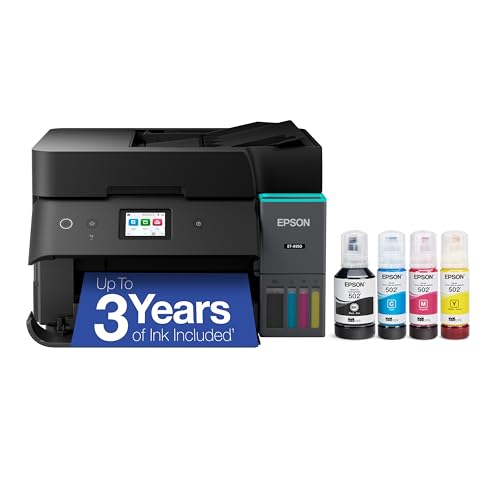
Epson EcoTank ET-4950 All-in-One Printer
Best for: two-sided multi-function tasks with refillable ink
- Features
- Duplex Printing, Fax (what this guide is about)
- Print Technology
- Inkjet
- Print Output
- Color
- Supported Functions
- Print, Copy, Scan, Fax
- Print Speed
- 18 black/9 color ISO ppm
- Connectivity
- Wireless
The Epson EcoTank ET-4950 is an all-in-one inkjet supertank printer built with automatic two-sided printing and auto duplex scanning. It delivers speeds up to 18 ISO ppm in black and 9 ISO ppm in color, fed by a 250-sheet paper tray and an auto document feeder. If you handle regular office tasks including faxing and color scanning alongside double-sided documents, this unit gives you full duplex capabilities in a refillable ink tank format.
Pros
- Automatic duplex printing and duplex scanning
- 250-sheet paper tray capacity
- Built-in fax, ADF, and 2.4-inch color display
- High-capacity refillable ink tank system
Cons
- Uses inkjet technology rather than a laser toner engine
- Color print speed reaches up to 9 ISO ppm
Good fit if
- You need automatic two-sided printing and two-sided scanning.
- You want an all-in-one with fax, ADF, and a 250-sheet paper tray.
- You prefer a refillable ink tank over toner cartridges.
Skip if
- You require true laser print technology.
- You need color print speeds faster than 9 ISO ppm.
Verdict: Epson EcoTank ET-4950 All-in-One Duplex Inkjet Printer delivers complete two-sided printing, copying, and scanning alongside standalone fax capabilities. It provides full multi-function utility for users who want cartridge-free ink tanks over traditional toner.

HP LaserJet M209d USB Duplex Printer
Best for: single-desk wired black-and-white duplex printing
- Features
- Duplex Printing (what this guide is about)
- Print Technology
- Laser
- Print Output
- Monochrome
- Supported Functions
- Connectivity
- USB
- Dimensions
- 14 × 8.07 × 11 inches
The HP LaserJet M209d is a monochrome laser printer built for dedicated desktop setups. It features automatic two-sided printing and comes with a 150-sheet input tray for everyday document runs. Connectivity is limited strictly to a wired USB setup, with a cable included in the box. You will find it practical if your workstation requires straightforward black-and-white printing without network configuration.
Pros
- Automatic two-sided printing
- Wired USB cable included in the box
- 150-sheet paper input tray
- Smart-guided control buttons
Cons
- Wired USB connection only with no built-in wireless
- Monochrome output with no color printing capability
- Blocks toner cartridges that lack HP chips or circuitry
Good fit if
- You need automatic two-sided monochrome document printing.
- You prefer a direct wired USB connection to a single computer.
- You want a compact desktop machine with a 150-sheet paper tray.
Skip if
- You need wireless connectivity or network sharing.
- You require color print output.
- You intend to use non-HP toner cartridges without HP chips.
Verdict: HP LaserJet M209d Monochrome Duplex Printer provides automatic two-sided black-and-white printing over a dedicated USB connection. It serves single-workstation setups that do not need network access or color printing.

Canon imageCLASS Duplex Color All-in-One Laser Printer
Best for: High-volume two-sided color printing and scanning
- Features
- Duplex Printing, Scanner, Copier, Fax (what this guide is about)
- Print Technology
- Laser
- Print Output
- Color
- Printer Type
- Multifunction (all-in-one)
- Supported Functions
- Print, scan, copy, fax
- Print Speed
- 35 ppm (bw / color, letter)
View on Amazon: Canon imageCLASS Duplex Color All-in-One Laser Printer
This color laser all-in-one delivers automatic two-sided printing at speeds up to 35 pages per minute for both color and black-and-white jobs. You get complete print, scan, copy, and fax capabilities, paired with one-pass two-sided scanning. Standard paper capacity starts at 300 sheets across a 250-sheet cassette and 50-sheet multipurpose tray. It fits offices that handle regular high-volume color documentation and need fast two-sided workflows.
Pros
- Automatic two-sided printing up to 35 ppm in color and black
- One-pass two-sided scanning via 50-sheet document feeder
- Standard 300-sheet input expandable up to 850 sheets
- Complete print, scan, copy, and fax functionality
Cons
- Heavy unit weighing 48.5 pounds
- Reaching maximum 850-sheet capacity requires an optional cassette
Good fit if
- You need automatic two-sided color printing at 35 pages per minute.
- You handle multi-page documents requiring one-pass duplex scanning.
- You want an all-in-one machine with built-in fax capabilities.
Skip if
- You need a lightweight device that is easy to move.
- You only require basic monochrome printing without scanning.
Verdict: Canon imageCLASS Duplex Color All-in-One Laser Printer provides high-speed two-sided color output and duplex scanning for demanding office workflows. Its 35 ppm speed and expandable paper handling support heavy daily print volumes.

HP Color LaserJet Pro Wireless All-in-One
Best for: offices needing duplex printing and feeder scanning
- Features
- Duplex Printing (what this guide is about)
- Print Technology
- Laser
- Print Output
- Color
- Printer Type
- All-in-One
- Supported Functions
- Print, scan, copy
- Print Speed
- 26 ppm
The HP Color LaserJet Pro MFP 3301sdw All-in-One is a color laser multifunction machine built for office workloads. It pairs automatic two-sided printing with an automatic document feeder for multi-page scanning and copying tasks. You get print speeds up to 26 pages per minute in color and black, a 250-sheet input tray, and wireless connectivity. It suits teams needing duplex printing alongside hands-free document handling.
Pros
- Automatic two-sided printing and duplex scanning
- Print speeds up to 26 ppm in color and black
- Integrated automatic document feeder
- 250-sheet paper input tray
Cons
- Firmware enforces use of toner cartridges with HP chips
- No built-in fax function listed
- Heavy unit weight at 37.7 pounds
Good fit if
- You need an automatic document feeder for multi-page scans and copies.
- You want automatic duplex printing in both monochrome and color at 26 ppm.
- You require wireless printing with a 250-sheet capacity.
Skip if
- You plan to use third-party toner cartridges lacking HP chips.
- You need a dedicated office fax connection.
Verdict: HP Color LaserJet Pro MFP 3301sdw All-in-One delivers duplex laser printing and hands-free feeder handling at 26 pages per minute. Cartridge firmware policies restrict consumables to original HP chipped supplies.

Canon Color imageCLASS All-in-One Laser
Best for: Small offices needing color duplex printing
- Features
- Duplex Printing (what this guide is about)
- Print Technology
- Laser
- Print Output
- Color
- Supported Functions
- Print, scan, copy, fax
- Print Speed
- 26 ppm
- Connectivity
- Wireless
The Canon MF665Cdw is a color wireless all-in-one laser printer with automatic duplex printing. It prints at 26 ppm with a first page out time of 10.3 seconds. You get a 5-inch color touchscreen, a 50-sheet duplex automatic document feeder, and a 250-sheet standard paper cassette. This model supports mobile printing via the Canon PRINT app, AirPrint, and Mopria. It is a solid choice for offices needing color output and network connectivity.
Pros
- Automatic duplex printing for two-sided documents
- 26 ppm print speed in both color and monochrome
- 50-sheet duplex automatic document feeder
- 5-inch color touchscreen with Application Library
- Supports Canon PRINT app, AirPrint, and Mopria
Cons
- 26 ppm speed is slower than the 45 ppm Ricoh MP C4504
- 250-sheet standard paper capacity is smaller than many competitors
- 50 pounds weight makes it less portable than compact models
Good fit if
- You need color printing with automatic duplexing
- You want a 5-inch color touchscreen for easy navigation
- You require a 50-sheet duplex automatic document feeder
Skip if
- You only need monochrome printing
- You require a print speed faster than 26 ppm
- You need a compact printer under 40 pounds
Verdict: Canon MF665Cdw Color Wireless MFP fits small offices that need color duplex printing and a large touchscreen interface. It suits users who value a 50-sheet duplex feeder and mobile app support over raw speed or portability.

HP Color LaserJet Wireless Duplex Printer
Best for: two-sided color printing in compact offices
- Features
- Duplex Printing, Mobile Printing (what this guide is about)
- Print Technology
- Laser
- Print Output
- Color
- Print Speed
- Up to 22 ppm
- Connectivity
- Wireless, Ethernet, dual band Wi-Fi
- Duplex Printing
- Automatic two-sided printing
The HP Color LaserJet Pro Duplex Printer delivers automatic two-sided printing and color laser output at speeds up to 22 pages per minute. You manage jobs through a 2.7-inch color touchscreen, with connections supported across dual-band Wi-Fi and Ethernet. Measuring 17 by 15 by 10 inches, this unit handles standard letter, legal, and envelope media. It fits you if you want straightforward two-sided color document output.
Pros
- Automatic two-sided printing
- Prints up to 22 ppm
- Dual-band Wi-Fi and Ethernet connectivity
- 2.7-inch color touchscreen display
Cons
- Print speed maxes out at 22 ppm
- Hardware warranty limited to one year
Good fit if
- You need automatic two-sided color laser prints up to 22 ppm.
- You want dual-band Wi-Fi or Ethernet networking options.
- You prefer navigation via a 2.7-inch color touchscreen.
Skip if
- You need print speeds faster than 22 ppm for large print queues.
- You require integrated fax hardware for office communications.
Verdict: HP Color LaserJet Pro Duplex Printer delivers reliable automatic two-sided color output at 22 ppm with dual-band Wi-Fi. The 2.7-inch touchscreen and broad paper format support make it practical for everyday office jobs.

Ricoh A3 Color Laser Multifunction Copier
Best for: A3 color printing with high-speed duplexing
- Features
- Duplex Printing, Scanner, Copier, Fax (what this guide is about)
- Print Technology
- Laser
- Print Output
- Color
- Printer Type
- Multifunction
- Supported Functions
- Copy, Fax, Print, Scan
- Print Speed
- 45 ppm
The Ricoh C4504 is an A3 color laser multifunction copier designed for high-volume office environments. It delivers 45 ppm print and scan speeds with auto duplex printing and scanning capabilities. The unit includes built-in Wi-Fi, network connectivity, and a 10.1-inch smart operation panel. It supports copy, fax, print, and scan functions, making it a robust solution for teams requiring large-format color output and efficient two-sided document handling.
Pros
- A3 paper compatibility for large-format printing
- 45 ppm color laser print speed
- Auto duplex printing and scanning
- 10.1-inch smart operation panel
- Built-in Wi-Fi and network connectivity
Cons
- Large physical footprint due to A3 support
- No mention of mobile printing apps
- No mention of Ethernet port
Good fit if
- You need to print on A3 paper sizes
- You require fast color output for large volumes
- You want auto duplexing for both printing and scanning
Skip if
- You only need standard Letter or A4 paper
- You require a compact desktop-sized device
- You prefer monochrome printing only
Verdict: Ricoh C4504 A3 Color Laser MFP is best for offices that need large-format color output and high-speed duplexing. It fits teams prioritizing A3 capabilities and network integration over compact size.

Brother All-in-One Color Laser Printer
Best for: all-in-one color printing with automatic two-sided output
- Features
- Duplex Printing, Scanner, Copier, Fax (what this guide is about)
- Print Technology
- Laser
- Print Output
- Color
- Supported Functions
- Print, Scan, Copy, Fax
- Print Speed
- 19 ppm
- Connectivity
- Wireless, USB 2.0, Wi-Fi Direct
This Brother color laser all-in-one printer handles printing, scanning, copying, and faxing in your workspace. You get automatic duplex printing for two-sided output without flipping pages manually. It delivers print speeds up to 19 pages per minute and includes a 250-sheet adjustable paper tray alongside a 50-sheet automatic document feeder. It suits you if you need color multi-function document handling with dual-band wireless connectivity and touchscreen control.
Pros
- Automatic duplex printing and duplex scanning support
- 50-sheet automatic document feeder and 250-sheet paper tray
- Dual-band 2.4GHz and 5GHz wireless plus Wi-Fi Direct
- 3.5-inch color touchscreen with customizable shortcuts
Cons
- Print speed limited to 19 pages per minute
- No Ethernet networking port included
- Heavy unit weighing 44 pounds
Good fit if
- You need an all-in-one color unit that prints, scans, copies, and faxes.
- You want automatic duplex output paired with an automatic document feeder.
- You prefer dual-band wireless connections over running network cables.
Skip if
- You require print speeds faster than 19 pages per minute.
- You need a wired Ethernet connection for your office setup.
- You have minimal desk space to support a 44-pound machine.
Verdict: Brother Wireless Color Laser All-in-One provides automatic duplex printing and comprehensive scan, copy, and fax features for moderate-volume office workflows.

HP Color LaserJet Pro 3201dw Duplex Printer
Best for: Small teams needing color duplex printing
- Features
- Duplex Printing (what this guide is about)
- Print Technology
- Laser
- Print Output
- Color
- Print Speed
- Up to 26 ppm
- Connectivity
- Wireless
- Duplex Printing
- Auto 2-sided
The HP Color LaserJet Pro 3201dw is a color laser printer with auto 2-sided printing. It prints up to 26 ppm and connects via dual-band Wi-Fi. The 250-sheet input tray handles standard loads. This unit suits small teams needing vivid color documents. It includes duplex scanning for efficient workflow. The white chassis measures 15.35 x 16.5 x 10.0 inches.
Pros
- Auto 2-sided printing reduces paper use
- Print speeds up to 26 ppm
- Dual-band Wi-Fi with self-reset
- 250-sheet input tray capacity
- Duplex scanning support
Cons
- No built-in Ethernet port listed
- Not a multi-function device
- Blocks non-HP toner chips
Good fit if
- You need color output with automatic double-sided printing
- You want wireless connectivity for a small office
- You print professional documents regularly
Skip if
- You require a scanner or copier function
- You need wired Ethernet connectivity
- You prefer third-party toner compatibility
Verdict: HP Color LaserJet Pro 3201dw Wireless Duplex fits small teams that prioritize color quality and automatic duplexing. It lacks scanning features but delivers reliable wireless performance.
Specifications side by side
| Spec | Brother All-in-One Monochrome Laser Printer | Brother Compact Monochrome Duplex Laser Printer | HP LaserJet Pro MFP 3101sdw All-in-One | HP LaserJet Pro Ethernet Duplex Printer | Canon imageCLASS Duplex Color Laser Printer | Epson EcoTank ET-4950 All-in-One Printer | HP LaserJet M209d USB Duplex Printer | Canon imageCLASS Duplex Color All-in-One Laser Printer | HP Color LaserJet Pro Wireless All-in-One | Canon Color imageCLASS All-in-One Laser | HP Color LaserJet Wireless Duplex Printer | Ricoh A3 Color Laser Multifunction Copier | Brother All-in-One Color Laser Printer | HP Color LaserJet Pro 3201dw Duplex Printer |
|---|---|---|---|---|---|---|---|---|---|---|---|---|---|---|
| Print Technology | Laser | Laser | Laser | Laser | Laser | Inkjet | Laser | Laser | Laser | Laser | Laser | Laser | Laser | Laser |
| Print Output | Monochrome | Monochrome | Monochrome | Monochrome | Color | Color | Monochrome | Color | Color | Color | Color | Color | Color | Color |
| Printer Type | not specified | Single-function | All-in-One | not specified | Single-function (print only) | not specified | not specified | Multifunction (all-in-one) | All-in-One | not specified | not specified | Multifunction | not specified | not specified |
| Supported Functions | Print, copy, scan | not specified | Print, Scan, Copy | not specified | Print, Copy, Scan, Fax | Print, scan, copy, fax | Print, scan, copy | Print, scan, copy, fax | not specified | Copy, Fax, Print, Scan | Print, Scan, Copy, Fax | not specified | ||
| Print Speed | 36 ppm | 36 ppm | 35 ppm | 40 ppm | 22 ppm (color and black) | 18 black/9 color ISO ppm | not specified | 35 ppm (bw / color, letter) | 26 ppm | 26 ppm | Up to 22 ppm | 45 ppm | 19 ppm | Up to 26 ppm |
| Connectivity | Wireless, Ethernet, USB | Wireless, Ethernet, USB | not specified | Ethernet | Wireless | Wireless | USB | Wireless | not specified | Wireless | Wireless, Ethernet, dual band Wi-Fi | WiFi, Network | Wireless, USB 2.0, Wi-Fi Direct | Wireless |
| Duplex Printing | not specified | Automatic | not specified | Automatic 2-sided | Automatic 2-sided printing | Auto duplex | not specified | Automatic 2-sided printing | not specified | Automatic | Automatic two-sided printing | Auto Duplex | Automatic | Auto 2-sided |
| First Page Out | not specified | not specified | not specified | not specified | not specified | not specified | not specified | not specified | not specified | 10.3 seconds | not specified | not specified | not specified | not specified |
| Ink/Toner System | Toner cartridge | Toner cartridge | Toner | Toner | Toner 067 / 067 High-Capacity | Ink tank, cartridge-free | not specified | Toner 069 / 069 High Capacity | not specified | Toner | Toner cartridges | not specified | Toner | Toner |
| Features | Duplex Printing, Mobile Printing, Scanner, Copier | Duplex Printing, Mobile Printing | Duplex Printing | Duplex Printing | Duplex Printing, Mobile Printing | Duplex Printing, Fax | Duplex Printing | Duplex Printing, Scanner, Copier, Fax | Duplex Printing | Duplex Printing | Duplex Printing, Mobile Printing | Duplex Printing, Scanner, Copier, Fax | Duplex Printing, Scanner, Copier, Fax | Duplex Printing |
| Use Case | not specified | not specified | not specified | not specified | Office, Home | not specified | not specified | not specified | not specified | not specified | not specified | not specified | not specified | not specified |
| Scanner Type | Portable | Portable | not specified | not specified | Portable | not specified | not specified | not specified | not specified | not specified | Portable | not specified | not specified | not specified |
| Scanning | Wireless Scanning | Wireless Scanning | not specified | not specified | Wireless Scanning | Wireless Scanning | not specified | Wireless Scanning | Wireless Scanning | Wireless Scanning | Wireless Scanning | not specified | Wireless Scanning | Wireless Scanning |
| Compatibility | not specified | Alexa | not specified | not specified | not specified | not specified | not specified | not specified | not specified | not specified | not specified | A3 | not specified | not specified |
| Duplex Scanning | Duplex | Duplex | Duplex | not specified | Duplex | Duplex | Duplex | Duplex | Duplex | Duplex | Duplex | Duplex | Duplex | Duplex |
| Scan Speed | not specified | not specified | not specified | not specified | not specified | not specified | not specified | not specified | not specified | not specified | not specified | 45 ppm | not specified | not specified |
| Dimensions | 15.7 × 16.1 × 12.5 inches | 14.2 × 14 × 7.2 inches | 15.7 × 16.5 × 12.3 inches | 10.8 × 17.4 × 18.3 inches | 16.5 × 17 × 11.3 inches | 13.7 × 14.8 × 9.4 inches | 14 × 8.07 × 11 inches | 18.2 × 16.8 × 17 inches | 16.5 × 13.4 × 16.5 inches | 21.5 × 20.5 × 23 inches | 15 × 17 × 10 inches | not specified | 16.1 × 17.5 × 15.8 inches | not specified |
| Weight | 25 pounds | 15.6 pounds | 23.1 pounds | 8.35 pounds | 35.3 pounds | 16.1 pounds | not specified | 48.5 pounds | 37.7 pounds | 50 pounds | not specified | not specified | 44 pounds | 33 pounds |
| Size | Standard | Standard | one size | One Size | One Size | not specified | Standard | One Size | standard | Medium | One Size | not specified | Standard | 15.35 x 16.5 x 10.0 |
| Color | Black | Black | White | White | white | Black | White | white | White | White | White | White | White | white |
| Model | DCPL2640DW | HLL2460DW | 9D2X4F#BGJ | W1A53A | 5159C003 | C11CL40201 | 8J9L0F#BGJ | 5455C010 | 499Q3F#BGJ | 6928C005 | M255dw | C4504 | MFCL3720CDW | 499Q9F#BGJ |
Is Automatic Two-Sided Printing Worth It?
Duplex printing handles both sides of a page automatically, saving you from manual flipping. This feature is standard on the listed models, supporting workflows from single-desk USB setups to high-volume enterprise networks. You gain paper efficiency and reduced handling time. However, if your daily output consists mostly of single-page labels or quick notes, the added complexity may not justify the choice. For multi-page reports, contracts, or double-sided scanning needs, it becomes essential.
Worth it if
- You regularly print multi-page documents that require professional two-sided formatting
- You need to reduce paper consumption across a busy office workflow
- Your scanning tasks involve handling stacks of double-sided original documents
Skip it if
- You primarily print single-page labels or quick reference notes
- Your workspace lacks the physical space for the standard-sized duplex units
- You only require basic monochrome output for a single dedicated workstation
How we selected duplex printers
We identified printers with duplex printing by scanning Amazon listings for this feature in titles or feature lists. We only included one size or variant per product family. All details come directly from the published specifications. We do not handle products or test them ourselves. Your guide reflects only the data provided by manufacturers.
We ordered these 14 picks by availability first. Next, we sorted by the listing's overall rating weighted by the number of ratings. Finally, we ranked by how many of our criteria the specs meet. This method ensures you see the most relevant duplex options first, based on verified listing data rather than subjective opinions.
Key Specs for Choosing Duplex Printers
-
Check Print Output Type
Decide between monochrome and color output before comparing models. Monochrome printers like the Brother DCPL2640DW focus on text documents, which is ideal for busy offices handling contracts or reports. Color models, such as the Canon 5159C003, support graphics and marketing materials. If your workflow involves only black-and-white text, a monochrome unit offers faster speeds and lower operational complexity. Choose color only if you regularly produce visual content that requires accurate hue reproduction for client presentations or internal reports.
-
Evaluate Print Speed Requirements
Pages per minute (ppm) determines how quickly your team processes documents. High-volume offices may prefer the HP M611dn, which delivers 65 ppm for rapid batch printing. Moderate workloads often find 36 ppm, like the Brother DCPL2640DW, sufficient for daily tasks. Slower speeds around 22 ppm, seen in the HP M255dw, suit smaller teams or home offices where urgency is lower. Match the speed to your peak daily volume to avoid bottlenecks during busy periods, ensuring your hardware keeps pace with your workflow demands without unnecessary delays.
-
Select Appropriate Connectivity
Connectivity options dictate how devices interact with your network. Wireless models like the Brother HLL2460DW allow mobile printing and flexible placement. Wired Ethernet, found in the HP W1A53A, provides stable connections for fixed office stations. Single-desk setups might use USB-only printers like the HP 8J9L0F#BGJ to avoid network configuration. Consider your office layout and security needs. Wireless offers convenience, while Ethernet ensures consistent performance. Choose the method that aligns with your existing infrastructure and printing habits to streamline daily operations effectively.
-
Review Supported Functions
Determine if you need scanning, copying, or faxing capabilities. All-in-one units like the Brother MFCL3720CDW integrate these functions, reducing desk clutter. Dedicated printers, such as the HP W1A53A, focus solely on printing, which can simplify maintenance. If you frequently digitize documents, duplex scanning is crucial. Models like the Brother DCPL2640DW support two-sided scanning, speeding up archiving processes. Evaluate your daily tasks to decide if multi-function hardware adds value or if a single-purpose printer better serves your specific workflow requirements and space constraints.
-
Consider Physical Dimensions
Printer size affects placement and workspace efficiency. Compact models like the Brother HLL2460DW measure 14 by 14.2 inches, fitting easily on crowded desks. Larger all-in-ones, such as the Brother MFCL8930CDW, require more floor space due to their 21.6-inch height. Measure your available area before purchasing. Ensure there is room for paper trays and output stacking. Choosing the right footprint prevents clutter and ensures easy access to controls and paper supplies, maintaining a tidy and efficient working environment for you and your colleagues.
Frequently asked questions
Which laser printer offers the fastest duplex printing speed?
The HP LaserJet Pro M404dn provides the highest speed at 40 ppm for black-and-white documents. It uses Ethernet connectivity for stable wired network connections. This model is ideal for offices that need rapid output without the bulk of color hardware or multifunction scanning components.
Can I print and scan double-sided pages automatically?
Yes, several models support duplex scanning alongside printing. The Brother DCPL2640DW and Canon imageCLASS 5455C010 both handle two-sided scanning automatically. This feature saves time by processing both sides of a document in a single pass, which is useful for archiving or digitizing paperwork.
What is the most compact monochrome duplex printer?
The Brother HLL2460DW is the most compact option, weighing only 15.6 pounds. It measures 14 inches wide and 7.2 inches high. This small footprint makes it suitable for busy desktops where space is limited, while still delivering 36 ppm automatic two-sided black-and-white output.
Are there color laser printers with automatic duplex printing?
Several color models include automatic duplex printing capabilities. The Canon imageCLASS 5159C003 and HP Color LaserJet Pro M255dw both offer two-sided color output at 22 ppm. These machines allow you to print professional color documents on both sides of the paper without manual intervention.
Which printer is best for A3 size paper?
The Ricoh C4504 supports A3 paper formats. It is a color multifunction copier that includes duplex printing and scanning functions. This model is designed for larger document handling needs, making it suitable for environments that require printing or scanning oversized technical drawings or reports.
Does the HP LaserJet M209d support wireless connectivity?
No, the HP LaserJet M209d connects via USB only. It is designed for single-desk setups that do not require network access. While it offers automatic two-sided black-and-white printing, you must plug it directly into a computer rather than connecting it to a wireless router.
Which printer includes fax capabilities with duplex printing?
The Canon imageCLASS 5455C010 and Brother MFCL3720CDW both include fax features. They also support duplex printing and scanning. These multifunction devices are practical for offices that need to send and receive faxes while maintaining high-speed two-sided document workflows and color output options.