ScanSnap Document Scanners: 7 Picks Ranked by Specs
As an Amazon Associate we earn from qualifying purchases. Links on this page are affiliate links.
ScanSnap offers a range of best ScanSnap document scanners designed for specific office needs. You can choose from compact desktop models, specialized receipt scanners, or overhead book scanners that preserve bound materials without damage. The ScanSnap iX1600 Wireless Document Scanner leads this group because it supports high-volume duplex scanning with a clear touchscreen interface. We compared 7 products ranked by their published specifications. Each pick is selected based on data like connectivity options, physical dimensions, and scanning features found on the listings. This approach ensures you find a device that matches your workflow requirements.
Quick picks
Our 7 picks

ScanSnap iX1600 Wireless Document Scanner
Best for: High-volume duplex scanning with touchscreen control
- Scan Speed
- 40 ppm
- Connectivity
- Wi-Fi, USB
- Media Types
- Receipts, business cards, photos
- Touchscreen
- Large color touchscreen
- Features
- Automatic Document Feeder, Touch Screen, Scanner
- Scanning
- Auto Document Feeder
View on Amazon: ScanSnap iX1600 Wireless Document Scanner Affiliate link
The ScanSnap iX1600 is a high-speed document scanner designed for home and small business use. It features a large color touchscreen and supports 40 ppm duplex scanning. You get both Wi-Fi and USB connectivity for flexible placement. The device handles documents, receipts, business cards, and photos. It includes up to 30 scanning profiles for easy organization. This model suits users who need fast, wireless scanning with clear visual controls.
Pros
- 40 ppm duplex scanning speed
- Large color touchscreen interface
- Wi-Fi and USB connectivity
- Support for up to 30 scanning profiles
Cons
- Heavier build at 7.5 pounds
- Larger footprint compared to compact models
- No mention of mobile app control in specifications
Good fit if
- You need fast duplex scanning for high volumes
- You prefer a large color touchscreen for navigation
- You want wireless connectivity without a computer
Skip if
- You require a lightweight portable scanner
- You need a scanner specifically for overhead book scanning
- You are looking for a dedicated receipt-only scanner
Verdict: ScanSnap iX1600 Color Duplex Scanner fits users who prioritize speed and a clear touchscreen interface for managing mixed document types. It is ideal for those who need robust wireless connectivity and do not mind a slightly heavier desktop footprint.

ScanSnap iX1300 Wireless Color Document Scanner
Best for: Small office spaces and mixed media scanning
- Scan Speed
- Up to 30 ppm
- Connectivity
- USB, Wi-Fi
- Media Types
- Documents, photos, receipts, cards
- Print Output
- Color
- Features
- Automatic Document Feeder, Scanner
- Scanning
- Auto Document Feeder
View on Amazon: ScanSnap iX1300 Wireless Color Document Scanner Affiliate link
The ScanSnap iX1300 is a compact wireless or USB document scanner designed for small spaces. It scans at up to 30 ppm duplex speed and handles documents, photos, and plastic cards. The unit connects via Wi-Fi or USB to Mac, PC, and mobile devices. Its small footprint, measuring 4.5 by 3.3 by 11.7 inches, keeps it out of the way. It includes software for organizing scanned data.
Pros
- Scans at 30 ppm duplex speed
- Compact dimensions of 4.5 by 3.3 by 11.7 inches
- Handles documents, photos, and plastic cards
- Connects via USB or Wi-Fi
Cons
- Heavier at 4.4 pounds compared to lighter competitors
- No touch screen interface listed in specifications
- Smaller paper handling capacity than high-volume models
Good fit if
- You need a scanner that fits in tight spaces
- You scan documents, photos, and cards regularly
- You want wireless connectivity without a computer
Skip if
- You require a high-volume heavy-duty scanner
- You need a touch screen for easy operation
- You prefer a lighter portable device under 4 pounds
Verdict: The ScanSnap iX1300 Compact Document Scanner is a solid choice for users with limited desk space who need reliable duplex scanning of mixed media. It suits those who value a small footprint over high-speed bulk processing.

ScanSnap iX1600 Receipt Edition Duplex Scanner
Best for: Direct QuickBooks Online integration
- Media Types
- Invoices, receipts
- Touchscreen
- 4.3-inch
- Print Output
- Color
- Features
- Duplex Printing, Scanner
- Ideal For
- Documents
- Dimensions
- 11.5 × 6 × 6.3 inches
View on Amazon: ScanSnap iX1600 Receipt Edition Duplex Scanner Affiliate link
The ScanSnap iX1600 Receipt Edition is a color duplex scanner designed for invoices and receipts. It features a 4.3-inch touchscreen and supports up to 30 customizable profiles. Wi-Fi connectivity allows direct scanning to smart devices or cloud services without a PC. This model simplifies business finance management by scanning directly into QuickBooks Online. It measures 6 by 6.3 by 11.5 inches and weighs 7.5 pounds.
Pros
- 4.3-inch touchscreen for intuitive operation
- Supports up to 30 customizable scanning profiles
- Wi-Fi connectivity for direct cloud or device scanning
- Preconfigured touch panel for QuickBooks Online integration
Cons
- Limited to invoices and receipts media types
- No mention of USB direct connection in specs
- Heavier build at 7.5 pounds compared to standard models
Good fit if
- You need to scan invoices and receipts directly into QuickBooks Online
- You want to customize up to 30 scanning profiles
- You prefer Wi-Fi scanning without a PC
Skip if
- You need to scan general documents beyond invoices and receipts
- You require a lighter or more portable scanner
- You prefer a standard desktop scanner without specialized finance features
Verdict: The ScanSnap iX1600 Receipt Edition is a specialized tool for users who primarily process invoices and receipts. Its direct QuickBooks Online integration and customizable profiles make it ideal for finance-focused workflows.
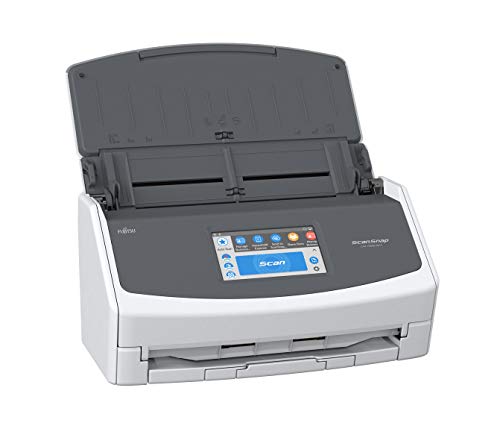
Fujitsu ScanSnap iX1500 4.3-Inch Touch
Best for: Small offices needing a large touchscreen interface
- Connectivity
- Wi-Fi, USB
- Portability
- Desktop
- Touchscreen
- 4.3-inch touchscreen
- Print Output
- Color
- Features
- Duplex Printing, Touch Screen, Scanner
- Ideal For
- Documents
View on Amazon: Fujitsu ScanSnap iX1500 4.3-Inch Touch Affiliate link
The ScanSnap iX1500 is a desktop color duplex document scanner with a 4.3-inch touchscreen. It connects via Wi-Fi and USB. You can scan directly to cloud services or folders without a PC. It supports multiple user profiles. This model suits small offices needing simple, one-touch scanning with clear visual feedback on a large display.
Pros
- 4.3-inch intuitive touchscreen for easy operation
- Wi-Fi and USB connectivity options
- PC-less scanning to cloud and desktop folders
- Color duplex scanning for two-sided documents
- Supports unique user profiles for shared use
Cons
- Desktop-only form factor limits portability
- Heavier at 7.5 pounds compared to lighter models
- Lacks the high-speed throughput of the iX1600
Good fit if
- You need a large screen for easy navigation
- You want to scan directly to cloud services
- You prefer a simple one-touch button workflow
Skip if
- You require a compact, portable design
- You need the fastest scanning speed available
- You only need basic black and white scanning
Verdict: The ScanSnap iX1500 Desktop Scanner fits users who value a large touchscreen and direct cloud scanning over raw speed. It is a solid choice for small teams sharing a single device.

ScanSnap SV600 Overhead Book Scanner
Best for: scanning books and magazines without damage
- Features
- Scanner
- Ideal For
- Documents
- Dimensions
- 8.27 × 6.14 × 15.1 inches
- Weight
- 6.61 pounds
View on Amazon: ScanSnap SV600 Overhead Book Scanner Affiliate link
The ScanSnap SV600 is an overhead scanner designed for books, magazines, and newspapers. It uses a top-down design to scan items without cutting or damaging them. Key features include Auto Book Correction to flatten curve distortion and Multi Document Detection for handling multiple small items like photos or business cards in one scan. This unit is built for users who need to digitize bound materials safely.
Pros
- Overhead design prevents damage to bound books and magazines
- Auto Book Correction flattens page curves automatically
- Multi Document Detection crops and rotates multiple small items in one pass
- Point Retouch function removes fingers captured during scanning
Cons
- Overhead format is slower for standard loose-leaf pages
- No automatic document feeder for high-volume paper stacks
- Requires manual page turning or time mode setup
Good fit if
- You need to scan books without damaging the spine
- You want to digitize magazines or newspapers intact
- You handle mixed batches of photos and documents
Skip if
- You primarily scan loose single-page documents
- You need high-speed batch scanning of paper stacks
- You require an automatic document feeder
Verdict: ScanSnap SV600 Overhead Book Scanner is the right tool for preserving bound materials. It fits users who prioritize physical safety of books over raw scanning speed.

Fujitsu ScanSnap iX1500 4.3-inch Touch Scanner
Best for: users prioritizing touch screen ease and color duplex
- Connectivity
- Wi-Fi, USB
- Touchscreen
- 4.3-inch
- Print Output
- Color
- Features
- Duplex Printing, Touch Screen, Scanner
- Ideal For
- Documents
- Dimensions
- 11.5 × 6 × 6.3 inches
View on Amazon: Fujitsu ScanSnap iX1500 4.3-inch Touch Scanner Affiliate link
The ScanSnap iX1500 is a color duplex document scanner featuring a 4.3-inch touch screen. It supports Wi-Fi and USB connectivity for flexible setup. You can scan directly to cloud services, desktop folders, or mobile devices without a PC. The unit measures 11.5 by 6 by 6.3 inches and weighs 7.5 pounds. It includes ScanSnap Home software to help you capture and organize documents efficiently.
Pros
- 4.3-inch touch screen for intuitive one-touch scanning
- Color duplex scanning for double-sided documents
- Wi-Fi and USB connectivity options
- PC-less scanning to cloud and mobile devices
Cons
- Heavier build at 7.5 pounds compared to lighter competitors
- No mention of Bluetooth connectivity in specifications
- Physical dimensions are bulkier than handheld alternatives
Good fit if
- You need a dedicated color scanner with a large touch screen
- You want to scan directly to cloud services without a computer
- You require reliable duplex scanning for mixed document batches
Skip if
- You prefer a lightweight portable scanner under 5 pounds
- You need Bluetooth connectivity for wireless transfers
- You only require black and white scanning
Verdict: ScanSnap iX1500 4.3-inch Touchscreen Scanner suits users who value a large interface and direct cloud scanning capabilities over portability.

ScanSnap iX1400 Desktop Color Scanner
Best for: wired scanning of receipts and documents
- Connectivity
- USB
- Print Output
- Color
- Features
- Automatic Document Feeder, Scanner
- Scanner Type
- Receipt
- Scanning
- Auto Document Feeder
- Auto Document Feeder
- ADF
View on Amazon: ScanSnap iX1400 Desktop Color Scanner Affiliate link
The ScanSnap iX1400 is a high-speed color document scanner designed for reliable, wired operation. It features an automatic document feeder for handling business cards, receipts, and envelopes. The unit connects via USB for stable performance. It includes software to clean up images by removing streaks and blank pages. This model suits users who prioritize consistent connectivity over wireless flexibility.
Pros
- USB wired connection for stable performance
- Automatic document feeder for batch scanning
- Color scanning capability for documents and photos
- One-touch button for simple operation
Cons
- USB only; no wireless connectivity
- No touch screen interface
- Requires separate software installation
Good fit if
- You need a stable wired connection
- You scan receipts and business cards frequently
- You prefer one-touch simplicity
Skip if
- You require wireless scanning
- You need a touch screen
- You want to scan books overhead
Verdict: ScanSnap iX1400 USB Color Scanner is a solid choice for users who need reliable, wired scanning for receipts and documents without the need for wireless features.
Specifications side by side
| Spec | ScanSnap iX1600 Wireless Document Scanner | ScanSnap iX1300 Wireless Color Document Scanner | ScanSnap iX1600 Receipt Edition Duplex Scanner | Fujitsu ScanSnap iX1500 4.3-Inch Touch | ScanSnap SV600 Overhead Book Scanner | Fujitsu ScanSnap iX1500 4.3-inch Touch Scanner | ScanSnap iX1400 Desktop Color Scanner |
|---|---|---|---|---|---|---|---|
| Scan Speed | 40 ppm | Up to 30 ppm | not stated | not stated | not stated | not stated | not stated |
| Connectivity | Wi-Fi, USB | USB, Wi-Fi | not stated | Wi-Fi, USB | not stated | Wi-Fi, USB | USB |
| Portability | not stated | not stated | not stated | Desktop | not stated | not stated | not stated |
| Media Types | Receipts, business cards, photos | Documents, photos, receipts, cards | Invoices, receipts | not stated | not stated | not stated | not stated |
| Touchscreen | Large color touchscreen | not stated | 4.3-inch | 4.3-inch touchscreen | not stated | 4.3-inch | not stated |
| Print Output | not stated | Color | Color | Color | not stated | Color | Color |
| Features | Automatic Document Feeder, Touch Screen, Scanner | Automatic Document Feeder, Scanner | Duplex Printing, Scanner | Duplex Printing, Touch Screen, Scanner | Scanner | Duplex Printing, Touch Screen, Scanner | Automatic Document Feeder, Scanner |
| Ideal For | Documents | Documents | Documents | Documents | Documents | Documents | Documents |
| Scanner Type | not stated | not stated | Receipt | not stated | not stated | not stated | Receipt |
| Scanning | Auto Document Feeder | Auto Document Feeder | not stated | not stated | not stated | not stated | Auto Document Feeder |
| Duplex Scanning | not stated | not stated | Duplex | Duplex | not stated | Duplex | not stated |
| Auto Document Feeder | ADF | ADF | not stated | not stated | not stated | not stated | ADF |
| Dimensions | 6.3 × 11.5 × 6 inches | 11.7 × 4.5 × 3.3 inches | 11.5 × 6 × 6.3 inches | 11.5 × 6 × 6.3 inches | 8.27 × 6.14 × 15.1 inches | 11.5 × 6 × 6.3 inches | 6.3 × 11.5 × 6 inches |
| Weight | 7.5 pounds | 4.4 pounds | 7.5 pounds | 7.5 pounds | 6.61 pounds | 7.5 pounds | 7.1 pounds |
| Size | ScanSnap iX1600 Black Photos & Documents | not stated | ScanSnap iX1600 Receipt Edition | iX1500 | not stated | not stated | not stated |
| Color | ScanSnap iX1600 Black Photos & Documents | ScanSnap iX1300 White | Black | White | Black | White | Black |
| Model | PA03770-B635 | PA03805-B005 | PA03770-B675 | 5NQ887 | PA03641-B305 | PA03770-B215 | PA03820-B235 |
ScanSnap Scanner Specs Compared
ScanSnap scanners differ mainly in connectivity and form factor. The iX1600 Wireless Document Scanner and iX1300 Wireless Color Document Scanner both support wireless and USB links. These models suit users who need flexible placement and mobile device pairing. The iX1400 Desktop Color Scanner relies on USB only, which appeals to those who prefer stable, wired connections for dedicated workstations.
Physical design also varies significantly. The SV600 Overhead Book Scanner uses a non-contact method for fragile items, while the iX1500 4.3-Inch Touch models prioritize a large interface for ease of use. The iX1600 Receipt Edition targets finance workflows with specific software integration. You should match the scanner type to your primary document volume and desk space constraints.
Where ScanSnap Fits Your Workflow
ScanSnap covers distinct scanning needs through varied form factors. You can choose the compact iX1300 for small desks or the standard iX1600 for higher volume. The iX1500 adds a large touchscreen for easier navigation. For specialized tasks, the iX1600 Receipt Edition handles invoices, while the SV600 overhead scanner protects books. Connectivity options include wireless, USB, or wired-only models. None of these units offer portable handheld designs. You also will not find flatbed glass scanners in this lineup. The range focuses on automatic document feeders and overhead imaging for efficient office processing.
Readers of this guide also look at onerugged i61j pda scanner alternatives.
How to Choose the Right Scanner
-
Check connectivity options
You need to verify how the device links to your computer. The ScanSnap iX1600 Wireless Document Scanner supports both wireless and USB connections. This flexibility allows you to place the unit away from your desk while maintaining a stable link. In contrast, the ScanSnap iX1400 Desktop Color Scanner relies solely on USB. If you require mobile scanning or flexible placement, wireless capability is essential. Check the connectivity specs before buying to ensure it matches your office layout.
-
Assess physical footprint
Desk space is often limited in small offices. You should measure the available area carefully. The ScanSnap iX1300 Wireless Color Document Scanner is notably compact, measuring only 4.5 inches in width. This small footprint suits users with tight workspaces. The iX1600 models are wider at 11.5 inches. If you prioritize a small footprint over high-speed bulk processing, the iX1300 is the better choice. Compare the width and length dimensions in the specs to find a fit.
-
Verify duplex scanning
Duplex scanning automatically processes both sides of a page. This feature saves significant time when handling double-sided documents. The ScanSnap iX1500 and iX1600 models both support duplex scanning. This capability is vital for high-volume workflows involving mixed media. The ScanSnap SV600 Overhead Book Scanner does not list duplex scanning, as it is designed for bound materials. Ensure the spec sheet lists duplex capability if you frequently scan two-sided papers.
-
Review interface type
The control interface affects daily usability. The ScanSnap iX1500 includes a 4.3-inch touchscreen. This large interface simplifies navigation for small teams sharing a single device. It allows direct cloud scanning without constant computer interaction. The iX1600 also features a touchscreen for managing mixed document types. If you value ease of use and direct cloud access, look for models with touch screens. Check the features list to confirm the presence of this interface.
-
Identify specialized needs
Some workflows require specialized tools rather than general-purpose scanners. The ScanSnap iX1600 Receipt Edition is designed for finance-focused tasks. It offers direct QuickBooks Online integration and customizable profiles for invoices. If your primary need is processing receipts, this specific model is ideal. The SV600 is designed for preserving bound materials like books. Match the scanner type to your specific document format to avoid purchasing unnecessary features.
Frequently asked questions
Which ScanSnap scanner is best for high-volume duplex scanning?
The ScanSnap iX1600 Wireless Document Scanner is the top choice for high-volume duplex scanning. It features a clear touchscreen interface for managing mixed document types. The unit supports both wireless and USB connectivity. It weighs 7.5 pounds and measures 11.5 inches wide. This model suits users who prioritize speed and robust wireless links.
What is the most compact ScanSnap document scanner?
The ScanSnap iX1300 Wireless Color Document Scanner is the most compact option. It measures only 4.5 inches wide and weighs 4.4 pounds. This small footprint makes it ideal for limited desk space. It supports duplex scanning of mixed media. The device connects via wireless and USB links for flexible placement.
Does ScanSnap offer a scanner for direct QuickBooks integration?
Yes, the ScanSnap iX1600 Receipt Edition Duplex Scanner offers direct QuickBooks Online integration. It is designed for users who primarily process invoices and receipts. The scanner includes customizable profiles for finance-focused workflows. It shares the same dimensions and weight as the standard iX1600 model. This specialized tool streamlines financial document processing.
Which ScanSnap model has the largest touchscreen?
The Fujitsu ScanSnap iX1500 4.3-Inch Touch features a large touchscreen interface. It is designed for users who value ease of navigation over raw speed. The scanner supports duplex scanning and direct cloud scanning. It weighs 7.5 pounds and measures 11.5 inches wide. This model is a solid choice for small teams sharing a single device.
How do I scan books without damaging them?
The ScanSnap SV600 Overhead Book Scanner is designed for this task. It scans books and magazines without requiring you to lay them flat or press down on the spine. This preserves bound materials from physical damage. The unit weighs 6.61 pounds and stands 15.1 inches tall. It is the right tool for prioritizing the safety of your documents.
Is there a ScanSnap scanner that only uses USB?
The ScanSnap iX1400 Desktop Color Scanner relies on USB connectivity. It is a solid choice for users who need reliable wired scanning. This model is ideal for receipts and documents without requiring wireless features. It includes an automatic document feeder. The unit weighs 7.1 pounds and measures 11.5 inches wide.