Best Monochrome Laser Printers: 15 Spec-Based Picks
As an Amazon Associate we earn from qualifying purchases. Links on this page are affiliate links.
Finding the best monochrome laser printers requires comparing print speeds, connectivity, and document handling. We compared 15 models using only the specifications published on their listings to show how each machine performs.
The Brother All-in-One Monochrome Laser Printer leads the ranking because it combines 36 ppm print speeds with automatic duplex printing and a 50-page document feeder. This guide helps you choose the right balance of output speed, machine dimensions, and multifunction features for your daily workload.
Quick picks
The best fit for you
- You need an all-in-one for everyday office tasks Brother All-in-One Monochrome Laser Printer It prints at 36 ppm with automatic two-sided printing and a 50-page document feeder.
- You require fast monochrome output for small teams HP LaserJet Pro Monochrome Printer It delivers 42 ppm output and centralized management for reliable black-and-white documents.
- You need wired office desks with fax capabilities HP LaserJet Pro Monochrome All-in-One Printer It supports print, copy, scan, and fax over wired Ethernet with duplex scanning.
Our 15 picks

Brother All-in-One Monochrome Laser Printer
Best for: everyday office printing, scanning, and copying
- Print Output
- Monochrome (what this guide is about)
- Print Technology
- Laser
- Supported Functions
- Print, copy, scan
- Print Speed
- 36 ppm
- Connectivity
- Wireless, Ethernet, USB
- Ink/Toner System
- Toner cartridge
This Brother multifunction monochrome laser printer combines printing, copying, and scanning in one desktop unit. You get print speeds reaching up to 36 ppm and a 50-page automatic document feeder for multi-page jobs. Connection options cover dual-band Wi-Fi, Ethernet, and local USB. If you need fast text output alongside digital scanning capabilities for everyday office workloads, this machine delivers dependable document handling without extra complexity.
Pros
- Print speeds up to 36 ppm
- 50-page automatic document feeder
- Dual-band wireless, Ethernet, and USB connectivity
- Automatic duplex printing
Cons
- No built-in fax function
- Prints only in monochrome
- Weighs 25 pounds
Good fit if
- You need black-and-white print speeds up to 36 ppm.
- You regularly scan or copy multipage stacks using a 50-page feeder.
- You want network choices spanning dual-band Wi-Fi and Ethernet.
Skip if
- You require color document printing.
- You need an integrated fax machine.
Verdict: Brother All-in-One Monochrome Laser Printer delivers balanced office performance with 36 ppm output, automatic two-sided printing, and a 50-page document feeder. It handles regular scanning and black-and-white printing over network or USB connections.

Brother Compact Monochrome Duplex Laser Printer
Best for: fast black-and-white home office printing
- Print Output
- Monochrome (what this guide is about)
- Print Technology
- Laser
- Printer Type
- Single-function
- Print Speed
- 36 ppm
- Connectivity
- Wireless, Ethernet, USB
- Duplex Printing
- Automatic
View on Amazon: Brother Compact Monochrome Duplex Laser Printer
This Brother monochrome laser printer delivers single-function black-and-white printing at speeds up to 36 pages per minute. You get automatic two-sided printing, a 250-sheet main paper tray, and a manual feed slot for envelopes. Connectivity options include dual-band wireless, Ethernet, and USB. If you need fast text document output for a home office or small workspace without extra bulk, this compact desktop machine fits your daily workflow.
Pros
- Fast print speeds up to 36 pages per minute
- Automatic two-sided duplex printing
- 250-sheet paper tray with manual feed slot
- Dual-band wireless, Ethernet, and USB connectivity
Cons
- Single-function unit with no built-in copy or fax hardware
- Monochrome output only with no color printing capability
Good fit if
- You need print speeds up to 36 ppm for black-and-white documents.
- You require automatic two-sided duplex printing to save paper.
- You want flexible network options with dual-band Wi-Fi and Ethernet.
Skip if
- You need to print color charts, photos, or graphics.
- You require an integrated flatbed scanner, copier, or fax machine.
Verdict: Brother Compact Monochrome Laser Printer provides reliable 36 ppm text output and automatic duplexing in a compact footprint. It gives you flexible wired and wireless connections for dedicated black-and-white print tasks.

HP LaserJet Pro Wired Monochrome Laser Printer
Best for: wired desktop setups needing monochrome printing
- Print Output
- Monochrome (what this guide is about)
- Print Technology
- Laser
- Connectivity
- Ethernet, USB
- Ink/Toner System
- Toner cartridge
- Dimensions
- 14.1 × 15 × 8.5 inches
- Weight
- 21.3 pounds
View on Amazon: HP LaserJet Pro Wired Monochrome Laser Printer
This renewed HP monochrome laser printer provides dedicated black-and-white printing through wired connections. It features standard Ethernet networking and a USB port, measuring 15 by 14.1 inches on your desk with an 8.5-inch height and a 21.3-pound weight. You need a dedicated physical cable to connect your computers, as it lacks built-in wireless hardware. It suits work spaces that require reliable wired local network printing.
Pros
- Built-in Ethernet and USB connectivity
- Compact desktop height of 8.5 inches
- Uses JetIntelligence high-yield black toner cartridges
- Dedicated monochrome laser print technology
Cons
- No wireless networking built in
- Toner cartridge not included in the package
- Weighs 21.3 pounds
Good fit if
- You connect your equipment via Ethernet or USB cables.
- You already have compatible toner ready to install.
- You want a low-profile desktop printer measuring 8.5 inches high.
Skip if
- You need built-in Wi-Fi connectivity.
- You require a toner cartridge included in the box.
- You want to print color documents.
Verdict: HP LaserJet Pro Wired Monochrome Laser Printer delivers dedicated Ethernet and USB black-and-white printing for wired work environments. You will need to supply your own toner cartridge since none comes in the box.
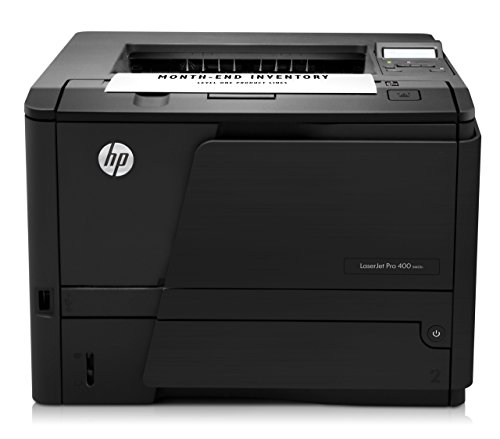
HP LaserJet Pro 400 Monochrome Printer
Best for: high-speed USB monochrome desktop printing
- Print Output
- Monochrome (what this guide is about)
- Print Technology
- Laser
- Print Speed
- Up to 35 ppm
- Connectivity
- USB 2.0
- Ink/Toner System
- Toner cartridge
- Dimensions
- 10.5 × 14.2 × 14.4 inches
This renewed monochrome laser printer provides standard black-and-white printing for your workspace. It delivers print speeds up to 35 pages per minute and includes a 250-sheet paper input tray. Connectivity is handled through a standard USB 2.0 connection. It suits you if you need a straightforward desktop printer for basic document workloads and prefer a refurbished unit that includes toner, a power cable, and a 90-day warranty.
Pros
- Print speeds reach up to 35 pages per minute
- Paper tray holds up to 250 sheets
- Includes replacement toner cartridge and power cable
- Key components like rollers, pads, and fusers are inspected and renewed
Cons
- Connection is limited to wired USB 2.0 with no Wi-Fi listed
- No automatic duplex printing is specified
- Coverage is limited to a 90-day warranty
Good fit if
- You need print speeds reaching up to 35 pages per minute.
- You connect directly to a single computer using USB 2.0.
- You want a 250-sheet input tray to minimize paper reloads.
Skip if
- You require wireless printing or Ethernet connectivity.
- You need automatic two-sided printing.
- You prefer brand-new hardware over a refurbished unit.
Verdict: HP LaserJet Pro 400 Monochrome Printer provides fast 35-page-per-minute black-and-white printing over a standard USB cable. It serves as a dependable desktop workhorse if you need high input capacity without network features.

Brother Compact Monochrome Laser Printer
Best for: compact single-sided home office document printing
- Print Output
- Monochrome (what this guide is about)
- Print Technology
- Laser
- Printer Type
- Single-function
- Print Speed
- 30 ppm
- Connectivity
- Wireless, USB
- Ink/Toner System
- Toner cartridge
This compact single-function monochrome laser printer delivers black-and-white documents at up to 30 pages per minute. You get a 250-sheet paper tray, a manual feed slot for envelopes, and dual-band wireless or USB connectivity. It measures 14 by 14.2 by 7.2 inches, making it easy to fit into tight desk setups. It suits you if you need straightforward, routine black-and-white document printing from computers or mobile devices.
Pros
- Prints single-sided pages at up to 30 ppm
- 250-sheet paper tray plus manual feed slot
- Dual-band wireless (2.4GHz/5GHz) and USB connectivity
- Compact footprint measuring 14 by 14.2 by 7.2 inches
Cons
- Lacks automatic two-sided (duplex) printing
- No built-in Ethernet network port
- Single-function unit without hardware copying or flatbed scanning
Good fit if
- You need fast single-sided black-and-white printing up to 30 ppm.
- You want dual-band wireless or direct USB connectivity in a compact footprint.
- You prefer a 250-sheet paper tray to minimize reload frequency.
Skip if
- You need automatic two-sided printing.
- You require a wired Ethernet network connection.
- You need standalone copy and scan hardware built into the machine.
Verdict: Brother Compact Monochrome Laser Printer provides dependable 30 ppm black-and-white printing with a 250-sheet tray and dual-band wireless connectivity. It is a practical, space-saving choice when you do not need automatic duplexing or an Ethernet port.

HP LaserJet Pro MFP 3101sdw All-in-One
Best for: small offices needing fast multi-function monochrome printing
- Print Output
- Monochrome (what this guide is about)
- Print Technology
- Laser
- Printer Type
- All-in-One
- Supported Functions
- Print, Scan, Copy
- Print Speed
- 35 ppm
- Ink/Toner System
- Toner
The HP LaserJet Pro MFP 3101sdw is an all-in-one monochrome laser printer built for document scanning, copying, and printing. You get print speeds up to 35 pages per minute alongside automatic two-sided printing. A 250-sheet paper tray and a 50-sheet automatic document feeder let you manage multi-page files efficiently. This setup suits you if your workspace requires wireless connectivity and daily black-and-white multi-function tasks.
Pros
- Prints up to 35 pages per minute
- 50-sheet automatic document feeder for multi-page jobs
- Automatic two-sided printing
- 250-sheet input paper tray capacity
Cons
- Blocks toner cartridges that lack HP chips or circuitry
- Weighs 23.1 pounds with a sizable desktop footprint
Good fit if
- You need multi-page scanning and copying via an automatic document feeder.
- You want black-and-white print output at speeds up to 35 pages per minute.
- You require automatic two-sided printing for office reports.
Skip if
- You plan to use third-party toner cartridges without HP microchips.
- You need color printing or standalone fax capabilities.
Verdict: HP LaserJet Pro MFP 3101sdw All-in-One delivers reliable 35 ppm speeds and versatile copying and scanning for busy workstations. Its integrated automatic feeder and duplex printing handle routine paperwork efficiently.

HP LaserJet Pro Ethernet Duplex Printer
Best for: wired offices needing fast monochrome duplex printing
- Print Output
- Monochrome (what this guide is about)
- Print Technology
- Laser
- Print Speed
- 40 ppm
- Connectivity
- Ethernet
- Duplex Printing
- Automatic 2-sided
- Ink/Toner System
- Toner
The HP LaserJet Pro Ethernet Duplex Printer is a dedicated monochrome laser machine built for wired office setups. It produces black-and-white documents at up to 40 pages per minute and includes automatic two-sided printing to conserve paper. A 250-sheet input tray handles regular office workloads without constant reloading. With built-in Ethernet connectivity, this printer suits you if your workspace relies on a shared network cable rather than a wireless connection.
Pros
- Fast print speeds reaching up to 40 ppm
- Automatic two-sided printing
- Standard 250-sheet paper input tray
- Built-in Ethernet for network sharing
Cons
- No Wi-Fi connectivity listed
- Monochrome print output only
- No copy or scan functionality
Good fit if
- You need rapid monochrome output up to 40 pages per minute.
- You connect office hardware directly via Ethernet.
- You require automatic double-sided document printing.
Skip if
- You require built-in wireless or Wi-Fi networking.
- You need an all-in-one unit to scan or copy.
- You want color document printing.
Verdict: HP LaserJet Pro Ethernet Duplex Printer delivers reliable 40 ppm monochrome output with built-in networking for shared office environments. Its automatic duplexing and 250-sheet tray handle standard print volumes efficiently.

HP LaserJet Pro Monochrome Printer
Best for: small teams needing fast monochrome printing
- Print Output
- Monochrome (what this guide is about)
- Print Technology
- Laser
- Printer Type
- Single-function
- Print Speed
- Up to 42 ppm
- Ink/Toner System
- Toner
- Dimensions
- 14.1 × 15 × 8.5 inches
This renewed HP LaserJet Pro is a dedicated monochrome laser printer engineered for fast document turnaround. You get print speeds reaching up to 42 pages per minute for teams of up to 10 users. It measures 15 by 14.1 inches and weighs 20.9 pounds, offering integrated HP Wolf Pro Security settings along with automatic paper jam recovery for your daily printing tasks.
Pros
- Single-sided print speeds up to 42 pages per minute
- Pre-configured HP Wolf Pro Security settings
- Automatic paper jam recovery
- Supports workgroups of up to 10 users
Cons
- Single-function unit without scanning, copying, or faxing
- Single-sided printing only without automatic duplexing
Good fit if
- You need fast black-and-white printing up to 42 pages per minute.
- You want a dedicated printer for a team of up to 10 users.
Skip if
- You require an all-in-one device that copies or scans.
- You need automatic two-sided duplex printing.
Verdict: HP LaserJet Pro Monochrome Printer delivers fast 42 ppm output and centralized management for small teams needing reliable black-and-white documents.
HP LaserJet Pro Auto-Duplex Laser Printer
Best for: small teams needing fast monochrome output
- Print Output
- Monochrome (what this guide is about)
- Print Technology
- Laser
- Printer Type
- Single-function
- Print Speed
- Up to 42 ppm
- Duplex Printing
- Auto 2-sided printing
- Ink/Toner System
- Toner
You get a dedicated monochrome laser printer built for up to 10 users. It outputs up to 42 pages per minute for single-sided black-and-white documents and handles automatic two-sided printing natively. It includes pre-configured HP Wolf Pro Security and centralized dashboard management. This renewed unit suits small office teams needing fast document output without multi-function hardware.
Pros
- Prints up to 42 single-sided pages per minute
- Automatic two-sided printing
- Pre-configured HP Wolf Pro Security settings
- Designed for workgroups of up to 10 users
Cons
- Single-function unit without scan or copy hardware
- Renewed hardware rather than new
- Monochrome output only
Good fit if
- You need print speeds reaching up to 42 pages per minute.
- You share a printer across a team of up to 10 users.
- You require automatic two-sided printing.
Skip if
- You need scanning, copying, or faxing capabilities.
- You require color print output.
Verdict: HP LaserJet Pro Auto-Duplex Laser Printer delivers fast 42 ppm monochrome output and automatic duplexing for workgroups up to 10 users.

Lexmark MS622de All-in-One Laser Printer
Best for: wired office networks needing duplex scanning
- Print Output
- Monochrome (what this guide is about)
- Print Technology
- Laser
- Supported Functions
- Scan, Copy
- Connectivity
- Ethernet
- Duplex Printing
- Duplex Printing
- Features
- Duplex Printing, Scanner, Copier
The Lexmark MS622de is a monochrome laser all-in-one printer designed for networked office environments. It supports Ethernet connectivity and handles duplex printing and scanning. The unit measures 17 by 18 by 18 inches and weighs approximately 39 pounds. It offers copy and scan functions alongside printing. This machine suits teams needing reliable wired connections and automatic two-sided document handling.
Pros
- Supports duplex printing for automatic two-sided output
- Includes built-in scanner and copier functions
- Connects via Ethernet for stable network integration
- Compact footprint at 17 inches wide
Cons
- Lacks wireless or Wi-Fi connectivity
- No mobile printing support mentioned
- Heavier build at 39 pounds
Good fit if
- You need a wired Ethernet connection for your office network
- You require automatic duplex printing to save paper
- You want a single device for printing, scanning, and copying
Skip if
- You need wireless or mobile printing capabilities
- You require a lightweight or portable printer
- You prefer a compact desktop unit under 15 inches wide
Verdict: Lexmark MS622de All-in-One Monochrome Laser is a solid choice for offices that prioritize wired stability and duplex functionality over wireless convenience.

HP LaserJet 1320 Duplex Laser Printer
Best for: basic two-sided monochrome document printing
- Print Output
- Monochrome (what this guide is about)
- Print Technology
- Laser
- Print Speed
- 22 ppm
- Duplex Printing
- Automatic duplexer included
- Dimensions
- 14 × 10 × 13.8 inches
- Weight
- 24.7 pounds
This renewed HP LaserJet 1320 is a dedicated monochrome laser printer built for straightforward black-and-white documents. You get print speeds up to 22 pages per minute and an integrated automatic duplexer for two-sided output. It features a 133 MHz processor with 16 MB of onboard memory that you can expand up to 144 MB. It suits you if you need a basic desktop unit for standard two-sided text printing.
Pros
- Automatic two-sided printing included
- Print speeds up to 22 pages per minute
- Memory expandable from 16 MB up to 144 MB
- Motorola ColdFire 4 133 MHz processor
Cons
- Substantial weight at 24.7 pounds
- Base memory starts at 16 MB
- No wireless networking listed in specifications
Good fit if
- You need automatic double-sided monochrome printing.
- You want a dedicated black-and-white print engine running at 22 ppm.
- You plan to expand onboard memory up to 144 MB.
Skip if
- You require built-in wireless or network connectivity.
- You need multi-function scanning, copying, or color printing.
Verdict: HP LaserJet 1320 Duplex Laser Printer provides automatic two-sided monochrome output and steady 22 ppm speeds for everyday paperwork. Expandable memory and simple mechanical features make it a reliable choice for direct text printing.

HP LaserJet Pro Wireless Monochrome All-in-One
Best for: small teams needing fax and duplex
- Print Output
- Monochrome (what this guide is about)
- Print Technology
- Laser
- Printer Type
- All-in-One
- Supported Functions
- Print, scan, copy, fax
- Print Speed
- 35 ppm
- Connectivity
- Wi-Fi, Ethernet, Bluetooth
View on Amazon: HP LaserJet Pro Wireless Monochrome All-in-One
The HP LaserJet Pro 3101fdw is a monochrome all-in-one laser printer designed for small teams. It delivers print speeds of up to 35 pages per minute and supports automatic two-sided printing. You get print, scan, copy, and fax functions in one unit. Connectivity includes Wi-Fi, Ethernet, and Bluetooth. The unit measures 19.3 by 19.3 inches and weighs 23.1 pounds, making it a compact desktop solution.
Pros
- Prints up to 35 pages per minute
- Supports automatic two-sided printing
- Includes fax capability
- Connects via Wi-Fi, Ethernet, and Bluetooth
Cons
- No color printing capability
- No built-in touchscreen display mentioned
- Heavier build at 23.1 pounds
Good fit if
- You need fax support
- You want automatic duplex printing
- You require Ethernet connectivity
Skip if
- You need color output
- You want a compact single-function printer
- You prefer a lighter device
Verdict: HP LaserJet Pro 3101fdw Monochrome MFP fits small teams that need faxing and duplexing in a connected package. It suits users who value speed and security over color options.

HP LaserJet Pro Monochrome All-in-One Printer
Best for: wired office desks needing fax capabilities
- Print Output
- Monochrome (what this guide is about)
- Print Technology
- Laser
- Printer Type
- All-in-One
- Supported Functions
- Print, copy, scan, fax
- Connectivity
- Ethernet
- Features
- Mobile Printing, Fax
View on Amazon: HP LaserJet Pro Monochrome All-in-One Printer
This refurbished HP monochrome laser printer supports print, copy, scan, and fax capabilities. It features wired Ethernet connectivity, mobile printing, and duplex scanning for office documents. The unit measures 15.9 inches wide, 16 inches long, and 12.3 inches high at 20.7 pounds. This setup suits you if you need dedicated fax functionality and reliable network scanning on a wired local network.
Pros
- Four-in-one functions: print, copy, scan, and fax
- Built-in duplex scanning
- Wired Ethernet connectivity
- Includes toner cartridge and power cable
Cons
- No wireless Wi-Fi connectivity listed
- Refurbished hardware
- Monochrome printing only
Good fit if
- You need integrated fax and duplex scanning capabilities
- You connect office equipment through wired Ethernet
- You manage monochrome document workflows
Skip if
- You need built-in Wi-Fi connectivity
- You require color printing
- You want brand-new hardware rather than renewed
Verdict: HP LaserJet Pro All-in-One Fax Printer provides print, copy, scan, and fax capabilities over wired Ethernet. It suits networked office desks requiring two-sided scanning and document transmission.

HP LaserJet M110w Wireless Monochrome Printer
Best for: compact single-sided monochrome printing in tight spaces
- Print Output
- Monochrome (what this guide is about)
- Print Technology
- Laser
- Printer Type
- Single-function
- Supported Functions
- Print Speed
- 21 ppm
- Connectivity
- Wireless
View on Amazon: HP LaserJet M110w Wireless Monochrome Printer
The HP LaserJet M110w is a compact single-function monochrome laser printer measuring 13.6 by 7.45 by 6.26 inches and weighing 9.02 pounds. It delivers black-and-white output at speeds up to 21 pages per minute single-sided. Featuring wireless connectivity with mobile app support, you get a desktop footprint made for small teams of 1 to 3 people.
Pros
- Print speed up to 21 single-sided pages per minute
- Compact footprint measuring 13.6 by 7.45 by 6.26 inches and weighing 9.02 pounds
- Wireless connectivity with mobile printing support via HP Smart app
Cons
- Blocks toner cartridges lacking original HP chips or circuitry
- Single-sided printing only without automatic duplexing
Good fit if
- You have limited desk space and need a lightweight 9.02-pound machine.
- You print standard single-sided black-and-white pages at up to 21 ppm.
- You want wireless printing from phones, tablets, and computers for 1 to 3 users.
Skip if
- You require automatic two-sided duplex printing.
- You plan to use third-party toner cartridges without HP chips.
Verdict: HP LaserJet M110w Wireless Monochrome Printer delivers straightforward 21 ppm black-and-white printing in an ultracompact footprint. It fits micro-teams and home desks that do not require automatic duplexing.

HP LaserJet Wireless Duplex Printer
Best for: Small teams needing compact duplex document printing
- Print Output
- Monochrome (what this guide is about)
- Print Technology
- Laser
- Printer Type
- Single-function
- Supported Functions
- Print Speed
- 30 ppm
- Connectivity
- Wireless
The HP LaserJet M209dw is a compact monochrome laser printer built for individual desks or teams of up to five users. It outputs single-sided black-and-white pages at up to 30 pages per minute and handles two-sided jobs automatically at 19 images per minute. Dual-band wireless networking maintains your shared connection, while a compact 11.2-pound frame fits tight workspaces.
Pros
- Single-sided print speeds reach up to 30 pages per minute
- Automatic duplex printing outputs up to 19 images per minute
- Dual-band Wi-Fi includes automatic self-resetting
- Compact footprint measuring 14 by 11 by 8.07 inches
Cons
- Single-function hardware lacks onboard flatbed scanning or copying
- Print speed caps at 30 ppm, below higher-volume office machines
Good fit if
- You need automatic two-sided printing in an 11.2-pound desktop footprint.
- You share a black-and-white printer among one to five team members.
Skip if
- You need an all-in-one machine with onboard copy and scan beds.
- You require single-sided print speeds faster than 30 pages per minute.
Verdict: HP LaserJet M209dw Monochrome Printer delivers reliable duplex text output for home offices and small workgroups that do not need multifunction paper handling.
Specifications side by side
| Spec | Brother All-in-One Monochrome Laser Printer | Brother Compact Monochrome Duplex Laser Printer | HP LaserJet Pro Wired Monochrome Laser Printer | HP LaserJet Pro 400 Monochrome Printer | Brother Compact Monochrome Laser Printer | HP LaserJet Pro MFP 3101sdw All-in-One | HP LaserJet Pro Ethernet Duplex Printer | HP LaserJet Pro Monochrome Printer | HP LaserJet Pro Auto-Duplex Laser Printer | Lexmark MS622de All-in-One Laser Printer | HP LaserJet 1320 Duplex Laser Printer | HP LaserJet Pro Wireless Monochrome All-in-One | HP LaserJet Pro Monochrome All-in-One Printer | HP LaserJet M110w Wireless Monochrome Printer | HP LaserJet Wireless Duplex Printer |
|---|---|---|---|---|---|---|---|---|---|---|---|---|---|---|---|
| Print Technology | Laser | Laser | Laser | Laser | Laser | Laser | Laser | Laser | Laser | Laser | Laser | Laser | Laser | Laser | Laser |
| Print Output | Monochrome | Monochrome | Monochrome | Monochrome | Monochrome | Monochrome | Monochrome | Black & White | Black & White | Monochrome | Monochrome | Monochrome | Monochrome | Monochrome | Monochrome |
| Printer Type | not specified | Single-function | not specified | not specified | Single-function | All-in-One | not specified | Single-function | Single-function | not specified | not specified | All-in-One | All-in-One | Single-function | Single-function |
| Supported Functions | Print, copy, scan | not specified | not specified | not specified | not specified | Print, Scan, Copy | not specified | not specified | not specified | Scan, Copy | not specified | Print, scan, copy, fax | Print, copy, scan, fax | ||
| Print Speed | 36 ppm | 36 ppm | not specified | Up to 35 ppm | 30 ppm | 35 ppm | 40 ppm | Up to 42 ppm | Up to 42 ppm | not specified | 22 ppm | 35 ppm | not specified | 21 ppm | 30 ppm |
| Connectivity | Wireless, Ethernet, USB | Wireless, Ethernet, USB | Ethernet, USB | USB 2.0 | Wireless, USB | not specified | Ethernet | not specified | not specified | Ethernet | not specified | Wi-Fi, Ethernet, Bluetooth | Ethernet | Wireless | Wireless |
| Duplex Printing | not specified | Automatic | not specified | not specified | not specified | not specified | Automatic 2-sided | not specified | Auto 2-sided printing | Duplex Printing | Automatic duplexer included | not specified | not specified | not specified | Automatic |
| Ink/Toner System | Toner cartridge | Toner cartridge | Toner cartridge | Toner cartridge | Toner cartridge | Toner | Toner | Toner | Toner | not specified | not specified | not specified | not specified | Cartridge | not specified |
| Features | Duplex Printing, Mobile Printing, Scanner, Copier | Duplex Printing, Mobile Printing | not specified | not specified | Mobile Printing | Duplex Printing | Duplex Printing | not specified | not specified | Duplex Printing, Scanner, Copier | not specified | not specified | Mobile Printing, Fax | not specified | not specified |
| Scanner Type | Portable | Portable | not specified | not specified | Portable | not specified | not specified | not specified | not specified | not specified | not specified | not specified | Portable | not specified | not specified |
| Scanning | Wireless Scanning | Wireless Scanning | not specified | not specified | Wireless Scanning | not specified | not specified | not specified | not specified | not specified | not specified | not specified | not specified | not specified | Wireless Scanning |
| Compatibility | not specified | Alexa | not specified | not specified | Alexa | not specified | not specified | not specified | not specified | not specified | not specified | not specified | Amazon Dash Replenishment | not specified | not specified |
| Duplex Scanning | Duplex | Duplex | not specified | not specified | not specified | Duplex | not specified | not specified | not specified | Duplex | not specified | not specified | Duplex | not specified | not specified |
| Dimensions | 15.7 × 16.1 × 12.5 inches | 14.2 × 14 × 7.2 inches | 14.1 × 15 × 8.5 inches | 10.5 × 14.2 × 14.4 inches | 14.2 × 14 × 7.2 inches | 15.7 × 16.5 × 12.3 inches | 10.8 × 17.4 × 18.3 inches | 14.1 × 15 × 8.5 inches | not specified | 18 × 17 × 18 inches | 14 × 10 × 13.8 inches | 19.3 × 19.3 × 15 inches | 16 × 15.9 × 12.3 inches | 7.45 × 13.6 × 6.26 inches | 14 × 11 × 8.07 inches |
| Weight | 25 pounds | 15.6 pounds | 21.3 pounds | not specified | 15.1 pounds | 23.1 pounds | 8.35 pounds | 20.9 pounds | not specified | not specified | 24.7 pounds | 23.1 pounds | 20.7 pounds | 9.02 pounds | 11.2 pounds |
| Size | Standard | Standard | 0 | 15 x 14.06 x 8.5 in | Standard | one size | One Size | one size | one size | 1 | not specified | printer | not specified | Printer | Printer |
| Color | Black | Black | Light Gray | Black | Black | White | White | black | white | Grey | Light Gray/Black | white | White | White | Gray |
| Model | DCPL2640DW | HLL2460DW | 0 | CZ195A | HLL2405W | 9D2X4F#BGJ | W1A53A | 4001n | 4001dn | MS622de | Q5927A-cr | 3101fdw | G3Q79A | 7MD66F#BGJ | 6GW62F#BGJ |
Is Monochrome Output Worth It?
Monochrome printers handle black-and-white text efficiently. You get fast speeds like 42 ppm on HP models or 36 ppm on Brother units. These machines focus on document clarity without color processing delays. If your work involves contracts, reports, or forms, single-color output saves time. You avoid the complexity of color calibration. However, you cannot produce graphics or photos. The trade-off is speed and simplicity for text-only needs.
Worth it if
- You print mostly text documents like reports and contracts
- You need high-speed output for busy office workflows
- You want reliable duplex printing without color distractions
Skip it if
- You regularly print color graphics or photos
- You need color-coded marketing materials
- You require full-color image processing
If you also compare prototyping hardware, our specification guide for best 3d printers with enclosed lists build volume dimensions.
How we picked these picks
We identified monochrome laser printers by scanning Amazon listings for products that explicitly state black-and-white output in their titles or feature lists. We focused strictly on published specifications from the product pages. We did not handle any devices or perform independent tests. Our selection relies entirely on the data provided by the manufacturers and retailers.
The list is ordered by availability first. Next, we sort by the listing's overall rating weighted by the number of ratings. Finally, we consider how many of our core criteria each spec set meets. We include only one size or variant per product family. All details come directly from the published specification sheets and feature descriptions.
Key Specs for Choosing Monochrome Printers
-
Check duplex capabilities
Automatic two-sided printing saves paper and reduces bulk. Look for models that support duplex printing in their feature lists. The Brother All-in-One Monochrome Laser Printer includes this function, allowing you to print on both sides without manual intervention. If you only need single-sided output, a simpler model like the HP LaserJet M110w may suffice. Verify the spec sheet to confirm whether the hardware handles duplexing automatically or requires you to flip pages yourself.
-
Verify connectivity options
Connectivity determines how you attach the device to your workflow. Wireless models like the Brother Compact Monochrome Duplex Laser Printer offer flexible placement and mobile printing support. Wired options such as the HP LaserJet Pro Ethernet Duplex Printer provide stable Ethernet connections for shared office networks. Some units, like the HP LaserJet M209d, rely solely on USB for direct computer connection. Choose the interface that matches your existing network infrastructure and usage patterns.
-
Compare print speeds
Pages per minute (ppm) indicates how quickly the printer produces documents. Higher speeds benefit busy environments. The HP LaserJet Pro Monochrome Printer reaches 42 ppm, making it suitable for small teams needing rapid output. The Brother All-in-One model offers 36 ppm, which is adequate for moderate volumes. Slower units like the HP LaserJet M110w print at 21 ppm, which is fine for light home use. Match the speed to your expected daily page count.
-
Select the right type
Decide between dedicated printers and multifunction devices. All-in-One units like the Brother All-in-One Monochrome Laser Printer include scanning and copying capabilities. This is useful if you need to digitize physical forms or make copies of documents. Dedicated printers like the HP LaserJet Pro 400 focus only on printing, often resulting in a smaller footprint. If you do not need scanning or copying, a single-function device may be more cost-effective and compact.
-
Review physical dimensions
Printer size affects where you can place the device. Measure your desk or shelf space before buying. The HP LaserJet M110w is ultracompact, measuring 13.6 inches wide and 6.26 inches high, fitting easily into tight spaces. Larger multifunction models like the Brother All-in-One Monochrome Laser Printer are significantly bigger, requiring more floor or desk area. Check the width, height, and length specifications to ensure the printer fits your designated workspace comfortably.
Frequently asked questions
Which monochrome laser printer is best for home offices?
The Brother Compact Monochrome Duplex Laser Printer is ideal for home offices. It delivers 36 ppm output in a compact footprint. The unit supports automatic duplexing for two-sided printing. It also offers flexible wired and wireless connections. This makes it suitable for dedicated black-and-white print tasks in smaller workspaces.
Do I need a wireless printer for my desk?
Wireless connectivity allows you to print from multiple devices without cables. The Brother All-in-One Monochrome Laser Printer supports wireless connections. It also includes mobile printing features. If you prefer a direct connection, the HP LaserJet Pro 400 uses a standard USB cable. Choose based on your network setup needs.
What is the fastest monochrome laser printer?
The HP LaserJet Pro Monochrome Printer and the HP LaserJet Pro Auto-Duplex Laser Printer both deliver 42 ppm output. These models handle high-volume workgroups efficiently. The HP LaserJet Pro Ethernet Duplex Printer is also fast at 40 ppm. These speeds ensure quick document turnaround for busy offices.
Which printer supports automatic two-sided printing?
Several models support automatic duplex printing. The Brother All-in-One and Compact Duplex models include this feature. The HP LaserJet Pro Ethernet Duplex Printer and the HP LaserJet M209d USB Duplex Printer also offer automatic two-sided output. This function saves paper and reduces document bulk for your files.
Do I need a printer with scanning and copying?
You need a multifunction device if you digitize paperwork. The Brother All-in-One Monochrome Laser Printer includes scanning and copying. The HP LaserJet Pro MFP 3101sdw All-in-One also provides these functions. Dedicated printers like the HP LaserJet Pro 400 lack these features. Choose an all-in-one if you handle physical forms regularly.
Which monochrome printer is best for small teams?
The HP LaserJet Pro Monochrome Printer is designed for small teams. It delivers 42 ppm output and supports centralized management. The HP LaserJet Pro Auto-Duplex Laser Printer also serves workgroups up to 10 users. Both models provide reliable black-and-white document output for collaborative office environments.
Is there a compact monochrome printer for tight spaces?
The HP LaserJet M110w Wireless Monochrome Printer fits tight spaces. It measures 13.6 inches wide and 6.26 inches high. The HP LaserJet M209d USB Duplex Printer is also compact at 8.07 inches wide. Both models provide straightforward monochrome printing without requiring automatic duplexing or large footprints.
Which printer supports fax capabilities?
The HP LaserJet Pro All-in-One Fax Printer supports fax capabilities. It provides print, copy, scan, and fax functions over wired Ethernet. This model suits networked office desks requiring document transmission. It also supports two-sided scanning for efficient paperwork handling in traditional office setups.