Xerox C230dni Wireless Color Laser Printer Review: Specs, Pros and Cons
As an Amazon Associate we earn from qualifying purchases. Links on this page are affiliate links.
This xerox c230dni wireless color laser printer review covers a compact device built for small offices. It delivers color laser output at 24 pages per minute. The printer includes built-in Wi-Fi for easy network connection. You get sharp text and vibrant graphics for professional documents. It supports Apple AirPrint and Mopria for mobile printing. The unit measures 16.2 by 15.5 by 9.6 inches and weighs 30 pounds. Starter toner provides 500 pages of yield. High-yield cartridges are available to lower ongoing costs. This model is ENERGY STAR certified for efficiency.
What stands out
- Prints color documents at 24 ppm speed
- Built-in Wi-Fi, AirPrint, and Mopria support
- Compact dimensions: 16.2 x 15.5 x 9.6 inches
- Includes 500-page starter toner cartridge
- ENERGY STAR certified for energy efficiency
Who it fits
Good fit for
This printer suits small offices printing up to 1,500 pages monthly. You will appreciate it if you need vibrant color graphics for presentations. The wireless setup helps teams print from laptops or tablets. The compact size fits tight desks. If you want professional-looking reports without complex drivers, this unit works well. The mobile printing features allow you to print from anywhere in your home office.
Who should skip it
You should look elsewhere if you need high-volume printing. This model handles only 1,500 pages per month. It lacks a scanner, so you cannot copy or scan documents. The included toner yields just 500 pages. You will need to buy high-yield cartridges soon. If you require multifunction capabilities or heavy-duty monthly volumes, this single-function printer is not the right choice for your needs.
Verdict: The Xerox C230dni is a solid choice for light color printing needs. It offers reliable wireless connectivity in a small footprint.
Key specs explained for Xerox C230dni
Print Speed: 24 ppm
This printer produces twenty-four pages each minute. You get documents ready quickly during busy workdays. This speed suits small offices with moderate volume needs. It handles reports and presentations without long waits. Compare this to slower models if you print often. Faster speeds keep your workflow moving smoothly.
Print Output: Color
The device creates full-color prints, not just black and white. You get vibrant graphics for professional presentations and reports. This feature helps your business documents stand out. It is ideal for marketing materials or visual data. Compare this to monochrome printers if color matters. Color adds clarity and visual appeal to your work.
Connectivity: Wi-Fi, Apple AirPrint, Mopria
Built-in Wi-Fi connects the printer to your network wirelessly. You print from laptops, smartphones, or tablets easily. Apple AirPrint and Mopria support direct printing from iOS and Android devices. This setup eliminates cable clutter. Compare this to USB-only models for greater flexibility. Wireless access lets you print from anywhere in your office.
Print Technology: Laser
Laser technology uses toner powder and heat to fuse images onto paper. You get sharp text and consistent results. This method is efficient for high-volume printing tasks. It produces professional-quality output quickly. Compare this to inkjet printers for cost and speed. Laser printers are reliable for daily office use and long-term durability.
Design and build overview
According to the listing, the Xerox C230dni features a standard size chassis finished in white. The dimensions are 16.2 inches wide, 15.5 inches long, and 9.6 inches high. This footprint allows it to fit comfortably on most office desks or shelves without dominating the workspace. The compact form factor is ideal for small offices where floor space is limited.
The unit weighs 30 pounds. This weight suggests a sturdy internal frame that helps stabilize the printer during operation. You can move it with relative ease when rearranging your office layout, but it remains stable enough to prevent vibration issues during high-speed printing. The white finish is practical for blending into typical corporate environments.
While the listing highlights wireless connectivity and mobile printing capabilities, it does not specify the exact control panel layout or button types. However, the inclusion of the Xerox Easy Assist App implies a setup process that relies on smartphone guidance rather than complex physical menus. This design choice reduces the need for extensive manual configuration. The space-saving design and reliable build quality make it suitable for users who need a consistent, professional output without requiring a large dedicated printer room.
Setup and everyday use guide
You can install this printer quickly using the Xerox Easy Assist App. The guided installation process removes complex manuals and traditional driver hurdles. This method helps you get printing in minutes. The device includes built-in Wi-Fi for network connection. You also get support for Apple AirPrint and Mopria. These protocols allow you to print from laptops, smartphones, or tablets. You can send documents from anywhere in your home office without cables. The printer handles wireless scanning as well. This feature adds convenience for daily tasks. You produce sharp text and vibrant color graphics. The laser technology ensures professional-looking business documents, presentations, and reports. The machine runs at twenty-four pages per minute. This speed suits small offices printing up to one thousand five hundred pages monthly. You benefit from low running costs. The unit includes starter toner with a five hundred page yield. You can switch to high-yield cartridges to reduce ongoing expenses. The printer is ENERGY STAR certified. This certification indicates eco-friendly efficiency for long-term use. The white chassis fits on most desks. Its standard size keeps your workspace organized. You rely on consistent performance for daily office needs. The wireless connectivity ensures you stay connected to your devices. You manage print jobs easily from your mobile devices. The setup is straightforward and the daily operation is reliable. You get a space-saving solution for your office.
Check compatibility and supplies first
Before you buy, check your network needs. This model supports Wi-Fi, Apple AirPrint, and Mopria. Verify your devices can connect to these protocols. You may need a wired Ethernet adapter if your office lacks strong wireless signals. The starter toner yields five hundred pages. You will likely need high-yield cartridges soon for regular use. Plan for these replacements to manage ongoing costs. The printer handles up to fifteen hundred pages monthly. This volume suits small offices well. Compare its size to other options on this page. At thirty pounds, it is heavier than some compact units. Ensure your desk can support the weight. Check if your current software integrates easily with Xerox drivers. The Easy Assist App simplifies setup, but confirm your mobile devices are compatible. Review the other 1 products listed here to see if a higher monthly duty cycle or duplex printing is more important for your specific workflow.
Check before you buy
- Verify Wi-Fi and AirPrint support on your devices
- Plan for high-yield toner cartridge purchases
- Ensure your desk supports the thirty-pound weight
- Confirm monthly volume stays under fifteen hundred pages
The product at a glance
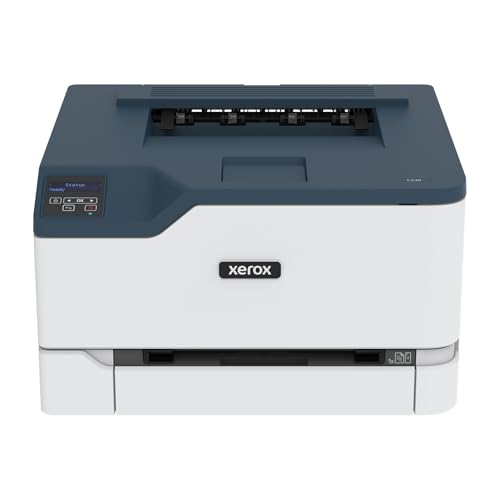
Xerox Wireless Color Laser Printer
Best for: Small offices with low-to-medium color print needs
- Print Technology
- Laser
- Print Output
- Color
- Print Speed
- 24 ppm
- Connectivity
- Wireless, Wi-Fi
- Ink/Toner System
- Toner cartridge
- Scanning
- Wireless Scanning
View on Amazon: Xerox Wireless Color Laser Printer Affiliate link
The Xerox C230dni is a wireless color laser printer designed for small offices with monthly volumes up to 1,500 pages. It delivers 24 ppm print speed and supports mobile printing via Wi-Fi, Apple AirPrint, and Mopria. The unit includes starter toner for 500 pages and accepts high-yield cartridges to manage running costs. Its compact footprint measures 16.2 x 15.5 x 9.6 inches and weighs 30 pounds. It suits users needing reliable color output without complex setup.
Pros
- 24 ppm print speed for standard office tasks
- Built-in Wi-Fi, Apple AirPrint, and Mopria support
- Compact dimensions: 16.2 x 15.5 x 9.6 inches
- Includes starter toner for 500 pages
Cons
- Print speed is modest for high-volume environments
- Starter toner yield is limited to 500 pages
- No wired Ethernet connectivity listed in specifications
Good fit if
- You need a compact color laser printer for a small office
- You print up to 1,500 pages per month
- You prefer wireless mobile printing from smartphones or tablets
Skip if
- You require high-speed printing for large teams
- You need wired Ethernet connectivity for network stability
- You print more than 1,500 pages monthly
Verdict: Xerox C230dni Color Laser Printer is a practical option for small offices needing wireless color printing and a compact design, provided your monthly volume stays under 1,500 pages.
Specifications side by side
| Spec | Xerox Wireless Color Laser Printer |
|---|---|
| Print Technology | Laser |
| Print Output | Color |
| Print Speed | 24 ppm |
| Connectivity | Wireless, Wi-Fi |
| Ink/Toner System | Toner cartridge |
| Scanning | Wireless Scanning |
| Dimensions | 15.5 × 16.2 × 9.6 inches |
| Weight | 30 pounds |
| Size | Standard |
| Color | White |
| Model | C230DNI |
Frequently asked questions
Is the Xerox C230dni suitable for a small office?
Yes, this printer is designed for small offices with low-to-medium color print needs. It supports wireless scanning and delivers color laser output. The compact design fits well on desks. However, it is best if your monthly volume stays under 1,500 pages to ensure reliable performance.
What are the physical dimensions of the Xerox C230dni?
The Xerox C230dni measures 16.2 inches in width, 15.5 inches in length, and 9.6 inches in height. It weighs 30 pounds. These standard dimensions allow it to fit comfortably on most office desks or shelves without taking up excessive space in your workspace.
Does this printer support wireless printing?
Yes, the Xerox C230dni includes built-in Wi-Fi for easy network connection. You can also use Apple AirPrint and Mopria protocols. This wireless capability allows you to print from various devices without needing a direct cable connection to your computer or network router.
Can the Xerox C230dni scan documents?
Yes, this model supports wireless scanning. You can send scanned documents directly to your network or email. This feature complements its color printing capabilities, making it a practical option for small offices that need to handle both printing and scanning tasks efficiently.
What is the print speed of the Xerox C230dni?
The Xerox C230dni produces twenty-four pages each minute. This speed suits small offices with moderate volume needs. You get documents ready quickly during busy workdays. It handles reports and presentations without long waits, ensuring your team stays productive.
What color is the Xerox C230dni printer?
The Xerox C230dni is finished in white. It features a standard size chassis. This neutral color helps it blend into most office environments. The white finish is easy to match with typical office furniture and decor.
How do you install the Xerox C230dni?
You can install this printer quickly using the Xerox Easy Assist App. The guided installation process removes complex manuals and traditional driver hurdles. This method helps you get printing in minutes. The device includes built-in Wi-Fi for network connection.
What is the monthly duty cycle for this printer?
This printer is a practical option provided your monthly volume stays under 1,500 pages. Exceeding this limit may affect performance. It is designed for small offices with low-to-medium color print needs. Staying within this range ensures reliable operation for your daily tasks.