HP LaserJet Pro MFP M227fdw Review: Specs, Pros and Cons
As an Amazon Associate we earn from qualifying purchases. Links on this page are affiliate links.
This hp laserjet pro mfp m227fdw review covers the HP LaserJet Pro MFP M227fdw, a monochrome all-in-one laser printer. It prints, scans, copies, and faxes. The device reaches up to 30 pages per minute. It supports wireless and Ethernet connectivity. These two specs define its performance and flexibility. The unit includes a color touchscreen and a 35-sheet auto document feeder. It also features two-sided printing. This model replaces the HP M225dw with a 15% faster print speed. It is designed for small work groups of one to five users. The printer uses original HP toner cartridges with JetIntelligence for efficiency.
What stands out
- Prints up to 30 pages per minute
- Monochrome output with laser technology
- Supports wireless, Ethernet, and Wi-Fi Direct
- Includes duplex scanning and printing
- Compatible with Alexa for voice control
Who it fits
Good fit for
This printer suits small offices or home businesses with one to five users. You need a monochrome machine that handles print, scan, copy, and fax duties. The 30 pages per minute speed helps busy workgroups. Wireless and Ethernet options let you connect easily. The 35-sheet auto document feeder saves time on multi-page scans. If you want a compact, efficient device for black-and-white tasks, this fits your setup well.
Who should skip it
Skip this model if you need color printing. The HP M227fdw is monochrome only. You might also look elsewhere if you require a high-volume workhorse. The duty cycle is up to 2,000 pages per month. This limit suits light to moderate use. Large enterprises with heavy daily demands may find this insufficient. Additionally, if you strictly avoid wireless connectivity, note that while it supports it, the core design emphasizes network integration.
Verdict: The HP LaserJet Pro MFP M227fdw is a capable monochrome all-in-one for small teams. Its speed and multifunction features make it a practical choice for light office work.
HP LaserJet Pro M227fdw Key Specs
Print Speed: Up to 30 pages/minute
This speed allows you to produce standard documents quickly. You can handle moderate workloads without long waits for each page. This rate suits small offices or home users who need steady output. It is faster than basic entry-level models, helping you maintain a smooth workflow during busy periods. You benefit from reduced idle time when printing multiple pages.
Connectivity: Wireless, Ethernet
These options let you connect via Wi-Fi or a cable. Wireless access enables printing from various devices anywhere in your range. Ethernet provides a stable, wired link for consistent performance. You can choose the method that best fits your office setup. This flexibility ensures reliable communication between your computer or mobile device and the printer.
Printer Type: All-in-One
This classification means the device handles multiple tasks. You get printing, scanning, copying, and faxing in one unit. This saves space compared to buying separate machines. It is ideal for users who need versatile functionality without cluttering their desk. You can manage various document needs efficiently using a single device interface.
Duplex Printing: Two-sided printing
This feature automatically prints on both sides of the paper. You save on paper costs and reduce waste. It is essential for creating professional-looking reports and booklets. You do not need to manually flip pages. This automation speeds up your workflow and supports environmentally conscious practices by using less material.
Supported Functions: Print, scan, copy, fax
These functions define the core capabilities of the machine. You can create documents, digitize paper files, make duplicates, and send faxes. This range covers most standard office requirements. You avoid needing additional tools for common tasks. This completeness makes it suitable for environments where diverse document handling is necessary.
Design and Build Overview
The HP LaserJet Pro MFP M227fdw measures 16 inches wide, 15.9 inches deep, and 12.3 inches tall. It weighs 20.7 pounds. The listing describes the exterior finish as white. These dimensions indicate a compact footprint suitable for small desks or limited office spaces. You can place it in tight corners without overwhelming the area. The weight suggests a stable unit that resists tipping during duplex scanning or heavy paper loads. This stability matters if you frequently use the automatic document feeder.
The device features a color touchscreen interface. You control print, scan, copy, and fax functions directly on the panel. This layout reduces the need to navigate complex menus on a connected computer. The all-in-one design integrates printing, scanning, copying, and faxing into one chassis. This consolidation saves space compared to using separate machines. The monochrome laser engine keeps the internal components streamlined. You benefit from a focused workflow for text-heavy documents.
According to the listing, the printer supports wireless and Ethernet connectivity. You can position the unit flexibly within your network range. The white finish helps it blend into professional environments. The compact size and integrated controls make it practical for work groups of one to five users. You get a complete station without requiring extensive desk real estate. The build prioritizes function over decorative elements, aligning with its role as a workhorse for small businesses.
Setup and Everyday Use Guide
You connect this unit via wireless or Ethernet. The listing confirms both options are built-in. You can link the device to your network for standard office use. For quick, temporary access, you may use Wi-Fi Direct. This allows you to print without a network. You can also use NFC touch-to-print for compatible devices. The printer supports AirPrint and the free HP ePrint app. This lets you send jobs from your iPhone or other mobile devices. Google Cloud Print is also supported for remote management. You can control the device using the color touchscreen. It includes a 35-sheet auto document feeder for scanning and copying. This feature handles multi-page tasks efficiently. You do not need to feed sheets one by one. The printer handles two-sided printing automatically. This saves paper and reduces manual effort. You can scan and fax directly from the interface. The duty cycle is up to 2,000 pages per month. This limit suggests it is designed for light to moderate use. It suits work groups of one to five users. The input tray holds up to 260 sheets. You refill the tray as needed. Original HP Toner cartridges with JetIntelligence are recommended. These are engineered to help the printer run faster. The device replaces the older M225dw model. It offers faster print speeds and additional security features. You get one-year limited hardware warranty and 24/7 web support. These specs define your daily interaction with the machine.
Before You Buy This Printer
This monochrome all-in-one handles print, scan, copy, and fax tasks. It replaces the older M225dw model with faster speeds and added security features. You should verify that your workspace can support its 16-inch width and 20.7-pound weight. The device supports wireless and Ethernet connections, so ensure your network infrastructure matches these requirements. Mobile printing via the HP ePrint app or AirPrint is available, meaning you must check device compatibility for seamless operation. The 35-sheet auto document feeder simplifies multi-page scanning, but you need to monitor toner levels closely. Original HP toner cartridges are specified for optimal performance, so plan for regular replacements. This unit suits workgroups of one to five users. It fits well among other compact laser printers if you prioritize faxing and duplex scanning. Always confirm your monthly duty cycle needs do not exceed 2,000 pages to avoid premature wear.
Check before you buy
- Verify network compatibility for wireless or Ethernet connections
- Check mobile device support for AirPrint or HP ePrint
- Confirm physical space for 16-inch width and 20.7-pound weight
- Ensure monthly volume stays under 2,000 pages
- Plan for regular replacement of original HP toner cartridges
The product at a glance
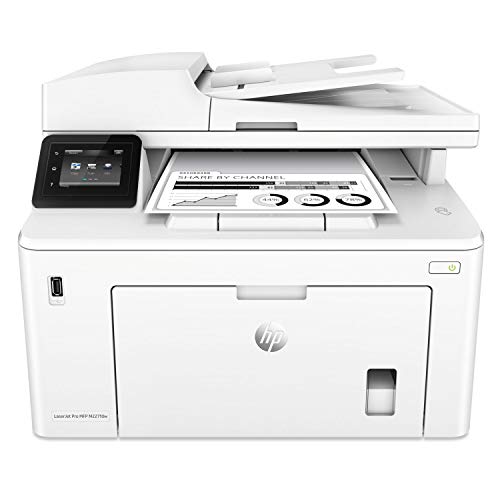
HP LaserJet Pro All-in-One Monochrome Printer
Best for: Small offices needing reliable monochrome printing
- Print Technology
- Laser
- Print Output
- Monochrome
- Printer Type
- All-in-One
- Supported Functions
- Print, scan, copy, fax
- Print Speed
- Up to 30 pages/minute
- Connectivity
- Wireless, Ethernet
View on Amazon: HP LaserJet Pro All-in-One Monochrome Printer Affiliate link
The HP M227fdw is a monochrome all-in-one laser printer designed for small workgroups. It prints up to 30 pages per minute and supports wireless and Ethernet connectivity. You get print, scan, copy, and fax functions, along with automatic two-sided printing. The unit includes a 35-sheet auto document feeder and a color touchscreen. It suits home offices or teams of up to five users needing reliable daily output.
Pros
- Prints up to 30 pages per minute
- Automatic two-sided printing and scanning
- Supports Wi-Fi, Ethernet, AirPrint, and NFC
- Includes a 35-sheet auto document feeder
Cons
- Monochrome output only, no color printing
- Monthly duty cycle limited to 2,000 pages
- No mention of mobile app control in specs
Good fit if
- You need fast black-and-white document printing
- You require wireless printing from multiple devices
- You want automatic two-sided output
Skip if
- You need color printing capabilities
- You print more than 2,000 pages monthly
- You require high-volume heavy-duty performance
Verdict: HP M227fdw Monochrome Laser MFP fits small offices needing reliable black-and-white printing with wireless convenience. It handles basic office tasks well but lacks the speed and color for larger workloads.
Specifications side by side
| Spec | HP LaserJet Pro All-in-One Monochrome Printer |
|---|---|
| Print Technology | Laser |
| Print Output | Monochrome |
| Printer Type | All-in-One |
| Supported Functions | Print, scan, copy, fax |
| Print Speed | Up to 30 pages/minute |
| Connectivity | Wireless, Ethernet |
| Duplex Printing | Two-sided printing |
| Ink/Toner System | Toner cartridges |
| Scanning | Wireless Scanning |
| Compatibility | Alexa |
| Duplex Scanning | Duplex |
| Dimensions | 15.9 × 16 × 12.3 inches |
| Weight | 20.7 pounds |
| Size | Printer |
| Color | White |
| Model | M227fdw |
Frequently asked questions
Does the HP LaserJet Pro MFP M227fdw support color printing?
No, this device is a monochrome printer. It only produces black-and-white output. You cannot print color documents with this specific model. It is designed for offices that primarily need reliable text-based printing. If you require color capabilities, you would need to look at a different series of all-in-one laser printers.
Can the HP M227fdw scan double-sided documents automatically?
Yes, it features duplex scanning. This allows you to place a stack of papers in the feeder, and the machine scans both sides automatically. You do not need to manually flip each page. This feature saves significant time when digitizing multi-page contracts or reports. It streamlines the workflow for busy small offices.
Is wireless printing available on this HP LaserJet Pro model?
Yes, wireless connectivity is built into the device. You can connect it to your local Wi-Fi network for easy printing from various devices. It also includes Ethernet for a stable wired connection. This dual connectivity ensures you can print from anywhere in your office without being tethered to a single computer or port.
What is the physical size of the HP M227fdw printer?
The printer measures 16 inches wide, 15.9 inches deep, and 12.3 inches tall. These dimensions create a compact footprint that fits well on standard desks. It is not overly bulky, making it suitable for small offices or home workspaces. You should ensure you have enough surface area to accommodate these specific measurements comfortably.
How heavy is the HP LaserJet Pro MFP M227fdw?
The device weighs 20.7 pounds. This weight provides stability during operation, reducing vibration while printing or scanning. It is light enough to move if necessary but heavy enough to stay firmly in place. You should consider this weight when choosing a desk or shelf that can safely support the unit without tipping or sagging.
Does this printer work with Amazon Alexa?
Yes, the listing confirms compatibility with Alexa. You can use voice commands to control basic printing functions through your smart devices. This adds convenience for hands-free operation in a modern office environment. You can integrate it into your existing smart home or office ecosystem for streamlined management of your daily printing tasks.
What functions does the HP M227fdw all-in-one perform?
It performs four main tasks: printing, scanning, copying, and faxing. This all-in-one design consolidates multiple office machines into a single unit. You save space by not needing separate devices for each function. It is ideal for small offices that need comprehensive document management capabilities without purchasing multiple pieces of hardware.