15 Best HP Monochrome Laser Printers, Compared
As an Amazon Associate we earn from qualifying purchases. Links on this page are affiliate links.
Finding the best HP monochrome laser printers requires evaluating your document volume and workspace setup. We compared 15 models based strictly on the specifications published on their listings. The HP LaserJet Pro Wired Monochrome Laser Printer leads the list because its 15 by 14.1-inch footprint and dedicated Ethernet and USB connections provide dependable desktop output.
This guide helps you choose the right print speeds, dimensions, and connectivity for your daily office workload.
Quick picks
The best fit for you
- You need a wired desktop black-and-white printer HP LaserJet Pro Wired Monochrome Laser Printer It connects via Ethernet or USB for dedicated black-and-white desktop output.
- You want the lightest and most compact printer HP LaserJet M110w Wireless Monochrome Printer It weighs 9.02 pounds with a 6.26-inch height for small workspaces.
- You need the fastest two-sided monochrome print speeds HP LaserJet Pro Auto-Duplex Laser Printer This unit delivers automatic two-sided monochrome output at 42 pages per minute.
- You require wired two-sided scanning and fax capabilities HP LaserJet Pro Monochrome All-in-One Printer It provides duplex scanning, automatic two-sided printing, faxing, and wired Ethernet connectivity.
Our 15 picks

HP LaserJet Pro Wired Monochrome Laser Printer
Best for: wired monochrome office desktop printing
- Print Output
- Monochrome (what this guide is about)
- Print Technology
- Laser
- Connectivity
- Ethernet, USB
- Ink/Toner System
- Toner cartridge
- Dimensions
- 14.1 × 15 × 8.5 inches
- Weight
- 21.3 pounds
View on Amazon: HP LaserJet Pro Wired Monochrome Laser Printer
This renewed unit is a dedicated monochrome laser printer built for straightforward black-and-white printing. It connects exclusively via wired Ethernet or USB, giving you stable network and local connections without wireless setup. Measuring 15 by 14.1 by 8.5 inches and weighing 21.3 pounds, it fits compact desk spaces. It suits you if you need reliable wired office printing and plan to supply your own HP toner cartridge.
Pros
- Ethernet and USB connectivity for stable wired printing
- Compact footprint measuring 15 by 14.1 by 8.5 inches
- Compatible with Original HP High Yield cartridges with JetIntelligence
Cons
- Toner cartridge is not included in the box
- Lacks Wi-Fi and wireless networking capabilities
Good fit if
- You use wired Ethernet or USB connections for all your printing.
- You already have or plan to buy an HP toner cartridge separately.
- You need a compact monochrome desktop laser printer.
Skip if
- You need Wi-Fi or wireless network connectivity.
- You want a printer that includes a toner cartridge in the box.
Verdict: HP LaserJet Pro M402n Monochrome Printer delivers dependable wired black-and-white laser output via Ethernet or USB. It is an effective desktop option if you do not need wireless connectivity and already have toner ready.
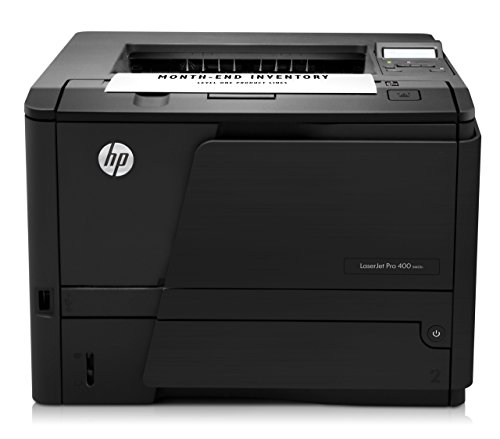
HP LaserJet Pro 400 Monochrome Printer
Best for: fast local USB monochrome office printing
- Print Output
- Monochrome (what this guide is about)
- Print Technology
- Laser
- Print Speed
- Up to 35 ppm
- Connectivity
- USB 2.0
- Ink/Toner System
- Toner cartridge
- Dimensions
- 10.5 × 14.2 × 14.4 inches
The HP LaserJet Pro 400 Monochrome Laser Printer is a refurbished black-and-white machine built for regular office document production. It delivers output speeds reaching up to 35 pages per minute and includes a 250-sheet paper tray for routine tasks. Connecting via standard USB 2.0, it provides a straightforward wired link to your computer, making it suitable if you need dependable monochrome printing at a single workstation.
Pros
- Print speeds up to 35 pages per minute
- 250-sheet input paper tray capacity
- Includes toner cartridge and power cable
- Backed by a 90-day warranty
Cons
- Connectivity is limited to USB 2.0 with no Wi-Fi listed
- Refurbished unit rather than brand-new hardware
Good fit if
- You need print speeds up to 35 pages per minute.
- You connect directly to a single computer using USB 2.0.
- You want a standard 250-sheet input paper tray.
Skip if
- You require wireless or Ethernet network connectivity.
- You prefer factory-new hardware over a renewed printer.
Verdict: HP LaserJet Pro 400 Monochrome Laser Printer delivers 35 ppm print speeds and a 250-sheet tray for daily office tasks. It works best if you need a dedicated, cable-connected monochrome desktop workstation.

HP LaserJet Pro MFP 3101sdw All-in-One
Best for: offices needing fast duplex printing and scanning
- Print Output
- Monochrome (what this guide is about)
- Print Technology
- Laser
- Printer Type
- All-in-One
- Supported Functions
- Print, Scan, Copy
- Print Speed
- 35 ppm
- Ink/Toner System
- Toner
This monochrome all-in-one laser printer handles printing, scanning, and copying for your office. It delivers print speeds up to 35 pages per minute and includes automatic two-sided printing. A 50-sheet automatic document feeder pairs with a 250-sheet input tray for multi-page jobs. Built-in wireless connectivity lets you share the machine across your team without running cables. It suits you if you need fast black-and-white output with scanning capability.
Pros
- Print speeds reach up to 35 ppm
- 50-sheet automatic document feeder
- Automatic two-sided printing
- 250-sheet input paper tray
- Built-in wireless connectivity
Cons
- Firmware blocks cartridges with non-HP chips
- Prints in black and white only
- No fax functionality included
Good fit if
- You need fast black-and-white prints at up to 35 ppm.
- You scan or copy multi-page stacks using an auto feeder.
- You print wirelessly across multiple office devices.
Skip if
- You need color print output.
- You require built-in fax capabilities.
- You plan to use third-party toner cartridges lacking HP chips.
Verdict: HP LaserJet Pro MFP 3101sdw All-in-One delivers 35 ppm black-and-white output alongside automatic document feeding and duplex printing. It serves small teams that need dependable wireless multifunction office performance.

HP LaserJet Pro Ethernet Duplex Printer
Best for: fast wired monochrome office printing
- Print Output
- Monochrome (what this guide is about)
- Print Technology
- Laser
- Print Speed
- 40 ppm
- Connectivity
- Ethernet
- Duplex Printing
- Automatic 2-sided
- Ink/Toner System
- Toner
This monochrome laser printer gives you fast output at up to 40 pages per minute and includes automatic two-sided printing. It connects to your office network via built-in Ethernet and holds up to 250 sheets in its standard paper tray. Embedded security includes PIN and pull print support. It suits small teams that need reliable, high-speed wired document production without color capability.
Pros
- Print speeds up to 40 pages per minute
- Automatic two-sided printing
- Built-in Ethernet network connectivity
- 250-sheet input paper tray
- Embedded security with PIN and pull printing support
Cons
- No built-in wireless Wi-Fi connectivity listed
- Limited to black-and-white printing with no color support
- Single 250-sheet paper cassette limits unattended high-volume runs
Good fit if
- You need fast monochrome output up to 40 pages per minute.
- You want automatic two-sided printing over a wired local network.
- You require secure document release using PIN or pull printing.
Skip if
- You need wireless Wi-Fi connectivity for cable-free printing.
- You need scanning, copying, or color output capabilities.
Verdict: HP LaserJet Pro Monochrome Duplex Printer delivers reliable wired networking and 40 ppm speeds for document-heavy workspaces. It is a solid choice when you need fast, secure two-sided monochrome prints without extra multifunction hardware.

HP LaserJet Pro Monochrome Printer
Best for: small teams needing fast single-sided monochrome printing
- Print Output
- Monochrome (what this guide is about)
- Print Technology
- Laser
- Printer Type
- Single-function
- Print Speed
- Up to 42 ppm
- Ink/Toner System
- Toner
- Dimensions
- 14.1 × 15 × 8.5 inches
This renewed HP LaserJet Pro is a dedicated monochrome laser printer engineered for teams of up to 10 users. It delivers single-sided print speeds of up to 42 pages per minute to handle everyday black-and-white documents quickly. With built-in HP Wolf Pro Security and centralized dashboard management, you get straightforward fleet control. It suits small offices that need dependable, high-speed text output without extra multifunction hardware.
Pros
- Prints up to 42 pages per minute single-sided
- Pre-configured HP Wolf Pro Security settings
- Automatic paper jam recovery
- Centralized management for multiple printers from one dashboard
Cons
- Single-function design lacks scan, copy, and fax capabilities
- No automatic two-sided printing listed in the specifications
- No wireless connectivity options specified
Good fit if
- You need fast single-sided black-and-white printing up to 42 ppm.
- You manage printing for a workgroup of up to 10 users.
Skip if
- You require multifunction capabilities like scanning or copying.
- You need automatic duplex printing out of the box.
Verdict: HP LaserJet Pro Monochrome Laser Printer delivers rapid 42 ppm output and built-in security for small offices focused entirely on black-and-white documents.
HP LaserJet Pro Auto-Duplex Laser Printer
Best for: Small teams needing fast monochrome duplex printing
- Print Output
- Monochrome (what this guide is about)
- Print Technology
- Laser
- Printer Type
- Single-function
- Print Speed
- Up to 42 ppm
- Duplex Printing
- Auto 2-sided printing
- Ink/Toner System
- Toner
This renewed single-function HP monochrome laser printer handles daily document workloads for teams of up to 10 users. You get print speeds reaching up to 42 pages per minute alongside automatic two-sided printing. It integrates HP Wolf Pro Security settings and connects to a centralized management dashboard. It fits your office if you need fast, text-heavy black-and-white output without scanning or color capabilities.
Pros
- Print speeds up to 42 pages per minute
- Automatic two-sided printing
- Pre-configured HP Wolf Pro Security
- Auto paper jam recovery
Cons
- Single-function design lacks copy and scan features
- Monochrome print output only
Good fit if
- You need print speeds reaching up to 42 ppm.
- You require automatic double-sided printing.
- You support a workgroup of up to 10 users.
Skip if
- You need scanning, copying, or faxing capabilities.
- You require color print output.
Verdict: HP LaserJet Pro Monochrome Duplex Printer provides fast 42 ppm monochrome speeds and automatic duplexing for small teams. It is a practical fit when you need high-speed black-and-white documents without multifunction hardware.

HP LaserJet 1320 Duplex Laser Printer
Best for: basic two-sided monochrome office printing
- Print Output
- Monochrome (what this guide is about)
- Print Technology
- Laser
- Print Speed
- 22 ppm
- Duplex Printing
- Automatic duplexer included
- Dimensions
- 14 × 10 × 13.8 inches
- Weight
- 24.7 pounds
This remanufactured monochrome laser printer delivers standard black-and-white documents at 22 pages per minute. It features an integrated automatic duplexer for double-sided output alongside a 133 MHz Motorola ColdFire processor and 16 MB of base memory upgradeable to 144 MB. Measuring 14 by 10 by 13.8 inches and weighing 24.7 pounds, it suits you if you need a dedicated two-sided desktop printing machine for basic office documentation.
Pros
- Prints up to 22 pages per minute
- Includes built-in automatic duplex printing
- Memory expands from 16 MB up to 144 MB
- Includes a minimum 90-day warranty
Cons
- Base internal memory is limited to 16 MB
- Print speed reaches a maximum of 22 pages per minute
- Weighs 24.7 pounds
Good fit if
- You need automatic two-sided monochrome printing on a desktop surface.
- You want expandable memory capacity for handling standard document queues.
Skip if
- You need print speeds faster than 22 pages per minute.
- You want a lightweight printer under 20 pounds.
Verdict: HP LaserJet 1320 Duplex Monochrome Printer provides automatic two-sided black-and-white printing at 22 pages per minute. Its expandable memory and integrated duplexer handle standard office document tasks without extra bulk.

HP LaserJet Pro Wireless Monochrome All-in-One
Best for: small teams needing versatile scanning and faxing
- Print Output
- Monochrome (what this guide is about)
- Print Technology
- Laser
- Printer Type
- All-in-One
- Supported Functions
- Print, scan, copy, fax
- Print Speed
- 35 ppm
- Connectivity
- Wi-Fi, Ethernet, Bluetooth
View on Amazon: HP LaserJet Pro Wireless Monochrome All-in-One
The HP LaserJet Pro All-in-One Monochrome Printer handles printing, scanning, copying, and faxing for teams of up to 7 people. You get single-sided print speeds reaching 35 pages per minute, along with automatic two-sided printing and an automatic document feeder for multi-page jobs. It connects via Wi-Fi, Ethernet, or Bluetooth. If you need a fast monochrome machine with wireless scanning, it suits your office setup.
Pros
- Prints up to 35 pages per minute in black and white
- Provides print, scan, copy, and fax capabilities
- Automatic document feeder and auto two-sided printing
- Supports Wi-Fi, Ethernet, and Bluetooth connectivity
Cons
- Prints only in monochrome, with no color option
- Weighs 23.1 pounds with a 19.3-by-19.3-inch footprint
- Capacity designed for teams of up to 7 users
Good fit if
- You need all-in-one functionality with scanning, copying, and faxing.
- You want automatic two-sided printing and fast speeds up to 35 ppm.
- You require multiple connection options including Wi-Fi and Ethernet.
Skip if
- You need color printing capability for your documents.
- You have minimal desk space for a 23.1-pound office machine.
- You support a large team with more than 7 active users.
Verdict: HP LaserJet Pro All-in-One Monochrome Printer delivers 35 ppm printing, an auto document feeder, and full four-in-one office functions. It is a solid choice for small workgroups seeking comprehensive document handling and wireless connectivity.

HP LaserJet Pro Monochrome All-in-One Printer
Best for: wired office duplex scanning and faxing
- Print Output
- Monochrome (what this guide is about)
- Print Technology
- Laser
- Printer Type
- All-in-One
- Supported Functions
- Print, copy, scan, fax
- Connectivity
- Ethernet
- Features
- Mobile Printing, Fax
View on Amazon: HP LaserJet Pro Monochrome All-in-One Printer
This monochrome laser all-in-one printer handles print, copy, scan, and fax tasks for your office. It includes Ethernet networking, automatic two-sided printing, and duplex scanning in a 20.7-pound frame. Mobile printing and Amazon Dash Replenishment compatibility assist daily output needs. The unit comes with a toner cartridge and power cable. It suits you if you require an Ethernet-connected machine capable of handling complete two-sided paperwork workflows.
Pros
- Print, copy, scan, and fax functions
- Automatic two-sided printing and duplex scanning
- Ethernet networking and mobile printing support
- Amazon Dash Replenishment compatibility
Cons
- No built-in Wi-Fi listed
- Monochrome printing only
Good fit if
- You need print, copy, scan, and fax capabilities in one machine.
- You require automatic two-sided printing and duplex scanning.
- You connect to your office network through wired Ethernet.
Skip if
- You require color print output.
- You need a printer with built-in Wi-Fi.
Verdict: HP LaserJet Pro All-in-One Laser Printer provides print, scan, copy, and fax capabilities with wired Ethernet connectivity. It delivers automatic two-sided printing and duplex scanning for double-sided office paperwork.

HP LaserJet M110w Wireless Monochrome Printer
Best for: small workspaces and light daily monochrome printing
- Print Output
- Monochrome (what this guide is about)
- Print Technology
- Laser
- Printer Type
- Single-function
- Supported Functions
- Print Speed
- 21 ppm
- Connectivity
- Wireless
View on Amazon: HP LaserJet M110w Wireless Monochrome Printer
The HP LaserJet M110w is a single-function monochrome laser printer built for tight workspaces. It delivers black-and-white print speeds up to 21 pages per minute over wireless connections. Measuring 13.6 inches wide, 7.45 inches long, and 6.26 inches tall, it weighs 9.02 pounds. You can print directly from mobile devices or computers. This compact machine suits individuals or small teams of one to three people needing basic daily document output.
Pros
- Compact footprint at 13.6 by 7.45 by 6.26 inches
- Print speeds up to 21 pages per minute
- Lightweight build at 9.02 pounds
- Wireless connectivity with self-reset
Cons
- Prints single-sided only without automatic duplexing
- Requires cartridges with original HP chips or circuitry
- Single-function printer with no built-in flatbed hardware scanner
Good fit if
- You need a compact monochrome laser printer for one to three users.
- You print up to 21 pages per minute from mobile devices or computers.
- You have limited desk space for a 9.02-pound machine.
Skip if
- You need automatic two-sided printing.
- You want to use toner cartridges with non-HP chips or circuitry.
- You require dedicated built-in copy or flatbed scan hardware.
Verdict: HP LaserJet M110w Wireless Monochrome Printer delivers 21 ppm black-and-white printing in a compact 9.02-pound footprint. It handles essential document tasks for up to three users via wireless connectivity.

HP LaserJet Wireless Duplex Printer
Best for: small teams needing fast wireless printing
- Print Output
- Monochrome (what this guide is about)
- Print Technology
- Laser
- Printer Type
- Single-function
- Supported Functions
- Print Speed
- 30 ppm
- Connectivity
- Wireless
The HP LaserJet M209dw is a single-function monochrome laser printer designed for small teams of one to five people. It delivers up to 30 pages per minute single-sided and 19 pages per minute two-sided. The unit features dual-band Wi-Fi with self-reset capabilities and built-in security. Weighing 11.2 pounds, it measures 14 by 11 by 8.07 inches. This model supports mobile printing and is eligible for Instant Ink.
Pros
- Prints up to 30 ppm single-sided
- Auto two-sided printing up to 19 ppm
- Dual-band Wi-Fi with self-reset
- Built-in security features
Cons
- Single-function design lacks scanning or copying
- No wired Ethernet port listed
- Smaller paper capacity typical for entry-level models
Good fit if
- You need a compact wireless printer for a small office
- You primarily print single-sided documents
- You want mobile printing without complex setup
Skip if
- You require scanning or copying functions
- You need a wired network connection
- You print large volumes exceeding 30 ppm
Verdict: The HP LaserJet M209dw Monochrome Wireless Printer suits small teams needing fast, secure wireless printing without the bulk of an all-in-one unit. It fits users who prioritize speed and connectivity over multifunction capabilities.

HP LaserJet Pro Wireless Monochrome All-in-One Printer
Best for: offices needing wireless scanning and faxing
- Print Output
- Monochrome (what this guide is about)
- Connectivity
- Wireless
- Features
- Fax
- Use Case
- Office
- Scanning
- Wireless Scanning
View on Amazon: HP LaserJet Pro Wireless Monochrome All-in-One Printer
This HP LaserJet Pro unit is a renewed monochrome multifunction printer built for office tasks. You get wireless connectivity alongside wireless scanning and integrated fax support. Because it prints exclusively in black and white, it suits office workstations handling standard text documents, forms, and general paperwork without requiring separate scanning or fax equipment.
Pros
- Wireless connectivity for cable-free operation
- Integrated fax functionality
- Wireless scanning capability
- Dedicated monochrome output for office documents
Cons
- No color printing capability
- Supplied as a renewed unit
Good fit if
- You require wireless scanning and built-in fax features for office tasks.
- You print exclusively in monochrome.
Skip if
- You need color output for graphics or presentations.
- You prefer a factory-new unit instead of renewed hardware.
Verdict: HP LaserJet Pro Wireless Monochrome MFP provides wireless printing, scanning, and fax capabilities for offices that only require black-and-white output.

HP LaserJet Pro 3001dw Monochrome Laser Printer
Best for: small teams needing fast monochrome duplex printing
- Print Output
- Monochrome (what this guide is about)
- Print Technology
- Laser
- Printer Type
- Single-function
- Print Speed
- Up to 35 ppm
- Connectivity
- Wi-Fi, Ethernet, Bluetooth
- Duplex Printing
- Auto 2-sided printing
View on Amazon: HP LaserJet Pro 3001dw Monochrome Laser Printer
The HP LaserJet Pro 3001dw is a single-function monochrome laser printer built for teams of up to 7 people. It delivers print speeds up to 35 pages per minute and handles automatic two-sided printing. You get flexible connectivity through Wi-Fi, Ethernet, and Bluetooth. This unit fits your workspace if you need dedicated black-and-white output with HP Wolf Pro Security for multi-device office printing.
Pros
- Prints up to 35 black-and-white pages per minute single-sided
- Automatic two-sided printing
- Connectivity includes Wi-Fi, Ethernet, and Bluetooth
- HP Wolf Pro Security with customizable settings
Cons
- Blocks cartridges that do not use original HP chips or circuitry
- Single-function printer without onboard copying or scanning glass
- Monochrome output only
Good fit if
- You need print speeds up to 35 pages per minute for documents and reports.
- You share a printer among a team of up to 7 people.
- You want automatic two-sided printing over Wi-Fi, Ethernet, or Bluetooth.
Skip if
- You need color printing.
- You plan to use cartridges with non-HP chips or circuitry.
- You require dedicated built-in scanner or copier hardware.
Verdict: HP LaserJet Pro 3001dw Wireless Printer delivers fast 35 ppm monochrome speeds and automatic duplexing for small office workgroups. Its versatile wireless and wired network support makes it a practical single-function laser printer.

HP LaserJet Pro Duplex Monochrome Printer
Best for: wired offices needing two-sided monochrome printing
- Print Output
- Monochrome (what this guide is about)
- Connectivity
- Ethernet, USB
- Duplex Printing
- Two-sided printing
- Ink/Toner System
- Toner cartridges
- Compatibility
- Amazon Dash Replenishment
- Dimensions
- 14.1 × 15 × 8.5 inches
This renewed HP laser printer delivers monochrome printing with built-in automatic two-sided output. You connect via Ethernet or USB, and paper loads into two standard trays. Measuring 15 by 14.1 by 8.5 inches and weighing 18.9 pounds, it fits compact desk spaces. It suits you if you need a wired workhorse for everyday multipage text documents and prefer automatic duplexing over manual page flipping.
Pros
- Automatic two-sided printing
- Two standard paper trays
- Ethernet and USB connectivity
- Amazon Dash Replenishment ready
Cons
- No built-in wireless connectivity
- Print output is limited to monochrome only
Good fit if
- You need automatic two-sided printing for multipage office documents.
- You prefer connecting through wired Ethernet or a direct USB cable.
- You want two separate paper trays for routine print jobs.
Skip if
- You need Wi-Fi support for wireless network printing.
- You require color output for graphics or presentations.
Verdict: HP LaserJet Pro Duplex Monochrome Printer delivers straightforward wired printing and automatic two-sided output for desktop workstations. It handles regular office paperwork efficiently when wireless features are not required.

HP LaserJet Pro Wireless Monochrome All-in-One
Best for: Small teams needing four-in-one monochrome printing
- Print Output
- Monochrome (what this guide is about)
- Print Technology
- Laser
- Printer Type
- All-in-One
- Supported Functions
- Print, scan, copy, fax
- Print Speed
- 33 ppm
- Duplex Printing
- Automatic
View on Amazon: HP LaserJet Pro Wireless Monochrome All-in-One
This monochrome laser multifunction printer prints up to 33 pages per minute and handles print, scan, copy, and fax tasks for workgroups of up to 7 users. You get automatic two-sided printing, Wi-Fi connectivity, and an automatic document feeder. It suits small teams needing shared black-and-white output with built-in digital workflow features like scan to email.
Pros
- Prints up to 33 pages per minute
- Automatic two-sided printing
- All-in-one print, scan, copy, and fax functions
- Supports teams of up to 7 users over Wi-Fi
Cons
- Document feeder only performs one-sided scanning
- Heavy build at 23.1 pounds
Good fit if
- You need print, scan, copy, and fax capabilities in one unit.
- You share a printer across an office team of up to 7 users.
- You want automatic two-sided monochrome printing at up to 33 ppm.
Skip if
- You require automatic two-sided scanning through the document feeder.
- You need a lightweight unit that weighs under 20 pounds.
Verdict: HP LaserJet Pro All-in-One Monochrome Printer delivers 33 ppm printing and four-in-one functionality for shared teams of up to seven users. It directly serves offices wanting dependable Wi-Fi printing and copying without needing two-sided automated scanning.
Specifications side by side
| Spec | HP LaserJet Pro Wired Monochrome Laser Printer | HP LaserJet Pro 400 Monochrome Printer | HP LaserJet Pro MFP 3101sdw All-in-One | HP LaserJet Pro Ethernet Duplex Printer | HP LaserJet Pro Monochrome Printer | HP LaserJet Pro Auto-Duplex Laser Printer | HP LaserJet 1320 Duplex Laser Printer | HP LaserJet Pro Wireless Monochrome All-in-One | HP LaserJet Pro Monochrome All-in-One Printer | HP LaserJet M110w Wireless Monochrome Printer | HP LaserJet Wireless Duplex Printer | HP LaserJet Pro Wireless Monochrome All-in-One Printer | HP LaserJet Pro 3001dw Monochrome Laser Printer | HP LaserJet Pro Duplex Monochrome Printer | HP LaserJet Pro Wireless Monochrome All-in-One |
|---|---|---|---|---|---|---|---|---|---|---|---|---|---|---|---|
| Print Technology | Laser | Laser | Laser | Laser | Laser | Laser | Laser | Laser | Laser | Laser | Laser | not specified | Laser | not specified | Laser |
| Print Output | Monochrome | Monochrome | Monochrome | Monochrome | Black & White | Black & White | Monochrome | Monochrome | Monochrome | Monochrome | Monochrome | Black & White | Black and white | Monochrome | Monochrome |
| Printer Type | not specified | not specified | All-in-One | not specified | Single-function | Single-function | not specified | All-in-One | All-in-One | Single-function | Single-function | not specified | Single-function | not specified | All-in-One |
| Supported Functions | not specified | not specified | Print, Scan, Copy | not specified | not specified | not specified | not specified | Print, scan, copy, fax | Print, copy, scan, fax | not specified | not specified | not specified | Print, scan, copy, fax | ||
| Print Speed | not specified | Up to 35 ppm | 35 ppm | 40 ppm | Up to 42 ppm | Up to 42 ppm | 22 ppm | 35 ppm | not specified | 21 ppm | 30 ppm | not specified | Up to 35 ppm | not specified | 33 ppm |
| Connectivity | Ethernet, USB | USB 2.0 | not specified | Ethernet | not specified | not specified | not specified | Wi-Fi, Ethernet, Bluetooth | Ethernet | Wireless | Wireless | Wireless | Wi-Fi, Ethernet, Bluetooth | Ethernet, USB | not specified |
| Duplex Printing | not specified | not specified | not specified | Automatic 2-sided | not specified | Auto 2-sided printing | Automatic duplexer included | not specified | not specified | not specified | Automatic | not specified | Auto 2-sided printing | Two-sided printing | Automatic |
| Ink/Toner System | Toner cartridge | Toner cartridge | Toner | Toner | Toner | Toner | not specified | not specified | not specified | Cartridge | not specified | not specified | not specified | Toner cartridges | not specified |
| Features | not specified | not specified | Duplex Printing | Duplex Printing | not specified | not specified | not specified | not specified | Mobile Printing, Fax | not specified | not specified | Fax | not specified | not specified | not specified |
| Use Case | not specified | not specified | not specified | not specified | not specified | not specified | not specified | not specified | not specified | not specified | not specified | Office | Office | not specified | not specified |
| Scanner Type | not specified | not specified | not specified | not specified | not specified | not specified | not specified | not specified | Portable | not specified | not specified | not specified | not specified | not specified | not specified |
| Scanning | not specified | not specified | not specified | not specified | not specified | not specified | not specified | not specified | not specified | not specified | Wireless Scanning | Wireless Scanning | Wireless Scanning | not specified | not specified |
| Compatibility | not specified | not specified | not specified | not specified | not specified | not specified | not specified | not specified | Amazon Dash Replenishment | not specified | not specified | not specified | not specified | Amazon Dash Replenishment | not specified |
| Duplex Scanning | not specified | not specified | Duplex | not specified | not specified | not specified | not specified | not specified | Duplex | not specified | not specified | not specified | not specified | not specified | not specified |
| Dimensions | 14.1 × 15 × 8.5 inches | 10.5 × 14.2 × 14.4 inches | 15.7 × 16.5 × 12.3 inches | 10.8 × 17.4 × 18.3 inches | 14.1 × 15 × 8.5 inches | not specified | 14 × 10 × 13.8 inches | 19.3 × 19.3 × 15 inches | 16 × 15.9 × 12.3 inches | 7.45 × 13.6 × 6.26 inches | 14 × 11 × 8.07 inches | not specified | 15.7 × 14.4 × 8.5 inches | 14.1 × 15 × 8.5 inches | 15.7 × 16.5 × 12.3 inches |
| Weight | 21.3 pounds | not specified | 23.1 pounds | 8.35 pounds | 20.9 pounds | not specified | 24.7 pounds | 23.1 pounds | 20.7 pounds | 9.02 pounds | 11.2 pounds | not specified | 16.1 pounds | 18.9 pounds | 23.1 pounds |
| Size | 0 | 15 x 14.06 x 8.5 in | one size | One Size | one size | one size | not specified | printer | not specified | Printer | Printer | one size | 8.5" x 14.4" x 15.7" | not specified | one size |
| Color | Light Gray | Black | White | White | black | white | Light Gray/Black | white | White | White | Gray | white | Information Not Available | LJ Pro M402dn | black |
| Model | 0 | CZ195A | 9D2X4F#BGJ | W1A53A | 4001n | 4001dn | Q5927A-cr | 3101fdw | G3Q79A | 7MD66F#BGJ | 6GW62F#BGJ | 4101fdwe | 3001dw | C5F94A | 3105sdw |
If you also need physical prototyping tools, you can compare specifications for the best 3d printers with enclosed.
Key specs to compare for HP monochrome printers
-
Check print speed needs
Print speed determines how quickly your documents finish. The HP LaserJet Enterprise Monochrome Duplex Printer offers 65 ppm for high-volume workgroups. If your office has fewer pages, the HP LaserJet M110w provides 21 ppm, which is sufficient for light daily tasks. You should match the pages per minute to your monthly volume. Faster speeds reduce wait times during busy periods. Slower models often have smaller footprints. Evaluate your typical daily output to avoid paying for unused speed capacity in your workspace.
-
Decide on duplex printing
Automatic duplex printing saves paper by printing on both sides. The HP LaserJet Pro 3001dw includes this feature for small teams needing efficient document handling. If you do not need two-sided output, the HP LaserJet Pro 400 Monochrome Printer is a simpler option. Duplex hardware adds weight and size. The HP LaserJet M209d USB Duplex Printer offers this function in a compact form. You should verify if automatic two-sided printing is in the specs. Manual duplexing requires you to flip pages yourself, which slows down workflow significantly.
-
Select connectivity type
Connectivity options determine how you link the printer to your network. The HP LaserJet Pro MFP 3101sdw supports wireless connections for flexible placement. If you prefer a stable wired link, the HP LaserJet Pro Wired Monochrome Laser Printer uses Ethernet. Some models like the HP LaserJet M209d rely solely on USB for direct desktop printing. You should choose based on your office layout. Wireless allows mobile printing from multiple devices. Wired connections offer consistent performance without network interference. Verify the available ports before purchasing.
-
Choose single or multi-function
All-in-one printers include scanning and faxing capabilities alongside printing. The HP LaserJet Pro MFP 3101sdw provides wireless scanning and duplex document feeding. If you only need printing, the HP LaserJet Pro Monochrome Printer is a dedicated single-function device. Multifunction units occupy more desk space and cost more in toner systems. You should assess if scanning or faxing is essential for your role. Single-function printers often have faster print speeds. Multi-function models consolidate several devices into one unit. Select the type that matches your daily document workflow.
-
Review physical dimensions
Printer size affects where you can place the device. The HP LaserJet M110w is compact, weighing only 9.02 pounds. Larger models like the HP LaserJet Enterprise weigh 56.2 pounds and require more floor space. You should measure your desk or shelf area before buying. Height and width matter for ventilation and paper tray access. The HP LaserJet Pro 400 measures 15 by 14.06 by 8.5 inches. Ensure the footprint fits your workspace. Consider the height if you need to stack paper trays above the unit.
Frequently asked questions
Which HP monochrome laser printers include fax functionality?
Several all-in-one models include built-in fax features. You can find fax capabilities on the HP LaserJet Pro Monochrome All-in-One Printer model G3Q79A, the HP LaserJet Pro Wireless Monochrome All-in-One model 3101fdw, and the model 4101fdwe. These units combine black-and-white printing, scanning, and faxing into single desktop chassis.
What is the difference between duplex printing and duplex scanning on these printers?
Duplex printing creates two-sided prints automatically, while duplex scanning digitizes two-sided documents. The HP LaserJet Pro MFP 3101sdw and HP LaserJet Pro Monochrome All-in-One Printer G3Q79A support duplex scanning. Models such as the HP LaserJet Pro Ethernet Duplex Printer focus specifically on automatic two-sided page output.
Which HP monochrome printers reach 42 pages per minute?
The HP LaserJet Pro Monochrome Printer and the HP LaserJet Pro Auto-Duplex Laser Printer deliver 42 ppm speeds. Both the 4001n and 4001dn models provide fast document generation for small workgroups. The 4001dn adds automatic two-sided printing, while the 4001n focuses purely on rapid single-sided monochrome output.
Which HP monochrome laser printers support wired Ethernet network connections?
You can connect several models using wired Ethernet. The HP LaserJet Pro Wired Monochrome Laser Printer, HP LaserJet Pro Ethernet Duplex Printer, and HP LaserJet Pro Monochrome All-in-One Printer specify wired Ethernet connectivity. These configurations suit offices where you require stable physical network cables instead of wireless connections.
Which models are compatible with Amazon Dash Replenishment?
The HP LaserJet Pro Monochrome All-in-One Printer and HP LaserJet Pro Duplex Monochrome Printer list Amazon Dash Replenishment compatibility. This hardware feature tracks your toner level as you print. It allows automatic reordering of monochrome toner cartridges so your office does not run out of printing supplies mid-task.
Which HP monochrome laser printers support wireless scanning?
Wireless scanning is specified on the HP LaserJet Wireless Duplex Printer, HP LaserJet Pro 3001dw, and HP LaserJet Pro Wireless Monochrome All-in-One Printer model 4101fdwe. This spec allows you to send scanned records directly over your local Wi-Fi setup without attaching physical cables to a computer.
What print speed does the HP LaserJet 1320 Duplex Printer deliver?
The HP LaserJet 1320 Duplex Laser Printer provides black-and-white printing at 22 pages per minute. It features an integrated duplexer for automatic two-sided page generation and supports expandable memory. These hardware specifications serve standard, low-volume office document printing without requiring extra multifunction components.