Best HP Color Laser Printers in 2026: 15 Picks
As an Amazon Associate we earn from qualifying purchases. Links on this page are affiliate links.
Finding the best HP color laser printers requires matching hardware capabilities directly to your daily office workload. This guide evaluates 15 models based on the specifications published on the listings.
The HP Color LaserJet Pro Wireless All-in-One takes the top spot because its 26 ppm print speed and duplex printing handle routine office output efficiently. Use this comparison to identify the right balance of output speed, physical footprint, and wireless networking for your daily workspace.
Quick picks
The best fit for you
- You need wireless color printing with two-sided scanning HP Color LaserJet Pro Wireless All-in-One It provides 26 ppm color output along with automatic duplex printing and wireless duplex scanning.
- You need fast wired color printing for busy networks HP LaserJet Enterprise Color Laser Printer This printer delivers 40-page-per-minute color output and built-in Ethernet connectivity for networked setups.
- You need wide-format color printing in a multifunction build HP LaserJet Enterprise 700 Wide-Format Color MFP It features wide-format A3 media handling combined with high-volume enterprise multifunction capabilities.
- You need duplex color printing with direct USB connectivity HP Color LaserJet Pro M451 Duplex Color Printer It includes built-in duplex printing and dedicated USB connectivity for desktop setups.
Our 15 picks

HP Color LaserJet Pro Wireless All-in-One
Best for: small teams needing wireless color multifunction printing
- Print Output
- Color (what this guide is about)
- Print Technology
- Laser
- Printer Type
- All-in-One
- Supported Functions
- Print, scan, copy
- Print Speed
- 26 ppm
- Connectivity
- Wireless
The HP Color LaserJet Pro 3301sdw All-in-One handles color printing, scanning, and copying for small offices. You get print speeds reaching 26 pages per minute in both color and black, automatic two-sided printing, and an automatic document feeder. It holds 250 sheets in the main input tray and connects wirelessly. This setup suits your workflow if you need dependable multifunction color output without needing fax capability.
Pros
- Print speeds up to 26 ppm in black and color
- Automatic two-sided printing and duplex scanning
- Automatic document feeder and 250-sheet input tray
- Wireless connectivity for printing and scanning
Cons
- No built-in fax function
- Blocks cartridges using non-HP chips or circuitry
- Weighs 37.7 pounds
Good fit if
- You need print speeds up to 26 ppm for color documents.
- You want an automatic document feeder with duplex scanning.
- You manage office print jobs via wireless connectivity.
Skip if
- You require a dedicated fax function in your office.
- You plan to use non-HP chipped toner cartridges.
- You need a lightweight unit for frequent relocation.
Verdict: HP Color LaserJet Pro 3301sdw All-in-One delivers reliable 26 ppm color output, duplex handling, and wireless connectivity. It provides practical multifunction productivity for small teams that do not require fax.

HP Color LaserJet Wireless Duplex Printer
Best for: small offices needing compact duplex color printing
- Print Output
- Color (what this guide is about)
- Print Technology
- Laser
- Print Speed
- Up to 22 ppm
- Connectivity
- Wireless, Ethernet, dual band Wi-Fi
- Duplex Printing
- Automatic two-sided printing
- Ink/Toner System
- Toner cartridges
The HP Color LaserJet Pro Wireless Duplex Printer provides color laser output at speeds up to 22 pages per minute. You get automatic two-sided printing, built-in dual-band Wi-Fi, Ethernet connectivity, and a 2.7-inch color touchscreen for managing jobs. It accommodates diverse media ranging from standard letter and legal sheets to envelopes and small postcards. This compact unit suits workgroups requiring steady duplex color output.
Pros
- Prints color pages at speeds up to 22 ppm
- Automatic two-sided printing included
- Dual-band Wi-Fi and Ethernet connectivity
- Built-in 2.7-inch color touchscreen interface
Cons
- Print speed tops out at 22 ppm
- Hardware warranty coverage limited to one year
Good fit if
- You need automatic two-sided color printing up to 22 ppm.
- You want dual-band Wi-Fi and a 2.7-inch touchscreen for setup.
- You handle various paper sizes including legal, envelopes, and postcards.
Skip if
- You require print speeds faster than 22 ppm for large workloads.
- You need hardware warranty protection beyond one year.
Verdict: HP Color LaserJet Pro Wireless Duplex Printer delivers reliable 22 ppm color output and automatic duplexing in a compact footprint. It provides versatile wireless connectivity and straightforward touchscreen controls for everyday business documents.

HP Color LaserJet Pro Multifunction
Best for: offices needing fast four-in-one color workflows
- Print Output
- Color (what this guide is about)
- Print Technology
- Laser
- Printer Type
- Multifunction
- Supported Functions
- Print, scan, copy, fax
- Print Speed
- Up to 28 ppm
- Connectivity
- Wireless, Wi-Fi Direct
This color laser multifunction machine handles printing, scanning, copying, and faxing for busy offices. It delivers print speeds up to 28 pages per minute and includes automatic two-sided printing alongside single-pass two-sided scanning via a 50-sheet document feeder. You can connect through Wi-Fi or Wi-Fi Direct. It suits you if your daily office workflow requires rapid document turnaround, full four-in-one capability, and wireless mobile printing.
Pros
- Print speeds reach up to 28 pages per minute
- Single-pass two-sided scanning with a 50-sheet auto document feeder
- Built-in Wi-Fi and Wi-Fi Direct connectivity
- Automatic two-sided printing
Cons
- Input paper tray limited to 250 sheets
- Substantial desktop footprint at 23.5 by 19.6 inches
Good fit if
- You need full print, copy, scan, and fax capabilities in one device.
- You want single-pass two-sided scanning for multi-page documents.
- You require mobile printing options without connecting to a local network.
Skip if
- You need an input paper capacity greater than 250 sheets.
- You work in a compact workspace that cannot accommodate a 23.5-inch wide chassis.
Verdict: HP Color LaserJet Pro Wireless Multifunction Printer delivers versatile four-in-one productivity with 28 ppm speeds and single-pass duplex scanning. It gives you comprehensive office capabilities in a single wireless unit.

HP Color LaserJet Pro 3201dw Duplex Printer
Best for: small offices needing 26 ppm color printing
- Print Output
- Color (what this guide is about)
- Print Technology
- Laser
- Print Speed
- Up to 26 ppm
- Connectivity
- Wireless
- Duplex Printing
- Auto 2-sided
- Ink/Toner System
- Toner
The HP Color LaserJet Pro 3201dw is a wireless color laser printer designed for small workgroups. You get print speeds reaching up to 26 pages per minute for color and black documents, automatic two-sided printing, and a 250-sheet paper tray. It fits small offices that need steady color document output without high-volume paper capacity.
Pros
- Prints up to 26 ppm in black and color
- Automatic two-sided printing
- 250-sheet paper input tray
- Dual-band Wi-Fi with self-reset
Cons
- Blocks toner cartridges that lack original HP chips
- Weighs 33 pounds
Good fit if
- You need print speeds up to 26 ppm for color and monochrome jobs.
- You want automatic two-sided printing with a 250-sheet tray capacity.
- You rely on dual-band wireless printing.
Skip if
- You plan to use third-party toner cartridges without HP chips.
- You need a lightweight unit under 30 pounds.
Verdict: HP Color LaserJet Pro 3201dw Duplex Printer delivers 26 ppm color output and automated duplexing for offices that manage moderate print volumes over Wi-Fi.

HP Color LaserJet Pro All-in-One Printer
Best for: Offices needing fast duplex scanning and faxing
- Print Output
- Color (what this guide is about)
- Print Technology
- Laser
- Printer Type
- Multifunction
- Supported Functions
- Print, scan, copy, fax
- Print Speed
- Up to 28 pages per minute
- Connectivity
- Wireless, Wi-Fi Direct
This all-in-one color laser machine combines print, scan, copy, and fax capabilities for your office. You get print speeds reaching up to 28 pages per minute, automatic two-sided printing, and single-pass duplex scanning through a 50-sheet document feeder. It connects via Wi-Fi Direct or wireless networking and includes a 250-sheet paper tray. It fits your workspace if you need reliable multifunction document handling with built-in hardware security features.
Pros
- Prints up to 28 pages per minute in color
- Single-pass two-sided scanning with 50-sheet auto document feeder
- Supports print, scan, copy, and fax operations
- Connects via dual-band wireless and Wi-Fi Direct
Cons
- Heavy build at 51.6 pounds
- Standard paper tray limited to 250 sheets
Good fit if
- You need automated double-sided scanning alongside two-sided color printing.
- You require dedicated fax functionality alongside print and scan tasks.
- You want mobile printing via Wi-Fi Direct without connecting to a local network.
Skip if
- You need a lightweight machine designed for frequent repositioning.
- You handle heavy print volumes requiring more than a 250-sheet input capacity.
Verdict: HP Color LaserJet Pro Multifunction Printer delivers fast 28 ppm color printing, duplex scanning, and complete four-in-one functionality for office settings. Its automated document feeder and Wi-Fi Direct support streamline multi-user document workloads.

HP LaserJet Enterprise 700 Wide-Format Color MFP
Best for: High-volume wide-format color printing
- Print Output
- Color (what this guide is about)
- Print Technology
- Laser
- Wide Format
- Ledger/A3
- Dimensions
- 23.3 × 25.2 × 23.4 inches
- Weight
- 14.4 pounds
View on Amazon: HP LaserJet Enterprise 700 Wide-Format Color MFP
The HP M775dn is a color laser multifunction printer that supports Ledger and A3 media sizes. It offers a 4350-sheet paper capacity for large jobs and includes touchscreen controls for document management. This renewed unit is designed for teams needing wide-format output and high-volume handling. It suits users who require robust printing capabilities and integrated workflow solutions without the footprint of larger enterprise models.
Pros
- Prints on Ledger and A3 media sizes
- 4350-sheet paper capacity for large jobs
- Touchscreen controls for document preview and editing
- Color laser printing technology
Cons
- Certified Refurbished condition with only a 90-day warranty
- Physical dimensions of 25.2 x 23.3 x 23.4 inches require significant desk space
- No mention of wireless connectivity in specifications
Good fit if
- You need to print marketing materials on A3 or Ledger paper
- You have high-volume color printing needs requiring large paper capacity
- You prefer wired network connections over wireless options
Skip if
- You require wireless printing capabilities
- You are looking for a new unit with a standard manufacturer warranty
- You have limited desk space for a large multifunction printer
Verdict: The HP M775dn A3 Color Laser MFP is a practical solution for offices that need wide-format color printing and high paper capacity. It fits teams that prioritize wired reliability and large media support over wireless convenience.

HP Color LaserJet Pro MFP 3301fdw
Best for: small offices needing duplex scanning and faxing
- Print Output
- Color (what this guide is about)
- Print Technology
- Laser
- Printer Type
- All-in-One
- Supported Functions
- Print, scan, copy, fax
- Print Speed
- 26 ppm
- Duplex Printing
- Automatic
The HP Color LaserJet Pro MFP 3301fdw is an all-in-one color laser machine designed for office workloads. You get print speeds up to 26 ppm in black and color, automatic two-sided printing, and single-pass two-sided scanning via the automatic document feeder. It also handles faxing, holds 250 sheets in the main input tray, and connects through dual-band Wi-Fi. This model suits you if you need full multifunction capabilities with duplex document capture.
Pros
- Print speeds up to 26 ppm in black and color
- Single-pass two-sided scanning and auto two-sided printing
- Full print, scan, copy, and fax capabilities
- Dual-band Wi-Fi with self-reset
Cons
- Blocks toner cartridges lacking HP chips or circuitry
- Heavy build weighing 41.4 pounds
- Paper capacity limited to a single 250-sheet tray
Good fit if
- You need print, copy, fax, and single-pass duplex scanning in one device.
- You require 26 ppm output for both color and monochrome jobs.
- You want dual-band Wi-Fi connectivity for wireless office sharing.
Skip if
- You plan to use third-party cartridges without HP chips.
- You require more than 250 sheets of input capacity.
Verdict: HP Color LaserJet Pro MFP 3301fdw All-in-One balances 26 ppm color output with single-pass duplex scanning and fax functionality. It delivers complete office multifunction features in a single wireless desktop build.

HP LaserJet Enterprise Color Laser Printer
Best for: busy workgroups needing high-speed wired color printing
- Print Output
- Color (what this guide is about)
- Print Technology
- Laser
- Supported Functions
- Print Speed
- Up to 40 pages per minute
- Connectivity
- Ethernet
- First Page Out
- 6 seconds black, 7 seconds color
This renewed color laser printer delivers print speeds reaching 40 pages per minute, with a first page out in 6 seconds for black and 7 seconds for color. You get a combined 650-sheet paper capacity across two trays and built-in Ethernet networking designed for workgroups of up to 15 users. It handles up to 6,000 pages monthly, making it suitable if your busy office requires fast color document output without multi-function extras.
Pros
- Print speeds up to 40 pages per minute
- First page out in 6 seconds for black and 7 seconds for color
- 650-sheet total paper input capacity across two trays
- Rated for workgroups up to 15 users with a 6,000-page monthly volume
Cons
- Print-only device with no scanning, copying, or faxing features
- Built-in network connectivity is limited to Ethernet with no Wi-Fi listed
Good fit if
- You need print speeds reaching up to 40 pages per minute for team workflows.
- You want high paper capacity with 650 sheets loaded across dual input trays.
- You connect your office printers via a wired local network.
Skip if
- You need multifunction features such as scanning or copying documents.
- You require wireless connectivity directly over Wi-Fi.
Verdict: HP LaserJet Enterprise Color Laser Printer delivers fast 40-page-per-minute color output and substantial paper capacity for networked office teams. It is a focused, high-volume print machine designed for wired workgroup setups.

HP Color LaserJet Pro Wireless Printer (Renewed)
Best for: light-duty wireless color printing on a network
- Print Output
- Color (what this guide is about)
- Print Technology
- Laser
- Print Speed
- Up to 14 ppm black, 14 ppm color
- Ink/Toner System
- Toner
- Dimensions
- 20.2 × 15.9 × 13.9 inches
View on Amazon: HP Color LaserJet Pro Wireless Printer (Renewed)
This renewed color laser printer provides standard document output at speeds up to 14 ppm for both color and monochrome jobs. You get a 600 x 600 dpi print resolution alongside flexible connection options, including built-in Wi-Fi, Ethernet, and USB. Its dedicated print-only design suits you if you need reliable, everyday color documents across a shared home or small office network without requiring high-volume output speeds.
Pros
- Equal 14 ppm print speeds for color and black documents
- Wireless 802.11b/g/n, Ethernet, and USB connectivity
- Up to 600 x 600 dpi print resolution
- Includes a minimum 90-day warranty
Cons
- Print speed tops out at 14 ppm
- No copy, scan, or fax functions listed
- May arrive in generic packaging
Good fit if
- You need standard color and monochrome printing at up to 14 ppm.
- You want flexible connectivity over Wi-Fi, Ethernet, or USB.
- You only need a dedicated print engine without all-in-one features.
Skip if
- You require built-in scanning, copying, or faxing hardware.
- You need output speeds faster than 14 ppm for heavy workloads.
Verdict: HP Color LaserJet Pro 200 Wireless Printer (Renewed) delivers dependable 600 x 600 dpi color printing with versatile network connectivity for everyday tasks. It gives you core laser performance if you do not require multifunction scanning or copying tools.

HP Color LaserJet Pro All-in-One Printer
Best for: everyday office color copying and scanning
- Print Output
- Color (what this guide is about)
- Print Technology
- Laser
- Printer Type
- All-in-One
- Supported Functions
- Print, Copy, Scan
- Print Speed
- 17 ppm
- Connectivity
- Wireless, Ethernet
The HP Color LaserJet Pro All-in-One handles printing, copying, and scanning in color. It produces prints at speeds up to 17 ppm and connects through dual-band Wi-Fi or Ethernet. You can manage jobs via the HP Smart app or the onboard numeric keypad. It supports diverse media from envelopes to legal paper. This unit suits you if you need routine document copying and basic color output in a shared workspace.
Pros
- Print speeds up to 17 ppm in color
- Dual-band Wi-Fi and Ethernet connectivity
- Dedicated numeric keypad on the control panel
- Multifunction support for printing, copying, and scanning
Cons
- No fax capability listed in specifications
- Heavy build at 40.6 pounds
Good fit if
- You need a color laser machine that scans and copies documents.
- You want network connections via dual-band Wi-Fi and Ethernet.
- You use mobile printing tools like the HP Smart app.
Skip if
- You require built-in fax functionality for office communications.
- You need color print speeds faster than 17 ppm.
Verdict: HP Color LaserJet Pro All-in-One delivers dependable color printing, copying, and scanning with dual-band wireless networking. It provides essential multifunction features for everyday office paperwork.

HP CP2025dn Color LaserJet Printer
Best for: Wired office networks needing duplex color printing
- Print Output
- Color (what this guide is about)
- Print Technology
- Laser
- Connectivity
- Built in Wired Networking
- Duplex Printing
- Two-sided printing
- Ink/Toner System
- Print cartridges
- Dimensions
- 19 × 19 × 20 inches
This renewed HP color laser printer provides automatic two-sided printing and built-in wired networking for your office workspace. It utilizes a four-cartridge system with individual black, cyan, magenta, and yellow toner supplies to produce color prints. You also get expandable memory for handling heavier document workflows. Measuring 19 by 19 by 20 inches, it suits you if you need a dedicated, networked duplex color printer.
Pros
- Automatic two-sided printing
- Built-in wired networking
- Expandable memory support
- Four individual color print cartridges
Cons
- No wireless networking listed
- Certified renewed condition rather than brand new
- Large physical footprint measuring 19 by 19 by 20 inches
Good fit if
- You need automatic duplex printing for two-sided color documents.
- You connect your office hardware through wired Ethernet.
- You require expandable printer memory for your document queue.
Skip if
- You need built-in Wi-Fi connectivity for wireless setups.
- You require a brand-new factory-sealed machine.
Verdict: HP CP2025dn Color LaserJet Printer delivers duplex color laser output and wired network integration for shared office setups. Its expandable memory and separate toner cartridges make it a practical renewed option for routine paperwork.

HP Color LaserJet Pro M451 Duplex Color Printer
Best for: wired office setups needing duplex color printing
- Print Output
- Color (what this guide is about)
- Print Technology
- Laser
- Connectivity
- USB, Network
- Features
- Duplex Printing
- Dimensions
- 15.9 × 19.1 × 12.7 inches
View on Amazon: HP Color LaserJet Pro M451 Duplex Color Printer
The HP Color LaserJet Pro M451dn is a renewed color laser printer designed for offices that rely on physical cables. You get automatic two-sided printing alongside wired network and USB connectivity options. With dimensions of 19.1 inches wide, 15.9 inches long, and 12.7 inches high, this machine fits standard desks. It suits you if you need reliable color duplex output without wireless networking.
Pros
- Automatic duplex printing
- Network and USB connectivity
- Color laser print technology
- Includes 90-day warranty
Cons
- No wireless connectivity listed
- Renewed condition rather than new
Good fit if
- You need automatic two-sided color printing.
- You connect printers via Ethernet or USB.
- You have desk space for a 19.1 by 15.9-inch base.
Skip if
- You require wireless Wi-Fi printing.
- You prefer buying brand-new equipment.
Verdict: HP Color LaserJet Pro M451dn Duplex Printer delivers wired color laser output and automatic two-sided printing for desktop setups. It is a solid choice if you do not need wireless features.
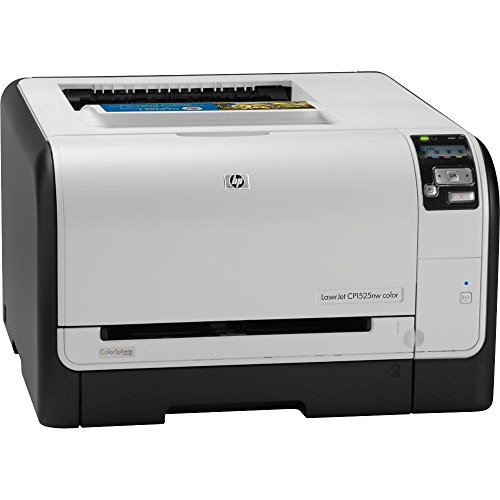
HP LaserJet Pro Wireless Color Printer
Best for: networked wireless color printing in small offices
- Print Output
- Color (what this guide is about)
- Print Technology
- Laser
- Printer Type
- Single-function
- Connectivity
- Wireless, Ethernet
- Dimensions
- 14 × 22 × 20 inches
The HP LaserJet Pro Wireless Color Printer is a dedicated single-function color laser machine designed for shared network setups. It includes both built-in Ethernet and wireless connectivity, allowing you to connect cables or print across your local network. It also supports mobile printing through HP ePrint and automatic image optimization via HP EasyColor. This unit suits you if you need a network-ready color laser printer for basic document production without extra multifunction features.
Pros
- Built-in Ethernet and wireless networking
- Mobile printing capabilities via HP ePrint
- HP EasyColor technology for automatic image adjustments
- Includes a minimum 90-day warranty
Cons
- Single-function design lacks scanning, copying, and faxing
- Renewed product that may arrive in generic packaging
Good fit if
- You want a dedicated color printer with both Wi-Fi and Ethernet options.
- You need mobile printing capabilities through HP ePrint.
- You prefer a single-function machine without unnecessary scanner hardware.
Skip if
- You need an all-in-one device to scan, copy, or fax.
- You require a brand-new printer rather than a refurbished unit.
Verdict: HP LaserJet Pro Wireless Color Printer delivers color laser printing with flexible networking and HP ePrint mobile support. It serves work areas that require straightforward single-function document output.

HP Color LaserJet Enterprise All-in-One
Best for: heavy-duty enterprise color multifunction use
- Print Output
- Color (what this guide is about)
- Print Technology
- Laser
- Printer Type
- All-in-one
- Dimensions
- 27.7 × 25 × 47.2 inches
- Weight
- 332 pounds
The HP Color LaserJet Enterprise All-in-One gives you color laser printing and multifunction capabilities in a large floor-standing unit. It measures 25 inches wide, 27.7 inches long, and 47.2 inches tall, with a total weight of 332 pounds. As a certified refurbished machine, it includes a 90-day warranty and required accessories. This heavy-duty system suits workgroups with dedicated floor space.
Pros
- All-in-one multifunction color laser system
- Certified refurbished with functionality testing and inspection
- Includes all relevant accessories and a 90-day warranty
Cons
- Heavy build weighing 332 pounds
- Large footprint measuring 47.2 inches high and 27.7 inches long
- May arrive in a generic box
Good fit if
- You need an enterprise-grade color laser all-in-one machine.
- You have dedicated floor space to accommodate a 332-pound unit.
- You are satisfied with a certified refurbished model backed by a 90-day warranty.
Skip if
- You need a compact or lightweight desktop printer.
- You require a brand-new factory-sealed printer.
Verdict: HP Color LaserJet Enterprise All-in-One delivers heavy-duty color laser multifunction capabilities for large workspaces. Its 332-pound floor-standing build requires dedicated floor room but provides tested enterprise performance with a 90-day warranty.
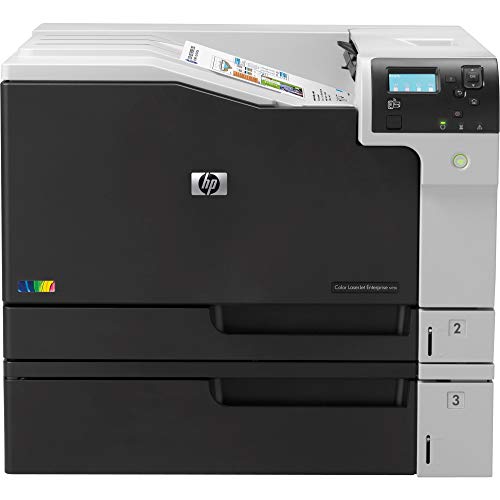
HP Color LaserJet Enterprise Wide Format Printer
Best for: wide format color printing in heavy-duty workspaces
- Print Output
- Color (what this guide is about)
- Print Technology
- Laser
- Wide Format
- Wide Format
- Ink/Toner System
- Toner
- Dimensions
- 21.4 × 23.1 × 18.3 inches
- Weight
- 425 pounds
View on Amazon: HP Color LaserJet Enterprise Wide Format Printer
This renewed HP enterprise color laser printer handles wide format printing for your office. It uses a dedicated toner system to generate color prints and comes with a minimum 90-day warranty. Measuring 23.1 by 21.4 by 18.3 inches and weighing 425 pounds, this machine requires dedicated, heavy-duty floor space. It suits workgroups that need wide-format laser output and color capabilities from an enterprise-grade device.
Pros
- Supports wide format color laser printing
- Comes with a minimum 90-day warranty
- Ships with relevant accessories and toner bundle pack
- Undergoes functionality testing, cleaning, and inspection
Cons
- Extremely heavy unit weight of 425 pounds
- May arrive in a generic box instead of original packaging
- Substantial physical dimensions require dedicated space
Good fit if
- You need wide format color laser printing capabilities.
- You have reinforced space that can support a 425-pound machine.
- You want an inspected enterprise machine with a 90-day warranty.
Skip if
- You lack the physical room or floor support for a 425-pound unit.
- You prefer a brand-new factory model over a renewed device.
Verdict: HP Color LaserJet Enterprise Wide Format Printer delivers color laser output and wide format handling for demanding office setups. Its massive 425-pound chassis makes it strictly suited for workgroups with dedicated, heavy-duty space.
Specifications side by side
| Spec | HP Color LaserJet Pro Wireless All-in-One | HP Color LaserJet Wireless Duplex Printer | HP Color LaserJet Pro Multifunction | HP Color LaserJet Pro 3201dw Duplex Printer | HP Color LaserJet Pro All-in-One Printer | HP LaserJet Enterprise 700 Wide-Format Color MFP | HP Color LaserJet Pro MFP 3301fdw | HP LaserJet Enterprise Color Laser Printer | HP Color LaserJet Pro Wireless Printer (Renewed) | HP Color LaserJet Pro All-in-One Printer | HP CP2025dn Color LaserJet Printer | HP Color LaserJet Pro M451 Duplex Color Printer | HP LaserJet Pro Wireless Color Printer | HP Color LaserJet Enterprise All-in-One | HP Color LaserJet Enterprise Wide Format Printer |
|---|---|---|---|---|---|---|---|---|---|---|---|---|---|---|---|
| Print Technology | Laser | Laser | Laser | Laser | Laser | Laser | Laser | Laser | Laser | Laser | Laser | Laser | Laser | Laser | Laser |
| Print Output | Color | Color | Color | Color | Color | Color | Color | Color | Color | Color | Color | Color | Color | Color | Color |
| Printer Type | All-in-One | not specified | Multifunction | not specified | Multifunction | not specified | All-in-One | not specified | not specified | All-in-One | not specified | not specified | Single-function | All-in-one | not specified |
| Supported Functions | Print, scan, copy | not specified | Print, scan, copy, fax | not specified | Print, scan, copy, fax | not specified | Print, scan, copy, fax | not specified | Print, Copy, Scan | not specified | not specified | not specified | not specified | not specified | |
| Print Speed | 26 ppm | Up to 22 ppm | Up to 28 ppm | Up to 26 ppm | Up to 28 pages per minute | not specified | 26 ppm | Up to 40 pages per minute | Up to 14 ppm black, 14 ppm color | 17 ppm | not specified | not specified | not specified | not specified | not specified |
| Connectivity | not specified | Wireless, Ethernet, dual band Wi-Fi | Wireless, Wi-Fi Direct | Wireless | Wireless, Wi-Fi Direct | not specified | not specified | Ethernet | not specified | Wireless, Ethernet | Built in Wired Networking | USB, Network | Wireless, Ethernet | not specified | not specified |
| Duplex Printing | not specified | Automatic two-sided printing | Automatic two-sided | Auto 2-sided | Automatic 2-sided printing | not specified | Automatic | not specified | not specified | not specified | Two-sided printing | not specified | not specified | not specified | not specified |
| First Page Out | not specified | not specified | not specified | not specified | not specified | not specified | not specified | 6 seconds black, 7 seconds color | not specified | not specified | not specified | not specified | not specified | not specified | not specified |
| Wide Format | not specified | not specified | not specified | not specified | not specified | Ledger/A3 | not specified | not specified | not specified | not specified | not specified | not specified | not specified | not specified | Wide Format |
| Ink/Toner System | not specified | Toner cartridges | Toner cartridges (HP 414A/414X) | Toner | Toner cartridges | not specified | not specified | Toner cartridges | Toner | Toner | Print cartridges | not specified | not specified | not specified | Toner |
| Features | Duplex Printing | Duplex Printing, Mobile Printing | not specified | Duplex Printing | not specified | not specified | Duplex Printing | not specified | not specified | Mobile Printing, Scanner, Copier | not specified | Duplex Printing | not specified | not specified | not specified |
| Use Case | not specified | not specified | not specified | not specified | Office | not specified | not specified | not specified | not specified | not specified | not specified | not specified | not specified | not specified | not specified |
| Scanner Type | not specified | Portable | not specified | not specified | not specified | not specified | not specified | not specified | not specified | Portable | not specified | not specified | not specified | not specified | not specified |
| Scanning | Wireless Scanning | Wireless Scanning | Wireless Scanning | Wireless Scanning | Wireless Scanning | not specified | Wireless Scanning | not specified | not specified | Wireless Scanning | not specified | not specified | not specified | not specified | not specified |
| Duplex Scanning | Duplex | Duplex | not specified | Duplex | not specified | not specified | Duplex | not specified | not specified | not specified | not specified | Duplex | not specified | not specified | not specified |
| Dimensions | 16.5 × 13.4 × 16.5 inches | 15 × 17 × 10 inches | 19.6 × 23.5 × 19.3 inches | not specified | 7.32 × 6.18 × 6.46 inches | 23.3 × 25.2 × 23.4 inches | not specified | 18.9 × 18 × 15.7 inches | 20.2 × 15.9 × 13.9 inches | 16.5 × 15 × 11.5 inches | 19 × 19 × 20 inches | 15.9 × 19.1 × 12.7 inches | 14 × 22 × 20 inches | 27.7 × 25 × 47.2 inches | 21.4 × 23.1 × 18.3 inches |
| Weight | 37.7 pounds | not specified | not specified | 33 pounds | 51.6 pounds | 14.4 pounds | 41.4 pounds | not specified | not specified | 40.6 pounds | not specified | not specified | not specified | 332 pounds | 425 pounds |
| Size | standard | One Size | One Size | 15.35 x 16.5 x 10.0 | Printer | not specified | 16.46 x 16.5 x 13.44 | 18.9 x 18 x 15.7 inches | not specified | One Size | not specified | not specified | 10 feet | not specified | not specified |
| Color | White | White | White | white | White | Black/white | white | white | black | White | Light Gray/Dark Gray | Light Gray/Black | -1 | Black | Light Gray/Dark Gray |
| Model | 499Q3F#BGJ | M255dw | M479fdw | 499Q9F#BGJ | M479fdw | M775dn | 499Q5F#BGJ | B5L24A | M251nw-cr | M182nw | CB495A#ABA-cr | M451 | CE875A | M880Z | M750dn |
If you also evaluate fabrication tools, specifications for the best multi color 3d printers outline build volumes and filament capacities.
How to choose the right HP color laser printer
-
Match print speed to volume
Print speed determines how quickly you handle large jobs. Look for pages per minute (ppm) ratings that align with your daily output. If you print frequently, choose a model like the HP LaserJet Enterprise Color Laser Printer, which offers 40 ppm for busy workgroups. Smaller offices may find 22 ppm or 26 ppm sufficient. Slower speeds are acceptable for light use, but higher speeds reduce wait times during peak hours. Check the ppm spec to ensure the machine keeps up with your workflow demands without creating bottlenecks.
-
Select connectivity based on setup
Connectivity options dictate how you link the printer to your network. Wireless models, such as the HP Color LaserJet Pro Wireless All-in-One, allow flexible placement and mobile printing. Wired units like the HP CP2025dn rely on Ethernet for stable, dedicated connections. Some printers support both USB and Ethernet for local or network use. If you need to print from multiple devices without cables, prioritize wireless capability. For fixed office stations, Ethernet provides consistent performance. Verify the available ports match your office infrastructure and security requirements.
-
Verify multifunction capabilities
Decide if you need scanning, copying, or faxing alongside printing. All-in-one units like the HP LaserJet Pro All-in-One Color Printer include these functions, saving desk space. Dedicated printers only output documents. If you require automatic duplex scanning, check for an Automatic Document Feeder (ADF). Models like the HP Color LaserJet Pro MFP 3301fdw handle multi-page documents efficiently. Fax functionality is available in select multifunction units. Assess your daily tasks to avoid paying for features you do not use or missing critical tools you need.
-
Check physical dimensions and weight
Printer size affects where you can place the device. Measure your available workspace before buying. The HP Color LaserJet Pro MFP 3301fdw measures 16.46 by 16.5 by 13.44 inches, fitting standard desks. Enterprise models like the HP Color LaserJet Enterprise Wide Format Printer weigh 425 pounds and require dedicated floor space. Weight also impacts portability. Heavier units are less likely to tip but harder to move. Ensure your table or floor can support the weight and that there is enough clearance for paper trays and output bins to open fully.
-
Consider print resolution needs
Print resolution affects the sharpness of text and graphics. Most HP color laser printers offer up to 600 dpi resolution, which is sufficient for standard business documents. Higher resolution is not always necessary for everyday paperwork. Check the specifications for dpi ratings if you print detailed graphics or images. Standard 600 dpi provides clear text and acceptable image quality for most office tasks. If your work involves high-quality marketing materials, verify that the printer meets your visual standards. Do not assume higher is always better for general office use.
Frequently asked questions
Which HP color laser printer handles wide-format media?
The HP LaserJet Enterprise 700 MFP M775dn and HP Color LaserJet Enterprise M750dn support wide-format color printing. The M775dn provides wired multifunction features for teams needing large-sheet output. For dedicated heavy-duty production, the M750dn offers wide-format printing within a 425-pound chassis designed for high-capacity office spaces.
Can you find an HP color laser printer with wired Ethernet instead of Wi-Fi?
Yes, several models prioritize wired connections for network reliability. The HP LaserJet Enterprise B5L24A relies strictly on Ethernet to deliver 40-page-per-minute color printing. Additionally, the HP CP2025dn integrates directly into wired office setups with expandable memory, while the HP M451 uses a dedicated USB connection without built-in wireless features.
How heavy are enterprise-level HP color laser printers?
Enterprise units weigh significantly more than standard desktop models. The HP Color LaserJet Enterprise All-in-One M880Z weighs 332 pounds and features a floor-standing frame that stands 47.2 inches high. If you select the wide-format HP Color LaserJet Enterprise M750dn, the physical unit weighs 425 pounds and requires dedicated, sturdy office space.
What is the difference between single-function and multifunction HP laser printers?
Single-function units like the HP Color LaserJet Pro 3201dw focus strictly on document printing to save desk space. Multifunction models like the HP Color LaserJet Pro M182nw incorporate scanning and copying alongside color printing. Choosing a multifunction machine lets you process incoming paperwork directly on the device through wireless connections.
Do all HP color laser printers support duplex scanning?
No, duplex scanning is limited to specific multifunction machines. Devices such as the HP Color LaserJet Pro 3301sdw and HP Color LaserJet Pro M451 feature automatic duplex scanning to capture both page sides. In contrast, smaller multifunction options like the HP M182nw provide basic scanning capabilities without listed two-sided scan specifications.
Which HP color laser printer fits compact desktop spaces?
The HP Color LaserJet Pro 3201dw fits tight workstations well with dimensions of 15.35 by 16.5 by 10 inches and a weight of 33 pounds. If you need multifunction scanning, the HP M182nw occupies a similar footprint at 15 by 16.5 inches and stands 11.5 inches tall on your desk.