HP Color LaserJet Pro All-in-One Review: Specs, Pros and Cons
As an Amazon Associate we earn from qualifying purchases. Links on this page are affiliate links.
This hp color laserjet pro all in one review covers the HP Color LaserJet Pro Multifunction M479fdw. It is a wireless color laser printer designed for office use. The device supports print, scan, copy, and fax functions. It delivers print speeds of up to 28 pages per minute. This speed helps you stay productive during busy workdays. The unit also features automatic two-sided printing to save paper. You get a multifunction device that handles daily tasks efficiently. The M479fdw model includes a touchscreen control panel for easy operation. It connects via Wi-Fi or Wi-Fi Direct for flexibility.
What stands out
- Print speeds of up to 28 pages per minute
- Supports print, scan, copy, and fax functions
- Automatic two-sided printing for paper savings
- Built-in Wi-Fi Direct for network-free mobile printing
- HP Wolf Pro Security built into hardware and firmware
Who it fits
Good fit for
This printer suits small offices that need fast, reliable color output. The 28 pages per minute speed handles moderate workloads well. Automatic duplex printing reduces paper waste and costs. You benefit from the four supported functions: print, scan, copy, and fax. Wi-Fi Direct allows printing without a local network, which helps remote workers. The built-in security features protect sensitive company data from cyberattacks. If you need a versatile all-in-one machine for daily business documents, this model fits your needs.
Who should skip it
You should look at another option if you require high-volume production. This unit is designed for office use, not heavy industrial tasks. The 250-sheet input tray may limit large jobs without frequent reloading. If you need a scanner with higher capacity, the 50-sheet auto document feeder might be insufficient for bulk digitization. Users wanting a compact footprint should note the 51.6-pound weight and specific dimensions. Those preferring inkjet technology for photo printing will find this laser model unsuitable for high-quality image output.
Verdict: The HP Color LaserJet Pro Multifunction M479fdw offers solid speed and security for office environments. Its combination of color laser printing and multifunction capabilities makes it a practical choice for business document management.
Key specs explained for this printer
Print Speed: Up to 28 pages per minute
This speed indicates how quickly the device produces single-sided pages. You can expect consistent output for standard office documents. This rate suits teams that need rapid turnover of reports or contracts. It is faster than entry-level models but slower than high-volume industrial units. You should compare this figure against your daily print volume to ensure the machine keeps up with your workflow without creating bottlenecks.
Printer Type: Multifunction
This classification means the unit combines several devices into one chassis. You get printing, scanning, copying, and faxing capabilities in a single footprint. This consolidation saves desk space and simplifies cabling. It is ideal for small offices that cannot accommodate separate machines. When shopping, compare this against single-function printers to see if the added utility justifies the typically higher initial cost and complexity.
Connectivity: Wireless, Wi-Fi Direct
Wireless capability allows connection to your local network without physical cables. Wi-Fi Direct enables a direct link from your smartphone or tablet to the printer. This feature is useful when no network is available or for quick, secure transfers. You benefit from flexible placement options within your office. Compare this against wired-only models to assess convenience versus potential security or stability trade-offs in your specific environment.
Duplex Printing: Automatic 2-sided printing
This feature allows the printer to flip pages and print on both sides without manual intervention. It reduces paper consumption and creates thinner documents. You save on supply costs and storage space for physical files. This is essential for eco-conscious offices or those with limited filing capacity. When comparing models, verify that duplexing is automatic, as manual options require you to stop and reload paper, slowing down your workflow significantly.
Print Output: Color
This specification confirms the device uses color toner to produce images and text. You can create professional reports, charts, and marketing materials with accurate color representation. This is distinct from monochrome printers that only use black toner. Color output is vital for design work or client-facing documents. Compare this against black-and-white options to determine if the added cost of color supplies is necessary for your specific business needs.
Design and build overview
According to the listing, the HP Color LaserJet Pro Multifunction M479fdw is a white unit measuring 7.32 inches in length, 6.18 inches in width, and 6.46 inches in height. It weighs 51.6 pounds. These dimensions indicate a compact footprint suitable for standard office desks or dedicated print stations. The substantial weight suggests a stable base that resists vibration during high-speed operations. You will need a sturdy surface to support this mass safely.
The device features a customizable touchscreen control panel. This interface allows you to automate complex workflows by saving settings for one-touch execution. The layout prioritizes direct interaction, reducing the need to navigate computer menus for routine tasks. This design choice supports efficiency in busy environments where quick access to copy, scan, or fax functions is essential.
Security is integrated into the hardware, firmware, and operating system. HP Wolf Pro Security protects company data against cyberattacks without requiring additional external tools. This built-in approach means you do not need to purchase separate security appliances for basic protection. The finish is a uniform white plastic, typical for professional office equipment. It is designed to blend into corporate settings while maintaining a clean, functional appearance. The physical build focuses on durability and ease of use rather than aesthetic flair.
Setup and everyday use guide
Setting up this multifunction device involves connecting it to your network or using direct wireless links. The listing notes built-in Wi-Fi Direct, which allows your smartphone to connect to the printer without a local network. This feature supports mobile printing even when you are away from your office router. For daily operations, the unit handles print, scan, copy, and fax tasks. You can load documents into the 50-sheet auto document feeder for scanning. The machine supports single-pass, two-sided scanning, which helps you process multi-page files faster. The 250-sheet input tray holds standard paper for regular printing jobs. A customizable touchscreen control panel lets you save settings for complex workflows. You can apply these saved configurations with a single touch, reducing repetitive setup steps. The printer also includes HP Wolf Pro Security features built into the hardware and firmware to protect company data. This security layer runs in the background while you work. Energy efficiency is another practical aspect. The design saves up to 18% energy over prior products and includes technologies to reduce paper waste. You use original HP 414A or 414X toner cartridges for color output. These cartridges are designed to avoid reprints and wasted supplies. The operating temperature range is 10 to 32.5°C, so you should place the unit in a climate-controlled office environment. The device weighs 51.6 pounds, so you need a sturdy surface for placement. Daily use focuses on steady, high-quality document production with minimal manual intervention.
Before you buy this printer
You should verify that your office network supports the required wireless standards before purchasing. This model relies on Wi-Fi Direct for mobile printing, so ensure your devices can handle direct connections. You will need to purchase Original HP 414A or 414X toner cartridges separately. These supplies are essential for maintaining print quality and avoiding service calls. Keep spare toner on hand, as color laser printing consumes supplies faster than monochrome units. Consider the physical space required, as the unit weighs 51.6 pounds. It fits well alongside other multifunction options in our guide, offering fax capabilities that many competitors lack. Check your fax line compatibility if you plan to use that feature. The automatic document feeder handles up to 50 sheets, which is useful for high-volume scanning tasks. Ensure your IT team approves the built-in security features for your specific environment. This printer suits teams that need robust, all-in-one functionality without external software dependencies.
Check before you buy
- Confirm wireless network compatibility for your office setup
- Verify fax line availability and phone jack access
- Purchase compatible Original HP 414A or 414X toner
- Ensure adequate space for the 51.6-pound unit
- Check IT security policies for built-in protections
The product at a glance
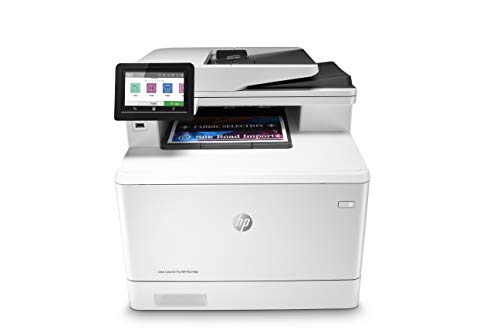
HP Color LaserJet Pro All-in-One Printer
Best for: fast color office printing with fax
- Print Technology
- Laser
- Print Output
- Color
- Printer Type
- Multifunction
- Supported Functions
- Print, scan, copy, fax
- Print Speed
- Up to 28 pages per minute
- Connectivity
- Wireless, Wi-Fi Direct
View on Amazon: HP Color LaserJet Pro All-in-One Printer Affiliate link
The HP M479fdw is a color laser multifunction printer designed for office use. It prints up to 28 pages per minute and supports automatic two-sided printing. You get print, scan, copy, and fax capabilities in one unit. Wireless connectivity and Wi-Fi Direct allow mobile printing without a network. The device includes a 50-sheet auto document feeder and single-pass two-sided scanning for efficient document handling.
Pros
- Prints up to 28 pages per minute
- Automatic two-sided printing and scanning
- Supports print, scan, copy, and fax
- Built-in Wi-Fi Direct for mobile printing
- Hardware-based security protection
Cons
- 51.6 pounds is heavy for a desk
- No mention of native mobile app control
- No mention of Ethernet port in specs
Good fit if
- You need fast color laser printing
- You require automatic two-sided scanning
- You want fax capabilities in one unit
Skip if
- You need a lightweight portable printer
- You only need black and white printing
- You require a very small footprint
Verdict: HP M479fdw Color Laser All-in-One suits offices needing fast color output and faxing. It fits teams that value automated document workflows and secure wireless printing.
Specifications side by side
| Spec | HP Color LaserJet Pro All-in-One Printer |
|---|---|
| Print Technology | Laser |
| Print Output | Color |
| Printer Type | Multifunction |
| Supported Functions | Print, scan, copy, fax |
| Print Speed | Up to 28 pages per minute |
| Connectivity | Wireless, Wi-Fi Direct |
| Duplex Printing | Automatic 2-sided printing |
| Ink/Toner System | Toner cartridges |
| Use Case | Office |
| Scanning | Wireless Scanning |
| Dimensions | 7.32 × 6.18 × 6.46 inches |
| Weight | 51.6 pounds |
| Size | Printer |
| Color | White |
| Model | M479fdw |
Frequently asked questions
What functions does the HP M479fdw all-in-one printer perform?
This device handles four core office tasks: printing, scanning, copying, and faxing. It is designed as a multifunction unit for office use. You can manage documents without needing separate machines. The wireless capability allows you to send faxes and scans directly from your network. This consolidates your workflow into a single footprint.
Is this printer suitable for small office teams?
Yes, it is built for office environments. The M479fdw supports automated document workflows and secure wireless printing. It fits teams that value efficiency and speed. The wireless scanning feature lets multiple users access scans easily. Its design prioritizes consistent output for standard office documents like reports and contracts.
How does the wireless connectivity work for mobile devices?
The printer supports wireless scanning and direct connections. You can use Wi-Fi Direct to link your smartphone without a local network. This allows mobile printing from devices nearby. The listing confirms built-in Wi-Fi Direct for easy setup. You do not need a complex network configuration to print from your phone.
What are the physical dimensions of the HP M479fdw?
The unit measures 7.32 inches in length, 6.18 inches in width, and 6.46 inches in height. It is a white printer with a compact footprint. These dimensions make it suitable for standard office desks. The size allows it to fit in tight spaces while maintaining full multifunction capabilities for your daily tasks.
How heavy is the HP Color LaserJet Pro M479fdw?
The printer weighs 51.6 pounds. This weight indicates a sturdy build suitable for office environments. You should ensure your desk or stand can support this mass. The substantial weight helps keep the machine stable during high-speed printing and faxing operations. It is not designed for frequent portable movement.
Does this model support color printing for office documents?
Yes, it is a color laser printer. The output is full color, which is ideal for graphics and charts. You get consistent color output for standard office documents. This feature supports teams that need professional-looking reports or marketing materials. The wireless connectivity ensures you can send color jobs from any device on your network.