HP LaserJet Pro MFP M227fdn Review: Specs, Pros and Cons
As an Amazon Associate we earn from qualifying purchases. Links on this page are affiliate links.
This hp laserjet pro mfp m227fdn review covers a monochrome all-in-one laser printer designed for compact office environments. It supports print, scan, copy, and fax functions. The device features a 30 pages per minute print speed and a 35-sheet auto document feeder. It also includes built-in Ethernet for secure network connectivity and automatic double-sided printing. The unit measures 15.9 inches wide and weighs 20 pounds. This model replaces the HP M225dn, offering a 15% faster print speed. It is built for small teams needing reliable document handling without taking up much desk space.
What stands out
- Prints up to 30 pages per minute in monochrome
- Built-in Ethernet for secure wired network connectivity
- Automatic double-sided printing reduces paper waste
- 35-sheet auto document feeder simplifies multi-page tasks
- Compact footprint fits into tight workspaces
Who it fits
Good fit for
This printer suits small offices with moderate monthly volume needs. Its 2,000 pages per month duty cycle handles typical administrative workloads. The Ethernet connection ensures stable connectivity for shared network use. Automatic duplexing is useful for contracts or reports. The compact size helps teams with limited desk space. Users who need print, scan, copy, and fax in one unit will find this model practical for their daily operations.
Who should skip it
You should look elsewhere if you need color printing, as this device only outputs monochrome. Wireless connectivity is not listed in the specifications, so you must use an Ethernet cable. If you require a high-volume workhorse, the 2,000 pages per month duty cycle may be insufficient for busy departments. Users needing a large paper tray will find the 260-sheet capacity limiting. Those who rely heavily on mobile printing without a network may find the options restricted.
Verdict: The HP LaserJet Pro MFP M227fdn is a compact, wired monochrome all-in-one that balances speed and function for small offices. It is a solid choice for teams prioritizing network stability and automatic duplexing over color capabilities.
HP M227fdn Key Specs Explained
Print Speed: Up to 30 pages/minute
This speed indicates how many pages the printer produces in one minute. You get faster output for standard office documents. This helps when you have multiple people needing prints. Compare this to slower models that take longer. It suits busy teams who need quick turnaround times without waiting.
Connectivity: Ethernet
This means the printer connects to your network via a cable. You get a stable and secure link for your office. Wired connections are often more reliable than wireless options. This setup is ideal for fixed workspaces. It ensures consistent performance for shared office resources.
Print Output: Monochrome
This printer only produces black and white pages. You save money on ink or toner costs. It is perfect for text-heavy documents and reports. You do not pay for color capabilities you may not use. This option suits businesses that prioritize text clarity over images.
Printer Type: All-in-One
This device combines printing, scanning, copying, and faxing into one unit. You save space by not buying separate machines. It fits into tight office areas effectively. This all-in-one design simplifies your workflow. You handle multiple tasks from a single console without clutter.
Duplex Printing: Double-sided printing
The printer automatically flips paper to print on both sides. You save paper and reduce waste. This feature is useful for long reports and manuals. It lowers your ongoing supply costs. Manual duplexing requires extra effort, so this automatic function saves time.
Physical Design and Build Quality
The HP LaserJet Pro MFP M227fdn is a compact all-in-one unit built for efficiency in tight spaces. According to the listing, the device measures 15.9 inches wide, 12.3 inches deep, and 16 inches high. These dimensions allow it to fit into smaller office footprints without dominating your desk or workspace. The monochrome print output is housed in a white casing that blends into standard office environments.
Weighing 20 pounds, the printer offers a sturdy feel that suggests durability for daily use. It supports double-sided printing and duplex scanning, which reduces paper waste and streamlines document handling. The inclusion of a 35-sheet auto document feeder means you can process multi-page jobs without manual intervention. This feature is particularly useful for administrative tasks that require frequent scanning or copying of lengthy reports.
Connectivity is handled through built-in Ethernet, ensuring stable wired connections for network sharing. The control panel includes an LCD display for easy navigation of settings and status updates. Mobile printing options like AirPrint and HP ePrint allow you to send jobs from various devices. This combination of physical size and functional layout makes the M227fdn suitable for teams needing reliable, space-saving performance. The design prioritizes functionality over flashy aesthetics, focusing on what matters for daily office operations.
Setup and Everyday Use Guide
Setting up the HP LaserJet Pro MFP M227fdn involves connecting it to your network via its built-in Ethernet port. This wired connection provides secure connectivity for your office environment. The device features an LCD display, which guides you through initial configuration steps without needing a computer. You can also install the free HP ePrint app on your mobile devices for remote management. This app allows you to print from anywhere, adding flexibility to your workflow. The printer supports AirPrint, meaning iPhones and iPads can send jobs directly to the device without additional drivers. Google Cloud Print is also supported, allowing you to send jobs from various devices to any company printer. Daily use is straightforward thanks to the compact design. The unit measures 15.9 inches wide, 12.3 inches deep, and 16 inches high. This footprint saves office real estate while housing print, scan, copy, and fax functions. You load paper into the input tray, which holds up to 260 sheets. For multi-page documents, the 35-sheet auto document feeder handles scanning and copying tasks efficiently. The double-sided printing feature reduces paper waste by automatically flipping pages. You can also perform duplex scanning for two-sided originals. The control panel lets you manage these tasks locally. With a duty cycle of up to 2,000 pages per month, this machine suits moderate office volumes. The HP JetAdvantage Security Manager adds a layer of protection for your data. Overall, the setup is standard for networked laser printers, and daily operations rely on the included hardware features.
Before You Buy This Printer
You should verify your network setup before purchasing this unit. The HP LaserJet Pro MFP M227fdn relies on built-in Ethernet for connectivity. It does not list Wi-Fi support in the provided specifications. Ensure your office has available wired ports. You will need to check mobile printing compatibility. The listing mentions support for the HP ePrint app, AirPrint, and Google Cloud Print. Confirm your devices run compatible operating systems. Consider the monthly duty cycle of 2,000 pages. This limit suits light to moderate office use. It may not handle high-volume departments. Compare this model to other options in Laser Printers & Office Machines. If you need higher speed or wireless flexibility, look elsewhere. This printer fits tight spaces due to its compact dimensions. Keep replacement toner cartridges on hand for ongoing upkeep. Regular maintenance ensures reliable performance over time.
Check before you buy
- Confirm wired Ethernet availability in your office.
- Check mobile OS compatibility for AirPrint or ePrint.
- Verify monthly volume stays under 2,000 pages.
- Ensure space fits 15.9 by 12.3 inches.
The product at a glance
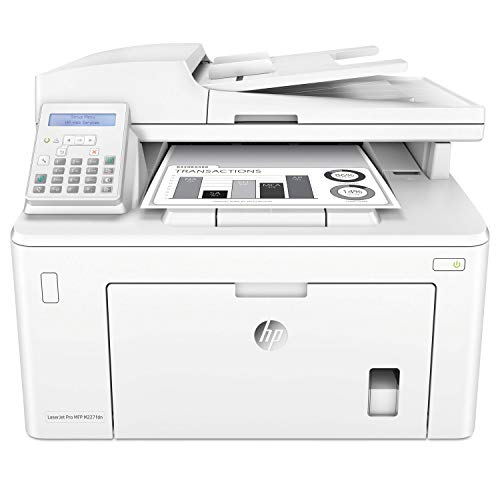
HP LaserJet Pro MFP M227fdn
Best for: Offices needing fast monochrome double-sided printing
- Print Technology
- Laser
- Print Output
- Monochrome
- Printer Type
- All-in-One
- Supported Functions
- Print, scan, copy, fax
- Print Speed
- Up to 30 pages/minute
- Connectivity
- Ethernet
View on Amazon: HP LaserJet Pro MFP M227fdn Affiliate link
This monochrome laser all-in-one printer handles printing, scanning, copying, and faxing for your workspace. It produces up to 30 pages per minute and includes automatic double-sided printing alongside a 35-sheet document feeder. With built-in Ethernet and a 260-sheet paper tray, it fits your office if you need reliable black-and-white multipage document processing.
Pros
- Prints up to 30 pages per minute
- Automatic double-sided printing and duplex scanning
- Integrated print, scan, copy, and fax functions
- 35-sheet automatic document feeder
Cons
- Restricted to monochrome output with no color printing
- Monthly duty cycle capped at 2,000 pages
- Paper input tray capacity limited to 260 sheets
Good fit if
- You need double-sided monochrome printing at speeds up to 30 pages per minute.
- You require scan, copy, and fax functions in a compact 20-pound unit.
Skip if
- You need color document or photo output.
- You exceed a monthly workload of 2,000 pages.
Verdict: HP LaserJet Pro Monochrome All-in-One delivers fast two-sided black-and-white output and complete fax and copy functions for Ethernet-connected office setups.
Specifications side by side
| Spec | HP LaserJet Pro MFP M227fdn |
|---|---|
| Print Technology | Laser |
| Print Output | Monochrome |
| Printer Type | All-in-One |
| Supported Functions | Print, scan, copy, fax |
| Print Speed | Up to 30 pages/minute |
| Connectivity | Ethernet |
| Duplex Printing | Double-sided printing |
| Duplex Scanning | Duplex |
| Dimensions | 12.3 × 15.9 × 16 inches |
| Weight | 20 pounds |
| Size | Normal |
| Color | White |
| Model | M227fdn |
Frequently asked questions
Does the HP LaserJet Pro MFP M227fdn support wireless printing?
No, this model does not support wireless printing. It relies on a built-in Ethernet port for network connectivity. You must connect the device directly to your router or switch using an Ethernet cable. This wired setup ensures a stable connection for small office environments.
What is the print speed of the HP M227fdn?
The HP LaserJet Pro MFP M227fdn prints at up to 30 pages per minute. This speed is suitable for standard office documents. It helps you produce output quickly when multiple people need prints. This makes it efficient for busy small office workflows.
Can the HP M227fdn scan double-sided documents automatically?
Yes, the HP LaserJet Pro MFP M227fdn features duplex scanning. This means it can scan both sides of a document in a single pass. It includes a 35-sheet auto document feeder to handle multi-page jobs. This saves time compared to manual single-sided scanning.
Is the HP LaserJet Pro MFP M227fdn a color printer?
No, this is a monochrome all-in-one laser printer. It only produces black and white output. It is not ideal if you require color printing or scanning. It is best suited for text-heavy documents and standard office tasks.
Does the HP M227fdn include fax capabilities?
Yes, the device supports fax functions. You can send and receive faxes directly from the unit. This feature is useful for small offices that still rely on traditional fax communication. It combines printing, scanning, copying, and faxing in one compact unit.
How heavy is the HP LaserJet Pro MFP M227fdn?
The HP LaserJet Pro MFP M227fdn weighs 20 pounds. This weight contributes to its stability during operation. The compact dimensions of 15.9 inches wide and 16 inches high allow it to fit in tight spaces. It is designed for efficiency in small offices.
What connectivity options does the HP M227fdn have?
The HP LaserJet Pro MFP M227fdn features Ethernet connectivity. It does not list Wi-Fi support in the specifications. You should ensure your office has available wired ports for setup. This wired connection provides secure and reliable networking for your documents.