HP LaserJet Pro M31w All-in-One Wireless Monochrome Laser Printer Review: Who It Fits and Who Should Skip It
As an Amazon Associate we earn from qualifying purchases. Links on this page are affiliate links.
The hp laserjet pro m31w all in one wireless monochrome laser printer is a compact device designed for small offices or home workspaces. It combines printing, scanning, and copying functions into a single unit. Two specs define its practicality: a print speed of up to 21 pages per minute and a first page out time of just 7.9 seconds. This model prioritizes efficiency and space savings, making it a suitable choice for users who need reliable document output without cluttering their desk. Its wireless connectivity allows for easy integration into existing networks.
What stands out
- Print speeds up to 21 pages per minute for quick document handling.
- First page out in as fast as 7.9 seconds to minimize wait times.
- Built-in wireless and Wi-Fi Direct for flexible printing from mobile devices.
- HP Smart app enables cloud printing and automated scanning tasks.
- Compact dimensions of 16.8 x 14.2 x 13.7 inches save desk space.
Who it fits
Good fit for
This printer suits individuals or small teams who primarily handle black-and-white documents. If you need a fast, space-saving solution for occasional printing and scanning, the M31w fits well. Its wireless features make it ideal for users who print from smartphones or tablets. The quick first-page output is beneficial for those who value immediate results. It is also a good choice for environments where energy efficiency matters, thanks to its auto-on/off technology.
Who should skip it
You should look elsewhere if you require color printing, as this device only supports monochrome output. Users needing high-volume monthly printing may find the 21 pages per minute speed limiting. If you prefer physical control panels, note that this model relies on the HP Smart app for setup and operation. It also lacks an automatic document feeder, which is necessary for scanning multiple pages at once. Finally, those needing duplex (two-sided) printing automatically should consider a different model.
Verdict: The HP LaserJet Pro M31w is a capable, compact monochrome laser printer for light to moderate office use. Its speed and wireless convenience make it a practical choice for small spaces.
HP LaserJet Pro M31w Key Specs Explained
Print Speed: Up to 21 pages per minute
This rate determines how quickly the printer produces documents during a busy workflow. You will get a steady stream of pages for reports or batch jobs. Compare this to slower inkjet models that may take longer for the same volume. It ensures your tasks finish without long waits between sheets, keeping your daily routine efficient.
First Page Out: As fast as 7.9 seconds
This metric measures the delay from sending a print command to the first sheet emerging. A sub-ten-second start time reduces idle frustration for urgent tasks. You benefit from immediate feedback when testing settings or printing short documents. This speed is critical for small offices where quick turnarounds matter more than total volume.
Connectivity: Wireless, Wi-Fi Direct
Wireless allows the printer to join your home or office network for sharing. Wi-Fi Direct enables printing from a phone or tablet without needing a router. You can connect devices directly to the printer for temporary or secure jobs. This flexibility supports mobile workflows and reduces cable clutter on your desk.
Printer Type: All-in-One
This classification means the device combines printing, scanning, and copying in one chassis. You save space by avoiding separate machines for each function. It is ideal for users who need to digitize documents or make quick copies. This all-in-one design simplifies management and reduces the footprint on your workspace.
Print Output: Monochrome
Monochrome output restricts printing to black ink only, excluding color options. This focus lowers cost per page and simplifies maintenance compared to color laser units. You benefit from consistent text quality for letters, contracts, and forms. It is best suited for users who primarily handle text documents rather than graphics or photos.
HP LaserJet Pro M31w Design Specs
The HP LaserJet Pro M31w is a monochrome all-in-one unit finished in white. According to the listing, it measures 16.8 inches wide, 14.2 inches deep, and 13.7 inches tall. It weighs 11.9 pounds. These dimensions place it in a compact footprint suitable for small desks or tight home office corners. The white casing keeps the visual profile clean and unobtrusive in a residential setting.
The device integrates print, scan, and copy functions into a single chassis. This layout reduces clutter by eliminating the need for separate machines. You can place it on a standard work surface without requiring a dedicated equipment rack. The all-in-one design means you access scanning and copying directly through the same physical unit used for printing.
Connectivity relies on built-in wireless capabilities and Wi-Fi Direct. This allows you to share the printer across a network or print directly from a smartphone without an active internet connection. The compact size and wireless features make it practical for users who need a reliable document tool in a limited space. The finish is simple, focusing on function over decorative elements.
Setup And Everyday Use Guide
You set up the HP LaserJet Pro M31w by downloading the HP Smart app on your mobile device. The listing states this app handles the wireless installation process. You do not need a computer for the initial connection. The printer supports built-in wireless capabilities for network sharing. It also includes Wi-Fi Direct. This feature allows you to print from a smartphone or tablet without an existing network. The device is compatible with Alexa. This integration lets you use voice commands for basic tasks. Daily use relies heavily on the HP Smart app. You use it to print from the cloud. The app also automates scanning tasks. You can scan files directly to PDF format. Emailing scanned documents is another supported function. The copy function handles identification cards efficiently. It automatically places both sides of the card onto one side of paper. Print speeds reach up to 21 pages per minute. The first page outputs in as fast as 7.9 seconds. This reduces wait time during busy periods. The printer uses HP Auto-On/Auto-Off technology. This intelligence turns the unit on when needed. It turns off when idle to save energy. You order toner easily through the app. The all-in-one design consolidates print, scan, and copy duties. This setup suits users who prefer mobile management over desktop software. The wireless connectivity ensures flexibility in placement. You are not tethered to a specific desk location. The compact form factor aids in saving space. The one-year limited hardware warranty provides basic coverage. You also get 24-hour free HP Web support. These features combine to create a streamlined workflow for small teams.
Key Checks Before Buying
Before you buy the HP LaserJet Pro M31w, consider its specific role in your workflow. This monochrome laser printer handles print, scan, and copy tasks efficiently. You must check that your mobile devices are compatible with the HP Smart app for full functionality. The listing notes it works with Alexa, which may interest some users but is not essential for printing. Since it is an all-in-one unit, you do not need separate scanners or copiers. However, you should verify your wireless network stability, as the printer relies on built-in wireless and Wi-Fi Direct. Keep in mind that toner replacement is part of regular upkeep. This compact device fits well alongside other options in Laser Printers & Office Machines for users prioritizing space savings and mobile convenience. It suits those who need reliable, fast monochrome output without color capabilities.
Check before you buy
- Verify mobile device compatibility with the HP Smart app
- Confirm your workspace has stable wireless network access
- Check if Alexa integration is needed for your setup
- Ensure you have space for its 16.8-inch width
The product at a glance
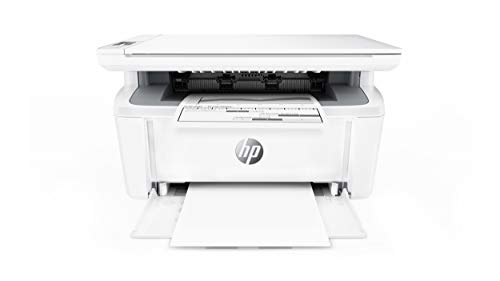
HP LaserJet Pro M31w Wireless All-in-One
Best for: Small home offices needing fast monochrome wireless printing
- Print Technology
- Laser
- Print Output
- Monochrome
- Printer Type
- All-in-One
- Supported Functions
- Print, scan, copy
- Print Speed
- Up to 21 pages per minute
- Connectivity
- Wireless, Wi-Fi Direct
View on Amazon: HP LaserJet Pro M31w Wireless All-in-One Affiliate link
The HP LaserJet Pro M31w is a compact monochrome laser printer offering print, scan, and copy functions. It delivers speeds up to 21 pages per minute with a first-page-out time of 7.9 seconds. This all-in-one device supports wireless connectivity and Wi-Fi Direct. It is designed for users who need professional-quality documents in a small footprint. The unit weighs 11.9 pounds and measures 14.2 inches in length.
Pros
- Print speeds up to 21 pages per minute
- First page out in as fast as 7.9 seconds
- Supports wireless and Wi-Fi Direct connectivity
- Monochrome laser print technology for professional results
Cons
- Monochrome output only, no color printing
- No physical display panel for direct control
- Lacks automatic duplex printing support
Good fit if
- You need a small footprint for limited desk space
- You primarily print black-and-white documents
- You want wireless printing from mobile devices
Skip if
- You require color printing capabilities
- You need to print double-sided pages automatically
- You prefer physical buttons over app control
Verdict: The HP LaserJet Pro M31w Compact Monochrome All-in-One is a practical choice for home offices needing fast, wireless black-and-white printing. It fits users who prioritize speed and compact size over color features.
Specifications side by side
| Spec | HP LaserJet Pro M31w Wireless All-in-One |
|---|---|
| Print Technology | Laser |
| Print Output | Monochrome |
| Printer Type | All-in-One |
| Supported Functions | Print, scan, copy |
| Print Speed | Up to 21 pages per minute |
| Connectivity | Wireless, Wi-Fi Direct |
| First Page Out | As fast as 7.9 seconds |
| Ink/Toner System | Toner |
| Features | Mobile Printing |
| Scanner Type | Portable |
| Scanning | Wireless Scanning |
| Compatibility | Alexa |
| Dimensions | 14.2 × 16.8 × 13.7 inches |
| Weight | 11.9 pounds |
| Size | One size |
| Color | White |
| Model | Y5S55A#BGJ |
Frequently asked questions
Does the HP LaserJet Pro M31w print color documents?
No, this device is a monochrome laser printer. It only produces black-and-white output. You cannot generate color images or text with this model. It is designed specifically for text-heavy documents like reports and letters. If you need color, you must choose a different all-in-one machine.
Can I scan documents wirelessly with this printer?
Yes, the HP LaserJet Pro M31w supports wireless scanning. You can send scanned files directly to your mobile device without a computer. This feature works alongside its wireless printing capabilities. It allows you to digitize papers from anywhere in your home office network.
Is the HP LaserJet Pro M31w compatible with Amazon Alexa?
Yes, the product listing confirms compatibility with Alexa. You can use voice commands to control basic printing functions. This adds convenience for hands-free operation in your workspace. It integrates with your existing smart home ecosystem for simple tasks.
How much space does the HP LaserJet Pro M31w take up?
The printer measures 16.8 inches wide, 14.2 inches deep, and 13.7 inches tall. It weighs 11.9 pounds. These dimensions make it compact enough for small desks. It fits easily into tight home office corners without overwhelming your workspace.
Does this printer require a computer to operate?
No, you do not need a computer for initial setup. You can install and configure the device using the HP Smart app on your mobile device. It connects directly via wireless networks. This makes it ideal for users who rely primarily on phones or tablets.
What types of documents does this printer handle best?
It is best for small home offices needing fast monochrome wireless printing. The compact design and mobile features suit users who prioritize speed and size. It handles standard text documents efficiently. It is not suitable for high-volume color graphics or large format media.