HP LaserJet M636z Monochrome MFP Review (2026): A Spec-Based Look
As an Amazon Associate we earn from qualifying purchases. Links on this page are affiliate links.
This hp laserjet m636z monochrome mfp review examines an enterprise-grade multifunction device built for high-volume environments. It combines print, scan, copy, and fax capabilities into a single unit. The two defining specs are its 75 ppm print speed and its 5.2 seconds first page out time. These numbers indicate rapid output for busy offices. The machine also includes a High Performance Secure Hard Disk for data protection. It supports legal-size paper and features a 150-page auto-document feeder. This listing details the hardware specifications and physical dimensions to help you determine if it fits your workflow.
What stands out
- Print speeds of up to 75 ppm
- 5.2 seconds first page out time
- 9" functional touchscreen interface
- 150-page auto-document feeder
- High Performance Secure Hard Disk
Who it fits
Good fit for
This machine suits large enterprises with heavy print volumes. The 75 ppm speed handles large batches quickly. The 1,000-sheet 3-bin stapler/stacker helps manage finished documents. If your team needs to process many pages daily, the duplex printing and high-capacity feeders reduce refill interruptions. The secure hard disk is useful for handling sensitive corporate data. You will appreciate the wheeled stand and 550-sheet and 2,000-sheet input options for flexible paper management.
Who should skip it
You should look at another option if you need color printing, as this model is monochrome only. It is also too large for small desks, measuring 26 inches wide and 48.5 inches high. The 142-pound weight makes it difficult to move without assistance. If you require a compact footprint or wireless-only connectivity without a hard disk, this enterprise unit is not the right fit. It is designed for dedicated print rooms, not shared home offices.
Verdict: The HP LaserJet M636z is a robust, high-speed monochrome MFP for large offices. Its secure storage and fast output make it ideal for demanding enterprise workflows.
Key specs explained for this MFP
Print Speed: 75 ppm
This machine produces up to seventy-five pages per minute. This high rate suits busy offices that need to clear large print queues quickly. It reduces wait times for multiple users. When shopping, compare this figure with standard office printers that often cap at twenty or thirty pages per minute. Higher speed means less downtime during peak workloads.
First Page Out: 5.2 seconds
The device starts printing the first page in just over five seconds. This quick start time keeps workflows moving without noticeable delays. It is particularly useful for jobs with only a few pages. Compare this metric with other models that may take ten seconds or more to begin. Faster initial output improves overall perceived performance.
Printer Type: All-in-One
This unit handles printing, scanning, copying, and faxing in a single chassis. You save desk space by consolidating these functions. It replaces separate devices for each task. When comparing options, verify if the model includes all four features. An all-in-one setup simplifies maintenance and reduces the footprint in a shared office environment.
Print Output: Monochrome
The printer produces black-and-white documents only. It does not support color output. This focus ensures lower toner costs and faster processing for text-heavy reports. Choose this type if your business rarely needs color graphics. Compare it with color laser models that offer broader visual capabilities but often run at slower speeds and higher operating costs.
Physical Design and Build Overview
According to the listing, this HP LaserJet M636z stands 48.5 inches tall, 26 inches wide, and 25.9 inches deep. It weighs 142 pounds. The exterior finish is white. These dimensions indicate a substantial footprint. You will need a dedicated space in your office. The height suggests it may require a wheeled stand for proper ergonomics and access. The significant weight means you should plan for delivery and placement carefully. This is not a device you move frequently.
The layout includes a 9-inch functional touchscreen. This large display allows you to navigate settings and monitor jobs without needing an external computer. The pull-out keyboard is another physical feature. It lets you enter data directly on the machine. This is useful for filling out forms or managing address books. The design prioritizes direct interaction. You can control the print, scan, copy, and fax functions from the front panel.
The build supports high-volume workflows. The physical size accommodates the internal 550-sheet and 2,000-sheet high-capacity input feeders. It also houses the 1,000-sheet 3-bin stapler/stacker. These components require the robust chassis. The white color helps it blend into standard office environments. The overall construction is designed for durability in busy settings. You get a stable platform for continuous operation. The physical controls are positioned for easy reach during daily use.
Setup And Daily Use Guide
Setting up this enterprise device requires significant floor space. The unit measures 48.5 inches high, 26 inches wide, and 25.9 inches deep. It weighs 142 pounds. You should use the included wheeled stand to position it correctly. The large footprint accommodates its extensive paper handling capabilities.
Daily operation centers on the 9-inch functional touchscreen. This interface controls print, scan, copy, and fax functions. You can manage jobs directly here. For faster data entry, the device includes a pull-out keyboard. This feature helps you input information accurately without switching screens.
The 150-page auto-document feeder streamlines scanning tasks. It detects potential errors or missed pages during the process. This ensures proper orientation and size for your documents. The printer also supports duplex printing, allowing you to print on both sides automatically.
Paper handling is robust. The system includes 650-sheet trays for sizes from 4x6 inches to legal. You can add a 550-sheet feeder or a 2,000-sheet high-capacity input feeder. Output is managed by a 1,000-sheet 3-bin stapler/stacker with job offset. This keeps your workspace organized when producing large batches.
Security is embedded into the hardware. A High Performance Secure Hard Disk protects sensitive data. The system continually detects and stops attacks. This feature is designed to thwart malware. You do not need to configure complex security settings manually for basic protection. The device is ready to secure your documents from the start.
Before You Buy This MFP
Before you buy this HP LaserJet M636z, consider its physical and operational demands. The unit weighs 142 pounds and measures 48.5 inches tall. You must ensure your office floor can support this weight. The wheeled stand helps, but you still need ample space for its 26-inch width and 25.9-inch depth. Verify that your network infrastructure supports enterprise-grade security features, as this device emphasizes deep security and malware protection. Check compatibility with your existing document management systems, especially if you rely on the 150-page auto-document feeder or the pull-out keyboard for data entry. Maintenance involves managing the 650-sheet trays and optional 2,000-sheet feeder. Ensure you have room for toner storage and waste disposal. This machine suits high-volume environments. Compare its 75 ppm speed and security focus against other options in Laser Printers & Office Machines to confirm it meets your specific throughput and safety requirements.
Check before you buy
- Verify floor load capacity for the 142-pound unit.
- Check network compatibility for enterprise security features.
- Ensure space for the 48.5-inch height and stand.
- Confirm toner and paper storage availability.
- Review document management system integration needs.
The product at a glance
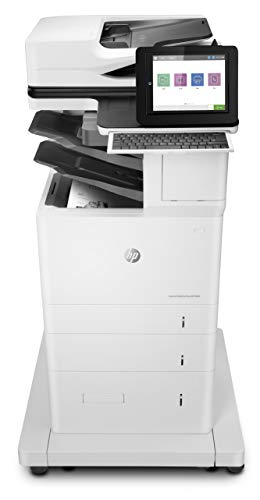
HP LaserJet M636z Monochrome MFP
Best for: High-volume legal document processing
- Print Technology
- Laser
- Print Output
- Monochrome
- Printer Type
- All-in-One
- Supported Functions
- Print, scan, copy, fax
- Print Speed
- Up to 75 ppm
- Connectivity
- Ethernet
View on Amazon: HP LaserJet M636z Monochrome MFP Affiliate link
The HP LaserJet M636z is a monochrome all-in-one laser printer designed for high-volume office environments. It delivers print speeds of up to 75 ppm with a first page out time of 5.2 seconds. The unit supports legal-sized paper and includes fax capabilities. Its large footprint and significant weight reflect its heavy-duty paper handling and security features.
Pros
- Print speeds of up to 75 ppm
- First page out in 5.2 seconds
- 1,000-sheet 3-bin stapler/stacker with job offset
- 150-page auto-document feeder for scanning
Cons
- Heavy build at 142 pounds
- Large physical footprint requires significant space
- Only supports monochrome printing
Good fit if
- You need fast output for large document batches
- You require integrated stapling and stacking
- You print legal-sized documents regularly
Skip if
- You have limited desk space
- You need color printing capabilities
- You prefer a lightweight portable unit
Verdict: HP LaserJet M636z Monochrome MFP suits busy offices that prioritize speed and heavy-duty paper handling over compact size. It fits teams needing legal support and automatic stapling, but it is too large and heavy for small workspaces.
Specifications side by side
| Spec | HP LaserJet M636z Monochrome MFP |
|---|---|
| Print Technology | Laser |
| Print Output | Monochrome |
| Printer Type | All-in-One |
| Supported Functions | Print, scan, copy, fax |
| Print Speed | Up to 75 ppm |
| Connectivity | Ethernet |
| Duplex Printing | Automatic two-sided |
| First Page Out | 5.2 seconds |
| Features | Duplex Printing, Scanner, Copier |
| Duplex Scanning | Duplex |
| Dimensions | 25.9 × 26 × 48.5 inches |
| Weight | 142 pounds |
| Size | One Size |
| Color | White |
| Model | 7PT01A#BGJ |
Frequently asked questions
Is the HP LaserJet M636z suitable for small home offices?
No, this machine is not suitable for small spaces. It weighs 142 pounds and measures 48.5 inches tall. The large footprint requires a dedicated area with strong floor support. It is designed for busy offices that prioritize heavy-duty performance over compact size.
What does the monochrome output mean for this printer?
It means the device only prints in black and white. You cannot produce color documents with this unit. This focus on monochrome output helps maintain high speed and reliability for text-heavy tasks, such as legal documents or standard business reports.
Does this model include automatic stapling?
Yes, the HP LaserJet M636z supports automatic stapling. This feature is useful for creating multi-page reports without manual intervention. It helps streamline document preparation for teams that frequently produce bound or stapled handouts for meetings and legal filings.
How much floor space does the HP LaserJet M636z require?
You need significant floor space for this unit. It measures 26 inches wide and 25.9 inches deep. The height is 48.5 inches. You should plan for a dedicated area that can accommodate this substantial footprint and the weight of 142 pounds.
What is the primary use case for this multifunction printer?
It is best for high-volume legal document processing. The machine handles large print queues quickly and supports automatic stapling. It suits teams that need to produce many pages daily and require reliable, heavy-duty paper handling capabilities in a professional environment.
Can I move the HP LaserJet M636z easily?
No, moving it is difficult due to its weight. The unit weighs 142 pounds. While it includes a wheeled stand for positioning, you still need ample space to maneuver it. You should not attempt to move it frequently once installed.
What functions does this multifunction device perform?
It performs print, scan, copy, and fax operations. All these capabilities are integrated into a single unit. This consolidation helps reduce clutter in busy offices by combining essential document management tasks into one enterprise-grade machine designed for high-volume workflows.