Lexmark MS431DN Laser Printer Review: Specs, Pros and Cons
As an Amazon Associate we earn from qualifying purchases. Links on this page are affiliate links.
This lexmark ms431dn laser printer review covers a monochrome device built for speed and efficiency. It prints up to 42 pages per minute, which helps you keep up with busy office workflows. The print resolution reaches 2400 dpi, ensuring sharp text and clear graphics for professional documents. You get automatic duplex printing as a standard feature, which saves paper and reduces manual handling. Connectivity is handled via Gigabit Ethernet, allowing stable network sharing among multiple users. The unit weighs about 22.8 pounds and measures 14.5 by 14.3 by 8.7 inches, fitting neatly into most workspaces without taking up too much floor space.
What stands out
- Prints up to 42 pages per minute
- Print resolution up to 2400 dpi
- Automatic duplex printing
- Gigabit Ethernet connectivity
Who it fits
Good fit for
This printer suits small to mid-sized offices that need fast, reliable monochrome output. If you print large volumes of text-heavy documents, the 42 ppm speed will keep your team productive. The automatic duplex feature is ideal for businesses looking to reduce paper costs and waste. Ethernet connectivity ensures stable connections in networked environments. It is a practical choice for teams that prioritize speed and simplicity over color printing or mobile wireless features.
Who should skip it
You should look at another option if you require color printing, as this model is strictly monochrome. Users needing wireless connectivity like Wi-Fi or Bluetooth will find this device lacking, as it only offers Ethernet. If you need a compact, portable solution for home use, the 22.8-pound weight and larger footprint may be inconvenient. Those who prioritize duplex scanning capabilities should also consider alternatives, as this model focuses on printing rather than comprehensive scanning functions.
Verdict: The Lexmark MS431DN is a solid, no-nonsense choice for offices needing fast, high-quality monochrome printing with automatic double-sided capability. It delivers on speed and clarity without unnecessary extras.
Lexmark MS431DN Key Specs Explained
Print Speed: 42 ppm
This printer produces up to 42 pages per minute. That rate helps you handle large print jobs quickly without long waits. It suits busy offices where time matters. When comparing laser printers, look for speeds above 30 ppm for similar performance. This metric tells you how fast the machine works under standard conditions.
Print Resolution: 2400 dpi
The device prints at up to 2400 dots per inch. This high resolution ensures sharp text and clear graphics. You get professional-looking documents for reports and presentations. Compare this with lower resolution models that may show pixelation. Higher dpi values generally mean better clarity for detailed black-and-white output.
Duplex Printing: Automatic
The printer handles two-sided printing automatically. You do not need to flip pages manually. This feature saves paper and reduces clutter on your desk. It is essential for creating booklets or formal reports efficiently. When shopping, check if duplexing is manual or automatic, as automatic saves significant time.
Connectivity: Gigabit Ethernet
This model connects via Gigabit Ethernet for stable network sharing. You can place the printer anywhere with a wired connection. It supports multiple users in an office environment. Compare this with Wi-Fi only models if you prefer wired stability. Gigabit speeds ensure fast data transfer between your computer and the printer.
Design and Build Overview
The Lexmark MS431DN features a BLACK GREY finish that blends into most office environments. According to the listing, the unit weighs 22.8 pounds. This weight suggests a sturdy internal frame, likely housing the laser engine and paper path components securely. It is not a lightweight portable device, but it is manageable for placement on a standard desk or floor stand.
Physical dimensions are listed as 14.3 inches in length, 14.5 inches in width, and 8.7 inches in height. This footprint is compact enough for shared workspaces without dominating the area. The low profile allows it to fit under standard shelves or in tight corners. You should ensure you have clear space above the unit for paper output, as the automatic duplex function ejects sheets upward.
The design prioritizes function over flair. There are no visible decorative elements in the provided data, which keeps the focus on performance. The Gigabit Ethernet port is integrated into the chassis, allowing for stable wired connections. This setup reduces wireless interference, which is critical for consistent print quality in busy networks. The monochrome output aligns with the utilitarian exterior, signaling that this machine is built for high-volume text and simple graphics rather than color creativity.
Setup and Everyday Use
Setting up the Lexmark MS431DN begins with connecting it to your network. The listing specifies Gigabit Ethernet connectivity, which means you will plug the printer directly into your router or switch using a standard cable. This wired connection provides a stable link for your office devices. You do not need to worry about wireless signal strength or interference. The printer is designed for plain paper, so you can load standard office stock without special handling. The automatic duplex feature is a key part of your daily workflow. This specification indicates that the machine flips pages internally. You do not need to manually turn over sheets to print on both sides. This saves time and reduces paper waste during long jobs. The 2400 dpi resolution ensures that text remains crisp and graphics stay clear. This high resolution is useful for documents that require sharp detail. The unit weighs 22.8 pounds and measures 14.5 inches wide. These dimensions suggest a compact footprint that fits well on a desk or in a small office area. The monochrome output is consistent with its 42 ppm speed. This combination supports high-volume text printing efficiently. You can rely on the automatic duplexing to handle double-sided documents seamlessly. The Ethernet port ensures that multiple users on the network can access the printer without delay. This setup supports a straightforward, efficient office environment.
Before you buy this printer
You should verify your network setup before ordering. This model relies on Gigabit Ethernet, so you need an available port on your router or switch. It does not list Wi-Fi support, meaning you must run a cable to the device. Check your office layout to ensure the 14.3 by 14.5 by 8.7 inch footprint fits your desk. The 22.8 pound weight requires a sturdy surface. You will need to monitor toner levels, as the listing includes a printer-only option without included supplies. This device suits high-volume text printing. It fits well among other monochrome laser printers for teams needing 42 ppm speed. If you require mobile printing or wireless connectivity, you may want to consider other options in this category. Ensure your drivers are compatible with your operating system before finalizing your purchase.
Check before you buy
- Confirm you have an open Gigabit Ethernet port nearby.
- Check that your desk can support 22.8 pounds.
- Verify driver compatibility with your computer operating system.
- Ensure you have toner supplies ready for initial use.
The product at a glance
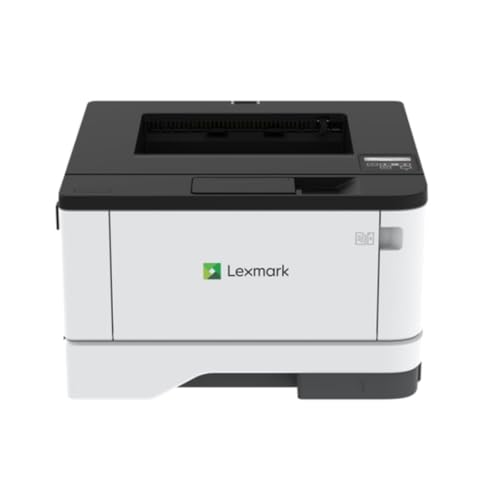
Lexmark Monochrome Duplex Laser Printer
Best for: fast networked black-and-white office printing
- Print Technology
- Laser
- Print Output
- Monochrome
- Print Speed
- 42 ppm
- Connectivity
- Gigabit Ethernet
- Duplex Printing
- Automatic duplex print
- Print Resolution
- Up to 2400 dpi
View on Amazon: Lexmark Monochrome Duplex Laser Printer Affiliate link
This Lexmark monochrome laser printer produces text documents at speeds up to 42 ppm with a 2400 dpi resolution. It connects via Gigabit Ethernet and features automatic duplex printing for two-sided output. You get reliable plain paper handling in a compact 8.7-inch tall frame designed for busy home workstations and office network desks.
Pros
- Print speeds reaching up to 42 ppm
- Automatic duplex printing for two-sided output
- Print resolution up to 2400 dpi
- Gigabit Ethernet network connectivity
Cons
- Limited to monochrome printing output
- Standard capacity listed at 100 sheets
Good fit if
- You need fast black-and-white document printing up to 42 ppm.
- You want automatic two-sided printing over a wired Gigabit network.
Skip if
- You require color printing for graphics and photos.
- You need a paper tray capacity larger than 100 sheets.
Verdict: Lexmark Monochrome Duplex Laser Printer delivers rapid 42 ppm monochrome output and automated two-sided printing for offices focused entirely on black-and-white documents.
Specifications side by side
| Spec | Lexmark Monochrome Duplex Laser Printer |
|---|---|
| Print Technology | Laser |
| Print Output | Monochrome |
| Print Speed | 42 ppm |
| Connectivity | Gigabit Ethernet |
| Duplex Printing | Automatic duplex print |
| Print Resolution | Up to 2400 dpi |
| Features | Duplex Printing |
| Duplex Scanning | Duplex |
| Dimensions | 14.3 × 14.5 × 8.7 inches |
| Weight | 22.8 pounds |
| Size | 25lbs |
| Color | BLACK GREY |
| Model | MS431DN |
Frequently asked questions
Does the Lexmark MS431DN support wireless printing?
No, this model does not list Wi-Fi support. It relies on Gigabit Ethernet connectivity for network access. You must connect the printer directly to your router or switch using a standard cable. This wired setup ensures a stable connection for your office environment.
Is automatic two-sided printing included?
Yes, the printer features automatic duplex printing. This allows you to print on both sides of the paper without manual intervention. It helps reduce paper usage and keeps your desk organized by eliminating the need to flip sheets for double-sided documents.
What is the maximum print resolution?
The device offers a print resolution of up to 2400 dpi. This high resolution ensures sharp text and clear graphics on every page. It is suitable for professional documents that require crisp details and clean lines for both internal reports and external materials.
How heavy is the Lexmark MS431DN?
The printer weighs 22.8 pounds. Its dimensions are 14.5 inches wide, 14.3 inches long, and 8.7 inches high. The weight suggests a sturdy internal frame designed to house the laser engine and paper path components securely during high-volume printing tasks.
Can it scan documents in duplex mode?
Yes, the unit supports duplex scanning. This feature allows you to scan both sides of a document in a single pass. It is useful for digitizing multi-page contracts or reports quickly without having to manually flip the pages over in the scanner bed.
What type of connectivity does it use?
It uses Ethernet connectivity. You will plug the printer into your network via a cable connected to your router or switch. This wired approach provides a reliable and stable connection, which is ideal for offices that prioritize consistent performance over wireless convenience.
Is this printer suitable for high-volume offices?
Yes, it is built for high-volume monochrome office printing. With a speed of up to 42 pages per minute, it handles large jobs efficiently. The combination of fast output and automatic duplexing makes it a practical choice for busy workspaces needing reliable black-and-white output.