Looking Beyond the Fujitsu Color Duplex Document Scanner? 6 Alternatives Worth a Look
As an Amazon Associate we earn from qualifying purchases. Links on this page are affiliate links.
The Fujitsu Color Duplex Document Scanner handles high-volume office scanning with an 80-sheet feeder and 60 ppm speed. If you need fujitsu color duplex document scanner alternatives, consider other models that share these core capabilities but offer different features. You might want a different size, connectivity option, or brand focus. This list covers 6 options selected because their specifications overlap with the original model.
Each alternative prioritizes a specific need while maintaining duplex scanning and auto document feeder functionality. The Epson ES-200 offers portability for mobile professionals, while the ES-500W provides wireless flexibility. The Canon imageFORMULA R40 specializes in receipt processing for QuickBooks users. Other options like the Epson ES-400 and Xerox DocuMate 3125 balance desktop space with reliable wired performance. These devices all support color output and duplex scanning, ensuring you can find a fit for your specific workflow requirements without sacrificing essential document processing features.
How alternatives compare to the Fujitsu
Epson WorkForce Portable Duplex Scanner
The Epson ES-200 Portable Color Scanner weighs just 1.08 pounds and measures 3.5 inches wide. This makes it significantly lighter and more compact than the Fujitsu Fi-7160, which weighs 9.3 pounds and is 10 inches wide. Both models support duplex scanning and include an automatic document feeder for two-sided documents. The Epson connects via USB, similar to the wired USB 3.0 connection on the Fujitsu. You should choose the Epson if you prioritize portability and a small footprint for mobile professionals. You will sacrifice the higher daily duty cycle and larger physical presence of the Fujitsu model, which is built for stationary office desks.
Epson WorkForce Desktop Duplex Scanner
The Epson ES-400 Color Duplex Scanner offers a middle ground in size between the portable and heavy-duty options. It measures 6.6 inches wide and 6.3 inches high, weighing 8.09 pounds. This is slightly smaller and lighter than the Fujitsu Fi-7160, which is 10 inches wide and weighs 9.3 pounds. Both devices feature duplex scanning and automatic document feeders for efficient processing of two-sided papers. The Epson connects via USB, matching the wired connectivity of the Fujitsu model. Select the Epson if you want a desktop scanner that saves some space without sacrificing duplex capabilities. You give up the specific dimensions and weight profile of the Fujitsu, which may fit better in larger workstations.
Fujitsu fi-7180 Duplex Document Scanner
The Fujitsu fi-7180 shares the same brand and duplex scanning features as the Fi-7160 but targets high-volume professional workflows. It measures 6.7 inches wide and 6.4 inches high, weighing 9.3 pounds. This is narrower than the Fi-7160, which is 10 inches wide, though both share the same weight. Both models include automatic document feeders and support color output. The fi-7180 is designed for teams prioritizing throughput over portability. Choose this alternative if you need a denser footprint for busy offices while maintaining similar scanning capabilities. You keep the Fujitsu ecosystem benefits but adjust to a different physical form factor that may fit tighter on crowded desks.
Canon imageFORMULA R40 Duplex Scanner
The Canon imageFORMULA R40 Receipt Scanner is specialized for processing receipts and invoices rather than general documents. It measures 15 inches wide and 12.5 inches high, weighing 6.17 pounds. This is significantly larger and heavier than the Fujitsu Fi-7160, which is 10 inches wide and weighs 9.3 pounds. Both support duplex scanning and automatic document feeders. The Canon is ideal for users automating data entry with Intuit QuickBooks Online. Pick this model if your primary task is receipt scanning and you need dedicated software integration. You will use a much larger device that lacks the general-purpose versatility of the Fujitsu scanner for standard office documents.
Epson Wireless Desktop Duplex Document Scanner
The Epson ES-500W Wireless Color Duplex Scanner introduces wireless connectivity, unlike the USB-only connection of the Fujitsu Fi-7160. It measures 6.9 inches wide and weighs 8.16 pounds, making it narrower and lighter than the Fujitsu model. Both devices support color output, duplex scanning, and automatic document feeders. The wireless feature allows for flexible placement away from computers. Choose the Epson if you value wireless flexibility and do not want to be tethered by a cable. You trade the wired reliability and specific dimensions of the Fujitsu for the convenience of wireless operation in your office workflow.
Xerox DocuMate 3125 Desktop Scanner
The Xerox DocuMate 3125 Desktop Scanner is designed for space efficiency in small offices. It measures 11.2 inches wide and 6.7 inches high, weighing 5.41 pounds. This is lighter than the Fujitsu Fi-7160, which weighs 9.3 pounds, though slightly wider. Both models support duplex scanning and automatic document feeders for two-sided documents. The Xerox connects via wired connections, similar to the Fujitsu. Select this scanner if you need a compact solution that saves desk space while handling standard paper sizes. You accept a different weight and dimension profile compared to the Fujitsu, which may suit smaller workspaces better than the bulkier original model.
Quick picks
Our 7 picks

Fujitsu Color Duplex Document Scanner
Best for: high-volume office document scanning
- Scan Speed
- 60 ppm
- ADF Capacity
- 80 sheets
- Connectivity
- USB 3.0
- Daily Duty Cycle
- 4,000 scans
- Print Output
- Color
- Print Resolution
- Up to 600 dpi
View on Amazon: Fujitsu Color Duplex Document Scanner Affiliate link
The Fujitsu Fi-7160 is a high-performance color document scanner designed for office environments. It features an 80-sheet automatic document feeder and supports duplex scanning for two-sided documents. With a scan speed of 60 pages per minute and a daily duty cycle of 4,000 scans, it handles substantial workloads. It connects via USB 3.0 and prints at up to 600 dpi resolution, making it suitable for teams processing mixed document types.
Pros
- 80-sheet automatic document feeder capacity
- 60 pages per minute scan speed
- Supports duplex scanning for two-sided documents
- 4,000 scans daily duty cycle
- USB 3.0 connectivity
Cons
- Limited to USB connectivity without wireless options
- No mention of mobile app support
- Requires separate power adapter (24V)
Good fit if
- You need to scan high volumes of mixed documents daily
- You require duplex scanning for two-sided papers
- You prefer wired USB 3.0 connections for stability
Skip if
- You need wireless or mobile scanning capabilities
- You require a portable or lightweight scanner
- You need scan speeds exceeding 60 ppm
Verdict: The Fujitsu Fi-7160 Color Duplex Scanner fits offices that prioritize high-volume, wired document processing with duplex capabilities over wireless convenience.

Epson WorkForce Portable Duplex Scanner
Best for: mobile professionals needing portable duplex scanning
- Scan Speed
- 25 ppm/50 ipm
- ADF Capacity
- 20 sheets
- Connectivity
- USB
- Portability
- Portable
- Power Source
- AC power or USB power
- Print Output
- Color
View on Amazon: Epson WorkForce Portable Duplex Scanner Affiliate link
The Epson ES-200 is a portable color document scanner designed for mobility. It offers a 20-sheet automatic document feeder and duplex scanning capabilities. With a scan speed of 25 pages per minute, it handles quick batch jobs efficiently. You can power it via AC outlet or USB, making it suitable for travel. This compact unit fits well in small workspaces or on-the-go setups.
Pros
- Portable design weighs only 1.08 pounds
- Scans up to 25 pages per minute
- Duplex scanning captures both sides in one pass
- Flexible power options using AC or USB
Cons
- Limited 20-sheet paper capacity
- USB-only connectivity lacks wireless options
- No built-in display for previewing scans
Good fit if
- You need a lightweight scanner for travel
- You primarily scan documents via USB
- You require duplex color scanning in a small form factor
Skip if
- You need high-volume batch scanning over 20 sheets
- You require wireless or network connectivity
- You need a scanner with a built-in display
Verdict: Epson ES-200 Portable Color Scanner is a compact solution for users who prioritize portability and duplex scanning over high-volume capacity or wireless features. It suits mobile professionals who connect via USB and value a lightweight build.

Epson WorkForce Desktop Duplex Scanner
Best for: High-volume USB-connected duplex scanning
- Scan Speed
- Up to 35 ppm / 70 ipm
- ADF Capacity
- 50 sheets
- Connectivity
- USB 3.0
- Media Types
- Business/ID cards, receipts
- Driver Support
- TWAIN
- Print Output
- Color
View on Amazon: Epson WorkForce Desktop Duplex Scanner Affiliate link
The Epson ES-400 is a color duplex document scanner designed for efficient single-pass scanning of two-sided pages. It achieves speeds of up to 35 ppm and 70 ipm, handling stacks via a 50-sheet automatic document feeder. This model connects via USB 3.0 and includes built-in Nuance OCR for creating searchable files. It suits users needing reliable, high-volume scanning without the need for network connectivity.
Pros
- Scans up to 35 pages per minute
- Captures both sides in one pass
- 50-sheet automatic document feeder capacity
- Built-in Nuance Optical Character Recognition
- USB 3.0 connectivity for fast transfer
Cons
- No built-in wireless or network connectivity
- Maximum resolution is interpolated to 1200 dpi
- Limited to USB connection only
Good fit if
- You need fast duplex scanning for paper documents
- You prefer a simple USB connection setup
- You require built-in OCR for searchable files
Skip if
- You need wireless or Ethernet connectivity
- You require native high-resolution scanning above 1200 dpi
- You want a portable scanner under 5 pounds
Verdict: The Epson ES-400 Color Duplex Scanner delivers solid speed and duplex capability for office desks, making it a practical fit for users who prioritize scanning throughput over wireless convenience.

Fujitsu fi-7180 Duplex Document Scanner
Best for: High-volume professional scanning workflows
- Scan Speed
- 80 ppm
- ADF Capacity
- 80 sheets
- Driver Support
- TWAIN, ISIS
- Print Output
- Color
- Features
- Duplex Printing, Automatic Document Feeder, Scanner
- Scanning
- Auto Document Feeder
View on Amazon: Fujitsu fi-7180 Duplex Document Scanner Affiliate link
The Fujitsu fi-7180 is a high-performance color duplex document scanner designed for professional environments. It scans at 80 pages per minute with an 80-sheet automatic document feeder. The compact footprint measures 6.7 by 6.4 by 11.8 inches. It supports TWAIN, ISIS, and Kofax VRS drivers. This unit suits teams needing speed and reliability for daily high-volume scanning tasks.
Pros
- Scans at 80 pages per minute
- 80-sheet automatic document feeder capacity
- Supports TWAIN, ISIS, and Kofax VRS
- Compact design saves desk space
Cons
- Heavier build at 9.3 pounds
- No wireless connectivity listed
- Not portable like handheld units
Good fit if
- You need fast duplex scanning
- You manage high document volumes
- You require professional driver support
Skip if
- You need portable scanning
- You require wireless features
- You prefer lightweight devices
Verdict: Fujitsu fi-7180 80ppm Color Duplex Scanner delivers speed and capacity for busy offices. It fits teams prioritizing throughput over portability.
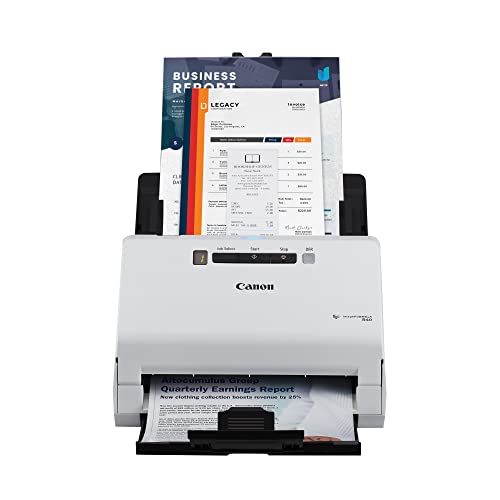
Canon imageFORMULA R40 Duplex Scanner
Best for: Automating receipt data entry
- Scan Speed
- Up to 40 ppm
- Media Types
- Receipts, invoices
- Print Output
- Color
- Supported Functions
- Scan
- Features
- Duplex Printing, Automatic Document Feeder, Scanner
- Use Case
- Office, Home
View on Amazon: Canon imageFORMULA R40 Duplex Scanner Affiliate link
The Canon imageFORMULA R40 is a dedicated receipt and invoice scanner designed for office and home use. It features a single automatic document feeder and supports duplex scanning at up to 40 pages per minute. The device includes software to extract data like payee, amount, and date, uploading it directly to Intuit QuickBooks Online or other cloud services. It creates keyword-searchable files for easy organization.
Pros
- Scans receipts and invoices at up to 40 ppm
- Supports duplex scanning for two-sided documents
- Includes CaptureOnTouch plugin for QuickBooks Online integration
- Extracts key data fields automatically
Cons
- Limited to receipts and invoices, not general documents
- No wireless connectivity mentioned in specifications
- Requires PC or Mac for operation
Good fit if
- You need to digitize high volumes of receipts
- You use Intuit QuickBooks Online for accounting
- You want to extract data automatically
Skip if
- You need to scan general office documents
- You require wireless scanning capabilities
- You do not use QuickBooks or similar cloud services
Verdict: The Canon imageFORMULA R40 Receipt Scanner is a specialized tool for users who process large numbers of receipts and invoices. It fits those who rely on Intuit QuickBooks Online and want to automate data extraction. It is not suitable for general document scanning or wireless workflows.

Epson Wireless Desktop Duplex Document Scanner
Best for: Wireless color duplex scanning workflows
- Scan Speed
- Up to 35 ppm / 70 ipm
- ADF Capacity
- 50 sheets
- Connectivity
- Wireless
- Media Types
- Business cards, ID cards
- Driver Support
- TWAIN
- Print Output
- Color
View on Amazon: Epson Wireless Desktop Duplex Document Scanner Affiliate link
The Epson ES-500W is a wireless color duplex document scanner designed for PC and Mac users. It features a 50-sheet auto document feeder and scans up to 35 pages per minute. Built-in OCR creates searchable PDFs and editable files. You can scan directly to smartphones, tablets, or cloud services like Dropbox and Google Drive. This model suits teams needing flexible connectivity and fast document processing without cables.
Pros
- Wireless connectivity for scanning to mobile devices and computers
- 50-sheet auto document feeder handles stacks of paper
- Scans up to 35 ppm with duplex capability
- Built-in OCR for searchable PDFs and editable files
Cons
- No mention of Ethernet or USB connectivity options
- Heavier build at 8.16 pounds compared to portable peers
- Limited to wireless connection which may be slower than wired
Good fit if
- You need to scan from multiple devices without cables
- You process high volumes of color documents daily
- You want direct scanning to cloud storage services
Skip if
- You require a portable scanner under 5 pounds
- You need a wired Ethernet connection for stability
- You only scan black and white text documents
Verdict: Epson ES-500W Wireless Color Duplex Scanner fits offices that prioritize wireless flexibility and color duplex speed over portability and wired reliability.

Xerox DocuMate 3125 Desktop Scanner
Best for: compact desktop duplex scanning
- Scan Speed
- 40 ppm / 70 ipm
- ADF Capacity
- 50 sheets
- Portability
- Desktop
- Features
- Duplex Printing, Automatic Document Feeder, Scanner
- Scanning
- Auto Document Feeder
- Auto Document Feeder
- ADF
View on Amazon: Xerox DocuMate 3125 Desktop Scanner Affiliate link
The Xerox DocuMate 3125 is a compact desktop scanner designed for PC and Mac users. It features a 50-sheet automatic document feeder and supports duplex scanning. You get speeds of 40 pages per minute at 200 dpi. It handles paper sizes from 2x2 inches up to 8.5x38 inches. This model creates searchable PDFs. It suits small offices needing reliable, space-saving color and grayscale scanning.
Pros
- 50-sheet automatic document feeder capacity
- Duplex scanning for two-sided documents
- 40 ppm scan speed at 200 dpi
- Compact footprint at 11.2 x 6.5 x 6.7 inches
Cons
- Desktop unit is not portable
- No wireless connectivity listed in specifications
- Maximum resolution not specified in data
Good fit if
- You need a small footprint for a crowded desk
- You scan both sides of documents regularly
- You use PC or Mac computers
Skip if
- You require wireless or mobile scanning
- You need to scan large format documents over 8.5 inches wide
- You prioritize high-resolution scanning over speed
Verdict: Xerox DocuMate 3125 Desktop Scanner fits small offices that value space efficiency and duplex capability. It is a practical choice for users who scan standard paper sizes on wired connections.
Specifications side by side
| Spec | Fujitsu Color Duplex Document Scanner | Epson WorkForce Portable Duplex Scanner | Epson WorkForce Desktop Duplex Scanner | Fujitsu fi-7180 Duplex Document Scanner | Canon imageFORMULA R40 Duplex Scanner | Epson Wireless Desktop Duplex Document Scanner | Xerox DocuMate 3125 Desktop Scanner |
|---|---|---|---|---|---|---|---|
| Scan Speed | 60 ppm | 25 ppm/50 ipm | Up to 35 ppm / 70 ipm | 80 ppm | Up to 40 ppm | Up to 35 ppm / 70 ipm | 40 ppm / 70 ipm |
| ADF Capacity | 80 sheets | 20 sheets | 50 sheets | 80 sheets | not stated | 50 sheets | 50 sheets |
| Connectivity | USB 3.0 | USB | USB 3.0 | not stated | not stated | Wireless | not stated |
| Portability | not stated | Portable | not stated | not stated | not stated | not stated | Desktop |
| Media Types | not stated | not stated | Business/ID cards, receipts | not stated | Receipts, invoices | Business cards, ID cards | not stated |
| Daily Duty Cycle | 4,000 scans | not stated | not stated | not stated | not stated | not stated | not stated |
| Power Source | not stated | AC power or USB power | not stated | not stated | not stated | not stated | not stated |
| Driver Support | not stated | not stated | TWAIN | TWAIN, ISIS | not stated | TWAIN | not stated |
| Print Output | Color | Color | Color | Color | Color | Color | not stated |
| Supported Functions | not stated | not stated | not stated | not stated | Scan | not stated | not stated |
| Print Resolution | Up to 600 dpi | not stated | not stated | not stated | not stated | not stated | not stated |
| Features | Duplex Printing, Automatic Document Feeder, Scanner | Duplex Printing, Automatic Document Feeder, Scanner | Duplex Printing, Automatic Document Feeder, Scanner | Duplex Printing, Automatic Document Feeder, Scanner | Duplex Printing, Automatic Document Feeder, Scanner | Duplex Printing, Automatic Document Feeder, Scanner | Duplex Printing, Automatic Document Feeder, Scanner |
| Ideal For | Documents | Documents | Documents | Documents | Documents | Documents | Documents |
| Use Case | not stated | not stated | not stated | not stated | Office, Home | not stated | not stated |
| Scanner Type | not stated | Portable | not stated | not stated | Receipt | not stated | not stated |
| Scanning | Auto Document Feeder | Auto Document Feeder | Auto Document Feeder | Auto Document Feeder | Auto Document Feeder | Auto Document Feeder | Auto Document Feeder |
| Duplex Scanning | Duplex | Duplex | Duplex | Duplex | Duplex | Duplex | Duplex |
| Auto Document Feeder | ADF | ADF | ADF | ADF | ADF | ADF | ADF |
| Dimensions | 12 × 10 × 9 inches | 11.3 × 3.5 × 2 inches | 11.6 × 6.6 × 6.3 inches | 11.8 × 6.7 × 6.4 inches | 9.5 × 15 × 12.5 inches | 11.6 × 6.9 × 6.6 inches | 6.5 × 11.2 × 6.7 inches |
| Weight | 9.3 pounds | 1.08 pounds | 8.09 pounds | 9.3 pounds | 6.17 pounds | 8.16 pounds | 5.41 pounds |
| Model | Fi-7160 | ES-200 | ES-400 | PA03670-B005 | 4229C009 | ES-500W | XDM31255M-WU |
| Color | not stated | Black | not stated | Black/White | White | not stated | Black |
| Size | not stated | not stated | not stated | not stated | One Size | not stated | not stated |
Frequently asked questions
Which scanner is best for mobile professionals?
The Epson ES-200 Portable Color Scanner is the top choice for users on the go. It weighs only 1.08 pounds and measures 3.5 inches wide. This compact design makes it easy to carry. It supports duplex scanning and connects via USB, ensuring reliable performance without bulky equipment.
What is the best wireless option for color scanning?
The Epson ES-500W Wireless Color Duplex Scanner offers wireless flexibility for color workflows. It supports duplex scanning and uses an automatic document feeder. This model fits offices that prioritize wireless convenience over wired stability, allowing you to scan documents from a distance without cable constraints.
Which scanner is ideal for automating receipt data entry?
The Canon imageFORMULA R40 Receipt Scanner is specialized for processing large volumes of receipts and invoices. It integrates with Intuit QuickBooks Online to automate data extraction. This device is not suitable for general document scanning but excels in office environments focused on financial document automation.
How does the Fujitsu fi-7180 compare to the Fi-7160?
The Fujitsu fi-7180 is designed for high-volume professional workflows with an 80 pages per minute speed. It shares duplex and ADF features with the Fi-7160 but targets busy offices needing higher throughput. Both are desktop units, but the fi-7180 prioritizes speed over portability for heavy users.
Is there a compact desktop scanner for small offices?
The Xerox DocuMate 3125 Desktop Scanner fits small offices needing space efficiency. It measures 11.2 inches wide and 6.7 inches high. It supports duplex scanning and connects via wired connections, making it a practical choice for users scanning standard paper sizes in limited desk space.
Which scanner offers the best balance of speed and size?
The Epson ES-400 Color Duplex Scanner balances speed and desk footprint well. It weighs 8.09 pounds and measures 6.6 inches wide. It supports duplex scanning and an automatic document feeder. This model suits users who prioritize scanning throughput on a desk without requiring wireless connectivity or extreme portability.