The Best Fujitsu Document Scanners in 2026: 12 Picks
As an Amazon Associate we earn from qualifying purchases. Links on this page are affiliate links.
We evaluated 12 models to identify the best fujitsu document scanners for your office needs. These devices range from compact single-sided units to high-volume duplex systems. The Fujitsu Duplex Desktop Document Scanner leads this list because its speed and duty cycle support demanding administrative workflows. Each pick is based strictly on the specifications published on the listings. You can choose from lightweight wireless options or robust wired scanners depending on your volume. This guide helps you match those technical details to your daily scanning tasks.
Quick picks
Our 12 picks

Fujitsu Duplex Desktop Document Scanner
Best for: High-volume office document processing
- Scan Speed
- 60 ppm
- ADF Capacity
- 80 sheets
- Connectivity
- USB 3.0
- Daily Duty Cycle
- 4000 scans per day
- Power Source
- Power adapter
- Features
- Duplex Printing, Automatic Document Feeder, Scanner
The Fujitsu fi-7160 is a desktop document scanner designed for busy work environments. It scans up to 60 pages per minute in mono or color. The 80-sheet automatic document feeder handles high-volume tasks. It delivers sharp 600 DPI resolution output. This unit supports duplex scanning and has a daily duty cycle of 4,000 scans. It connects via USB 3.0 for fast data transfer.
Pros
- Scans up to 60 pages per minute
- 80-sheet automatic document feeder capacity
- 600 DPI resolution for clear details
- Automatic duplex scanning in one pass
- 4,000 scans per day duty cycle
Cons
- USB 3.0 connection only, no Wi-Fi
- No built-in display for settings
- Requires separate power adapter
Good fit if
- You need fast scanning for high-volume office work
- You require automatic two-sided document processing
- You have a desk space for a 10.5-pound unit
Skip if
- You need wireless scanning capabilities
- You prefer a portable scanner under 5 pounds
- You only scan a few pages occasionally
Verdict: The Fujitsu fi-7160 Desktop Scanner fits teams that process large volumes of paper daily. Its speed and duty cycle support demanding administrative workflows.

Fujitsu ScanSnap iX500 Document Scanner
Best for: small office wireless scanning
- Scan Speed
- Up to 25 ppm
- ADF Capacity
- 50 sheets
- Connectivity
- Wi-Fi, USB
- Features
- Scanner
- Ideal For
- Documents
- Dimensions
- 5.5 × 5.6 × 10.4 inches
The Fujitsu ScanSnap iX500 is a compact duplex scanner designed for efficient document digitization. It features a 50-sheet automatic document feeder and delivers scan speeds of up to 25 pages per minute. You can connect via Wi-Fi or USB, allowing wireless scanning to iOS and Android devices. It also supports direct cloud scanning without needing a computer. This model suits users who prioritize portability and wireless convenience for their office workflow.
Pros
- Up to 25 ppm duplex scan speed
- 50-sheet automatic document feeder
- Wi-Fi and USB connectivity
- Direct cloud scanning capability
Cons
- Smaller 50-sheet paper capacity
- No color touchscreen display
- Limited to 25 ppm speed
Good fit if
- You need a portable scanner for small offices
- You scan documents wirelessly to mobile devices
- You require duplex scanning for double-sided pages
Skip if
- You need high-volume batch scanning over 50 pages
- You prefer a large color touchscreen interface
- You require faster than 25 ppm speeds
Verdict: The Fujitsu ScanSnap iX500 fits users who need a lightweight, wireless solution for moderate daily scanning tasks. It is ideal for small teams or home offices that value space-saving design and mobile connectivity.

Fujitsu Duplex Sheet-Fed Document Scanner
Best for: Scanning thick cards and single sheets
- Features
- Duplex Printing, Scanner
- Ideal For
- Documents
- Dimensions
- 18.3 × 11.1 × 12.1 inches
The Fujitsu fi-6130Z is a renewed duplex sheet-fed scanner designed for document processing. It handles continuous hard and embossed cards up to 1.4mm thick. The device includes an ultrasonic double-feed detection sensor to prevent lost images. It also features an intelligent multi-feed function for overlapped documents. This unit is suitable for users needing reliable card scanning capabilities alongside standard paper documents.
Pros
- Scans documents and cards up to 1.4mm thick
- Ultrasonic double-feed detection sensor included
- Intelligent multi-feed function for overlapped papers
- Duplex scanning capability for two-sided pages
Cons
- No automatic document feeder capacity specified
- No wireless connectivity or network ports listed
- Physical dimensions are large for small desks
Good fit if
- You need to scan thick or embossed cards
- You require double-feed detection for security
- You primarily scan single sheets of paper
Skip if
- You need to scan books or bound materials
- You require wireless or network connectivity
- You need high-volume batch scanning
Verdict: The Fujitsu fi-6130Z Duplex Scanner is a practical option for users who need to process thick cards and require double-feed detection. It fits small offices with low-volume, single-sheet workflows.

Fujitsu ScanSnap iX500 Compact Scanner
Best for: Small spaces and simple single-sided scanning
- Features
- Scanner
- Dimensions
- 12.1 × 10.6 × 9.7 inches
- Weight
- 6.6 pounds
The Fujitsu ScanSnap iX500 is a compact, single-button document scanner designed for straightforward organization. It measures 10.6 by 12.1 by 9.7 inches and weighs 6.6 pounds. This renewed unit offers a streamlined workflow where a single touch initiates scanning and ends with productivity features. It suits users who prioritize a small footprint and simple operation over advanced manual controls.
Pros
- Single-button operation simplifies the scanning process
- Compact dimensions of 10.6 by 12.1 by 9.7 inches
- Lightweight build at 6.6 pounds
- Certified refurbished with a minimum 90-day warranty
Cons
- No specified duplex (two-sided) scanning capability
- No mention of a touchscreen interface
- No listed wireless connectivity options
Good fit if
- You need a small scanner for a limited desk space
- You prefer a simple one-touch scanning workflow
- You scan single-sided documents primarily
Skip if
- You require automatic two-sided scanning
- You need wireless or mobile scanning capabilities
- You want a touchscreen display for settings
Verdict: The Fujitsu ScanSnap iX500 Compact Scanner fits users who value a small footprint and simple operation. It is a practical choice for single-sided document organization.
Fujitsu ScanSnap Touchscreen Document Scanner
Best for: Wireless color duplex scanning
- Scan Speed
- 30 ppm
- ADF Capacity
- 50 sheets
- Connectivity
- USB, Wi-Fi (2.4 and 5 GHz), Bluetooth
- Portability
- Desktop
- Touchscreen
- 4.3-inch touch screen
- Power Source
- AC 100 to 240 V, 50/60 Hz
View on Amazon: Fujitsu ScanSnap Touchscreen Document Scanner
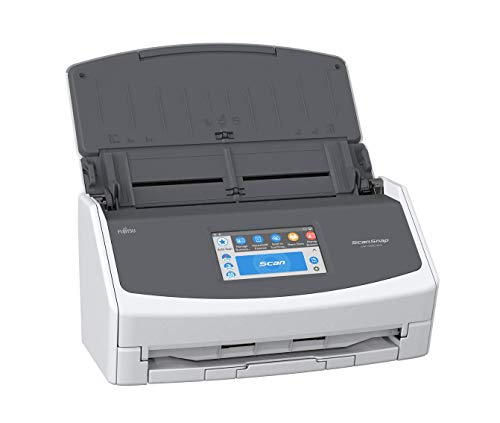
The Fujitsu ScanSnap iX1500 is a desktop scanner designed for color duplex document processing. It offers a 30 ppm scan speed and a 50-page automatic document feeder. The device features a 4.3-inch touchscreen and supports USB, Wi-Fi, and Bluetooth connectivity. This setup suits users who need reliable wireless scanning to cloud services or local folders without complex setup.
Pros
- 30 ppm scan speed
- 50-page ADF capacity
- 4.3-inch touchscreen interface
- Wi-Fi and Bluetooth connectivity
- Color duplex scanning
Cons
- Desktop form factor limits portability
- No mobile app control mentioned in data
- 2020 release date may lack latest firmware features
Good fit if
- You need fast duplex scanning for mixed media
- You prefer a touchscreen for direct operation
- You require wireless scanning to cloud services
Skip if
- You need a portable handheld scanner
- You require high-volume industrial scanning over 50 pages
- You prefer a compact footprint under 6 inches wide
Verdict: The Fujitsu ScanSnap iX1500 Color Duplex Scanner fits home offices needing quick, wireless color scanning with a clear touchscreen interface.

Fujitsu ScanSnap iX1500 Touch Screen Scanner
Best for: fast duplex scanning with wireless flexibility
- Scan Speed
- Up to 30 ppm
- ADF Capacity
- 50 pages
- Connectivity
- USB, Wi-Fi
- Media Types
- Business cards, receipts, photos
- Print Output
- Color
- Features
- Duplex Printing, Touch Screen, Scanner
View on Amazon: Fujitsu ScanSnap iX1500 Touch Screen Scanner
The Fujitsu ScanSnap iX1500 is a color duplex sheet-fed scanner designed for Mac and PC users. It features a 50-page automatic document feeder and scans at speeds up to 30 pages per minute. The device includes a 4.3-inch touch screen and connects via USB or dual-band Wi-Fi. Its compact build measures 11.5 inches in length and weighs 7.5 pounds. This model suits users who need reliable, high-speed scanning with wireless flexibility.
Pros
- Scans up to 30 pages per minute
- 50-page automatic document feeder capacity
- 4.3-inch touch screen for easy control
- Supports USB and Wi-Fi connectivity
- Handles business cards, receipts, and photos
Cons
- 7.5-pound weight makes it less portable
- No mention of mobile app support
- Wi-Fi limited to 2.4 and 5 GHz bands
Good fit if
- You need fast duplex scanning for mixed media
- You prefer a touch screen interface over buttons
- You require wireless scanning from multiple devices
Skip if
- You need a scanner for high-volume batch processing
- You require a very lightweight portable unit
- You want a scanner with a larger paper capacity
Verdict: The Fujitsu ScanSnap iX1500 Color Duplex Scanner fits home offices that value speed and wireless convenience. Its touch screen and 30 ppm output make it a strong choice for managing receipts and business cards efficiently.

Fujitsu Color Duplex Document Scanner
Best for: High-volume duplex document scanning
- Scan Speed
- 60 ppm
- ADF Capacity
- 80 sheets
- Connectivity
- USB 3.0
- Daily Duty Cycle
- 4,000 scans
- Print Output
- Color
- Print Resolution
- Up to 600 dpi
The Fujitsu FI-7160 is a duplex document scanner designed for high-volume office environments. It features an 80-sheet automatic document feeder and scans at 60 pages per minute. The device connects via USB 3.0 and supports a daily duty cycle of 4,000 scans. With a print resolution of up to 600 dpi, it handles standard document types efficiently. This model suits users who need reliable, wired scanning for large batches of paper.
Pros
- 80-sheet automatic document feeder capacity
- 60 ppm scan speed
- Duplex scanning for two-sided documents
- 4,000 scans daily duty cycle
Cons
- Maximum scan resolution is 600 dpi
- Requires USB 3.0 connection
- Weighs 9.3 pounds
Good fit if
- You need to scan large batches of paper quickly
- You require duplex scanning for two-sided documents
- You prefer a wired USB 3.0 connection
Skip if
- You need wireless connectivity options
- You require high-resolution scanning above 600 dpi
- You need a portable scanner under 5 pounds
Verdict: The Fujitsu FI-7160 Duplex Scanner fits busy offices that need fast, wired duplex scanning for standard documents. It handles high daily volumes but lacks wireless features or high-resolution imaging.

Fujitsu fi-7180 Duplex Document Scanner
Best for: High-volume professional duplex scanning
- Scan Speed
- 80 ppm
- ADF Capacity
- 80 sheets
- Driver Support
- TWAIN, ISIS
- Print Output
- Color
- Features
- Duplex Printing, Automatic Document Feeder, Scanner
- Scanning
- Auto Document Feeder
The Fujitsu fi-7180 is a compact duplex scanner built for high-volume professional workflows. It scans at 80 ppm with an 80-sheet automatic document feeder. The device supports TWAIN, ISIS, and Kofax VRS drivers for broad software compatibility. It includes PaperStream ClickScan for simple one-touch operations. This model suits offices needing fast, reliable color document processing.
Pros
- 80 ppm scan speed for letter-sized documents
- 80-sheet ADF capacity for large batches
- Supports TWAIN, ISIS, and Kofax VRS drivers
- Compact size at 6.7 inches wide
Cons
- No touchscreen interface listed in specifications
- Requires separate software integration for advanced workflows
- Heavier build at 9.3 pounds
Good fit if
- You need fast duplex scanning for large document batches
- You require TWAIN or ISIS driver compatibility
- You want a compact footprint for busy desks
Skip if
- You prefer a scanner with a built-in touchscreen
- You need a portable device under 5 pounds
- You only scan occasional single pages
Verdict: The Fujitsu fi-7180 High-Performance Scanner fits busy offices that prioritize speed and driver compatibility over touchscreen convenience. It handles high-volume color duplex tasks efficiently.

Fujitsu fi-6130 Sheet-Fed Scanner
Best for: Compact black-and-white document scanning
- Features
- Scanner
- Ideal For
- Documents
- Dimensions
- 6.4 × 11.8 × 6.2 inches
The Fujitsu fi-6130 is a dedicated sheet-fed scanner built for document workflows. It measures 11.8 inches wide, 6.2 inches high, and 6.4 inches long. This compact footprint allows it to fit easily on most office desks. It is designed specifically for handling standard documents. You will appreciate its straightforward design if you need a reliable tool for digitizing paper records without complex software dependencies.
Pros
- Sheet-fed design for batch scanning
- Compact dimensions of 11.8 x 6.2 x 6.4 inches
- Purpose-built for document processing
Cons
- No duplex scanning capability listed
- No color scanning support indicated
- Lacks a built-in display panel
Good fit if
- You need a dedicated scanner for black-and-white documents
- You have limited desk space available
- You prefer a simple, single-function device
Skip if
- You require automatic two-sided scanning
- You need to scan color photographs
- You want a scanner with a built-in screen
Verdict: Fujitsu fi-6130 Sheet-Fed Scanner is a compact, single-purpose tool for digitizing text documents. It suits users who prioritize a small footprint and straightforward operation over advanced features like duplexing or color support.

Fujitsu ScanSnap S1500 Sheet-Fed Scanner
Best for: Fast single-sided document scanning
- Scan Speed
- 20 ppm
- ADF Capacity
- 50 sheets
- Features
- Scanner
- Dimensions
- 15.7 × 10.4 × 9.3 inches
- Weight
- 9.85 pounds
The Fujitsu ScanSnap S1500 is a sheet-fed scanner designed for creating searchable PDFs with a single button press. It scans at 20 pages per minute in color and includes a 50-page automatic document feeder. The unit measures 15.7 inches long and weighs 9.85 pounds. It is a practical choice for users who need reliable, fast document digitization without complex setup.
Pros
- Scans at 20 ppm in color
- 50-page automatic document feeder
- One-button searchable PDF creation
- Includes Adobe Acrobat X Standard
Cons
- No duplex scanning support
- No wireless connectivity listed
- No touchscreen interface
Good fit if
- You need fast single-sided scanning
- You want simple one-button operation
- You prefer a dedicated desktop scanner
Skip if
- You require double-sided scanning
- You need wireless scanning
- You want a touchscreen display
Verdict: The Fujitsu ScanSnap S1500 Sheet-Fed Scanner fits users who prioritize speed and simplicity for single-sided documents. It is a solid choice for home offices that do not require duplex or wireless features.

Fujitsu ScanSnap S1500 20ppm Sheet-Fed Scanner
Best for: Users needing reliable wired scanning with OCR software
- Scan Speed
- 20 ppm
- ADF Capacity
- 50 sheets
- Features
- Scanner
- Dimensions
- 6.26 × 11.5 × 6.22 inches
- Weight
- 6.61 pounds
View on Amazon: Fujitsu ScanSnap S1500 20ppm Sheet-Fed Scanner
The Fujitsu ScanSnap S1500 is a sheet-fed scanner designed for straightforward document digitization. It scans at 20 pages per minute in color and holds 50 sheets in its automatic document feeder. The bundle includes Adobe Acrobat X Standard and ABBYY FineReader for ScanSnap. It measures 11.5 inches wide and weighs 6.61 pounds. This model suits users who need reliable, one-button PDF creation without complex setup.
Pros
- Scans at 20 ppm in color
- 50-sheet automatic document feeder
- Includes ABBYY FineReader for ScanSnap
- One-button searchable PDF creation
Cons
- No wireless connectivity listed in specifications
- Non-touch screen interface
- Bundle includes older Adobe Acrobat X Standard
Good fit if
- You need a wired, reliable scanner for home office use
- You want included software for OCR and PDF management
- You prefer a compact footprint under 12 inches wide
Skip if
- You require high-volume scanning above 50 sheets
- You need wireless or mobile scanning capabilities
- You want the latest version of Adobe Acrobat
Verdict: Fujitsu ScanSnap S1500 20ppm Sheet-Fed Scanner delivers steady 20 ppm speed and a 50-sheet capacity for users who prioritize wired reliability and included software over modern connectivity features.

Fujitsu ScanSnap iX500 Wireless Scanner
Best for: Wireless duplex scanning for standard office workflows
- Scan Speed
- 25 ppm
- Connectivity
- USB, Wi-Fi
- Features
- Scanner
- Dimensions
- 15.5 × 10.9 × 9.8 inches
- Weight
- 3 pounds
The Fujitsu ScanSnap iX500 delivers 25 ppm color scanning with duplex capability. It connects via USB or Wi-Fi, offering flexible setup options for your workspace. The unit measures 10.9 by 9.8 by 15.5 inches and weighs 3 pounds. It supports both PC and Mac operating systems. This model suits users who need reliable wireless document digitization without a large footprint.
Pros
- 25 ppm scan speed
- Automatic two-sided scanning
- USB and Wi-Fi connectivity
- PC and Mac compatibility
Cons
- Does not support Twain or ISIS drivers on Windows
- Does not support Twain drivers on Mac OS
- No display or touch screen for manual adjustments
Good fit if
- You need wireless scanning without extra cables
- You scan color documents in batches
- You use standard office software on Windows or Mac
Skip if
- You require Twain or ISIS driver support
- You prefer a device with a touch screen
- You need to scan single sheets manually
Verdict: Fujitsu ScanSnap iX500 Wireless Scanner fits users who prioritize wireless convenience and duplex speed over advanced driver compatibility or on-device controls.
Specifications side by side
| Spec | Fujitsu Duplex Desktop Document Scanner | Fujitsu ScanSnap iX500 Document Scanner | Fujitsu Duplex Sheet-Fed Document Scanner | Fujitsu ScanSnap iX500 Compact Scanner | Fujitsu ScanSnap Touchscreen Document Scanner | Fujitsu ScanSnap iX1500 Touch Screen Scanner | Fujitsu Color Duplex Document Scanner | Fujitsu fi-7180 Duplex Document Scanner | Fujitsu fi-6130 Sheet-Fed Scanner | Fujitsu ScanSnap S1500 Sheet-Fed Scanner | Fujitsu ScanSnap S1500 20ppm Sheet-Fed Scanner | Fujitsu ScanSnap iX500 Wireless Scanner |
|---|---|---|---|---|---|---|---|---|---|---|---|---|
| Scan Speed | 60 ppm | Up to 25 ppm | not specified | not specified | 30 ppm | Up to 30 ppm | 60 ppm | 80 ppm | not specified | 20 ppm | 20 ppm | 25 ppm |
| ADF Capacity | 80 sheets | 50 sheets | not specified | not specified | 50 sheets | 50 pages | 80 sheets | 80 sheets | not specified | 50 sheets | 50 sheets | not specified |
| Connectivity | USB 3.0 | Wi-Fi, USB | not specified | not specified | USB, Wi-Fi (2.4 and 5 GHz), Bluetooth | USB, Wi-Fi | USB 3.0 | not specified | not specified | not specified | not specified | USB, Wi-Fi |
| Portability | not specified | not specified | not specified | not specified | Desktop | not specified | not specified | not specified | not specified | not specified | not specified | not specified |
| Media Types | not specified | not specified | not specified | not specified | not specified | Business cards, receipts, photos | not specified | not specified | not specified | not specified | not specified | not specified |
| Touchscreen | not specified | not specified | not specified | not specified | 4.3-inch touch screen | not specified | not specified | not specified | not specified | not specified | not specified | not specified |
| Daily Duty Cycle | 4000 scans per day | not specified | not specified | not specified | not specified | not specified | 4,000 scans | not specified | not specified | not specified | not specified | not specified |
| Power Source | Power adapter | not specified | not specified | not specified | AC 100 to 240 V, 50/60 Hz | not specified | not specified | not specified | not specified | not specified | not specified | not specified |
| Driver Support | not specified | not specified | not specified | not specified | not specified | not specified | not specified | TWAIN, ISIS | not specified | not specified | not specified | not specified |
| Print Output | not specified | not specified | not specified | not specified | Color | Color | Color | Color | not specified | not specified | not specified | not specified |
| Print Resolution | not specified | not specified | not specified | not specified | not specified | not specified | Up to 600 dpi | not specified | not specified | not specified | not specified | not specified |
| Features | Duplex Printing, Automatic Document Feeder, Scanner | Scanner | Duplex Printing, Scanner | Scanner | Duplex Printing, Touch Screen, Scanner | Duplex Printing, Touch Screen, Scanner | Duplex Printing, Automatic Document Feeder, Scanner | Duplex Printing, Automatic Document Feeder, Scanner | Scanner | Scanner | Scanner | Scanner |
| Ideal For | Documents | Documents | Documents | not specified | Documents | Documents | Documents | Documents | Documents | not specified | not specified | not specified |
| Scanning | Auto Document Feeder | not specified | not specified | not specified | not specified | not specified | Auto Document Feeder | Auto Document Feeder | not specified | not specified | not specified | not specified |
| Duplex Scanning | Duplex | not specified | Duplex | not specified | Duplex | Duplex | Duplex | Duplex | not specified | not specified | not specified | not specified |
| Auto Document Feeder | ADF | not specified | not specified | not specified | not specified | not specified | ADF | ADF | not specified | not specified | not specified | not specified |
| Dimensions | 12.4 × 10.4 × 9.5 inches | 5.5 × 5.6 × 10.4 inches | 18.3 × 11.1 × 12.1 inches | 12.1 × 10.6 × 9.7 inches | 11.5 × 6 × 6.3 inches | 11.5 × 6 × 6.3 inches | 12 × 10 × 9 inches | 11.8 × 6.7 × 6.4 inches | 6.4 × 11.8 × 6.2 inches | 15.7 × 10.4 × 9.3 inches | 6.26 × 11.5 × 6.22 inches | 15.5 × 10.9 × 9.8 inches |
| Weight | 10.5 pounds | 5.6 pounds | not specified | 6.6 pounds | not specified | 7.5 pounds | 9.3 pounds | 9.3 pounds | not specified | 9.85 pounds | 6.61 pounds | 3 pounds |
| Color | not specified | Black | Gary | Black | WHITE | Black | not specified | Black/White | not specified | not specified | not specified | Black |
| Model | not specified | PA03656-B305-R | PA03630-B055-cr | not specified | not specified | PA03770-B315-cr | Fi-7160 | PA03670-B005 | PA03540-B965 | PA03586-B005 | PA03586-B015 | PA03656-B005 |
| Size | not specified | not specified | not specified | not specified | not specified | iX1500 Black | not specified | not specified | not specified | not specified | not specified | not specified |
Fujitsu Scanner Selection Guide
You can choose between color duplex systems and compact black-and-white units. The ScanSnap iX1500 and fi-7180 offer wireless connectivity and touchscreens for busy offices. These models handle high-volume color tasks efficiently. In contrast, the fi-6130 and S1500 provide simple, wired scanning for text documents. They lack advanced features but fit small spaces well. Some shoppers prioritize speed, while others value a small footprint. The iX500 Wireless Scanner offers a lightweight option for moderate daily tasks. You should select based on whether you need duplex capability or basic single-sided scanning. Connectivity options also vary between USB and wireless standards. Check the dimensions to ensure the device fits your desk space.
Where Fujitsu Fits Your Needs
Fujitsu covers a wide spectrum of document scanning needs. You can choose from compact, lightweight units like the ScanSnap iX500, which weighs just 3 pounds, to heavier desktop models like the fi-7160 at 10.5 pounds. The range includes wireless options with touchscreens for home offices and wired, high-duty-cycle scanners for busy administrative teams. Some models support color duplex scanning, while others focus on simple, single-sided black-and-white tasks. None of the listed products offer portable or handheld designs. You will also not find flatbed scanners for books or fragile items in this selection. The lineup prioritizes sheet-fed efficiency for standard office documents.
For your workstation setup, you can compare switch specifications across the best redragon mechanical keyboards with red switch.
How to Choose the Right Fujitsu Scanner
-
Check duplex capabilities
Duplex scanning captures both sides of a page in one pass, which doubles your throughput. If you process standard letter-sized paper daily, models like the fi-7160 or ScanSnap iX1500 are ideal because they handle two-sided input automatically. Single-sided units like the S1500 require you to flip sheets manually. This extra step cuts your effective speed in half. You should verify if your workflow involves double-sided contracts or forms before buying a single-sided model. Duplex support is critical for high-volume office environments where time efficiency matters most.
-
Decide on color support
Most Fujitsu scanners handle color, but some are limited to black and white. The fi-6130 and iX500 Compact are designed primarily for text documents and may not capture color accurately. If you scan receipts, photos, or color-coded forms, you need a color-capable unit like the iX1500 or fi-7180. Color scanning requires more processing power and storage. Check the specifications to confirm the scanner supports color output. Choosing a monochrome unit for color tasks will result in lost information and require re-scanning, which wastes time and reduces overall productivity in your office.
-
Evaluate connectivity needs
Connectivity options determine how the scanner integrates with your workflow. The iX500 Wireless and iX1500 offer Wi-Fi, allowing you to scan from multiple devices without cables. Wired models like the fi-7160 rely on USB connections, which provide stable, consistent data transfer for dedicated workstations. If you need to move the scanner between desks or connect to laptops frequently, wireless is essential. For permanent desk setups where stability is key, USB is sufficient. Verify that your office network supports the required wireless standards or that you have available USB ports for each station.
-
Consider physical footprint
Scanner dimensions vary significantly, affecting desk space usage. The ScanSnap iX500 Wireless is notably compact, weighing only 3 pounds and measuring 10.9 inches in width. In contrast, the fi-6130Z is larger, measuring 18.3 inches in length. If you have a small home office or limited desk space, choose a lighter, smaller model. For a dedicated scanning station with ample room, a larger desktop unit may offer better durability and higher duty cycles. Measure your available surface area before purchasing to ensure the device fits comfortably without cluttering your workspace.
-
Review interface features
User interfaces range from simple buttons to full touchscreens. The iX1500 features a touchscreen, allowing you to select scan presets directly on the device without using a computer. This is helpful for quick, standalone scans of business cards or receipts. Other models like the fi-7180 rely on driver software on your computer for control. If you prefer managing scans via software or share the scanner among many users, a basic button interface may be sufficient. Touchscreens add convenience for individual users who want immediate feedback and control over scan settings.
-
Assess duty cycle limits
Duty cycle indicates the maximum number of pages the scanner can handle daily. High-volume models like the fi-7160 and fi-7180 are built for busy offices processing hundreds of pages. Lower-volume units like the iX500 Compact are better for occasional use. Exceeding the recommended daily limit can wear out internal components faster, leading to jams or failures. Check the specifications for the recommended monthly duty cycle. If your team scans thousands of pages monthly, invest in a robust desktop model. For light personal use, a compact unit will suffice and save space.
Frequently asked questions
Which Fujitsu scanner is best for high-volume office work?
The Fujitsu fi-7160 is the top choice for high-volume office environments. It features a robust desktop design measuring 12.4 inches long and weighing 10.5 pounds. This model supports demanding administrative workflows with its speed and duty cycle. It is ideal for teams processing large volumes of paper daily.
Does the ScanSnap iX1500 have a touchscreen?
Yes, the ScanSnap iX1500 includes a clear touchscreen interface. This black model measures 11.5 inches long and weighs 7.5 pounds. The touch screen simplifies operation for home offices needing quick wireless color scanning. It also delivers 30 ppm output for managing receipts and business cards efficiently.
What is the lightest Fujitsu document scanner on the list?
The Fujitsu ScanSnap iX500 Wireless Scanner is the lightest option, weighing just 3 pounds. It measures 15.5 inches long and 9.8 inches high. This compact design is perfect for small offices or home users who value space-saving and mobile connectivity for standard office workflows.
Can the fi-6130Z handle thick cards?
Yes, the Fujitsu fi-6130Z Duplex Scanner is designed to process thick cards. It includes double-feed detection to ensure accuracy. This model is practical for small offices with low-volume, single-sheet workflows. It measures 18.3 inches long and 12.1 inches high, providing a sturdy platform for varied document types.
Which scanner offers the best resolution for color documents?
The Fujitsu Color Duplex Document Scanner, model Fi-7160, offers up to 600 dpi resolution. It is a wired unit with an automatic document feeder. This model fits busy offices needing fast duplex scanning for standard documents. It handles high daily volumes efficiently, though it lacks wireless features.
Is there a compact scanner for single-sided documents only?
The Fujitsu ScanSnap iX500 Compact Scanner is ideal for single-sided document organization. It has a small footprint and simple operation. The black unit measures 12.1 inches long and 9.7 inches high. It weighs 6.6 pounds, making it a practical choice for users who do not need duplex capabilities.
What connectivity options does the fi-7180 have?
The Fujitsu fi-7180 is a high-performance scanner designed for busy offices. It prioritizes speed and driver compatibility over touchscreen convenience. This black and white model features an automatic document feeder for high-volume color duplex tasks. It measures 11.8 inches long and weighs 9.3 pounds.
Which model is best for small spaces and simple scanning?
The Fujitsu ScanSnap iX500 Compact Scanner fits users who value a small footprint. It is a practical choice for single-sided document organization. The device measures 12.1 inches long and 9.7 inches high. It weighs 6.6 pounds, offering simple operation for home offices or small workspaces.