Epson Workforce WF-2850 Wireless All-in-One Review: Specs, Pros and Cons
As an Amazon Associate we earn from qualifying purchases. Links on this page are affiliate links.
This epson workforce wf 2850 wireless all in one review highlights a compact office machine designed for mixed tasks. It functions as a color printer, scanner, copier, and fax device. Two specs define its core utility: automatic two-sided printing and wireless connectivity. These features allow you to save paper and print from mobile devices without cables. The unit uses individual ink cartridges, meaning you replace only the colors you need. It measures 14.8 by 22.7 inches and weighs 11.5 pounds. This size fits well on standard desks. The black exterior keeps it looking professional in any workspace environment.
What stands out
- Automatic two-sided printing reduces paper waste
- Wireless printing from Android and iOS devices
- Individual ink cartridges for efficient replacement
- Built-in fax and scan capabilities
- Permanent printhead for long-term reliability
Who it fits
Good fit for
This printer suits small home offices or remote workers who need a single device for multiple tasks. If you regularly print color documents, scans, and faxes, this all-in-one unit covers your needs. The wireless connectivity and mobile app support make it ideal for users who print from smartphones or tablets. The automatic duplex feature helps those who want to save paper on reports or drafts. Its compact footprint works well in tight spaces where a larger multifunction device would not fit.
Who should skip it
You should look at another option if you need high-volume commercial printing. This model is designed for home office use, not heavy-duty enterprise environments. If you require a wired Ethernet connection for stable network sharing, this wireless-only model may not suit your infrastructure. Users needing a large touchscreen interface might prefer models with bigger displays. Additionally, if you print exclusively in black and white and want the lowest cost per page, a monochrome laser printer might be more efficient than this color inkjet system.
Verdict: The Epson WorkForce WF-2850 is a practical all-in-one for light home office use. Its wireless convenience and duplex printing make it a solid choice for mixed tasks.
Epson WF-2850 Key Specs Explained
Printer Type: All-in-One
This device combines printing, scanning, copying, and faxing into a single unit. You do not need separate machines for these tasks. This saves desk space and simplifies your workflow. If you need to handle mixed office duties, this all-in-one design provides versatility without cluttering your workspace with multiple devices.
Print Output: Color
The printer produces vibrant color graphics alongside sharp text. This allows you to create professional-looking reports, flyers, and photos. Color printing is essential for marketing materials or creative projects. When comparing to monochrome laser printers, this feature adds flexibility for users who frequently need color documents.
Duplex Printing: Automatic 2-sided printing
The machine automatically flips pages to print on both sides. This reduces paper usage and helps you save money on supplies. It also keeps your document stack thinner. This feature is valuable for creating double-sided reports or booklets. It offers convenience that manual duplexing cannot match.
Connectivity: Wireless
You can connect to the printer without physical cables. This allows printing from smartphones, tablets, or computers anywhere in your range. Wireless setup simplifies installation for multiple users. It provides flexibility for modern home offices. You can print from different rooms without moving to the printer.
Ink/Toner System: Individual ink cartridges
Each color uses a separate cartridge. You only replace the specific ink that runs out. This prevents waste when one color depletes while others remain full. It makes long-term operation more efficient. You can manage costs by monitoring individual cartridge levels rather than replacing a full set.
Design and Build Overview
The Epson WorkForce WF-2850 measures 14.8 inches wide, 9.5 inches high, and 22.7 inches long. It weighs 11.5 pounds. The listing notes the color is black and the size is one size. These dimensions suggest a compact footprint suitable for small desks or home office corners. You can place it in tight spaces without it dominating the area. The weight is moderate, making it stable during operation but easy to move if you rearrange your workspace.
According to the listing, the device features a color display. This screen allows you to navigate settings and manage tasks directly on the machine. You do not need to rely solely on your smartphone or tablet for basic controls. The layout includes buttons for scanning, copying, and faxing. This physical interface supports quick access to core functions without launching software. The finish is standard for office equipment, prioritizing function over decorative elements.
The design integrates a permanent printhead and heat-free technology. This engineering choice affects the internal build, reducing moving parts that might wear out. You benefit from a device designed to last the life of the printer. The individual ink cartridge system is part of the operational design. It allows you to replace only the colors you use, keeping the machine efficient. Overall, the build focuses on reliability and space efficiency for mixed office duties.
Setup And Everyday Use Guide
You set up this device using the Epson Smart Panel app on your smartphone or tablet. The printer includes a color display that guides you through navigation during installation. This interface simplifies the initial configuration process. You connect the machine wirelessly to your network. The listing confirms support for both Android and iOS devices. This allows you to print directly from your mobile devices without additional drivers on a computer. For daily operations, the color display remains central to your interaction. You use it to manage copy, scan, and fax tasks. The machine supports wireless scanning, so you can digitize documents from your phone. Voice-activated printing is also available through Alexa, Siri, and Google Assistant. This feature lets you start print jobs hands-free. The printer uses individual ink cartridges. You replace only the specific color that runs out. This system keeps maintenance straightforward. Automatic two-sided printing is built into the hardware. You do not need to manually flip pages for duplex jobs. This saves paper and reduces waste during high-volume days. The permanent printhead is designed to last the life of the printer. This implies you avoid frequent printhead replacements. The heat-free technology operates quietly during print cycles. You can expect consistent output for text and graphics. The included Epson ScanSmart software helps you create searchable PDFs. This adds utility to your scanning workflow. Overall, the setup relies on app guidance and wireless connection. Daily use centers on the color display and mobile connectivity.
Before You Buy This Epson WF-2850
You should verify your wireless network compatibility before purchasing. This Epson WorkForce WF-2850 requires a stable Wi-Fi connection for full functionality, including mobile printing via the Epson Smart Panel app. Check that your router supports the necessary protocols to ensure seamless setup and operation from your smartphone or tablet. You must also account for ongoing ink costs. The device uses individual ink cartridges, meaning you replace only the color you run out of. This system can be economical if you print in color frequently. However, if you primarily print black text, consider whether this color model suits your needs compared to monochrome options in Laser Printers & Office Machines. The automatic two-sided printing feature helps reduce paper waste, which is useful for document-heavy workflows. Keep spare ink cartridges on hand to avoid interruptions. The permanent printhead is designed for longevity, reducing maintenance concerns. Ensure your workspace has adequate ventilation, as heat-free technology minimizes ozone output but still requires some airflow. This machine fits well in small offices or home workspaces where versatility matters more than high-volume speed.
Check before you buy
- Verify your Wi-Fi network supports the required protocols for mobile app connectivity.
- Confirm you need color printing, as individual ink cartridges drive ongoing costs.
- Check that your smartphone or tablet runs compatible operating systems for the app.
- Ensure you have space for automatic duplex printing and spare ink storage.
The product at a glance
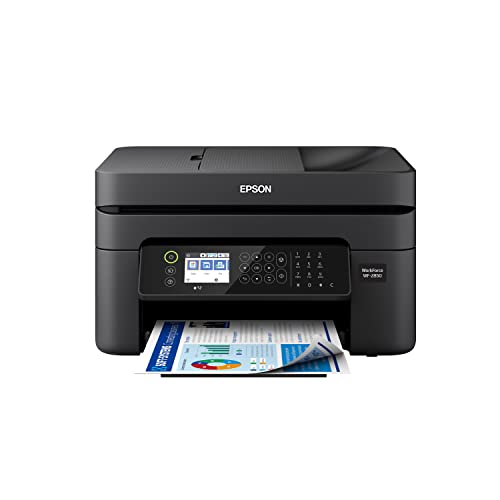
Epson WorkForce Wireless Color All-in-One
Best for: home offices needing fax and voice control
- Print Output
- Color
- Printer Type
- All-in-One
- Connectivity
- Wireless
- Duplex Printing
- Automatic 2-sided printing
- Ink/Toner System
- Individual ink cartridges
- Supported Functions
- Scan, Copy
View on Amazon: Epson WorkForce Wireless Color All-in-One Affiliate link
The Epson Workforce WF-2850 is a wireless all-in-one printer that handles print, scan, copy, and fax tasks. It features automatic two-sided printing and individual ink cartridges for efficient color output. The device includes a color display and supports voice-activated printing via Alexa, Siri, and Google Assistant. Its permanent printhead and heat-free technology are designed for long-term reliability. This model suits home offices needing versatile connectivity and compact dimensions.
Pros
- Automatic 2-sided printing reduces paper waste
- Individual ink cartridges allow targeted replacement
- Permanent printhead designed to last the life of the printer
- Supports voice-activated printing with Alexa, Siri, and Google Assistant
- Includes color display for effortless navigation
Cons
- Prints only in color, lacking a monochrome option
- Dimensions of 22.7 x 14.8 x 9.5 inches require dedicated desk space
- No mention of Ethernet connectivity, limiting wired network options
Good fit if
- You need a single device for printing, scanning, copying, and faxing
- You prefer voice-activated printing commands for hands-free operation
- You want to save paper with automatic two-sided printing
Skip if
- You require high-volume black-and-white text printing
- You need a compact footprint smaller than 22.7 inches in length
- You prefer ink tank systems over individual cartridges
Verdict: The Epson Workforce WF-2850 Wireless All-in-One fits home offices that need fax capabilities and voice control. It suits users who value automatic duplexing and individual ink replacements over high-speed monochrome output.
Specifications side by side
| Spec | Epson WorkForce Wireless Color All-in-One |
|---|---|
| Print Output | Color |
| Printer Type | All-in-One |
| Connectivity | Wireless |
| Duplex Printing | Automatic 2-sided printing |
| Ink/Toner System | Individual ink cartridges |
| Supported Functions | Scan, Copy |
| Features | Scanner, Copier, Fax |
| Scanning | Wireless Scanning |
| Dimensions | 22.7 × 14.8 × 9.5 inches |
| Weight | 11.5 pounds |
| Size | One Size |
| Color | Black |
| Model | C11CG31201 |
Frequently asked questions
Does the Epson WorkForce WF-2850 support faxing?
Yes, this all-in-one device includes fax capabilities. The listed features confirm it functions as a scanner, copier, and fax machine. This allows you to send and receive documents without needing a separate line or device. It is suitable for home offices that require traditional fax functionality alongside digital tasks.
What are the physical dimensions of the WF-2850?
The printer measures 14.8 inches wide, 9.5 inches high, and 22.7 inches long. These compact dimensions make it suitable for small desks or tight office spaces. You can place it in areas where space is limited, as the footprint is designed for efficient use of room.
How much does the Epson WorkForce WF-2850 weigh?
The device weighs 11.5 pounds. This weight suggests a sturdy build that remains stable during operation. It is light enough to move if necessary but heavy enough to prevent excessive vibration while printing or scanning. You can handle it with ease during relocation.
Can I use voice control with this printer?
Yes, the product is noted for supporting voice control. This feature allows you to operate the printer using voice commands, which can be convenient for hands-free operation. It integrates well with smart home ecosystems, adding convenience to your daily printing and scanning routines.
Does it print in color?
Yes, the Epson WorkForce WF-2850 is a color all-in-one printer. It produces color documents, photos, and graphics in addition to standard black-and-white text. This versatility makes it ideal for home offices that need to produce varied content, including marketing materials or personal projects.
Is wireless connectivity included in this model?
Yes, wireless connectivity is a standard feature. You can connect the printer to your Wi-Fi network for printing from multiple devices. This eliminates the need for USB cables and allows you to print from computers, tablets, or smartphones located anywhere within your network range.
What model number is associated with this unit?
The specific model number is C11CG31201. You can use this identifier to locate replacement parts, drivers, or manuals online. It ensures you are referencing the exact version of the printer, which helps when troubleshooting issues or verifying compatibility with your operating system.