Epson Workforce ES-200 Color Portable or Epson RapidReceipt RR-60 Compact Mobile? Which Epson Model to Buy
As an Amazon Associate we earn from qualifying purchases. Links on this page are affiliate links.
When you compare the epson workforce es 200 color portable vs rapidreceipt rr 60 compact, you find two distinct Epson scanners. Both devices are portable and connect via USB. They share Epson’s ScanSmart software ecosystem for basic document handling. The main difference lies in their intended use. The WorkForce ES-200 is a general-purpose duplex scanner for mixed media. The RapidReceipt RR-60 is a specialized, compact tool focused on receipts and invoices.
Key differences
| Aspect | Epson WorkForce Portable Duplex Scanner | Epson RapidReceipt RR-60 Mobile Receipt Scanner |
|---|---|---|
| Scan Speed | 25 ppm / 50 ipm | 10 ppm |
| Scanner Type | Portable / Color | Receipt / Compact |
| ADF Capacity | 20 sheets | not listed |
| Power Source | AC or USB | USB only |
| Special Features | Duplex scanning | ScanSmart AI PRO, HyperClear |
Which one should you choose?
Choose Epson WorkForce Portable Duplex Scanner if
- You need to scan double-sided documents quickly.
- You want to scan various media like IDs and business cards.
- You prefer the flexibility of AC or USB power.
Choose Epson RapidReceipt RR-60 Mobile Receipt Scanner if
- You primarily process receipts and invoices for accounting.
- You want the smallest, lightest scanner available.
- You need automatic data extraction for financial software.
Verdict: Choose the WorkForce ES-200 if you need a versatile, high-speed scanner for general office documents and mixed media. Pick the RapidReceipt RR-60 if your workflow is strictly limited to receipts and invoices, and you value AI-driven data extraction and compact size over speed.
Epson ES-200 vs RR-60 Comparison
Scan speed and volume
The Epson WorkForce ES-200 Color Portable scanner offers a scan speed of 25 pages per minute with 50 images per minute in duplex mode. This makes it suitable for handling larger stacks of documents quickly. The Epson RapidReceipt RR-60 Compact Mobile scanner scans up to 10 pages per minute. While both devices are fast for their respective categories, the ES-200 provides significantly higher throughput for general document scanning tasks.
Document feeder capacity
The WorkForce ES-200 Color Portable includes a 20-page Auto Document Feeder. This allows you to load a stack of papers and scan them all at once without manual intervention. The RapidReceipt RR-60 Compact Mobile does not list a specific sheet-fed ADF capacity in the provided data. It is designed primarily for scanning individual receipts and invoices. If you need to process multiple pages in a batch, the ES-200 is the more capable choice.
Portability and weight
The Epson RapidReceipt RR-60 Compact Mobile is described as the smallest and lightest in its class, weighing under 10 ounces. It is USB-powered and designed for maximum mobility. The Epson WorkForce ES-200 Color Portable weighs 1.08 pounds. While still portable, it is heavier than the RR-60. The RR-60 is easier to carry in a bag or pocket due to its lower weight and compact form factor.
Color and duplex scanning
The Epson WorkForce ES-200 Color Portable supports color scanning and duplex scanning. It uses Single-Step Technology to capture both sides of a document in one pass. This is ideal for contracts, forms, or any document where you need to preserve color or scan both sides. The RapidReceipt RR-60 Compact Mobile is listed as a receipt scanner. The data does not specify color or duplex capabilities. It focuses on extracting data from single-side receipts and invoices.
Specialized software features
The Epson RapidReceipt RR-60 Compact Mobile features ScanSmart AI PRO Technology. This intelligently converts and extracts scanned information into smart digital data. It also integrates with financial applications like QuickBooks and TurboTax. The WorkForce ES-200 Color Portable includes Epson ScanSmart Software for previewing, emailing, and automatic file naming. While both use Epson software, the RR-60 offers specialized AI-driven data extraction for receipts, whereas the ES-200 focuses on general document management.
Which Epson Scanner Fits Your Workflow
You need high-volume duplex scanning
The WorkForce ES-200 scans at 25 pages per minute with 50 images per minute in duplex mode. Its 20-sheet auto document feeder handles large stacks efficiently. Single-Step Technology captures both sides in one pass. This speed and capacity make it ideal for processing significant volumes of mixed documents quickly.
You process receipts for accounting software
The RapidReceipt RR-60 uses ScanSmart AI PRO to extract data from receipts and invoices. It integrates directly with financial apps like QuickBooks and TurboTax. HyperClear Technology enhances scan quality for small text. This specialized workflow support saves time by automatically categorizing and digitizing financial documents for easy export.
You want the lightest portable option
The RR-60 weighs under 10 ounces and measures 10.7 by 1.3 inches. It is USB-powered, requiring no external power adapter. This compact size and low weight make it easier to carry in a bag compared to the larger ES-200. It is designed for mobile use with minimal bulk.
You scan diverse items like IDs
The ES-200 handles various media types including business cards and plastic IDs. It supports duplex scanning for standard documents. The 20-sheet feeder allows batch processing. If you need to scan different document formats beyond just receipts, this versatile scanner offers broader compatibility for mixed office materials.
The products compared

Epson WorkForce Portable Duplex Scanner
Best for: mobile color scanning and mixed media
- Scan Speed
- 25 ppm/50 ipm
- ADF Capacity
- 20 sheets
- Connectivity
- USB
- Portability
- Portable
- Power Source
- AC power or USB power
- Print Output
- Color
View on Amazon: Epson WorkForce Portable Duplex Scanner Affiliate link
The Epson ES-200 is a portable, duplex color scanner designed for mobile use. It scans up to 25 pages per minute with a 20-sheet auto document feeder. You can power it via AC outlet or USB. It handles documents, receipts, and plastic IDs. This model suits users needing fast, portable color scanning without a fixed desk setup.
Pros
- Scans up to 25 ppm and 50 ipm
- 20-sheet auto document feeder for batch jobs
- Dual power options: AC or USB
- Compact dimensions: 11.3 x 3.5 x 2 inches
Cons
- Only 20-sheet ADF capacity
- USB connectivity only
- No built-in battery for cordless operation
Good fit if
- You need portable color scanning
- You scan mixed media like IDs and receipts
- You have access to USB power
Skip if
- You require wireless connectivity
- You need high-volume batch scanning
- You prefer desktop-sized devices
Verdict: The Epson ES-200 Portable Color Scanner fits mobile professionals who need duplex color scanning on the go. It works best for small batches and mixed media types.
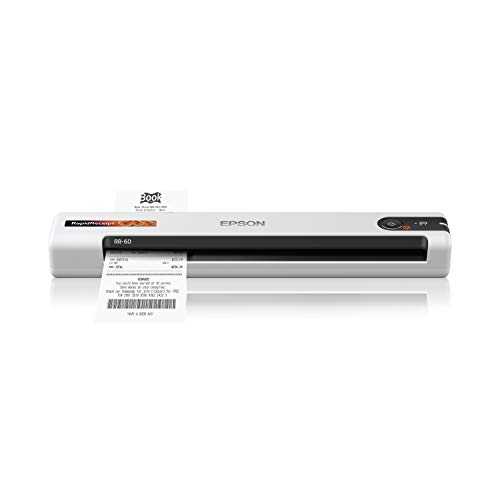
Epson RapidReceipt RR-60 Mobile Receipt Scanner
Best for: digitizing receipts and invoices
- Scan Speed
- 10 ppm
- Portability
- Mobile, portable
- Media Types
- Receipts, invoices, business/ID cards
- Power Source
- USB-powered
- Features
- Mobile Printing, Scanner
- Ideal For
- Documents
View on Amazon: Epson RapidReceipt RR-60 Mobile Receipt Scanner Affiliate link
The Epson RapidReceipt RR-60 is a compact, USB-powered scanner designed specifically for receipts and invoices. It scans up to 10 pages per minute and weighs just one pound. The device uses ScanSmart AI PRO to extract data for financial software like QuickBooks. It also supports cloud export via the Epson Smart Panel app. This small white unit suits users who need to digitize paper financial records quickly.
Pros
- Scans up to 10 pages per minute
- Weighs only one pound for easy portability
- ScanSmart AI PRO extracts data for financial apps
- HyperClear Technology enhances scan quality
- Exports directly to cloud services like OneDrive
Cons
- No automatic document feeder for bulk scanning
- Limited to receipt-sized documents only
- Requires USB power connection
Good fit if
- You need to process many receipts quickly
- You want to export data directly to QuickBooks
- You need a lightweight scanner for travel
Skip if
- You need to scan full-size letter documents
- You require wireless connectivity without a computer
- You need to scan photos or magazines
Verdict: The Epson RapidReceipt RR-60 Compact Receipt Scanner is a specialized tool for users who primarily handle receipts and invoices. Its small size and AI data extraction make it ideal for quick financial record digitization.
Specifications side by side
| Spec | Epson WorkForce Portable Duplex Scanner | Epson RapidReceipt RR-60 Mobile Receipt Scanner |
|---|---|---|
| Scan Speed | 25 ppm/50 ipm | 10 ppm |
| ADF Capacity | 20 sheets | not stated |
| Connectivity | USB | not stated |
| Portability | Portable | Mobile, portable |
| Media Types | not stated | Receipts, invoices, business/ID cards |
| Power Source | AC power or USB power | USB-powered |
| Print Output | Color | not stated |
| Features | Duplex Printing, Automatic Document Feeder, Scanner | Mobile Printing, Scanner |
| Ideal For | Documents | Documents |
| Use Case | not stated | Office |
| Scanner Type | Portable | Receipt |
| Scanning | Auto Document Feeder | not stated |
| Duplex Scanning | Duplex | not stated |
| Auto Document Feeder | ADF | not stated |
| Dimensions | 11.3 × 3.5 × 2 inches | 10.7 × 10.7 × 1.3 inches |
| Weight | 1.08 pounds | 1 pounds |
| Color | Black | White |
| Model | ES-200 | B11B252204 |
| Size | not stated | 10.7 x 1.8 x 1.3 Inch |
Frequently asked questions
Which Epson scanner is better for mobile color documents?
The Epson WorkForce ES-200 is the better choice for mobile color scanning. It is designed for mixed media and handles duplex color scans efficiently. Its 20-sheet auto document feeder supports larger batches. The device weighs 1.08 pounds, making it easy to carry. This model fits professionals who need versatile, portable color scanning capabilities on the go.
Can the Epson RapidReceipt RR-60 scan double-sided documents?
The product data does not specify double-sided scanning capabilities for the Epson RapidReceipt RR-60. It is described as a specialized tool for digitizing receipts and invoices. Its design focuses on quick financial record digitization using AI data extraction. You should check the manual for specific duplex features if you need to scan both sides of a receipt.
What are the physical dimensions of the Epson ES-200?
The Epson WorkForce ES-200 measures 11.3 inches in length, 3.5 inches in width, and 2 inches in height. It weighs 1.08 pounds. These dimensions make it a compact portable scanner. You can easily fit it into a bag for travel. The black color helps it blend in with standard office gear.
How large is the Epson RapidReceipt RR-60 scanner?
The Epson RapidReceipt RR-60 measures 10.7 inches in length, 10.7 inches in width, and 1.3 inches in height. It weighs 1 pound. The white casing gives it a clean look. Its compact size allows it to fit on small desks or in tight spaces. This makes it ideal for users who handle receipts and invoices primarily.
Is the Epson ES-200 suitable for high-volume scanning?
Yes, the Epson ES-200 is suitable for high-volume scanning. It features a 20-sheet auto document feeder. This allows you to process larger stacks of documents without manual intervention. The scanner is ideal for small batches and mixed media types. It supports duplex scanning, which doubles your throughput for two-sided documents.
Does the RR-60 include software for data extraction?
The Epson RapidReceipt RR-60 uses AI data extraction to digitize financial records. This feature helps you quickly process receipts and invoices. It works within Epson’s ScanSmart software ecosystem. This allows for basic document handling and efficient data capture. You do not need separate software for initial setup, as it integrates with standard Epson tools.
Which scanner is lighter to carry?
The Epson RapidReceipt RR-60 is slightly lighter at 1 pound. The Epson WorkForce ES-200 weighs 1.08 pounds. Both devices are portable and designed for mobile use. The weight difference is minimal, so either scanner is easy to transport. Choose based on your specific scanning needs rather than weight alone.