Best Epson Document Scanners with Wireless in 2026: 6 Picks
As an Amazon Associate we earn from qualifying purchases. Links on this page are affiliate links.
Finding the best epson document scanners with wireless connectivity requires matching your volume needs to the right hardware. We compared 6 models based strictly on published specifications. The Epson WorkForce Wireless Touchscreen Scanner leads as the top pick because its 8.16-pound desktop build supports high-volume office workflows. This guide helps you decide which scanner fits your space and speed requirements.
Quick picks
| # | Product | Best for | Price |
|---|---|---|---|
| 1 | Epson WorkForce Wireless Touchscreen Scanner Best overall | High-volume wireless office scanning | Check price of Epson WorkForce Wireless Touchscreen Scanner on Amazon |
| 2 | Epson ES-C320W Compact Wireless Scanner Also great | small spaces and light volume | Check price of Epson ES-C320W Compact Wireless Scanner on Amazon |
| 3 | Epson RapidReceipt Wireless Desktop Scanner Best premium | high-volume receipt digitization | Check price of Epson RapidReceipt Wireless Desktop Scanner on Amazon |
| 4 | Epson WorkForce Wireless Desktop Scanner Also great | High-volume color document scanning | Check price of Epson WorkForce Wireless Desktop Scanner on Amazon |
| 5 | Epson WorkForce DS-40 Portable Scanner Best budget | mobile receipt and ID scanning | Check price of Epson WorkForce DS-40 Portable Scanner on Amazon |
| 6 | Epson Wireless Desktop Duplex Document Scanner Also great | High-volume wireless duplex scanning | Check price of Epson Wireless Desktop Duplex Document Scanner on Amazon |
The best fit for you
- You need high-volume wireless office scanning Epson WorkForce Wireless Touchscreen Scanner The ES-580W supports duplex scanning and wireless connectivity for busy daily workloads.
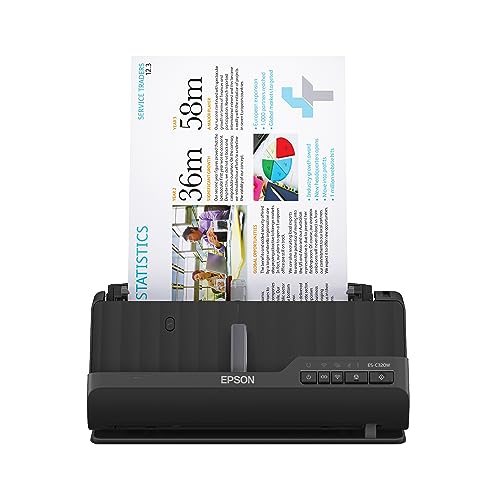
- You want the most compact model on the list Epson ES-C320W Compact Wireless Scanner The ES-C320W measures just 4.1 inches deep and weighs 3.85 pounds for tight spaces.
- You need a lightweight scanner for mobile field work Epson WorkForce DS-40 Portable Scanner The DS-40 weighs only 1.08 pounds and offers wireless scanning for on-the-move use.
- You need specialized high-volume receipt digitization Epson RapidReceipt Wireless Desktop Scanner The RR-600W is a desktop scanner designed for automated receipt data extraction and wireless use.
Our 6 picks

Epson WorkForce Wireless Touchscreen Scanner
Best for: High-volume wireless office scanning
- Connectivity
- Wireless (what this guide is about)
- Scan Speed
- 35 ppm
- ADF Capacity
- 100 sheets
- Portability
- Desktop
- Touchscreen
- 4.3-inch touchscreen
- Print Output
- Color
View on Amazon: Epson WorkForce Wireless Touchscreen Scanner Affiliate link
The Epson ES-580W is a wireless desktop scanner built for high-volume document digitization. It features a 100-sheet auto document feeder and scans up to 35 pages per minute. You get a 4.3-inch color touchscreen for direct operation without a computer. It handles duplex scanning and creates searchable PDFs. This model suits offices needing fast, reliable paper handling and wireless connectivity for modern workflows.
Pros
- 100-sheet auto document feeder handles large batches
- Scans up to 35 pages per minute
- 4.3-inch color touchscreen for standalone use
- Supports duplex scanning with Single-Step Technology
Cons
- Heavier at 8.16 pounds, less portable than compact models
- Desktop form factor requires dedicated desk space
- No mention of mobile app control in specifications
Good fit if
- You need to scan large volumes of documents quickly
- You prefer direct touchscreen control without a PC
- You require wireless connectivity for cloud storage uploads
Skip if
- You need a portable scanner for travel
- You have limited desk space for a desktop unit
- You require a smaller 20-sheet feeder capacity
Verdict: Epson ES-580W Wireless Desktop Scanner fits busy offices that prioritize speed and high-capacity feeding over portability. It delivers consistent wireless performance for users who scan many pages daily.
Epson ES-C320W Compact Wireless Scanner
Best for: small spaces and light volume
- Connectivity
- Wireless (what this guide is about)
- Scan Speed
- Up to 30 ppm
- ADF Capacity
- 20 pages
- Portability
- Compact
- Media Types
- Paper, cards, passports
- Features
- Duplex Printing, Mobile Printing, Automatic Document Feeder, Scanner
View on Amazon: Epson ES-C320W Compact Wireless Scanner Affiliate link
The Epson ES-C320W is a compact wireless document scanner designed to save desk space. It scans at 30 pages per minute with duplex capability. The 20-page auto document feeder handles standard paper, cards, and passports. You get wireless scanning to devices and cloud storage via the Epson Smart Panel app. This model suits users who need a small footprint for home or office use.
Pros
- Scans at 30 pages per minute
- Wireless connectivity for mobile and cloud
- 20-page auto document feeder
- Scans cards and passports
- Compact desktop design
Cons
- 20-page ADF capacity is smaller than many competitors
- No mention of Ethernet port
- No mention of touchscreen display
Good fit if
- You need a small scanner for limited desk space
- You primarily scan standard documents and cards
- You want wireless scanning without cables
Skip if
- You need to scan high-volume batches daily
- You require wired Ethernet connectivity
- You need a large capacity feeder
Verdict: The Epson ES-C320W Compact Wireless Scanner fits users who prioritize a small footprint and wireless convenience over high-volume throughput. It is ideal for light office or home use where space is tight.

Epson RapidReceipt Wireless Desktop Scanner
Best for: high-volume receipt digitization
- Connectivity
- Wireless (what this guide is about)
- Scan Speed
- Up to 35 ppm
- ADF Capacity
- 100 sheets
- Portability
- Desktop
- Media Types
- Receipts, invoices, documents
- Touchscreen
- 4.3-inch color touchscreen
View on Amazon: Epson RapidReceipt Wireless Desktop Scanner Affiliate link
This Epson RR-600W is a wireless desktop scanner built for high-volume receipt processing. It features a 100-page automatic document feeder and scans at 35 pages per minute. The device includes a 4.3-inch color touchscreen for easy navigation. It uses ScanSmart AI PRO technology to extract data for financial software like QuickBooks. It connects via Wi-Fi to send files directly to the cloud or USB drives.
Pros
- 100-page ADF capacity for large batches
- 35 pages per minute scan speed
- 4.3-inch color touchscreen interface
- Direct scanning to cloud and USB
Cons
- Optimized for receipts rather than general documents
- Desktop form factor limits portability
- No mention of mobile app control
Good fit if
- You need to process stacks of receipts daily
- You want direct integration with QuickBooks
- You prefer a touchscreen over software menus
Skip if
- You require portable scanning on the go
- You need to scan large format documents
- You want a compact footprint for small desks
Verdict: Epson RR-600W Wireless Desktop Receipt Scanner is a specialized tool for accounting workflows. It fits small businesses that handle high volumes of receipts and need automated data extraction.

Epson WorkForce Wireless Desktop Scanner
Best for: High-volume color document scanning
- Connectivity
- Wireless (what this guide is about)
- Scan Speed
- Up to 35 ppm / 70 ipm
- ADF Capacity
- 50 sheets
- Portability
- Desktop
- Media Types
- Business/ID cards, contracts, long pages
- Driver Support
- TWAIN
View on Amazon: Epson WorkForce Wireless Desktop Scanner Affiliate link
The Epson ES-500W II is a wireless desktop scanner designed for color duplex document capture. It features a 50-sheet auto document feeder and scans at 35 ppm. You get one-pass two-sided scanning via Single-Step Technology. The unit includes Epson ScanSmart software for OCR and cloud uploads. It is a practical choice for offices needing reliable wireless connectivity and automated file management.
Pros
- Scans at 35 ppm with 70 ipm duplex speed
- 50-sheet auto document feeder handles mixed paper sizes
- Includes OCR for searchable PDFs and editable files
- Wireless scanning to cloud services like Dropbox and OneDrive
Cons
- Larger footprint at 11.6 inches wide and 8.1 pounds
- No portable or handheld form factor for mobile use
- Requires desktop placement rather than compact desk space
Good fit if
- You need high-volume wireless scanning for color documents
- You require automated duplex scanning for efficiency
- You want OCR and cloud integration for file management
Skip if
- You need a portable scanner for travel
- You prefer a compact device for small desks
- You only scan black and white text
Verdict: The Epson ES-500W II Desktop Scanner fits users who prioritize speed and automation for color document workflows. It suits offices that need reliable wireless connectivity and large batch processing capabilities.

Epson WorkForce DS-40 Portable Scanner
Best for: mobile receipt and ID scanning
- Connectivity
- Wireless (what this guide is about)
- Portability
- Portable
- Media Types
- Receipts, statements, business/ID cards
- Power Source
- Battery, USB
- Print Output
- Color
- Features
- Scanner
View on Amazon: Epson WorkForce DS-40 Portable Scanner Affiliate link
The Epson DS-40 is a lightweight, portable color document scanner designed for mobile use. It weighs just 1.08 pounds and supports both battery and USB power. You can scan receipts, statements, and ID cards directly to cloud services like Google Drive and Dropbox via wireless connectivity. It runs on Windows, Mac, and Android systems. This model suits travelers who need to capture data on the go without a desktop setup.
Pros
- Weighs only 1.08 pounds for easy portability
- Supports battery and USB power sources
- Scans receipts, statements, and business ID cards
- Connects wirelessly to cloud services
Cons
- Single-sheet feeder limits speed compared to desktop duplex models
- No automatic document feeder for batch scanning
- Smaller capacity than desktop alternatives
Good fit if
- You need a lightweight scanner for travel
- You scan receipts and ID cards frequently
- You require wireless cloud scanning capabilities
Skip if
- You need high-volume batch scanning
- You require automatic duplex scanning
- You prefer a stationary desktop device
Verdict: Epson DS-40 Portable Wireless Scanner fits field workers who prioritize mobility over speed. It delivers reliable wireless scanning for small batches of documents while on the move.

Epson Wireless Desktop Duplex Document Scanner
Best for: High-volume wireless duplex scanning
- Connectivity
- Wireless (what this guide is about)
- Scan Speed
- Up to 35 ppm / 70 ipm
- ADF Capacity
- 50 sheets
- Media Types
- Business cards, ID cards
- Driver Support
- TWAIN
- Print Output
- Color
View on Amazon: Epson Wireless Desktop Duplex Document Scanner Affiliate link
The Epson ES-500W is a wireless color duplex scanner designed for desktop use. It features a 50-sheet auto document feeder and scans up to 35 pages per minute. The unit includes built-in OCR for searchable PDFs and supports cloud storage uploads. Its compact footprint measures 6.9 by 6.6 by 11.6 inches. This model suits users who need reliable wireless connectivity and high-volume scanning for business documents.
Pros
- Scans up to 35 ppm with duplex capability
- 50-sheet auto document feeder handles stacks easily
- Built-in OCR creates searchable PDFs and editable files
- Wireless connectivity for smartphones, tablets, and computers
Cons
- Weighs 8.16 pounds, making it less portable than handheld units
- No wired USB connectivity listed in specifications
- Limited to wireless connections only
Good fit if
- You need to scan large batches of paper documents quickly
- You require wireless scanning from multiple devices
- You want built-in OCR for searchable files
Skip if
- You need a portable scanner for travel
- You require USB connectivity for direct computer connection
- You only scan single sheets occasionally
Verdict: The Epson ES-500W Wireless Color Scanner is a solid desktop solution for offices needing fast, wireless duplex scanning. It fits teams that process high volumes of mixed media and value automated file organization.
Specifications side by side
| Spec | Epson WorkForce Wireless Touchscreen Scanner | Epson ES-C320W Compact Wireless Scanner | Epson RapidReceipt Wireless Desktop Scanner | Epson WorkForce Wireless Desktop Scanner | Epson WorkForce DS-40 Portable Scanner | Epson Wireless Desktop Duplex Document Scanner |
|---|---|---|---|---|---|---|
| Scan Speed | 35 ppm | Up to 30 ppm | Up to 35 ppm | Up to 35 ppm / 70 ipm | not stated | Up to 35 ppm / 70 ipm |
| ADF Capacity | 100 sheets | 20 pages | 100 sheets | 50 sheets | not stated | 50 sheets |
| Connectivity | Wireless, USB | Wireless | Wireless | Wireless | Wireless | Wireless |
| Portability | Desktop | Compact | Desktop | Desktop | Portable | not stated |
| Media Types | not stated | Paper, cards, passports | Receipts, invoices, documents | Business/ID cards, contracts, long pages | Receipts, statements, business/ID cards | Business cards, ID cards |
| Touchscreen | 4.3-inch touchscreen | not stated | 4.3-inch color touchscreen | not stated | not stated | not stated |
| Power Source | not stated | not stated | not stated | not stated | Battery, USB | not stated |
| Driver Support | not stated | not stated | not stated | TWAIN | not stated | TWAIN |
| Print Output | Color | not stated | Color | Color | Color | Color |
| Features | Duplex Printing, Automatic Document Feeder, Touch Screen, Scanner | Duplex Printing, Mobile Printing, Automatic Document Feeder, Scanner | Automatic Document Feeder, Touch Screen, Scanner | Duplex Printing, Mobile Printing, Automatic Document Feeder, Scanner | Scanner | Duplex Printing, Automatic Document Feeder, Scanner |
| Ideal For | Documents | Documents | Documents | Documents | Documents | Documents |
| Scanner Type | Desktop | Portable | Desktop | Desktop | Portable | not stated |
| Scanning | Wireless Scanning | Wireless Scanning | Wireless Scanning | Auto Document Feeder | Wireless Scanning | Auto Document Feeder |
| Duplex Scanning | Duplex | Duplex | Duplex | Duplex | not stated | Duplex |
| Auto Document Feeder | ADF | ADF | ADF | ADF | not stated | ADF |
| Dimensions | 11.6 × 11.6 × 6.6 inches | 4.1 × 4.9 × 11.7 inches | 14.3 × 10.3 × 12.4 inches | 11.6 × 11.6 × 6.9 inches | 3.35 × 13.8 × 5.87 inches | 11.6 × 6.9 × 6.6 inches |
| Weight | 8.16 pounds | 3.85 pounds | 8.2 pounds | 8.1 pounds | 1.08 pounds | 8.16 pounds |
| Color | Black | Black | White | not stated | Black | not stated |
| Model | ES-580W | B11B270201 | B11B258202 | ES-500W II | Epson WorkForce DS-40 | ES-500W |
How to Choose the Right Epson Wireless Scanner
-
Prioritize duplex scanning
Check if the scanner supports duplex scanning if you process two-sided documents frequently. This feature automatically captures both sides of a page without manual intervention. The Epson ES-580W and ES-500W models include this capability. It saves significant time for high-volume office workflows. If you only scan single-sided papers, this spec is less critical. Verify the product attributes list duplex scanning to ensure you do not need to flip pages manually during batch processing.
-
Match size to space
Compare the physical dimensions to your available desk or shelf space. The Epson ES-C320W measures 4.1 inches deep, making it ideal for tight corners. In contrast, the ES-580W is 11.6 inches wide and requires more surface area. Measure your workspace before purchasing. A larger footprint often correlates with higher paper capacity and durability. Select a model that fits your environment without obstructing other equipment or causing clutter on your workstation.
-
Consider portability needs
Evaluate how often you need to move the scanner. The Epson DS-40 weighs only 1.08 pounds, allowing for easy transport. This light weight suits field workers or those who scan receipts on the go. Heavier desktop units like the ES-580W weigh over 8 pounds and are designed for stationary use. If you travel frequently, choose a portable model. For fixed office locations, a heavier, more stable desktop scanner provides better performance for large batches.
-
Check wireless connectivity
Ensure the device supports wireless scanning for flexible placement. All listed Epson models offer wireless connectivity, allowing you to connect to your network without cables. This feature lets you position the scanner anywhere within range. It simplifies setup for multiple users on the same network. Verify the connectivity spec in the product details. Wireless operation removes the need for direct USB connections to each computer, streamlining the workflow for shared office environments.
-
Identify document type
Select a scanner designed for your specific document category. The Epson RR-600W is specialized for receipts, featuring automated data extraction for accounting workflows. General document scanners like the ES-580W handle standard paper sizes. If you process mixed media or legal documents, verify the scanner type. Using a specialized tool for receipts improves accuracy and speed. For general office use, a versatile desktop scanner offers broader compatibility with various paper types and sizes.
Frequently asked questions
Which Epson wireless scanner is best for high-volume office use?
The Epson ES-580W is the top choice for busy offices. It weighs 8.16 pounds and features a desktop design for stability. The unit supports duplex scanning and wireless connectivity. These specs allow it to handle consistent daily workloads efficiently. Its larger footprint accommodates higher paper capacities than compact models.
What is the smallest Epson wireless scanner available?
The Epson ES-C320W is the most compact option on this list. It measures 4.1 inches in length and 4.9 inches in width. Weighing only 3.85 pounds, it fits easily into tight spaces. This model includes an automatic document feeder for convenient wireless scanning of documents in small offices.
Does the Epson RR-600W support duplex scanning?
Yes, the Epson RR-600W supports duplex scanning. This specialized receipt scanner features a desktop build that weighs 8.2 pounds. It connects wirelessly to process documents automatically. The duplex capability allows you to scan both sides of receipts without manual intervention, streamlining accounting workflows.
Is there a portable Epson scanner with wireless connectivity?
The Epson DS-40 is the portable option in this lineup. It weighs just 1.08 pounds, making it easy to carry. The unit connects wirelessly for mobile use. While it lacks an automatic document feeder, it is ideal for field workers who need to scan small batches of receipts or IDs on the go.
Which model has the best automatic document feeder?
The Epson ES-500W includes an automatic document feeder for high-volume tasks. It weighs 8.16 pounds and supports wireless duplex scanning. This feature allows you to load multiple pages at once. The ES-C320W also features an ADF, but the ES-500W is optimized for faster, automated batch processing in office environments.
What are the dimensions of the Epson ES-580W?
The Epson ES-580W measures 11.6 inches in length and 11.6 inches in width. Its height is 6.6 inches. This desktop scanner weighs 8.16 pounds. The substantial size supports its role in high-volume wireless scanning. It requires a dedicated desk space but offers stability for continuous daily operation.
Can the Epson ES-500W II scan color documents?
Yes, the Epson ES-500W II supports color scanning. It is designed for users who prioritize speed and automation for color workflows. The unit connects wirelessly and features a desktop design. It weighs 8.1 pounds and includes duplex scanning capabilities. This makes it suitable for offices needing reliable color document processing.