Epson vs Canon Document Scanners: Which Brand Fits You?
As an Amazon Associate we earn from qualifying purchases. Links on this page are affiliate links.
Choosing between an epson vs canon document scanner depends on your workflow and space. Both the Epson WorkForce ES-400 II and the Canon imageFORMULA R10 offer duplex scanning and automatic document feeders for efficient document digitization. They both create searchable PDFs and integrate with cloud services. The main difference lies in their physical design and speed. The Epson is a desktop unit with a larger feeder, while the Canon is a compact, portable device with a smaller capacity.
Key differences
| Aspect | Epson WorkForce Desktop Duplex Scanner | Canon imageFORMULA R10 Portable Duplex Scanner |
|---|---|---|
| Portability | Desktop | Portable |
| ADF Capacity | 50 sheets | 20 sheets |
| Scan Speed | not listed | 12 ppm |
| Weight | 8.16 pounds | 2.2 pounds |
| Power Source | not listed | USB powered |
Which one should you choose?
Choose Epson WorkForce Desktop Duplex Scanner if
- You need to scan large batches of paper regularly with a 50-sheet feeder.
- You have a dedicated desk space for a heavier desktop unit.
- You prefer automatic file naming and ultrasonic double feed detection.
Choose Canon imageFORMULA R10 Portable Duplex Scanner if
- You need a lightweight scanner you can carry between rooms or offices.
- You want a device that plugs directly into USB power without a bulky adapter.
- You scan a moderate daily volume of around 500 pages.
Verdict: The Epson WorkForce ES-400 II suits users who prioritize higher daily throughput and a larger paper feeder for stationary office use. The Canon imageFORMULA R10 is better for those who value portability, a lighter footprint, and straightforward USB connectivity. Choose the Epson for volume and the Canon for mobility.
Epson vs Canon Scanner Specs
Portability and size
The Epson WorkForce ES-400 II is a desktop scanner with dimensions of 11.6 inches wide, 6.9 inches high, and 6.6 inches deep. It weighs 8.16 pounds, making it a substantial piece of office equipment designed to stay in one place. In contrast, the Canon imageFORMULA R10 is built for mobility. It measures just 3.75 inches long and 1.57 inches high, weighing only 2.2 pounds. This compact, lightweight design allows you to take it anywhere, from home offices to remote workspaces, without taking up much desk space.
ADF capacity
When handling large stacks of paper, the Epson WorkForce ES-400 II offers a 50-sheet Auto Document Feeder. This higher capacity helps you speed through bigger jobs with fewer interruptions to reload paper. The Canon imageFORMULA R10 features a 20-sheet automatic feeder. While sufficient for smaller daily tasks, you will need to reload more often if you are digitizing large volumes of documents. The difference in capacity affects workflow efficiency for heavy users versus occasional scanners.
Scan speed
The Canon imageFORMULA R10 provides a scan speed of up to 12 pages per minute. This rate allows you to process documents quickly, especially when using the duplex feature to scan both sides simultaneously. The Epson WorkForce ES-400 II is described as high-speed, but the specific pages-per-minute metric is not listed in the provided data. Without explicit speed figures for the Epson model, we cannot determine if it matches or exceeds the Canon's 12 ppm performance for your specific needs.
Power and connectivity
The Canon imageFORMULA R10 connects via USB and is USB powered, meaning it draws power directly from your computer without needing a separate power adapter. This simplifies setup and reduces cable clutter. The Epson WorkForce ES-400 II includes a TWAIN driver for integration with document management software and supports seamless integration into business workflows. While it likely uses USB, the specific power source is not detailed in the data. The Canon’s plug-and-play power approach offers a distinct setup advantage.
Daily duty cycle
The Canon imageFORMULA R10 has a suggested daily duty cycle of 500 scans, indicating it is built to handle a moderate volume of daily work reliably. The Epson WorkForce ES-400 II is designed for home and office document scanning, but the specific daily scan volume limit is not listed in the available specifications. This lack of data for the Epson model makes it difficult to compare long-term durability and high-volume performance between the two devices directly.
Software features
Both scanners offer robust software to manage your documents. The Epson WorkForce ES-400 II uses Epson ScanSmart, which allows you to preview scans, email files, upload to cloud services, and create searchable PDFs with OCR. It also includes automatic file naming and image adjustments like auto-crop. The Canon imageFORMULA R10 comes with built-in software that requires no installation and updates automatically. It allows you to edit, straighten, and trim files, and create custom scanning buttons. Both provide essential tools for efficient document digitization.
Which scanner fits your specific needs?
Users needing high volume desktop scanning
The Epson WorkForce ES-400 II features a 50-sheet automatic document feeder, allowing you to process large stacks of paper quickly. Its desktop design supports a higher daily duty cycle, making it ideal for busy offices. The included TWAIN driver ensures seamless integration with existing document management software for efficient workflow.
Users needing portable scanning on the go
The Canon imageFORMULA R10 weighs only 2.2 pounds and connects via USB power, making it highly portable. Its compact size fits easily in bags for travel. At 12 pages per minute, it offers fast duplex scanning for receipts or business cards, ensuring you can digitize documents efficiently without carrying heavy equipment.
Users prioritizing advanced double feed protection
The Epson model includes ultrasonic double feed detection and dynamic skew correction. This hardware feature helps prevent missed pages during high-speed scanning. If you handle mixed document batches frequently, this reliable paper feeding system reduces errors and ensures every page is captured accurately without manual intervention or re-scanning.
Users wanting easy setup with no drivers
The Canon R10 uses built-in software that requires no installation and updates automatically. This simplicity removes technical hurdles for Windows and Mac users. You can preview, edit, and organize scans directly, adjusting settings like straightening and trimming without navigating complex driver configurations or external software installations.
The products compared

Epson WorkForce Desktop Duplex Scanner
Best for: High-volume desktop duplex scanning
- ADF Capacity
- 50 sheets
- Portability
- Desktop
- Driver Support
- TWAIN
- Print Output
- Color
- Features
- Duplex Printing, Automatic Document Feeder, Scanner
- Scanning
- Auto Document Feeder
View on Amazon: Epson WorkForce Desktop Duplex Scanner Affiliate link
The Epson Workforce ES-400 II is a desktop scanner built for high-volume office tasks. It features a 50-sheet automatic document feeder and supports duplex scanning to process both sides of a page. You get ultrasonic double feed detection to prevent missed pages. The unit includes Epson ScanSmart software for cloud sharing and OCR. It measures 11.6 by 6.9 inches and weighs 8.16 pounds.
Pros
- 50-sheet automatic document feeder for rapid batch scanning
- Duplex scanning capability captures both sides of documents
- Ultrasonic double feed detection prevents missed pages
- Epson ScanSmart software enables cloud and email sharing
- Built-in OCR creates searchable PDFs and editable files
Cons
- Desktop form factor requires dedicated desk space
- No mention of Wi-Fi or wireless connectivity
- No built-in touchscreen for direct operation
Good fit if
- You need to scan large stacks of paper quickly
- You require duplex scanning for double-sided documents
- You want reliable double feed detection for accuracy
Skip if
- You need a portable scanner for travel
- You require wireless connectivity without a computer
- You prefer a compact footprint under 6 inches wide
Verdict: Epson Workforce ES-400 II Desktop Scanner suits offices that prioritize speed and accuracy for high-volume paper documents. It fits users who need a stationary, reliable scanner with automatic duplexing and robust software integration.
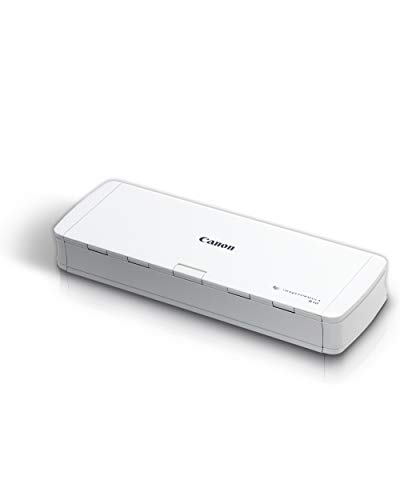
Canon imageFORMULA R10 Portable Duplex Scanner
Best for: light travel and moderate scanning
- Scan Speed
- 12 ppm
- ADF Capacity
- 20 sheets
- Connectivity
- USB
- Portability
- Portable
- Daily Duty Cycle
- 500 scans
- Power Source
- USB powered
View on Amazon: Canon imageFORMULA R10 Portable Duplex Scanner Affiliate link
The Canon imageFORMULA R10 is a compact, USB-powered portable scanner designed for on-the-go document digitization. It features a 20-sheet automatic feeder and scans up to 12 pages per minute in duplex mode. With a suggested daily duty cycle of 500 scans, it suits light office or remote work. Its lightweight build and broad compatibility with Windows and Mac make it easy to carry and use anywhere.
Pros
- Scans up to 12 pages per minute
- 20-sheet automatic document feeder
- USB powered for portability
- Duplex scanning capability
- Built-in software requires no installation
Cons
- Limited to 500 scans daily duty cycle
- Only USB connectivity
- 2.2 pounds weight may feel light
Good fit if
- You need a lightweight scanner for travel
- You scan moderate volumes of documents
- You prefer USB-powered simplicity
Skip if
- You require high-volume daily scanning
- You need wireless connectivity options
- You prioritize heavy-duty durability
Verdict: Canon imageFORMULA R10 Portable Scanner fits users who need a lightweight, USB-powered device for moderate scanning tasks. It is ideal for remote workers or students who value portability over high-volume capacity.
Specifications side by side
| Spec | Epson WorkForce Desktop Duplex Scanner | Canon imageFORMULA R10 Portable Duplex Scanner |
|---|---|---|
| Scan Speed | not stated | 12 ppm |
| ADF Capacity | 50 sheets | 20 sheets |
| Connectivity | not stated | USB |
| Portability | Desktop | Portable |
| Daily Duty Cycle | not stated | 500 scans |
| Power Source | not stated | USB powered |
| Driver Support | TWAIN | not stated |
| Print Output | Color | not stated |
| Features | Duplex Printing, Automatic Document Feeder, Scanner | Duplex Printing, Mobile Printing, Scanner |
| Ideal For | Documents | Documents |
| Scanner Type | Desktop | Portable |
| Scanning | Auto Document Feeder | not stated |
| Duplex Scanning | Duplex | Duplex |
| Auto Document Feeder | ADF | not stated |
| Dimensions | 6.6 × 11.6 × 6.9 inches | 3.75 × 11.2 × 1.57 inches |
| Weight | 8.16 pounds | 2.2 pounds |
| Color | Black | White |
| Model | ES-400 II | 4861C001 |
| Size | not stated | Compact |
Frequently asked questions
Which scanner is better for high-volume office use?
The Epson WorkForce ES-400 II is designed for high-volume desktop scanning. It features a substantial build with dimensions of 11.6 inches wide and 8.16 pounds in weight. This desktop model suits offices that prioritize speed and accuracy for large stacks of paper documents.
Is there a portable option for remote workers?
Yes, the Canon imageFORMULA R10 is a portable duplex scanner. It weighs only 2.2 pounds and connects via USB. This compact device fits users who need a lightweight solution for moderate scanning tasks while traveling or working remotely.
Do both scanners support automatic duplexing?
Both the Epson ES-400 II and the Canon R10 support duplex scanning. This feature allows you to scan both sides of a document automatically. It saves time by eliminating the need to manually flip pages during the digitization process.
What is the main difference in form factor?
The Epson ES-400 II is a stationary desktop scanner. It measures 11.6 inches wide and is built for a fixed office location. The Canon R10 is a portable unit. Its compact size and low weight make it easy to carry in a bag.
Which brand is better for students?
The Canon imageFORMULA R10 is ideal for students. Its portability and USB connectivity allow for easy use in libraries or dorms. It handles moderate scanning tasks without requiring a dedicated desk space, unlike the larger Epson desktop model.
Does the Epson scanner require a power outlet?
The Epson WorkForce ES-400 II is a desktop scanner designed for stationary use. While the data does not specify power requirements, its size and weight suggest it is meant for a permanent setup. The Canon R10 is USB-powered, offering more flexibility.
Can I scan documents on the go with Epson?
The Epson WorkForce ES-400 II is not designed for portability. It weighs 8.16 pounds and has a large footprint. It is best suited for a fixed office environment. For mobile needs, the Canon R10 is the more practical choice due to its lightweight design.