Desktop or Receipt Document Scanners? Compared by Specs
As an Amazon Associate we earn from qualifying purchases. Links on this page are affiliate links.
You are deciding between a desktop vs receipt document scanner for your office needs. Both Epson models handle document scanning tasks efficiently. The WorkForce ES-400 II is a desktop duplex scanner built for high-volume paper handling. The RapidReceipt RR-60 is a compact mobile device designed specifically for receipts and invoices. They share Epson’s scanning software ecosystem. Your choice depends on whether you prioritize volume capacity or portability.
Key differences
| Aspect | Epson WorkForce Desktop Duplex Scanner | Epson RapidReceipt RR-60 Mobile Receipt Scanner |
|---|---|---|
| Scanner Type | Desktop | Receipt |
| Portability | Desktop | Compact mobile |
| ADF Capacity | 50 sheets | not listed |
| Scan Speed | not listed | 10 ppm |
| Duplex Scanning | Duplex | not listed |
| Weight | 8.16 pounds | 1 pounds |
Which one should you choose?
Choose Epson WorkForce Desktop Duplex Scanner if
- You need to scan double-sided documents in bulk
- You have a fixed workspace and do not need to move the device
- You require ultrasonic double feed detection for reliability
Choose Epson RapidReceipt RR-60 Mobile Receipt Scanner if
- You primarily scan receipts and invoices for accounting
- You need a lightweight device that weighs under one pound
- You want to export data directly to financial software like QuickBooks
Verdict: The WorkForce ES-400 II suits users who process large stacks of mixed documents daily. The RapidReceipt RR-60 is better for those who need a portable tool for financial record keeping. Choose the desktop model for volume and the mobile model for convenience.
Desktop vs Receipt Scanner Specs
Scanner Type
The Epson WorkForce ES-400 II is classified as a desktop document scanner. It is designed to sit on a desk and handle standard office paper stacks. The Epson RapidReceipt RR-60 is a receipt scanner. It is built for small, specific documents like invoices and receipts. The RR-60 is also described as compact mobile. This means you can easily move it or store it away. The ES-400 II is larger and stays in one place. You should choose the desktop model for general paper. Pick the receipt scanner for financial documents only.
ADF Capacity
The WorkForce ES-400 II includes a 50-sheet Auto Document Feeder. This allows you to load a large stack of pages at once. The scanner processes them automatically. The RapidReceipt RR-60 does not list a specific sheet capacity in its data. It is designed for quick, individual scanning of small items. The 50-sheet capacity is a clear advantage for the desktop model. You can scan hundreds of pages without stopping. The receipt scanner is better for small batches. It is not built for high-volume paper handling tasks. The desktop feeder saves significant time for large jobs.
Portability
The RapidReceipt RR-60 is extremely portable. It weighs only one pound. Its dimensions are 10.7 x 1.8 x 1.3 inches. It is USB-powered, so you do not need a separate power outlet. You can take it anywhere. The WorkForce ES-400 II is a desktop unit. It weighs 8.16 pounds. Its dimensions are 11.6 x 6.9 x 6.6 inches. It is heavy and bulky. You should leave it on your desk. The receipt scanner wins for mobility. You can carry it in a bag. The desktop scanner is fixed in place. Choose based on your need for movement.
Scan Speed
The RapidReceipt RR-60 scans up to 10 pages per minute. This speed is measured in automatic feeding mode. It is efficient for processing stacks of receipts. The WorkForce ES-400 II does not list a specific pages per minute rate in the provided data. It is described as high-speed. It uses a 50-sheet feeder to process documents quickly. The RR-60 has a stated numerical speed. The ES-400 II relies on general high-speed claims. For pure speed metrics, the receipt scanner has a defined rate. However, the desktop model handles larger volumes per load.
Connectivity
The WorkForce ES-400 II uses a TWAIN driver. This allows integration with most document management software. It supports scanning to email and cloud services like Dropbox and Google Drive. The RapidReceipt RR-60 also scans to cloud services. It connects via USB. It works with a mobile app called Epson Smart Panel. The desktop model relies on standard drivers. The receipt model offers app-based control. Both connect to major cloud platforms. The desktop model is better for PC workflows. The receipt model adds mobile app flexibility. Connectivity is comparable for basic tasks.
Build and Size
The WorkForce ES-400 II is black and measures 11.6 x 6.9 x 6.6 inches. It is a sturdy desktop unit. The RapidReceipt RR-60 is white and measures 10.7 x 1.8 x 1.3 inches. It is very thin and small. The receipt scanner is the smallest in its class. It weighs under 10 ounces. The desktop scanner is nearly nine pounds. The size difference is significant. The receipt scanner fits in tight spaces. The desktop scanner needs a dedicated desk area. The build reflects their different purposes. One is for fixed offices. The other is for flexible use.
Which Scanner Suits Your Workflow Best
Office managers handling large document stacks
The Epson WorkForce ES-400 II features a 50-sheet auto document feeder for high-volume tasks. Its duplex scanning capability processes both sides of pages simultaneously. Ultrasonic double feed detection prevents errors. This desktop unit integrates seamlessly with business workflows via TWAIN drivers, making it ideal for serious office document management.
Accountants managing receipts and invoices
The Epson RapidReceipt RR-60 uses ScanSmart AI PRO technology to extract data automatically. It exports directly to financial software like QuickBooks and TurboTax. This compact, USB-powered device weighs under one pound. Its specialized design focuses on organizing receipts and invoices efficiently for tax and accounting purposes.
Users needing portable scanning solutions
The Epson RapidReceipt RR-60 is significantly smaller and lighter than the desktop alternative. Weighing only one pound, it fits easily into bags. It connects via USB power, requiring no external outlet. This portability allows you to scan receipts and invoices anywhere, making it perfect for mobile professionals or travel.
Quick picks
| # | Product | Best for | Price |
|---|---|---|---|
| 1 | Epson WorkForce Desktop Duplex Scanner | High-volume office document scanning | Check price of Epson WorkForce Desktop Duplex Scanner on Amazon |
| 2 | Epson RapidReceipt RR-60 Mobile Receipt Scanner | portable receipt and invoice scanning | Check price of Epson RapidReceipt RR-60 Mobile Receipt Scanner on Amazon |
The products compared

Epson WorkForce Desktop Duplex Scanner
Best for: High-volume office document scanning
- Scanner Type
- Desktop (what this guide is about)
- ADF Capacity
- 50 sheets
- Portability
- Desktop
- Driver Support
- TWAIN
- Print Output
- Color
- Features
- Duplex Printing, Automatic Document Feeder, Scanner
View on Amazon: Epson WorkForce Desktop Duplex Scanner Affiliate link
The Epson ES-400 II is a desktop scanner designed for high-volume document processing. It features a 50-sheet auto document feeder and supports duplex scanning to handle two-sided pages efficiently. The unit includes ultrasonic double feed detection to prevent errors. You get seamless integration with document management software via TWAIN drivers. It also creates searchable PDFs and editable files using OCR. This model suits offices needing reliable, fast scanning workflows.
Pros
- 50-sheet auto document feeder capacity
- Duplex scanning capability for two-sided pages
- Ultrasonic double feed detection system
- Built-in OCR for searchable PDFs
- Direct scanning to email and cloud services
Cons
- Desktop form factor limits portability
- No mention of mobile app support
- No wireless connectivity listed in specs
Good fit if
- You need to scan high volumes of paper daily
- You require duplex scanning for two-sided documents
- You want reliable double-feed detection
Skip if
- You need a portable or handheld scanner
- You require wireless scanning capabilities
- You only scan occasional single pages
Verdict: Epson ES-400 II Desktop Scanner fits busy offices that process large stacks of paper regularly. It offers steady throughput and error prevention for standard document workflows.
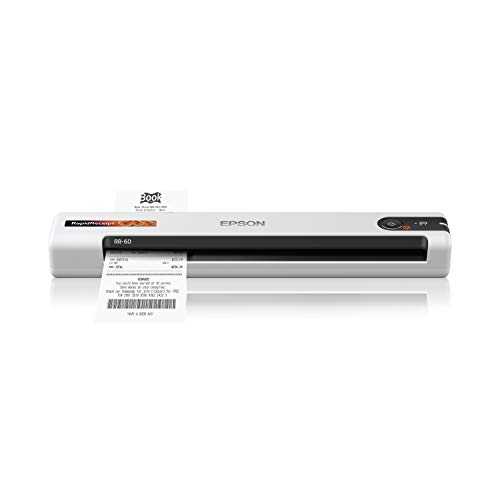
Epson RapidReceipt RR-60 Mobile Receipt Scanner
Best for: portable receipt and invoice scanning
- Scanner Type
- Receipt (what this guide is about)
- Scan Speed
- 10 ppm
- Portability
- Mobile, portable
- Media Types
- Receipts, invoices, business/ID cards
- Power Source
- USB-powered
- Features
- Mobile Printing, Scanner
View on Amazon: Epson RapidReceipt RR-60 Mobile Receipt Scanner Affiliate link
The Epson RapidReceipt RR-60 is a compact mobile scanner designed for receipts and invoices. It scans up to 10 pages per minute and weighs under 10 ounces. The device uses ScanSmart AI PRO Technology to extract data for financial software like QuickBooks. It connects via USB and supports cloud exports. This small unit suits users who need portable, automated receipt processing.
Pros
- Scans up to 10 pages per minute
- Weighs under 10 ounces for portability
- Extracts data for QuickBooks and TurboTax
- Includes cloud export to OneDrive and Dropbox
Cons
- Manual feed only; no automatic document feeder
- Single-sided scanning capability only
- Requires USB connection to a computer
Good fit if
- You need a lightweight scanner for travel or small desks
- You want to automate receipt data entry for accounting software
- You primarily scan receipts and invoices rather than large documents
Skip if
- You require high-volume automatic duplex scanning
- You need a standalone scanner without a computer
- You need to scan thick or non-standard paper sizes
Verdict: The Epson RapidReceipt RR-60 Compact Receipt Scanner is a lightweight, portable option for users who need to quickly digitize and categorize receipts for financial software. It fits best in environments where space is limited and manual feeding is acceptable.
Specifications side by side
| Spec | Epson WorkForce Desktop Duplex Scanner | Epson RapidReceipt RR-60 Mobile Receipt Scanner |
|---|---|---|
| Scan Speed | not stated | 10 ppm |
| ADF Capacity | 50 sheets | not stated |
| Portability | Desktop | Mobile, portable |
| Media Types | not stated | Receipts, invoices, business/ID cards |
| Power Source | not stated | USB-powered |
| Driver Support | TWAIN | not stated |
| Print Output | Color | not stated |
| Connectivity | not stated | USB |
| Features | Duplex Printing, Automatic Document Feeder, Scanner | Mobile Printing, Scanner |
| Ideal For | Documents | Documents |
| Use Case | not stated | Office |
| Scanner Type | Desktop | Receipt |
| Scanning | Auto Document Feeder | not stated |
| Duplex Scanning | Duplex | not stated |
| Auto Document Feeder | ADF | not stated |
| Dimensions | 6.6 × 11.6 × 6.9 inches | 10.7 × 10.7 × 1.3 inches |
| Weight | 8.16 pounds | 1 pounds |
| Color | Black | White |
| Model | ES-400 II | B11B252204 |
| Size | not stated | 10.7 x 1.8 x 1.3 Inch |
Frequently asked questions
Can a receipt scanner handle standard letter-sized documents?
No, the Epson RapidReceipt RR-60 is designed specifically for receipts and invoices. It has a narrow input slot that accommodates smaller paper sizes. The Epson WorkForce ES-400 II is built for standard office documents. It supports duplex scanning for full pages. Choose the desktop model for general paper handling.
Which scanner is better for a small desk space?
The Epson RapidReceipt RR-60 is the better choice for limited space. It measures 10.7 by 1.8 by 1.3 inches and weighs only one pound. The WorkForce ES-400 II is larger, measuring 11.6 by 6.9 by 6.6 inches. It weighs 8.16 pounds. The mobile receipt scanner fits easily into tight areas.
Does the desktop scanner support double-sided scanning?
Yes, the Epson WorkForce ES-400 II supports duplex scanning. This feature allows it to scan both sides of a page in one pass. This improves throughput for busy offices. The RapidReceipt RR-60 is a receipt scanner and does not offer this specific desktop duplex capability for standard documents.
Is the receipt scanner portable enough for travel?
Yes, the Epson RapidReceipt RR-60 is designed for portability. It weighs one pound and has a compact footprint. It is ideal for users who need to digitize receipts on the go. The desktop scanner is heavier and intended for stationary use on a desk or workstation.
What is the main difference in scanner type between these two?
The Epson WorkForce ES-400 II is a desktop scanner. It is built for high-volume office document workflows. The Epson RapidReceipt RR-60 is a mobile receipt scanner. It focuses on quick digitization of financial documents. The desktop unit handles larger stacks, while the receipt unit targets specific small items.
Can I scan color documents with these Epson models?
Yes, the Epson WorkForce ES-400 II supports color output. It is suitable for documents requiring color accuracy. The product data for the RapidReceipt RR-60 does not specify color scanning capabilities. It is primarily focused on receipt processing. Check the specific color requirements for your document types before purchasing.