Best Desktop Document Scanners: 14 Spec-Based Picks
As an Amazon Associate we earn from qualifying purchases. Links on this page are affiliate links.
You need the best desktop document scanners that match your volume and connectivity needs. We compared 14 models based strictly on the specifications published on the listings. Our top pick is the Epson WorkForce Desktop Duplex Scanner, which leads because of its 50-sheet feeder and double feed detection for high-volume duplex document scanning. This guide helps you decide which scanner fits your workflow. We focus on dimensions, weight, and scanning features so you can choose a device that fits your desk and handles your daily tasks efficiently.
Quick picks
The best fit for you
- You need high-volume duplex scanning with cloud integration Epson WorkForce Desktop Duplex Scanner The ES-400 II offers a 50-sheet feeder and double feed detection for automated accuracy.
- You require wireless convenience and standalone touchscreen operation Epson WorkForce Wireless Touchscreen Scanner The ES-580W provides wireless connectivity and a touchscreen interface for busy office teams.
- You seek the most compact and lightweight model Brother Compact Desktop Document Scanner The ADS1200 weighs only 3.3 pounds and draws power via USB bus.
- You need a scanner for small business receipts Epson RapidReceipt Wireless Desktop Scanner The RR-600W includes specialized AI features designed for fast receipt processing.
Our 14 picks

Epson WorkForce Desktop Duplex Scanner
Best for: High-volume duplex document scanning
- Scanner Type
- Desktop (what this guide is about)
- ADF Capacity
- 50 sheets
- Portability
- Desktop
- Driver Support
- TWAIN
- Print Output
- Color
- Features
- Duplex Printing, Automatic Document Feeder, Scanner
The Epson ES-400 II is a desktop document scanner designed for high-speed color duplex scanning. It features a 50-sheet auto document feeder and ultrasonic double feed detection to ensure accuracy. The unit includes Epson ScanSmart software for cloud integration and OCR capabilities. Measuring 11.6 by 6.6 inches, it fits standard office desks. This scanner suits users who need reliable, automated scanning for mixed document stacks.
Pros
- 50-sheet auto document feeder capacity
- Color duplex scanning capability
- Ultrasonic double feed detection system
- Built-in OCR for searchable PDFs
Cons
- No wireless connectivity listed in specifications
- Limited to TWAIN driver support only
- No display panel for local preview
Good fit if
- You need to scan double-sided documents quickly
- You require automatic double feed detection
- You prefer desktop scanners with large feeders
Skip if
- You need wireless scanning capabilities
- You require mobile app control
- You need a scanner with a built-in display
Verdict: The Epson ES-400 II Desktop Scanner delivers fast duplex scanning with a 50-sheet feeder and double feed detection. It fits users who prioritize automated accuracy and cloud integration over wireless convenience.

Epson WorkForce Wireless Touchscreen Scanner
Best for: high-volume wireless office scanning
- Scanner Type
- Desktop (what this guide is about)
- Scan Speed
- 35 ppm
- ADF Capacity
- 100 sheets
- Connectivity
- Wireless, USB
- Portability
- Desktop
- Touchscreen
- 4.3-inch touchscreen
View on Amazon: Epson WorkForce Wireless Touchscreen Scanner
The Epson ES-580W is a wireless desktop document scanner with a 100-sheet auto document feeder. It scans up to 35 pages per minute and handles duplex scanning in a single pass. A 4.3-inch color touchscreen lets you save files to USB, email, or cloud services without a computer. It supports OCR for searchable PDFs. This model suits offices needing fast, standalone digitization of mixed paper sizes.
Pros
- 100-sheet auto document feeder capacity
- 35 pages per minute scan speed
- 4.3-inch color touchscreen interface
- Single-step duplex scanning capability
- Direct wireless saving to cloud and USB
Cons
- Heavier at 8.16 pounds compared to compact competitors
- Larger footprint at 11.6 inches wide
- No mention of Ethernet or USB connectivity options
Good fit if
- You need to scan large batches of documents quickly
- You want to save files directly to cloud storage without a PC
- You prefer a touchscreen interface for manual control
Skip if
- You require a portable scanner for travel
- You need wired Ethernet connectivity for stable networks
- You have limited desk space and need a compact unit
Verdict: Epson ES-580W Wireless Desktop Scanner offers high-speed duplex scanning and a large feeder for busy offices. It fits teams that value standalone wireless operation and touchscreen control over compact portability.

Epson RapidReceipt Wireless Desktop Scanner
Best for: Small business receipt automation
- Scanner Type
- Desktop (what this guide is about)
- Scan Speed
- Up to 35 ppm
- ADF Capacity
- 100 sheets
- Connectivity
- Wireless
- Portability
- Desktop
- Media Types
- Receipts, invoices, documents
The Epson RapidReceipt RR-600W is a desktop scanner built for receipts and invoices. It scans at 35 pages per minute with duplex capability. The 100-page feeder handles various document sizes. You get a 4.3-inch color touchscreen for direct cloud or email scanning. Wireless connectivity lets you scan from phones or tablets. It integrates data into financial software like QuickBooks.
Pros
- 35 ppm scan speed with duplex scanning
- 100-page ADF with staple protection
- 4.3-inch color touchscreen interface
- Wireless scanning to cloud or email
- ScanSmart AI PRO for data extraction
Cons
- Optimized for receipts rather than general documents
- No wired USB or Ethernet connectivity listed
- Limited to desktop portability
Good fit if
- You process high volumes of receipts daily
- You need direct wireless scanning to cloud storage
- You use QuickBooks or TurboTax for accounting
Skip if
- You need to scan legal-size documents
- You require high-resolution photo scanning
- You prefer a compact portable scanner
Verdict: The Epson RapidReceipt RR-600W Wireless Receipt Scanner fits small businesses that need fast, automated receipt processing. Its specialized AI features and large feeder make it ideal for financial data entry.

Epson WorkForce Wireless Desktop Scanner
Best for: wireless color duplex scanning and batch processing
- Scanner Type
- Desktop (what this guide is about)
- Scan Speed
- Up to 35 ppm / 70 ipm
- ADF Capacity
- 50 sheets
- Connectivity
- Wireless
- Portability
- Desktop
- Media Types
- Business/ID cards, contracts, long pages
The Epson ES-500W II is a wireless desktop scanner designed for color duplex document scanning. It handles 50-sheet stacks with a 35 ppm speed. You get automatic file naming and searchable PDFs via included software. The unit connects to cloud services and mobile apps. It suits small offices needing reliable, automated document digitization without manual feeding.
Pros
- Wireless connectivity for mobile and cloud scanning
- 35 ppm scan speed with duplex capability
- 50-sheet auto document feeder capacity
- Includes OCR for searchable PDFs
Cons
- No Ethernet port listed in specifications
- Lacks a built-in display for manual navigation
- Heavier at 8.1 pounds compared to compact peers
Good fit if
- You need wireless scanning from tablets or phones
- You scan mixed batches of documents regularly
- You want automatic skew correction and blank page skip
Skip if
- You require a wired Ethernet connection for security
- You need a scanner under 7 pounds for portability
- You prefer a model with a physical LCD screen
Verdict: Epson ES-500W II Wireless Desktop Scanner fits users who prioritize wireless convenience and automated batch processing for color documents. It delivers steady speed and smart software features for small office environments.

Ricoh fi-8040 Desktop Document Scanner
Best for: High-volume office document scanning
- Scanner Type
- Desktop (what this guide is about)
- Scan Speed
- 40 double-sided pages per minute
- ADF Capacity
- 50 page
- Connectivity
- Network
- Portability
- Desktop
- Media Types
- Document, Receipt, ID Card
The Ricoh fi-8040 is a desktop document scanner built for office efficiency. It scans 40 double-sided pages per minute, handling high volumes quickly. DirectScan lets you send files to email or network folders without a computer. The unit includes a touchscreen and PaperStream software for simple operation. Its compact footprint fits standard desks. This model suits teams needing reliable, fast, and direct scanning workflows.
Pros
- Scans 40 double-sided pages per minute
- DirectScan enables network and email output without a PC
- Includes intuitive touchscreen interface
- Features OCR and image enhancement software
Cons
- Connectivity is limited to network ports
- No wireless or USB connectivity listed
- Heavier build at 6.8 pounds
Good fit if
- You need high-speed double-sided scanning
- You prefer direct network scanning over PC dependency
- You want a touchscreen interface for easy operation
Skip if
- You require wireless connectivity
- You need a lightweight portable scanner
- You want USB connection options
Verdict: The Ricoh fi-8040 Desktop Scanner fits offices that prioritize speed and network independence. Its 40 ppm duplex rate and DirectScan feature support busy document workflows.

Brother Compact Desktop Document Scanner
Best for: light-duty desktop scanning powered through a laptop
- Scanner Type
- Desktop (what this guide is about)
- Scan Speed
- 25 ppm
- ADF Capacity
- 20 pages
- Connectivity
- USB 3.0
- Portability
- Compact desktop
- Media Types
- Plastic cards, documents
This compact desktop scanner digitizes single- and double-sided sheets in one pass at up to 25 ppm. It weighs 3.3 pounds and runs on USB bus power via a USB 3.0 connection to your laptop. Its 20-page automatic feeder and dedicated card slot handle daily receipts, forms, and plastic IDs without needing a full-sized desktop footprint.
Pros
- Powers directly over a USB 3.0 connection from a computer
- Single-pass duplex scanning at up to 25 pages per minute
- Dedicated card slot feeds plastic IDs
- Compact 3.3-pound build with a 3.3-inch height
Cons
- Automatic document feeder holds only 20 pages
- No wireless or Ethernet network connectivity listed
Good fit if
- You need a lightweight unit powered directly via USB.
- You process smaller document batches up to 20 pages at a time.
- You frequently scan plastic cards through a dedicated slot.
Skip if
- You need an automatic document feeder larger than 20 sheets.
- You require wireless network sharing for multiple users.
Verdict: Brother Compact Desktop Document Scanner fits individuals who need portable USB bus power and low-volume duplex scanning for tight desks.

Brother ADS-3100 Compact Desktop Scanner
Best for: small offices needing wired scanning
- Scanner Type
- Desktop (what this guide is about)
- Scan Speed
- Up to 40 ppm
- ADF Capacity
- Up to 60 pages
- Connectivity
- Hi-Speed USB 3.0
- Portability
- Desktop
- Supported Functions
- Scan
The Brother ADS-3100 is a compact desktop scanner designed for small offices and home workspaces. It offers scan speeds of up to 40 pages per minute with a 60-page auto document feeder. Connectivity relies on Hi-Speed USB 3.0. It supports A4 and A5 paper sizes. This model includes bundled software for document optimization. It suits users needing reliable, straightforward scanning without wireless features.
Pros
- Scans up to 40 pages per minute
- 60-page auto document feeder capacity
- Compact dimensions of 8.5 x 11.7 x 7.5 inches
- Hi-Speed USB 3.0 connectivity
- Includes seven bundled applications
Cons
- No wireless or Wi-Fi connectivity
- No color display on the unit
- Limited to USB connection only
Good fit if
- You need a compact scanner for a small desk
- You prefer wired USB 3.0 connections
- You scan A4 or A5 documents regularly
Skip if
- You require wireless scanning capabilities
- You need to scan legal size paper
- You want a color touchscreen interface
Verdict: The Brother ADS-3100 Compact Desktop Scanner fits users who prioritize a small footprint and fast wired scanning. It is a practical choice for home offices that do not need wireless features.

Brother Desktop Network Document Scanner
Best for: networked workgroups needing broad driver compatibility
- Scanner Type
- Desktop (what this guide is about)
- Scan Speed
- Up to 40 ppm
- ADF Capacity
- 80 pages
- Connectivity
- Ethernet, USB
- Portability
- Desktop
- Driver Support
- TWAIN, WIA, ISIS, SANE
This desktop document scanner captures single and double-sided pages at up to 40 pages per minute. Its 80-sheet automatic document feeder handles multi-page batches, while built-in Ethernet lets you share access across a local network. With TWAIN, WIA, ISIS, and SANE driver support, it integrates into diverse office workflows that route files directly to email, SharePoint, or SFTP servers.
Pros
- Single-pass duplex scanning at up to 40 pages per minute
- 80-page automatic document feeder with continuous scanning mode
- Broad driver integration supporting TWAIN, WIA, ISIS, and SANE
- Direct scanning to SFTP, SharePoint, email, and USB drives
Cons
- Weighs 6.1 pounds and requires a permanent desktop footprint
- Top speed is capped at 40 pages per minute
Good fit if
- You need an 80-sheet feeder to process medium document stacks in one go.
- You share a scanner over a wired local Ethernet network.
- You require ISIS, TWAIN, or SANE drivers for legacy business applications.
Skip if
- You need speeds exceeding 40 pages per minute for heavy archiving runs.
- You need a lightweight device under six pounds that packs away easily.
Verdict: Brother Ethernet Desktop Document Scanner delivers reliable 40 ppm network capture with broad driver support and an 80-sheet feeder. It suits workgroups that send documents directly to networked folders, email, or SFTP targets.

Plustek PS186 Desktop Scanner
Best for: compact offices needing barcode batch scanning
- Scanner Type
- Desktop (what this guide is about)
- ADF Capacity
- 50 sheets
- Portability
- Desktop
- Features
- Automatic Document Feeder, Scanner
- Scanning
- Auto Document Feeder
- Auto Document Feeder
- ADF
The Plustek PS186 is a compact desktop scanner designed for high-volume document processing. It features a 50-sheet automatic document feeder and delivers scan speeds of up to 25 pages per minute. The unit includes optical character recognition to create searchable PDFs and supports batch scanning via info barcode categorization. Its small footprint measures 10.4 by 5.02 by 5.83 inches, making it suitable for tight workspaces.
Pros
- 50-sheet automatic document feeder capacity
- 25 pages per minute scan speed
- Built-in OCR for searchable PDFs
- Compact desktop dimensions
Cons
- No wireless connectivity options listed
- Limited to 300 dpi resolution
- No mobile app support mentioned
Good fit if
- You need a compact scanner for small offices
- You require batch scanning with barcode indexing
- You prefer wired USB connections for stability
Skip if
- You need wireless scanning capabilities
- You require high-speed duplex scanning
- You need mobile app integration
Verdict: Plustek PS186 Desktop Document Scanner fits users who prioritize a small footprint and barcode-driven batch processing over wireless convenience.

Brother Desktop Document Scanner with Touchscreen
Best for: High-volume office scanning with speed
- Scanner Type
- Desktop (what this guide is about)
- Scan Speed
- Up to 60 ppm
- ADF Capacity
- 100 pages
- Connectivity
- Wi-Fi, Ethernet, USB 3.0
- Portability
- Desktop
- Touchscreen
- 4.3-inch color touchscreen
View on Amazon: Brother Desktop Document Scanner with Touchscreen
The Brother ADS-4900W is a desktop scanner built for busy offices. It scans single and double-sided pages in one pass at up to 60 ppm. The 100-page auto document feeder handles large batches efficiently. You get a 4.3-inch color touchscreen for easy navigation and 56 customizable shortcuts. Connectivity includes dual-band Wi-Fi, Ethernet, and USB 3.0. It supports TWAIN, WIA, ISIS, and SANE drivers for broad integration.
Pros
- Scans up to 60 pages per minute
- 100-page capacity auto document feeder
- 4.3-inch color touchscreen display
- Dual-band Wi-Fi and Ethernet support
Cons
- Heavier build at 7.8 pounds
- Larger footprint than compact models
- No mobile app control mentioned
Good fit if
- You need to scan large volumes quickly
- You want a large touchscreen for shortcuts
- You require dual-band wireless connectivity
Skip if
- You need a portable or lightweight device
- You prefer a compact desktop footprint
- You only scan small batches occasionally
Verdict: Brother ADS-4900W Desktop Scanner fits high-volume offices that need speed and a large interface. It suits teams that scan many pages daily and value direct touchscreen shortcuts over mobile app control.

Brother ADS-4700W Desktop Scanner
Best for: High-volume office scanning tasks
- Scanner Type
- Desktop (what this guide is about)
- Scan Speed
- 40 ppm
- ADF Capacity
- 80 pages
- Connectivity
- Wireless, Ethernet
- Portability
- Desktop
- Touchscreen
- 4.3 in color touchscreen
The Brother ADS-4700W is a desktop scanner built for busy offices. It scans single and double-sided documents at up to 40 pages per minute. The 80-page auto document feeder handles large batches efficiently. You get wireless and Ethernet connectivity for easy network sharing. A 4.3-inch color touchscreen simplifies navigation and shortcut creation. This model suits workgroups needing speed and flexible scan-to destinations.
Pros
- Scans at up to 40 ppm
- 80-page auto document feeder
- Wireless and Ethernet connectivity
- 4.3-inch color touchscreen display
Cons
- Limited to desktop portability
- No mention of mobile app control
- No mention of USB direct scan
Good fit if
- You need fast duplex scanning
- You want a large touchscreen
- You share a network printer
Skip if
- You need portable scanning
- You require mobile app control
- You have limited desk space
Verdict: The Brother ADS-4700W Desktop Scanner fits busy workgroups that need speed and a large touchscreen. It handles high-volume batches well.

Epson DS-C330 Compact Desktop Scanner
Best for: Space-constrained offices with moderate scanning needs
- Scanner Type
- Desktop (what this guide is about)
- Scan Speed
- 30 ppm / 60 ipm
- ADF Capacity
- 20 sheets
- Portability
- Desktop
- Media Types
- Paper, cards, passports
- Daily Duty Cycle
- 5,000 pages
The Epson DS-C330 is a compact desktop scanner designed for tight spaces. It scans at 30 pages per minute with one-pass duplex capability. The 20-sheet auto document feeder handles standard paper, cards, and passports. It includes intelligent imaging features like staple protection and background removal. This unit suits users needing reliable, space-saving scanning for moderate daily volumes.
Pros
- One-pass duplex scanning at 30 ppm and 60 ipm
- Compact vertical design saves 60 percent of desk space
- 20-sheet auto document feeder accommodates varying document sizes
- Scans media types including paper, cards, and passports
Cons
- 20-sheet ADF capacity is smaller than many competitors
- 5,000-page daily duty cycle limits high-volume use
- No wireless connectivity listed in specifications
Good fit if
- You need a scanner that fits in tight spaces
- You scan moderate batches of documents daily
- You require duplex scanning for two-sided documents
Skip if
- You need to scan more than 5,000 pages per day
- You require wireless scanning capabilities
- You need to handle large batches without manual intervention
Verdict: Epson DS-C330 Compact Desktop Scanner fits users with limited desk space who need reliable duplex scanning for moderate daily volumes. It is not suitable for high-volume offices or those requiring wireless connectivity.
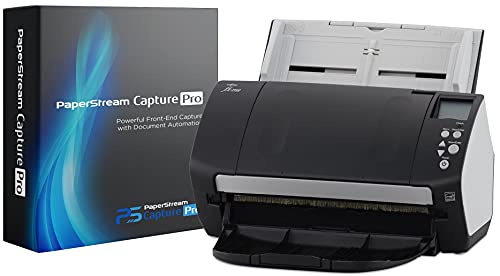
Fujitsu fi-7160 Desktop Color Duplex Scanner
Best for: Desktop color duplex scanning with standard drivers
- Scanner Type
- Desktop (what this guide is about)
- Portability
- Desktop
- Driver Support
- TWAIN, ISIS
- Print Output
- Color
- Features
- Duplex Printing, Automatic Document Feeder, Scanner
- Scanning
- Auto Document Feeder
View on Amazon: Fujitsu fi-7160 Desktop Color Duplex Scanner
The Fujitsu fi-7160 is a desktop scanner designed for daily document processing. It captures color output and handles duplex scanning automatically. The unit measures 6.69 inches wide and weighs 9.26 pounds. It supports TWAIN and ISIS drivers for integration with ECM solutions. This model suits offices needing reliable paper handling and standard interface compatibility for routine imaging tasks.
Pros
- Supports duplex scanning for two-sided documents
- Captures color print output
- Compatible with TWAIN and ISIS drivers
- Includes PaperStream Capture Pro software
Cons
- Desktop form factor requires dedicated desk space
- No wireless connectivity listed in specifications
- No mention of mobile app support
Good fit if
- You need reliable duplex scanning for paper documents
- You require standard TWAIN or ISIS driver support
- You prefer a compact desktop footprint
Skip if
- You need wireless or mobile scanning capabilities
- You require high-speed batch processing over 20 ppm
- You want a portable handheld device
Verdict: The Fujitsu fi-7160 Desktop Color Duplex Scanner fits users who need dependable color duplex scanning via standard drivers. It is a solid choice for fixed-desk environments requiring TWAIN or ISIS compatibility.

Brother ADS-2200 Desktop Scanner
Best for: high-speed duplex paper scanning
- Scanner Type
- Desktop (what this guide is about)
- Scan Speed
- Up to 35 ppm
- ADF Capacity
- 50 sheets
- Portability
- Desktop
- Driver Support
- TWAIN, WIA, ICA, SANE
- Supported Functions
- Scan
The Brother ADS-2200 is a desktop document scanner designed for high-volume single-pass duplex scanning. It processes up to 35 pages per minute using a 50-sheet automatic document feeder. The unit supports multiple scan destinations, including email, file, and USB flash drives. It includes image optimization features like multi-feed detection and blank page removal. The scanner works with Windows, Mac, and Linux operating systems via standard driver protocols.
Pros
- Scans up to 35 pages per minute
- 50-sheet automatic document feeder
- Single-pass duplex scanning
- Supports Windows, Mac, and Linux
Cons
- No wireless connectivity option
- No built-in display panel
- No mobile app support
Good fit if
- You need fast duplex scanning for paper documents
- You want to scan directly to a USB drive
- You use Windows, Mac, or Linux computers
Skip if
- You require wireless scanning capabilities
- You need to scan credit cards or ID cards
- You prefer a compact portable design
Verdict: Brother ADS-2200 Desktop Scanner is a solid choice for offices that need reliable, high-speed paper document processing without the need for wireless features.
Specifications side by side
| Spec | Epson WorkForce Desktop Duplex Scanner | Epson WorkForce Wireless Touchscreen Scanner | Epson RapidReceipt Wireless Desktop Scanner | Epson WorkForce Wireless Desktop Scanner | Ricoh fi-8040 Desktop Document Scanner | Brother Compact Desktop Document Scanner | Brother ADS-3100 Compact Desktop Scanner | Brother Desktop Network Document Scanner | Plustek PS186 Desktop Scanner | Brother Desktop Document Scanner with Touchscreen | Brother ADS-4700W Desktop Scanner | Epson DS-C330 Compact Desktop Scanner | Fujitsu fi-7160 Desktop Color Duplex Scanner | Brother ADS-2200 Desktop Scanner |
|---|---|---|---|---|---|---|---|---|---|---|---|---|---|---|
| Scan Speed | not specified | 35 ppm | Up to 35 ppm | Up to 35 ppm / 70 ipm | 40 double-sided pages per minute | 25 ppm | Up to 40 ppm | Up to 40 ppm | not specified | Up to 60 ppm | 40 ppm | 30 ppm / 60 ipm | not specified | Up to 35 ppm |
| ADF Capacity | 50 sheets | 100 sheets | 100 sheets | 50 sheets | 50 page | 20 pages | Up to 60 pages | 80 pages | 50 sheets | 100 pages | 80 pages | 20 sheets | not specified | 50 sheets |
| Connectivity | not specified | Wireless, USB | Wireless | Wireless | Network | USB 3.0 | Hi-Speed USB 3.0 | Ethernet, USB | not specified | Wi-Fi, Ethernet, USB 3.0 | Wireless, Ethernet | not specified | not specified | not specified |
| Portability | Desktop | Desktop | Desktop | Desktop | Desktop | Compact desktop | Desktop | Desktop | Desktop | Desktop | Desktop | Desktop | Desktop | Desktop |
| Media Types | not specified | not specified | Receipts, invoices, documents | Business/ID cards, contracts, long pages | Document, Receipt, ID Card | Plastic cards, documents | not specified | not specified | not specified | not specified | not specified | Paper, cards, passports | not specified | not specified |
| Touchscreen | not specified | 4.3-inch touchscreen | 4.3-inch color touchscreen | not specified | Intuitive touchscreen | not specified | not specified | not specified | not specified | 4.3-inch color touchscreen | 4.3 in color touchscreen | not specified | not specified | not specified |
| Daily Duty Cycle | not specified | not specified | not specified | not specified | not specified | not specified | not specified | not specified | not specified | not specified | not specified | 5,000 pages | not specified | not specified |
| Power Source | not specified | not specified | not specified | not specified | not specified | USB bus power | not specified | not specified | not specified | not specified | not specified | not specified | not specified | not specified |
| Driver Support | TWAIN | not specified | not specified | TWAIN | TWAIN | TWAIN, WIA, ICA, SANE | not specified | TWAIN, WIA, ISIS, SANE | not specified | TWAIN, WIA, ISIS, SANE | TWAIN, WIA, ISIS, SANE | TWAIN, ISIS | TWAIN, ISIS | TWAIN, WIA, ICA, SANE |
| Print Output | Color | Color | Color | Color | not specified | not specified | not specified | not specified | not specified | not specified | not specified | not specified | Color | not specified |
| Print Speed | not specified | not specified | not specified | not specified | not specified | not specified | not specified | not specified | not specified | not specified | not specified | Up to 30 ppm | not specified | not specified |
| Supported Functions | not specified | not specified | not specified | not specified | not specified | Scan | Scan | Scan | not specified | Scan | Scan | Scan | not specified | Scan |
| Features | Duplex Printing, Automatic Document Feeder, Scanner | Duplex Printing, Automatic Document Feeder, Touch Screen, Scanner | Automatic Document Feeder, Touch Screen, Scanner | Duplex Printing, Mobile Printing, Automatic Document Feeder, Scanner | Scanner | Scanner | Scanner | Duplex Printing, Scanner | Automatic Document Feeder, Scanner | Duplex Printing, Touch Screen, Scanner | Duplex Printing, Touch Screen, Scanner | Duplex Printing, Scanner | Duplex Printing, Automatic Document Feeder, Scanner | Duplex Printing, Scanner |
| Ideal For | Documents | Documents | Documents | Documents | Documents | not specified | not specified | not specified | Documents | not specified | not specified | Documents | Documents | Documents |
| Use Case | not specified | not specified | not specified | not specified | Office | Office, Home | not specified | not specified | not specified | not specified | not specified | not specified | not specified | not specified |
| Scanner Type | Desktop | Desktop | Desktop | Desktop | Desktop | Desktop | Desktop | Desktop | Desktop | Desktop | Desktop | Desktop | Desktop | Desktop |
| Scanning | Auto Document Feeder | Wireless Scanning | Wireless Scanning | Auto Document Feeder | not specified | not specified | not specified | not specified | Auto Document Feeder | Wireless Scanning | Wireless Scanning | not specified | Auto Document Feeder | not specified |
| Duplex Scanning | Duplex | Duplex | Duplex | Duplex | not specified | not specified | not specified | Duplex | not specified | Duplex | Duplex | Duplex | Duplex | Duplex |
| Auto Document Feeder | ADF | ADF | ADF | ADF | not specified | not specified | not specified | not specified | ADF | not specified | not specified | not specified | ADF | not specified |
| Dimensions | 6.6 × 11.6 × 6.9 inches | 11.6 × 11.6 × 6.6 inches | 14.3 × 10.3 × 12.4 inches | 11.6 × 11.6 × 6.9 inches | 11.5 × 6.2 × 5.6 inches | 11.8 × 4.1 × 3.3 inches | 11.7 × 8.5 × 7.5 inches | 11.7 × 8.5 × 7.5 inches | 10.4 × 5.02 × 5.83 inches | 11.6 × 9.2 × 7.8 inches | 11.7 × 8.5 × 7.5 inches | 4.2 × 11.7 × 4.9 inches | 11.8 × 6.69 × 6.42 inches | 5.8 × 11.8 × 7 inches |
| Weight | 8.16 pounds | 8.16 pounds | 8.2 pounds | 8.1 pounds | 6.8 pounds | 3.3 pounds | 6.1 pounds | 6.1 pounds | 3.66 pounds | 7.8 pounds | 6.4 pounds | 4 pounds | 9.26 pounds | 5.5 pounds |
| Color | Black | Black | White | not specified | Black | White | White | White | black | White | White | White | Black | Black |
| Model | ES-400 II | ES-580W | B11B258202 | ES-500W II | PA03836-B005 | ADS1200 | ADS3100 | ADS-4300N | PS186 | ADS-4900W | ADS4700W | B11B272201 | CG01000-286401 | ADS2200 |
| Size | not specified | not specified | not specified | not specified | not specified | not specified | A4 - 8.27" x 11.69",A5 - 5.83" x 8.27" | 9.70 | not specified | not specified | A4 - 8.27" x 11.69",A5 - 5.83" x 8.27" | not specified | not specified | 5.6" x 11.8" x 5.7" |
If you need workstation cooling for high-volume processing, review specifications for the best heatsinks for desktop.
Key Specs for Choosing Desktop Scanners
-
Check duplex scanning needs
Duplex scanning captures both sides of a page in one pass. This doubles your daily throughput without manual intervention. If you process contracts or forms, prioritize models with explicit duplex support. The Epson ES-400 II and ES-580W both handle double-sided documents automatically. The Brother ADS1200 is noted for light-duty duplex tasks. Avoid single-sided scanners if your workflow involves two-sided papers, as manual flipping slows you down significantly.
-
Verify connectivity options
Connectivity determines how the scanner integrates with your office. Wireless models offer flexibility for shared desks. The Epson ES-580W and ES-500W II provide wireless scanning capabilities. The Brother ADS-4900W and ADS-4700W also include wireless features alongside touchscreens. If you prefer stable wired connections, the Brother ADS-3100 and ADS-2200 rely on wired interfaces. Choose wireless if you need mobility, or wired if you prioritize consistent network stability without interference.
-
Assess physical footprint
Desktop space is often limited. Measure your desk before buying. The Brother ADS1200 is notably compact at 4.1 inches wide and weighs only 3.3 pounds. The Ricoh fi-8040 is also small at 6.2 inches wide. Larger models like the Epson ES-580W are 11.6 inches long. The Plustek PS186 is narrow at 5.02 inches wide. Ensure the scanner fits your workspace while allowing room for paper input and output trays to function correctly.
-
Review supported functions
Some scanners include specialized features beyond basic scanning. The Ricoh fi-8040 offers DirectScan for network independence. The Plustek PS186 supports barcode-driven batch processing for automated sorting. The Brother ADS-4300N includes broad driver compatibility for networked folders and email. If you need automated routing or barcode triggers, check the attributes list. Standard scanners may require manual file naming and saving, which adds time to high-volume tasks.
-
Confirm color capabilities
Most desktop scanners capture color, but verify the print output specification. The Epson ES-400 II and ES-580W support color output. The Fujitsu fi-7160 is explicitly a color duplex scanner. If you scan photographs or color-coded documents, ensure the model supports color. Some budget or monochrome-focused models may only scan in grayscale. Check the attributes to confirm color support if visual accuracy is critical for your records.
Frequently asked questions
Which desktop scanner is best for high-volume duplex work?
The Epson ES-400 II is the top choice for high-volume duplex scanning. It features a 50-sheet automatic document feeder and double feed detection for accuracy. This model fits users who prioritize automated processing and cloud integration over wireless convenience. Its dimensions are 11.6 by 6.9 inches.
Do I need a wireless desktop scanner for my office?
Wireless scanners like the Epson ES-580W or ES-500W II offer standalone operation without a direct computer connection. They are ideal for teams that value connectivity and touchscreen controls. If you prefer a wired setup for stability, the Brother ADS-3100 provides fast scanning with a small footprint and no wireless components.
What is the smallest desktop scanner available?
The Brother ADS1200 is the most compact option, measuring 4.1 by 3.3 inches and weighing just 3.3 pounds. It is designed for tight desks and light-duty tasks. The Plustek PS186 is also small at 5.02 by 5.83 inches, making it suitable for compact offices needing barcode batch scanning.
Which scanner is best for processing receipts automatically?
The Epson RapidReceipt RR-600W is specialized for small business receipt automation. It includes AI features and a large feeder to handle financial data entry efficiently. This wireless model is designed specifically for automating receipt processing rather than general document scanning.
Can desktop scanners handle color documents?
Many models support color output, including the Epson ES-580W and Fujitsu fi-7160. The ES-580W offers wireless color duplex scanning with batch processing capabilities. The Fujitsu fi-7160 provides dependable color duplex scanning via standard drivers, making it a solid choice for fixed-desk environments requiring TWAIN or ISIS compatibility.
Which scanner has the fastest scanning speed?
The Ricoh fi-8040 delivers a 40 pages per minute duplex rate, supported by a DirectScan feature for busy workflows. The Brother ADS-4300N also offers reliable 40 ppm network capture. These models suit workgroups that need high-speed processing for large document volumes.
Do I need a touchscreen on my desktop scanner?
Touchscreens are useful for standalone operation and direct shortcuts. The Epson ES-580W and Brother ADS-4900W feature large touch interfaces for high-volume users. Models like the Brother ADS-2200 or Epson DS-C330 lack touchscreens but remain practical for users who prefer computer-based control.