Canon or Xerox? Document Scanners Compared in 2026
As an Amazon Associate we earn from qualifying purchases. Links on this page are affiliate links.
This canon vs xerox document scanner comparison looks at two reliable options for digitizing paper. Both the Canon imageFORMULA R10 and the Xerox DocuMate 3125 offer duplex scanning and automatic document feeders. They support both Windows and Mac systems. The main difference lies in their intended use. The Canon is a lightweight, portable unit for on-the-go tasks. The Xerox is a heavier desktop model built for higher volume office work.
Key differences
| Aspect | Canon imageFORMULA R10 Portable Duplex Scanner | Xerox DocuMate 3125 Desktop Scanner |
|---|---|---|
| Scan Speed | 12 ppm | 40 ppm |
| ADF Capacity | 20 sheets | 50 sheets |
| Portability | Portable | Desktop |
| Weight | 2.2 pounds | 5.41 pounds |
| Daily Duty Cycle | 500 scans | not listed |
Which one should you choose?
Choose Canon imageFORMULA R10 Portable Duplex Scanner if
- You need a lightweight scanner you can carry to different locations.
- You primarily scan small batches of documents and receipts.
- You prefer a device that draws power directly from your computer's USB port.
Choose Xerox DocuMate 3125 Desktop Scanner if
- You require faster scanning speeds for larger volumes of paper.
- You want to load more pages into the feeder at once.
- You need a stable desktop unit for a fixed office workspace.
Verdict: The Canon imageFORMULA R10 is the better choice for users who value portability and simplicity. The Xerox DocuMate 3125 is the superior option for those needing higher speed and a larger paper capacity. Your decision should depend on whether you move your scanner often or keep it in one place.
Canon vs Xerox Scanner Specs
Scan speed
The Xerox DocuMate 3125 offers a significant speed advantage with a rated 40 pages per minute. This is more than three times faster than the Canon imageFORMULA R10, which scans at 12 pages per minute. If you have large stacks of documents to digitize, the Xerox will finish the job much quicker. The Canon is designed for lighter, occasional use rather than high-volume throughput. For most home offices or small teams with moderate needs, the Canon speed is sufficient, but the Xerox clearly wins for efficiency.
ADF capacity
When handling multiple pages, the Xerox DocuMate 3125 holds up to 50 sheets in its automatic document feeder. The Canon imageFORMULA R10 has a smaller capacity of 20 sheets. This means you will need to reload the Xerox less often during long scanning sessions. The Canon’s smaller feeder is acceptable for short batches but requires more frequent attention. If you frequently scan reports or books with many pages, the larger tray on the Xerox reduces interruptions and keeps your workflow moving smoothly.
Portability
The Canon imageFORMULA R10 is built for movement, weighing just 2.2 pounds with a compact footprint. You can easily carry it to classrooms, remote offices, or travel with it. The Xerox DocuMate 3125 is a desktop unit weighing 5.41 pounds and is not designed for frequent transport. It sits stably on a desk but is too bulky to be truly portable. If you need a scanner that fits in a bag or moves with you, the Canon is the practical choice.
Daily duty cycle
Canon specifies a suggested daily volume of 500 scans for the imageFORMULA R10. The Xerox DocuMate 3125 does not list a specific daily duty cycle in its published data. While the Xerox has a higher speed, Canon provides a clear guideline for how much you can use it each day. This suggests the Canon is optimized for consistent, moderate daily use. Without explicit data for the Xerox, you cannot verify its long-term durability under heavy daily loads. Canon offers more transparency here.
Power source
The Canon imageFORMULA R10 is USB powered, drawing only 2.5 watts during operation and 0.7 watts in energy saving mode. This allows you to power it directly from a laptop or USB hub without a separate brick. The Xerox DocuMate 3125 does not list its power source in the provided specifications. You must assume it requires a standard power adapter, which limits where you can place it near outlets. The Canon’s USB power offers greater flexibility and convenience for various setups.
Which Scanner Fits Your Needs
Mobile professionals needing portability
The Canon imageFORMULA R10 weighs just 2.2 pounds and measures 1.57 inches tall. Its compact design fits easily in a bag. You can take it to remote offices or classrooms. It is USB powered, so you do not need a separate outlet. This makes it ideal for users who move between locations frequently.
Users with high volume tasks
The Xerox DocuMate 3125 scans at 40 pages per minute. This speed is more than three times faster than the Canon model. It also holds 50 sheets in its automatic document feeder. If you process large batches of documents daily, this desktop scanner handles the volume and speed requirements efficiently.
Small office desktop setup
The Xerox DocuMate 3125 sits on your desk with dimensions of 11.2 by 6.5 by 6.7 inches. It supports duplex scanning for both sides of a page at once. The 50-sheet feeder reduces manual loading. You get fast, reliable scanning for routine office tasks without worrying about portability constraints.
The products compared
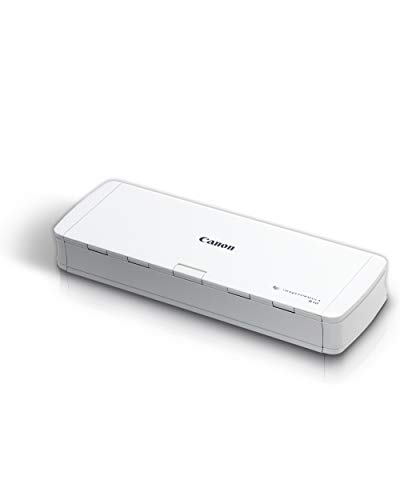
Canon imageFORMULA R10 Portable Duplex Scanner
Best for: portable, moderate-volume duplex scanning
- Scan Speed
- 12 ppm
- ADF Capacity
- 20 sheets
- Connectivity
- USB
- Portability
- Portable
- Daily Duty Cycle
- 500 scans
- Power Source
- USB powered
View on Amazon: Canon imageFORMULA R10 Portable Duplex Scanner Affiliate link
The Canon imageFORMULA R10 is a compact, USB-powered document scanner designed for portability. It scans at 12 pages per minute with a 20-sheet automatic feeder. This duplex unit handles various media types and produces high-quality images. It suits users who need a lightweight, easy-to-setup solution for home or remote offices with a daily volume of up to 500 scans.
Pros
- Scans both sides of documents simultaneously at 12 ppm
- Compact size at 3.75 by 1.57 by 11.2 inches
- Lightweight build at 2.2 pounds for easy transport
- USB powered with no external adapter needed
Cons
- Limited to USB connectivity without wireless options
- Small 20-sheet automatic document feeder capacity
- 500 scan daily duty cycle restricts high-volume use
Good fit if
- You need a lightweight scanner for travel or remote work
- You require fast duplex scanning for moderate daily volumes
- You prefer a simple USB setup without complex installation
Skip if
- You need wireless connectivity like Wi-Fi or Bluetooth
- You regularly scan more than 500 pages per day
- You require a high-capacity feeder for large batches
Verdict: The Canon imageFORMULA R10 Portable Scanner fits individuals who prioritize portability and straightforward USB connectivity for moderate scanning tasks. It is ideal for home offices or remote workers who value a lightweight, compact design over high-volume capacity.

Xerox DocuMate 3125 Desktop Scanner
Best for: High-volume duplex document scanning
- Scan Speed
- 40 ppm / 70 ipm
- ADF Capacity
- 50 sheets
- Portability
- Desktop
- Features
- Duplex Printing, Automatic Document Feeder, Scanner
- Scanning
- Auto Document Feeder
- Auto Document Feeder
- ADF
View on Amazon: Xerox DocuMate 3125 Desktop Scanner Affiliate link
The Xerox DocuMate 3125 is a desktop duplex scanner built for PC and Mac. It features a 50-sheet automatic document feeder and scans up to 40 pages per minute. You get color, grayscale, and black-and-white options with searchable PDF output. Its compact footprint measures 11.2 by 6.5 by 6.7 inches. This model suits offices needing steady, high-volume scanning without the bulk of larger machines.
Pros
- Scans up to 40 ppm at 200 dpi
- 50-sheet automatic document feeder capacity
- Supports duplex scanning for two-sided documents
- Creates searchable PDF files
Cons
- Desktop form factor limits portability
- Maximum paper size is 8.5 by 38 inches
- Weighs 5.41 pounds
Good fit if
- You need a dedicated desktop scanner for daily office use
- You require duplex scanning for two-sided documents
- You want searchable PDF output for easy keyword searching
Skip if
- You need a portable scanner that fits in a bag
- You frequently scan documents larger than 8.5 by 38 inches
- You require scanning speeds higher than 40 ppm
Verdict: Xerox DocuMate 3125 Desktop Scanner fits users who need reliable, high-volume duplex scanning on a desk. It handles standard office documents well but does not suit those needing portability or larger paper formats.
Specifications side by side
| Spec | Canon imageFORMULA R10 Portable Duplex Scanner | Xerox DocuMate 3125 Desktop Scanner |
|---|---|---|
| Scan Speed | 12 ppm | 40 ppm / 70 ipm |
| ADF Capacity | 20 sheets | 50 sheets |
| Connectivity | USB | not stated |
| Portability | Portable | Desktop |
| Daily Duty Cycle | 500 scans | not stated |
| Power Source | USB powered | not stated |
| Features | Duplex Printing, Mobile Printing, Scanner | Duplex Printing, Automatic Document Feeder, Scanner |
| Ideal For | Documents | Documents |
| Scanner Type | Portable | not stated |
| Scanning | not stated | Auto Document Feeder |
| Duplex Scanning | Duplex | Duplex |
| Auto Document Feeder | not stated | ADF |
| Dimensions | 3.75 × 11.2 × 1.57 inches | 6.5 × 11.2 × 6.7 inches |
| Weight | 2.2 pounds | 5.41 pounds |
| Size | Compact | not stated |
| Color | White | Black |
| Model | 4861C001 | XDM31255M-WU |
Frequently asked questions
Which scanner is better for frequent travel?
The Canon imageFORMULA R10 is the better choice for travel. It weighs only 2.2 pounds and stands 1.57 inches tall. This compact size fits easily into a laptop bag. The Xerox DocuMate 3125 is much heavier at 5.41 pounds. It is designed for desktop use and is not portable.
Does the Canon scanner support duplex scanning?
Yes, the Canon imageFORMULA R10 supports duplex scanning. You can scan both sides of a document in one pass. This feature helps save time when digitizing double-sided papers. The Xerox DocuMate 3125 also offers duplex scanning for similar efficiency.
Is the Xerox scanner suitable for home offices?
The Xerox DocuMate 3125 is suitable for home offices that need high-volume scanning. It features an automatic document feeder for batch processing. However, it is larger and heavier than portable options. It measures 6.5 inches long and 6.7 inches tall, requiring dedicated desk space.
What connectivity options do these scanners have?
The Canon imageFORMULA R10 uses USB connectivity for power and data transfer. This makes it easy to connect to laptops without extra power adapters. The Xerox DocuMate 3125 is a desktop unit designed for stable desk connections. Both models support standard document scanning workflows.
Can these scanners handle standard office documents?
Yes, both scanners are ideal for standard office documents. The Xerox DocuMate 3125 is rated for high-volume tasks with its automatic feeder. The Canon imageFORMULA R10 handles moderate volumes well. Both devices are designed to digitize paper files efficiently for everyday use.
Which scanner is smaller and lighter?
The Canon imageFORMULA R10 is significantly smaller and lighter. It weighs 2.2 pounds and has a compact footprint. The Xerox DocuMate 3125 weighs 5.41 pounds and is bulkier. If space is limited, the Canon model is the more practical desktop or travel choice.
Do these models include automatic document feeders?
Yes, both models include automatic document feeder capabilities. The Xerox DocuMate 3125 features a dedicated ADF for handling stacks of paper. The Canon imageFORMULA R10 also supports duplex scanning for automated two-sided feeds. This allows you to scan multiple pages without manual intervention.