Canon or ScanSnap? Document Scanners Compared in 2026
As an Amazon Associate we earn from qualifying purchases. Links on this page are affiliate links.
This canon vs ScanSnap document scanner comparison looks at two very different tools. Both devices convert paper into digital files, but they serve different workflows. The Canon imageFORMULA R10 is a small, USB-powered portable unit. The ScanSnap iX1600 is a larger, wireless machine with a touchscreen. You need to decide if you value portability or speed and connectivity for your daily scanning tasks.
Key differences
| Aspect | Canon imageFORMULA R10 Portable Duplex Scanner | ScanSnap iX1600 Wireless Document Scanner |
|---|---|---|
| Scan Speed | 12 ppm | 40 ppm |
| Connectivity | USB | Wi-Fi, USB |
| ADF Capacity | 20 sheets | not listed |
| Power Source | USB powered | not listed |
| Display | not listed | Large color touchscreen |
| Weight | 2.2 pounds | 7.5 pounds |
Which one should you choose?
Choose Canon imageFORMULA R10 Portable Duplex Scanner if
- You need a lightweight scanner that fits easily in a bag for travel or remote work.
- You want a simple device that powers directly from your computer via USB without extra cords.
- You scan moderate volumes and prefer a compact footprint on your desk.
Choose ScanSnap iX1600 Wireless Document Scanner if
- You need high-speed scanning for large batches of documents in a home office or small business.
- You want to scan directly to cloud services or mobile devices without connecting a computer.
- You prefer using a large color touchscreen to select scanning profiles and destinations easily.
Verdict: The Canon imageFORMULA R10 is the better choice for users who prioritize portability and simple USB connectivity. The ScanSnap iX1600 suits those who need faster throughput and wireless flexibility for a stationary setup.
Canon vs ScanSnap Scanner Comparison
Scan Speed
When you need to process large stacks of paper quickly, speed matters. The ScanSnap iX1600 scans at 40 pages per minute. This high rate helps you clear desks fast. The Canon imageFORMULA R10 scans at 12 pages per minute. It handles duplex scanning, but the pace is slower. If you have a heavy workload, the ScanSnap model offers significantly faster throughput. The Canon unit is adequate for lighter, occasional scanning tasks. You choose based on how much volume you handle daily.
Connectivity
Connection options define how you use the device. The ScanSnap iX1600 includes built-in Wi-Fi and USB. Wi-Fi allows direct scanning to mobile devices or cloud services without a computer. You can place it anywhere convenient. The Canon imageFORMULA R10 relies solely on USB connectivity. It requires a direct cable connection to a Windows or Mac device. You cannot scan wirelessly with the Canon unit. If you value flexibility and wireless freedom, the ScanSnap option is superior. The Canon is limited to wired setups.
Portability
Size and weight determine if you can take the scanner with you. The Canon imageFORMULA R10 weighs just 2.2 pounds. It measures 11.2 inches wide and 1.57 inches high. You can easily carry it to home offices, classrooms, or remote locations. The ScanSnap iX1600 weighs 7.5 pounds. It is larger, measuring 11.5 inches wide and 6.3 inches long. You must keep the ScanSnap on a desk. For travelers or those needing a mobile solution, the Canon is the clear winner. The ScanSnap is a stationary device.
User Interface
How you control the scanner affects ease of use. The ScanSnap iX1600 features a large color touchscreen. You can select from up to 30 scanning profiles directly on the device. Users can access personal shortcuts and destinations without a computer screen. The Canon imageFORMULA R10 has no mentioned display or touchscreen. You likely rely on the connected computer for setup and control. The ScanSnap offers a more intuitive, standalone experience. You can manage scans independently of your PC or Mac interface.
Power Source
Power requirements influence where you can place the device. The Canon imageFORMULA R10 is USB powered. It draws power directly from your computer or a USB port. Power consumption is 2.5W or less, with an energy-saving mode of 0.7W. This makes it efficient and easy to power anywhere with a USB port. The ScanSnap iX1600 specifications do not list its power source or consumption in the provided data. You must check the manual for its power needs. The Canon unit offers transparent, low-energy USB power details.
Daily Duty Cycle
Volume capacity matters for frequent users. The Canon imageFORMULA R10 has a suggested daily volume of 500 scans. This indicates it is built for moderate daily use. The ScanSnap iX1600 specifications do not list a daily duty cycle in the provided data. You cannot compare official volume limits directly. However, the ScanSnap’s higher speed suggests it may handle higher volumes. For known limits, the Canon provides clear guidance on expected daily usage. The ScanSnap data is missing this specific metric.
Which Scanner Fits Your Workflow
Users needing portable, lightweight scanning
The Canon imageFORMULA R10 weighs just 2.2 pounds and measures 1.57 inches in height. Its compact size and USB power source make it easy to carry to classrooms or remote offices. You can take it anywhere without needing a dedicated desk space or complex setup.
High-volume users requiring fast throughput
The ScanSnap iX1600 scans at 40 pages per minute, which is significantly faster than the Canon’s 12 pages per minute. This speed helps you clear large stacks of paper quickly. It also supports a large color touchscreen for easy selection of scanning destinations and profiles.
Teams needing wireless connectivity and profiles
The ScanSnap iX1600 features built-in Wi-Fi and supports up to 30 scanning profiles. Multiple users can select their own shortcuts and destinations via the large color touchscreen. This setup allows direct connection to mobile devices and cloud services without needing a computer for every scan.
The products compared
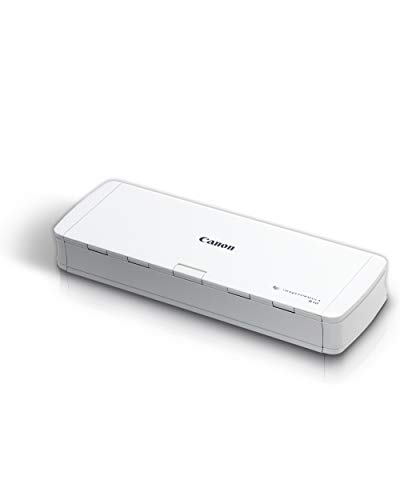
Canon imageFORMULA R10 Portable Duplex Scanner
Best for: portable, duplex document scanning
- Scan Speed
- 12 ppm
- ADF Capacity
- 20 sheets
- Connectivity
- USB
- Portability
- Portable
- Daily Duty Cycle
- 500 scans
- Power Source
- USB powered
View on Amazon: Canon imageFORMULA R10 Portable Duplex Scanner Affiliate link
The Canon imageFORMULA R10 is a compact, USB-powered document scanner designed for portability. It scans at 12 pages per minute with a 20-sheet automatic feeder. The device supports duplex scanning and handles various media types, including receipts and business cards. It connects via USB and includes built-in software for Windows and Mac. This scanner suits users needing a lightweight, efficient tool for converting paper documents into digital formats like searchable PDFs.
Pros
- Scans at 12 pages per minute
- 20-sheet automatic document feeder
- Supports duplex scanning
- Compact and lightweight design
Cons
- USB-only connectivity without wireless options
- Low daily duty cycle of 500 scans
- No built-in battery for cordless use
Good fit if
- You need a lightweight scanner for travel
- You primarily scan documents on a desk
- You want duplex scanning in a small footprint
Skip if
- You require wireless or network scanning
- You scan more than 500 pages daily
- You need to scan high-volume batches
Verdict: The Canon imageFORMULA R10 Portable Scanner is a practical, portable option for users who value speed and duplex scanning in a compact USB device. It fits individuals who need efficient document digitization without the bulk of larger scanners.

ScanSnap iX1600 Wireless Document Scanner
Best for: small office duplex scanning
- Scan Speed
- 40 ppm
- Connectivity
- Wi-Fi, USB
- Media Types
- Receipts, business cards, photos
- Touchscreen
- Large color touchscreen
- Features
- Automatic Document Feeder, Touch Screen, Scanner
- Scanning
- Auto Document Feeder
View on Amazon: ScanSnap iX1600 Wireless Document Scanner Affiliate link
The ScanSnap iX1600 is a compact wireless scanner designed for home and small office use. It delivers fast 40 ppm duplex scanning with a large color touchscreen. You can connect via Wi-Fi or USB to send documents to cloud services or computers. The device supports 30 scanning profiles for organized workflows. Its small footprint fits easily on your desk while handling photos and documents efficiently.
Pros
- 40 ppm duplex scanning speed
- Large color touchscreen interface
- Wi-Fi and USB connectivity
- Supports 30 scanning profiles
- Compact 11.5-inch width
Cons
- 7.5 pounds weight is heavier than some competitors
- No mention of automatic document feeder capacity
- Limited to single-sheet scanning workflows
Good fit if
- You need fast duplex scanning for mixed documents
- You want wireless operation without a computer
- You prefer a touchscreen interface for profile selection
Skip if
- You require high-volume batch scanning
- You need a lightweight portable device
- You prefer manual paper feeding only
Verdict: ScanSnap iX1600 Wireless Document Scanner suits users who prioritize speed and wireless convenience for daily document management. It is ideal for small offices needing reliable duplex scanning with easy cloud integration.
Specifications side by side
| Spec | Canon imageFORMULA R10 Portable Duplex Scanner | ScanSnap iX1600 Wireless Document Scanner |
|---|---|---|
| Scan Speed | 12 ppm | 40 ppm |
| ADF Capacity | 20 sheets | not stated |
| Connectivity | USB | Wi-Fi, USB |
| Portability | Portable | not stated |
| Media Types | not stated | Receipts, business cards, photos |
| Touchscreen | not stated | Large color touchscreen |
| Daily Duty Cycle | 500 scans | not stated |
| Power Source | USB powered | not stated |
| Features | Duplex Printing, Mobile Printing, Scanner | Automatic Document Feeder, Touch Screen, Scanner |
| Ideal For | Documents | Documents |
| Scanner Type | Portable | not stated |
| Scanning | not stated | Auto Document Feeder |
| Duplex Scanning | Duplex | not stated |
| Auto Document Feeder | not stated | ADF |
| Dimensions | 3.75 × 11.2 × 1.57 inches | 6.3 × 11.5 × 6 inches |
| Weight | 2.2 pounds | 7.5 pounds |
| Size | Compact | ScanSnap iX1600 Black Photos & Documents |
| Color | White | ScanSnap iX1600 Black Photos & Documents |
| Model | 4861C001 | PA03770-B635 |
Frequently asked questions
Which scanner is better for mobile professionals?
The Canon imageFORMULA R10 is the better choice for mobile professionals. It weighs only 2.2 pounds and measures 1.57 inches in height. This compact USB device fits easily into a bag. You can take it to remote offices or classrooms without carrying a heavy machine.
Does the ScanSnap iX1600 support wireless connectivity?
Yes, the ScanSnap iX1600 supports wireless connectivity. It also includes a USB port for wired connections. This wireless scanning feature allows you to send documents directly to your computer or cloud services without being tethered by a cable, which is useful for small office setups.
Can both scanners handle duplex scanning?
Yes, both scanners handle duplex scanning. The Canon imageFORMULA R10 is explicitly designed for portable duplex document scanning. The ScanSnap iX1600 is also described as suitable for small office duplex scanning. This means you can scan both sides of a page in a single pass with either device.
How much desk space does the ScanSnap iX1600 take?
The ScanSnap iX1600 takes up more desk space than the portable option. It measures 11.5 inches in width and 6.3 inches in length. It also weighs 7.5 pounds. This larger footprint makes it better suited for a fixed workstation rather than a mobile or temporary setup.
What is the primary connectivity method for the Canon R10?
The primary connectivity method for the Canon imageFORMULA R10 is USB. It is a portable unit that relies on this connection for power and data transfer. This makes it simple to plug into a laptop or desktop without needing additional power adapters or wireless configuration.
Which scanner is ideal for small office daily management?
The ScanSnap iX1600 is ideal for small office daily management. It offers wireless convenience and reliable duplex scanning. Its higher speed and cloud integration capabilities help teams process documents efficiently. It is designed for users who prioritize speed and ease of use in a shared office environment.