Canon vs Ricoh: Document Scanners Compared by Specs
As an Amazon Associate we earn from qualifying purchases. Links on this page are affiliate links.
Choosing between a canon vs ricoh document scanner depends on your workflow and space. Both devices handle standard paper documents efficiently. The Canon imageFORMULA R10 is a lightweight, portable unit designed for mobile use. The Ricoh fi-8040 is a desktop scanner built for office environments. The main difference lies in speed and connectivity. The Ricoh offers faster scanning and network capabilities. The Canon prioritizes portability and USB simplicity.
Key differences
| Aspect | Canon imageFORMULA R10 Portable Duplex Scanner | Ricoh fi-8040 Desktop Document Scanner |
|---|---|---|
| Scan Speed | 12 ppm | 40 double-sided ppm |
| Portability | Portable | Desktop |
| Connectivity | USB | Network |
| ADF Capacity | 20 sheets | not listed |
| Daily Duty Cycle | 500 scans | not listed |
| Weight | 2.2 pounds | 6.8 pounds |
Which one should you choose?
Choose Canon imageFORMULA R10 Portable Duplex Scanner if
- You need a scanner you can easily carry between home and office.
- You prefer a lightweight device that connects via USB without network setup.
- You scan a moderate volume of documents, around 500 per day.
Choose Ricoh fi-8040 Desktop Document Scanner if
- You require high-speed scanning for larger office batches.
- You need to scan directly to network folders or email without a computer.
- You want advanced image processing and OCR features for data extraction.
Verdict: The Canon imageFORMULA R10 suits individuals or remote workers who value portability and simple USB connectivity. The Ricoh fi-8040 is better for offices that need speed, network integration, and higher throughput. Your choice depends on whether you prioritize mobility or volume.
Canon vs Ricoh Scanner Specs
Scan speed
The Ricoh fi-8040 offers a significant speed advantage for high-volume workflows. It scans up to 40 double-sided pages per minute. This makes it ideal for busy office environments where time matters. The Canon imageFORMULA R10 scans at 12 pages per minute. While slower, this speed is sufficient for moderate daily use. The Canon supports both color and black-and-white scanning efficiently. The Ricoh focuses on rapid throughput with its advanced processing. If you need to digitize large stacks of documents quickly, the Ricoh is the faster choice. For occasional scanning, the Canon speed is adequate.
Portability
The Canon imageFORMULA R10 is designed for mobility. It weighs only 2.2 pounds and has a compact footprint. You can easily carry it in a bag for travel or remote work. The Ricoh fi-8040 is a desktop unit weighing 6.8 pounds. It is larger and heavier, making it less suitable for frequent movement. The Canon fits well in small spaces like home offices or classrooms. The Ricoh requires a dedicated desk space due to its size. If you move between locations or need a lightweight device, the Canon is the clear winner. The Ricoh is stationary by design.
Connectivity
The Ricoh fi-8040 supports network connectivity, allowing you to scan directly to email or network folders. This feature, called DirectScan, lets you use the device without a computer. The Canon imageFORMULA R10 connects via USB only. It requires a connected Windows or Mac device to function. The Canon is USB powered, which simplifies power needs but limits independence. The Ricoh offers more flexibility for shared office environments. You can place it on a network and have multiple users access it. The Canon is better for single-user, direct-computer setups.
Daily duty cycle
The Canon imageFORMULA R10 suggests a daily volume of 500 scans. This is a moderate workload suitable for small teams or individual users. The Ricoh fi-8040 does not list a specific daily duty cycle in the provided data. However, its desktop design and higher speed suggest it is built for heavier office use. The Canon is optimized for portability and moderate volume. The Ricoh is built for sustained office performance. If you know your exact daily scan count, the Canon gives you a clear benchmark. For the Ricoh, the data does not specify a limit, implying higher robustness.
Software features
The Canon imageFORMULA R10 includes built-in software that requires no installation. It updates automatically and allows you to preview, edit, and organize scans directly. You can create custom buttons for specific destinations. The Ricoh fi-8040 uses PaperStream software with a TWAIN driver. It offers powerful image enhancement, indexing, and optical character recognition (OCR). The Ricoh also includes PaperStream ClickScan for one-touch scanning to email or folders. The Canon focuses on ease of use and portability. The Ricoh offers more advanced data extraction and indexing tools for business workflows.
Choose the right scanner for your needs
Remote workers needing portability
The Canon imageFORMULA R10 weighs just 2.2 pounds and measures 3.75 by 11.2 inches. Its compact, portable design fits easily into bags for travel. USB power allows use with laptops without needing a wall outlet. This makes it ideal for home offices, classrooms, or remote workspaces where space is limited and mobility matters.
Office staff with high volume
The Ricoh fi-8040 scans 40 double-sided pages per minute. This speed handles busy office environments efficiently. It connects via network for direct scanning to email or folders. Built-in OCR creates editable documents. The desktop form factor supports sustained daily use, making it a robust choice for teams processing large amounts of paper regularly.
Users wanting simple operation
The Ricoh fi-8040 includes a touchscreen and PaperStream ClickScan software. You place paper in the feeder and press a button to scan directly to destinations. DirectScan allows network scanning without a computer. This intuitive interface reduces setup time and technical hurdles, letting you focus on digitizing documents quickly and accurately.
The products compared
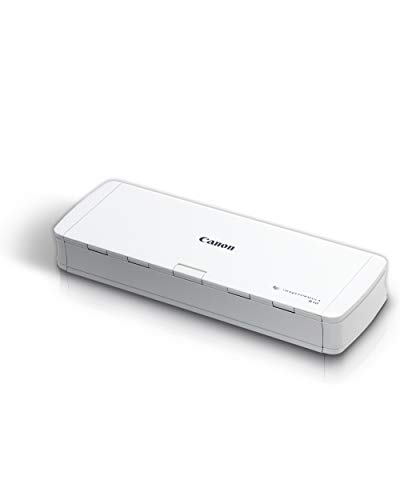
Canon imageFORMULA R10 Portable Duplex Scanner
Best for: light mobile scanning and travel
- Scan Speed
- 12 ppm
- ADF Capacity
- 20 sheets
- Connectivity
- USB
- Portability
- Portable
- Daily Duty Cycle
- 500 scans
- Power Source
- USB powered
View on Amazon: Canon imageFORMULA R10 Portable Duplex Scanner Affiliate link
The Canon R10 is a USB-powered portable scanner designed for mobile workflows. It scans duplex documents at 12 pages per minute with a 20-sheet automatic feeder. The compact unit weighs 2.2 pounds and fits easily in bags. It handles receipts, business cards, and legal documents. This model suits users who need quick, high-quality scans from laptops or Macs without a dedicated desk setup.
Pros
- Scans both sides simultaneously at 12 ppm
- 20-sheet automatic document feeder
- USB powered for portable use
- Built-in software requires no installation
Cons
- Limited to USB connectivity only
- Small 20-sheet ADF capacity
- Low daily duty cycle of 500 scans
Good fit if
- You need a lightweight scanner for travel
- You scan small batches of documents
- You want a plug-and-play USB device
Skip if
- You require high-volume daily scanning
- You need network or Wi-Fi connectivity
- You scan large stacks of paper regularly
Verdict: The Canon R10 Portable Document Scanner is a compact, USB-powered tool for light mobile scanning tasks. It fits users who prioritize portability and ease of setup over high-volume throughput or network integration.

Ricoh fi-8040 Desktop Document Scanner
Best for: High-volume office document scanning
- Scan Speed
- 40 double-sided pages per minute
- ADF Capacity
- 50 page
- Connectivity
- Network
- Portability
- Desktop
- Media Types
- Document, Receipt, ID Card
- Touchscreen
- Intuitive touchscreen
View on Amazon: Ricoh fi-8040 Desktop Document Scanner Affiliate link
The Ricoh fi-8040 is a desktop document scanner built for office environments. It scans 40 double-sided pages per minute, making it fast for high-volume tasks. You get network connectivity for DirectScan to email or folders, plus a touchscreen interface. It uses PaperStream software for OCR and image enhancement. This model suits teams needing reliable, high-speed scanning without the bulk of larger machines.
Pros
- Scans 40 double-sided pages per minute
- Network connectivity for DirectScan to folders or email
- Intuitive touchscreen interface for simplified operation
- Includes OCR and image enhancement software
Cons
- Desktop form factor limits portability compared to handheld units
- Heavier build at 6.8 pounds makes it less mobile
- Requires network connection for DirectScan features
Good fit if
- You need to process high volumes of double-sided documents quickly
- You want to scan directly to network folders or email without a computer
- You prefer a touchscreen interface for quick access to scan destinations
Skip if
- You need a portable scanner that fits easily in a bag
- You only scan occasional single-sided pages and need minimal speed
- You require USB-only connectivity without network infrastructure
Verdict: Ricoh fi-8040 Desktop Scanner is ideal for offices that prioritize speed and network integration over portability. It fits teams scanning double-sided documents daily who want direct-to-folder workflows.
Specifications side by side
| Spec | Canon imageFORMULA R10 Portable Duplex Scanner | Ricoh fi-8040 Desktop Document Scanner |
|---|---|---|
| Scan Speed | 12 ppm | 40 double-sided pages per minute |
| ADF Capacity | 20 sheets | 50 page |
| Connectivity | USB | Network |
| Portability | Portable | Desktop |
| Media Types | not stated | Document, Receipt, ID Card |
| Touchscreen | not stated | Intuitive touchscreen |
| Daily Duty Cycle | 500 scans | not stated |
| Power Source | USB powered | not stated |
| Driver Support | not stated | TWAIN |
| Features | Duplex Printing, Mobile Printing, Scanner | Scanner |
| Ideal For | Documents | Documents |
| Use Case | not stated | Office |
| Scanner Type | Portable | Desktop |
| Duplex Scanning | Duplex | not stated |
| Dimensions | 3.75 × 11.2 × 1.57 inches | 11.5 × 6.2 × 5.6 inches |
| Weight | 2.2 pounds | 6.8 pounds |
| Size | Compact | not stated |
| Color | White | Black |
| Model | 4861C001 | PA03836-B005 |
Frequently asked questions
Which scanner is better for travel?
The Canon imageFORMULA R10 is the better choice for travel. It weighs only 2.2 pounds and measures 3.75 by 11.2 inches. This compact size allows it to fit easily into bags. The device is USB-powered, so you can use it with laptops without needing a separate power adapter.
Does the Ricoh fi-8040 support duplex scanning?
Yes, the Ricoh fi-8040 supports duplex scanning. It scans up to 40 double-sided pages per minute. This high speed makes it suitable for offices that process large volumes of two-sided documents daily. The desktop design ensures stability during these high-speed operations.
Is the Canon R10 suitable for office use?
The Canon R10 is designed for light mobile scanning rather than heavy office use. It lacks network integration and relies on USB connectivity. While it handles documents well, it is not built for the high-volume throughput or direct-to-folder workflows typical in busy office environments.
What is the weight difference between the two scanners?
There is a significant weight difference between the two models. The Canon R10 weighs 2.2 pounds, making it highly portable. In contrast, the Ricoh fi-8040 weighs 6.8 pounds. This heavier desktop unit is designed to stay in one place rather than be carried around.
Can I scan double-sided documents with the Canon scanner?
Yes, the Canon imageFORMULA R10 supports duplex scanning. It is explicitly listed as a duplex scanner. However, its speed is lower than the Ricoh model, scanning at 12 pages per minute. It is best for users who need portability and occasional two-sided scanning.
Which scanner is better for high-volume offices?
The Ricoh fi-8040 is better for high-volume offices. It scans up to 40 double-sided pages per minute. This speed handles large daily workloads efficiently. The desktop form factor provides stability and integration options that the portable Canon unit does not offer.
Does the Canon R10 require AC power?
No, the Canon R10 does not require AC power. It is USB-powered, which allows you to connect it directly to a laptop. This feature supports its design as a portable tool for mobile use. You do not need to find an electrical outlet to use it.