Fujitsu vs Canon Document Scanners: Which Brand Fits You?
As an Amazon Associate we earn from qualifying purchases. Links on this page are affiliate links.
When you compare canon vs fujitsu document scanner options, you face a clear choice between heavy-duty office use and portable convenience. Both devices handle duplex scanning and connect via USB. However, the Fujitsu model targets high-volume environments with a faster speed and larger feeder, while the Canon unit prioritizes portability and low power consumption for lighter tasks. This guide breaks down the specs to help you decide which fits your workflow.
Key differences
| Aspect | Fujitsu Duplex Desktop Document Scanner | Canon imageFORMULA R10 Portable Duplex Scanner |
|---|---|---|
| Scan Speed | Up to 60 ppm | Up to 12 ppm |
| ADF Capacity | 80 sheets | 20 sheets |
| Daily Duty Cycle | Up to 4,000 scans/day | 500 scans/day |
| Portability | Desktop (10.5 lbs) | Portable (2.2 lbs) |
| Power Source | Power adapter | USB powered |
Which one should you choose?
Choose Fujitsu Duplex Desktop Document Scanner if
- You need to process large batches of documents quickly and efficiently.
- Your office environment requires a scanner built for high daily volumes.
- You prefer a stationary device with a larger paper feeder capacity.
Choose Canon imageFORMULA R10 Portable Duplex Scanner if
- You require a lightweight scanner for travel or remote work.
- You want a device that runs directly from your computer's USB port.
- Your scanning volume is low, averaging around 500 pages per day.
Verdict: The Fujitsu fi-7160 is the better choice for busy offices that need speed and high-volume reliability. The Canon imageFORMULA R10 suits individuals or small teams who value portability and easy USB power. Select the Fujitsu for heavy duty tasks and the Canon for mobility.
Fujitsu vs Canon Scanner Specs
Scan Speed
The Fujitsu fi-7160 offers a significant advantage in raw processing speed for busy offices. It scans up to 60 pages per minute in both mono and color modes. This high throughput ensures that large batches of documents are processed quickly without bottlenecks. In contrast, the Canon imageFORMULA R10 scans at 12 pages per minute. While this speed is sufficient for occasional use or small tasks, it is much slower than the Fujitsu model. If your workflow involves scanning hundreds of pages daily, the Fujitsu unit will save you considerable time. The Canon device is better suited for lower-volume scenarios where speed is less critical than portability.
ADF Capacity
Document feeder capacity directly impacts how often you need to refill paper during a job. The Fujitsu fi-7160 features an 80-sheet automatic document feeder. This larger capacity allows for longer unattended scanning sessions, which is ideal for high-volume environments like legal firms or large administrative offices. The Canon imageFORMULA R10 has a 20-sheet automatic feeder. While adequate for smaller tasks like scanning receipts or a few pages, you will need to reload the feeder more frequently. For users who prioritize minimizing interruptions during bulk scanning, the Fujitsu model provides a clear operational advantage due to its significantly larger paper capacity.
Build and Portability
Physical design determines where and how you can use each scanner. The Canon imageFORMULA R10 is designed for portability, weighing only 2.2 pounds. Its compact dimensions make it easy to carry between home offices, classrooms, or remote workspaces. The Fujitsu fi-7160 is a desktop unit that weighs 10.5 pounds and measures 10.4 inches wide by 12.4 inches deep. This heavier build suggests it is meant to stay on a desk in a fixed location. If you need a scanner that travels with you, the Canon is the practical choice. If you want a stationary device for a dedicated office space, the Fujitsu fits that role.
Daily Duty Cycle
The daily duty cycle indicates how many pages a scanner can handle each day without wear. The Fujitsu fi-7160 is built for heavy-duty use, supporting up to 4,000 scans per day. This rating makes it suitable for demanding office environments with consistent, high-volume scanning requirements. The Canon imageFORMULA R10 has a suggested daily volume of 500 scans. This lower limit indicates it is intended for lighter, occasional use rather than constant commercial operation. For businesses that scan thousands of pages regularly, the Fujitsu offers greater durability and reliability. The Canon is better matched for personal or light office use.
Connectivity and Power
Power source and connection type affect setup flexibility. The Canon imageFORMULA R10 is USB powered, meaning it draws power directly from your computer. This eliminates the need for a separate power adapter and makes it easier to use with laptops. The Fujitsu fi-7160 uses a power adapter and connects via USB 3.0. USB 3.0 offers faster data transfer speeds than standard USB, which can be beneficial for large files. However, the Canon’s USB-powered design offers greater convenience for mobile users. If you value a simple, cable-free power setup, the Canon has the edge. If you need faster data transfer, the Fujitsu’s USB 3.0 is superior.
Which Document Scanner Fits Your Needs
High-volume office managers needing speed
The Fujitsu fi-7160 handles up to 60 pages per minute with an 80-sheet automatic document feeder. Its 4,000 scan daily duty cycle supports demanding workloads. You benefit from USB 3.0 connectivity for fast data transfer. This model is built for consistent, heavy use in busy environments.
Remote workers needing portable convenience
The Canon imageFORMULA R10 weighs just 2.2 pounds and plugs directly into USB power. Its compact size fits easily into bags for travel. You can scan receipts, cards, and documents on the go. The lightweight design makes it ideal for home offices, classrooms, or remote workspaces.
Users scanning small batches frequently
With a 20-sheet feeder and 12 pages per minute speed, the Canon R10 suits lower volume tasks. It handles various media types like business cards and plastic cards. The built-in software requires no installation. Its 500 scan daily duty cycle is sufficient for occasional document digitization.
Teams needing rapid duplex scanning
The Fujitsu fi-7160 automatically scans both sides of documents in a single pass. Its 600 DPI resolution captures fine details clearly. The 80-sheet capacity reduces frequent reloading. This high-speed duplex capability streamlines workflows for teams processing large volumes of administrative paperwork efficiently.
The products compared

Fujitsu Duplex Desktop Document Scanner
Best for: High-volume office document scanning
- Scan Speed
- 60 ppm
- ADF Capacity
- 80 sheets
- Connectivity
- USB 3.0
- Daily Duty Cycle
- 4000 scans per day
- Power Source
- Power adapter
- Features
- Duplex Printing, Automatic Document Feeder, Scanner
View on Amazon: Fujitsu Duplex Desktop Document Scanner Affiliate link
The Fujitsu FI-7160 is a desktop document scanner built for busy offices. It scans up to 60 pages per minute in color or mono. The 80-sheet automatic document feeder handles high volumes. It delivers 600 DPI resolution for clear text. With a 4,000 scans per day duty cycle, it supports demanding daily use. You need USB 3.0 connectivity and a power adapter for operation.
Pros
- Scans up to 60 pages per minute
- 80-sheet automatic document feeder capacity
- 600 DPI resolution for sharp details
- 4,000 scans per day duty cycle
- Automatic duplex scanning in one pass
Cons
- Requires a power adapter, not USB powered
- Heavier at 10.5 pounds for a desktop unit
- Lacks wireless connectivity options like Wi-Fi
Good fit if
- You process high volumes of paper daily
- You need fast color and mono scanning
- You prefer a dedicated desktop scanner
Skip if
- You need a portable, lightweight scanner
- You require wireless or mobile scanning
- You only scan occasional documents
Verdict: The Fujitsu FI-7160 Desktop Scanner fits teams that need speed and volume. It handles large batches efficiently. You get reliable performance for busy workflows.
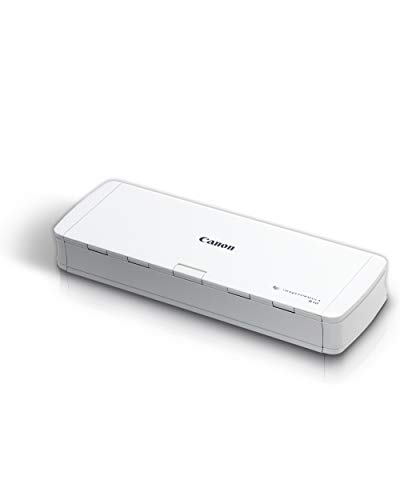
Canon imageFORMULA R10 Portable Duplex Scanner
Best for: lightweight mobile document scanning
- Scan Speed
- 12 ppm
- ADF Capacity
- 20 sheets
- Connectivity
- USB
- Portability
- Portable
- Daily Duty Cycle
- 500 scans
- Power Source
- USB powered
View on Amazon: Canon imageFORMULA R10 Portable Duplex Scanner Affiliate link
The Canon imageFORMULA R10 is a compact, USB-powered portable scanner designed for mobile workflows. It scans up to 12 pages per minute with a 20-sheet automatic document feeder. The device supports duplex scanning and handles various media types, including receipts and business cards. With a suggested daily duty cycle of 500 scans, it suits light office use. Its lightweight build makes it easy to transport between home and remote offices.
Pros
- Scans up to 12 pages per minute
- 20-sheet automatic document feeder
- USB powered for portability
- Supports duplex scanning
Cons
- Limited to USB connectivity
- 500 scan daily duty cycle
- No Ethernet or Wi-Fi options
Good fit if
- You need a lightweight scanner for travel
- You primarily scan receipts and small documents
- You have access to a USB port
Skip if
- You require high-volume daily scanning
- You need wireless connectivity
- You scan large format documents
Verdict: The Canon imageFORMULA R10 Portable Scanner fits users who need a lightweight, USB-connected device for occasional document digitization. It is ideal for those who prioritize portability over high-speed volume.
Specifications side by side
| Spec | Fujitsu Duplex Desktop Document Scanner | Canon imageFORMULA R10 Portable Duplex Scanner |
|---|---|---|
| Scan Speed | 60 ppm | 12 ppm |
| ADF Capacity | 80 sheets | 20 sheets |
| Connectivity | USB 3.0 | USB |
| Portability | not stated | Portable |
| Daily Duty Cycle | 4000 scans per day | 500 scans |
| Power Source | Power adapter | USB powered |
| Features | Duplex Printing, Automatic Document Feeder, Scanner | Duplex Printing, Mobile Printing, Scanner |
| Ideal For | Documents | Documents |
| Scanner Type | not stated | Portable |
| Scanning | Auto Document Feeder | not stated |
| Duplex Scanning | Duplex | Duplex |
| Auto Document Feeder | ADF | not stated |
| Dimensions | 12.4 × 10.4 × 9.5 inches | 3.75 × 11.2 × 1.57 inches |
| Weight | 10.5 pounds | 2.2 pounds |
| Size | not stated | Compact |
| Color | not stated | White |
| Model | not stated | 4861C001 |
Frequently asked questions
Is the Canon R10 good for heavy daily office use?
No. The Canon imageFORMULA R10 is designed for lightweight, mobile document scanning. It prioritizes portability over high-speed volume. If you need to scan large batches daily, this compact device may not meet your throughput needs. The Fujitsu model is better suited for busy workflows and high-volume environments.
Which scanner is lighter and easier to carry?
The Canon imageFORMULA R10 is significantly lighter. It weighs only 2.2 pounds. In contrast, the Fujitsu FI-7160 weighs 10.5 pounds. The Canon unit is also more compact, measuring 3.75 inches in length. It fits easily into a bag for travel or occasional use on the go.
Do both scanners support duplex scanning?
Yes. Both devices handle duplex scanning. The Canon imageFORMULA R10 explicitly lists duplex scanning as a feature. The Fujitsu FI-7160 is described as a duplex desktop scanner. You can scan both sides of a document automatically with either machine, saving time and paper compared to single-sided scanning.
How do the physical sizes compare between the two?
The Fujitsu FI-7160 is larger and heavier. It measures 10.4 inches wide and 12.4 inches long. The Canon R10 is much smaller, at 11.2 inches wide but only 3.75 inches long. The Canon’s compact design makes it ideal for small desks or travel, while the Fujitsu requires more permanent space.
Can I connect these scanners to my laptop via USB?
Yes. Both scanners connect via USB. The Canon imageFORMULA R10 is a USB-connected device. The Fujitsu FI-7160 also uses USB connectivity. You do not need additional hubs or complex setups. Simply plug the USB cable into your computer to start scanning documents directly.
Which brand is better for occasional personal scanning?
Canon is better for occasional use. The imageFORMULA R10 fits users who need a lightweight device for digitizing documents occasionally. It prioritizes portability. If you do not scan large volumes daily, the Fujitsu FI-7160 may be overkill. The Canon offers sufficient functionality without the bulk of a desktop unit.