Zebra Technologies ZEBRA GK420d Direct Thermal Review: Who It Fits and Who Should Skip It
As an Amazon Associate we earn from qualifying purchases. Links on this page are affiliate links.
This zebra technologies zebra gk420d direct thermal review covers a desktop label printer built for routine office tasks. It uses direct thermal technology, which means you do not need a thermal ribbon to print. The device connects via USB, Serial, or Parallel ports for flexible setup. It prints at a speed of 5 inches per second with a resolution of 203 dpi. The printer handles media rolls with a 1-inch core and a maximum width of 4.25 inches. It weighs 3.1 pounds and measures 13 by 9.13 by 8.07 inches. This model is Energy Star approved for efficiency.
What stands out
- Direct thermal printing eliminates the need for ribbons.
- Connects via USB, Serial, and Parallel ports.
- Prints at 5 inches per second with 203 dpi resolution.
- Energy Star approved for power efficiency.
- Handles media rolls up to 4.25 inches wide.
Who it fits
Good fit for
This printer suits small offices or warehouses that need to produce shipping labels, barcodes, or file folder tags regularly. The direct thermal method saves you from buying and replacing ribbons. The multiple connectivity options help if your computer or system lacks modern ports. The 203 dpi resolution is sufficient for standard shipping and mailing labels. Its compact size fits well on a desktop without taking up too much space.
Who should skip it
You should look at another option if you need high-resolution graphics or photo-quality prints. The 203 dpi resolution is standard for text and barcodes, not fine detail. This model is monochrome only, so it cannot print in color. If you require wireless connectivity, this printer lacks Wi-Fi or Bluetooth. It also does not support thermal transfer, so you cannot use ribbon-based media for longer-lasting labels.
Verdict: The Zebra GK420d is a practical, no-frills label printer for basic monochrome tasks. It offers reliable performance for standard shipping and office labeling needs without the complexity of ribbon management.
Key specs explained for Zebra GK420d
Print Technology: Direct Thermal
This printer uses heat-sensitive paper to create images, meaning you do not need to install a thermal ribbon. This simplifies maintenance because there are no ribbons to replace or dispose of. It is ideal for printing shipping labels, file folder tabs, and name tags. You save money on consumables since you only buy the special paper. This method is best for short-to-medium term labels that do not need to last for years in harsh conditions.
Connectivity: USB, Serial, Parallel
The device offers three connection types, allowing you to link it to modern computers via USB or older systems using Serial and Parallel ports. This flexibility helps you integrate the printer into various office setups without needing extra adapters. If your workstation has limited USB ports, you can use the Serial or Parallel options instead. This makes the GK420d a practical choice for environments with mixed hardware ages.
Print Output: Monochrome
This printer produces only black and white images. You cannot print color labels or graphics with this model. This is standard for most label printers focused on barcodes, addresses, and text. If you need color coding for your labels, you must look elsewhere. For standard office tasks like mailing labels and inventory tags, monochrome output is sufficient and keeps the printing process straightforward and cost-effective.
Max print speed: 5 in/sec
The printer prints at a maximum speed of five inches per second. This speed is adequate for routine office tasks such as printing a few shipping labels or file markers. It is not designed for high-volume industrial environments where hundreds of labels are needed per hour. If you have a small team or occasional printing needs, this speed will handle the workload without causing bottlenecks in your daily operations.
Design and build
According to the listing, the Zebra GK420d is a desktop printer with a compact footprint. It measures 9.13 inches in width, 8.07 inches in height, and 13 inches in length. The device weighs 3.1 pounds. This modest weight and size allow you to place it on standard office desks or small workstations without consuming excessive space. The black finish is practical for blending into typical office environments.
The listing highlights that the unit is designed for durability and frequent use. Zebra engineers tested and certified the printer to ensure optimal performance and reduce downtime. This focus on robust construction suggests it can handle the demands of routine label printing tasks. You can expect reliable operation for address, shipping, and barcode labels in high-volume settings.
Connectivity options include USB, Serial, and Parallel ports. This variety allows you to connect the printer to different types of computers or systems commonly found in offices. The design supports media rolls with a 1-inch core, a maximum diameter of 5 inches, and a maximum width of 4.25 inches. This flexibility lets you use various label sizes without needing to change hardware. The direct thermal technology means you do not need to manage ribbons, simplifying the physical setup and maintenance process.
Setup and everyday use guide
Connecting the Zebra GK420d is straightforward because the listing confirms support for USB, Serial, and Parallel ports. You choose the interface that matches your computer or network setup. The printer accepts media rolls with a one-inch core, so you do not need adapters for standard label stocks. The maximum roll diameter is five inches, and the print width reaches 4.25 inches. This allows you to load various label sizes without frequent reloading.
Daily operation relies on direct thermal technology. You place heat-sensitive labels inside the device. The printer applies heat to create text and barcodes. There is no ribbon to install or replace. This reduces maintenance steps and potential points of failure. You simply load the media and start printing.
The print speed is five inches per second at 203 dpi. This resolution is sufficient for standard shipping labels, address tags, and file folder markers. It is not designed for high-resolution photographic images. The device is Energy Star approved, which suggests it manages power efficiently during idle periods. Zebra engineers tested this model to ensure it handles frequent use without excessive downtime. You can expect consistent output for routine office tasks like creating name tags or barcode labels. The monochrome output is limited to black text and graphics on white or light backgrounds. You do not need to manage ink or toner levels. The process is purely about loading paper and sending print commands.
Before you buy this printer
Since this unit uses direct thermal technology, you must purchase compatible heat-sensitive media. The listing notes support for rolls with a one-inch core, a maximum diameter of five inches, and a width up to 4.25 inches. Verify your existing stock matches these dimensions before ordering. You also need to check your computer ports. This model offers USB, Serial, and Parallel connections, so ensure your setup has the right cable or adapter. Maintenance is simple because there are no ribbons to replace. Just swap out the paper rolls when they run low. This printer fits well among the 1 other options in Laser Printers & Office Machines for users who need basic label printing without complex ink systems. It is best for routine office tasks like shipping or filing. Avoid it if you need color prints or high-speed industrial output.
Check before you buy
- Confirm your media rolls fit the one-inch core size.
- Check that your computer has USB, Serial, or Parallel ports.
- Ensure you have enough heat-sensitive paper stock on hand.
- Verify the four-inch print width meets your label needs.
The product at a glance
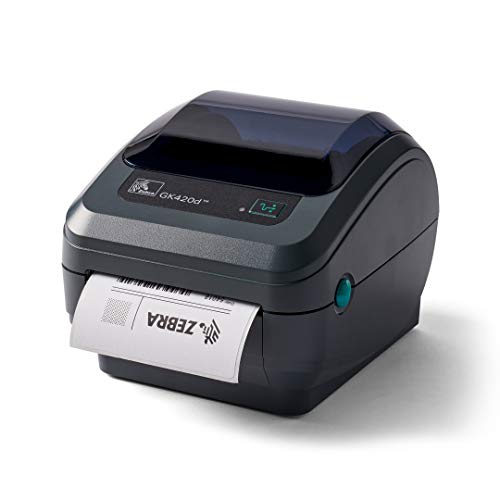
Zebra GK420d Direct Thermal Label Printer
Best for: Standard width shipping and file labels
- Print Technology
- Direct Thermal
- Print Output
- Monochrome
- Connectivity
- USB, Serial, Parallel
- Scanner Type
- Desktop
- Dimensions
- 13 × 9.13 × 8.07 inches
- Weight
- 5 pounds
View on Amazon: Zebra GK420d Direct Thermal Label Printer Affiliate link
The Zebra GK420d is a desktop direct thermal printer designed for high-volume label tasks. It prints at 5 inches per second with 203 dpi resolution. You connect via USB, serial, or parallel ports. The unit handles media up to 4.25 inches wide on a 1-inch core. It weighs 3.1 pounds and measures 13 by 9.13 by 8.07 inches. This model suits offices needing reliable, wired monochrome printing for shipping or file labels.
Pros
- Direct thermal technology requires no ribbon
- Prints at 5 inches per second
- Connects via USB, serial, and parallel ports
- Energy Star approved for efficiency
Cons
- Monochrome output only
- Maximum print width limited to 4.25 inches
- 203 dpi resolution is standard for basic labels
Good fit if
- You need a wired connection via USB or serial
- You print shipping or file labels up to 4 inches wide
- You want a durable machine certified by Zebra engineers
Skip if
- You require color printing capabilities
- You need wireless connectivity options
- You require high-resolution graphics above 203 dpi
Verdict: Zebra GK420d Direct Thermal Desktop Printer is a sturdy, wired solution for standard label printing tasks. It fits buyers who prioritize reliable, direct thermal output over wireless convenience or high-resolution color.
Specifications side by side
| Spec | Zebra GK420d Direct Thermal Label Printer |
|---|---|
| Print Technology | Direct Thermal |
| Print Output | Monochrome |
| Connectivity | USB, Serial, Parallel |
| Scanner Type | Desktop |
| Dimensions | 13 × 9.13 × 8.07 inches |
| Weight | 5 pounds |
| Color | Black |
| Model | GK420d |
Frequently asked questions
Is the Zebra GK420d suitable for high-volume shipping labels?
Yes, it is built for standard shipping and file label tasks. The direct thermal technology eliminates the need for ribbons, simplifying maintenance. This makes it a sturdy, wired solution for routine office work where reliability matters more than wireless features or color output.
What media sizes does this printer support?
The Zebra GK420d handles media rolls with a one-inch core. It supports a maximum roll diameter of five inches and a width up to 4.25 inches. You must use compatible heat-sensitive media since the device uses direct thermal printing without ribbons.
Does the Zebra GK420d connect wirelessly?
No, this model is a wired desktop printer. It connects via USB, Serial, or Parallel ports. You should choose the interface that matches your computer or network setup. It does not offer wireless convenience, focusing instead on reliable direct thermal output for standard tasks.
How much space does the printer take on a desk?
The unit measures 9.13 inches in width, 8.07 inches in height, and 13 inches in length. Weighing 3.1 pounds, it has a compact footprint. This modest size allows you to place it easily on most desktops without consuming excessive workspace in your office.
Can I print color labels with this device?
No, the Zebra GK420d produces monochrome print output. It uses direct thermal technology to create images on heat-sensitive paper. This printer is designed for buyers who prioritize reliable black-and-white label printing over wireless convenience or high-resolution color capabilities for their office needs.
Is the Zebra GK420d a portable printer?
It is classified as a desktop scanner type, not a portable unit. While it weighs only 3.1 pounds, it is designed for stationary use. The wired connectivity options, including USB and Parallel, suggest it is intended to remain connected to a fixed workstation.