What Is Print Speed? A Guide for Laser Printers Buyers (2026)
As an Amazon Associate we earn from qualifying purchases. Links on this page are affiliate links.
Print Speed Explained for Buyers
Print speed is a core specification that tells you how fast a laser printer produces pages. It is usually measured in pages per minute, or ppm. When you see a listing that states a speed of up to 42 ppm, that is the maximum rate the machine can achieve under ideal conditions.
This number helps you estimate how long a job will take. If you have a fifty-page document, a printer with a 42 ppm rating will handle it faster than one rated at 20 ppm. However, real-world results often differ from the box. The first page in a job takes longer to print than the subsequent pages. This is because the printer needs time to heat its fuser unit and prepare the toner cartridge.
Manufacturers calculate this speed using specific test standards. They typically measure the rate after the first page is printed. They use standard test pages that contain simple text and graphics. These tests do not always reflect complex layouts or heavy image usage. A document with large photos or dense charts will print slower. The printer must process more data and apply more toner.
Understanding print speed explained helps you choose the right machine for your needs. If you only print a few pages a week, a slower model is fine. It may even save space and energy. If you run a busy office with high volume, a faster model reduces wait times. It keeps your team productive.
You should also consider the type of paper you use. Thicker cardstock or specialty media slows down the process. The printer feeds these sheets more carefully to prevent jams. This extra care reduces the overall speed. Always check the full specifications if you plan to print on unusual materials.
In summary, print speed is a useful benchmark for comparing laser printers. It gives you a baseline for performance. Just remember that actual speeds depend on the job complexity and the printer’s internal processing power. Look for the highest ppm rating that fits your workflow.
Print Speed Up to 42 Ppm Guide
Up to 42 ppm
This rating means the printer produces up to 42 pages each minute. You get fast output for busy offices. The Canon imageCLASS MF465dw All-in-One uses this speed for high-volume workflows. It fits teams needing scanning and faxing too. The Canon LBP246dw II focuses on speed without extra features. It suits users who prioritize quick text document turnaround. The KYOCERA ECOSYS MA4000x offers similar speed for wireless monochrome needs. It handles busy office demands well. The Lexmark MX432adwe provides this rate for moderate volumes. It lacks wireless options but handles two-sided printing. The Lexmark MS431DN connects via Ethernet for stable wired speed. This spec helps you avoid delays. It is ideal for environments where time matters. You should check if your volume justifies this speed.
Monochrome Output
All listed models print only black and white. You do not get color pages. This focuses the hardware on text efficiency. The Canon MF465dw delivers 42 ppm in monochrome. It is built for document-heavy tasks. The Canon LBP246dw II also prints monochrome. It offers wireless convenience for fast text jobs. The Canon LBP247dw II is another monochrome option. It lacks scanning but provides high speed. The KYOCERA ECOSYS MA4000x is a multifunction monochrome unit. It adds copying and scanning to the mix. The Lexmark MX432adwe prints black and white. It supports duplex printing for two-sided documents. The Lexmark MS431DN is a wired monochrome printer. It uses Ethernet for stable connections. This output type keeps costs lower. It suits offices that rarely need color.
Who Needs 42 Ppm Speed
Who needs it
You should prioritize this print speed if you manage a busy office with high daily output demands. Teams that print hundreds of pages each day benefit significantly from a rate of up to 42 pages per minute. This speed reduces wait times for large reports, invoices, or marketing materials. If your staff frequently waits for documents to finish printing, this specification directly improves workflow efficiency. It is ideal for environments where time is critical and delays impact productivity. You will find this speed suitable for shared workspaces where multiple users need quick access to printed materials without creating bottlenecks. The high volume capability ensures that even during peak hours, your printing tasks remain manageable and fast.
Who can skip it
You can ignore this specification if you print only occasionally or in small quantities. Home users or individuals who produce just a few pages weekly do not need such high speed. The difference between slower and faster models will be negligible for your needs. Instead, prioritize features like compact size, lower energy consumption, or better connectivity options. If you value quiet operation or portability over speed, these attributes matter more. Also, consider color quality or scanning capabilities if you need versatile document handling. For light users, paying extra for high speed offers no practical benefit. Focus on finding a machine that fits your space and budget while meeting your basic printing requirements without unnecessary performance upgrades.
Print Speed Glossary
Pages Per Minute
The standard metric for laser printer speed, measuring how many monochrome sheets a device outputs in one minute under ideal conditions.
Color Print Speed
The rate at which a printer produces color pages, often slower than monochrome speed due to the extra processing and toner layers required.
First Page Out
The time elapsed from sending a print command to the first page exiting the tray, crucial for quick, single-page tasks.
Monochrome Output
Black-and-white printing speed, which typically reaches higher maximums because the laser and toner application process is simpler than color.
Print Resolution
Measured in dots per inch, this spec affects detail quality but can reduce speed if the printer processes more data per page.
Paper Tray Capacity
The number of sheets the printer holds, influencing workflow efficiency by reducing the frequency of manual paper reloading during large jobs.
Quick picks
| # | Product | Best for | Price |
|---|---|---|---|
| 1 | Canon imageCLASS MF465dw Monochrome All-in-One | High-volume monochrome office workflows | Check price of Canon imageCLASS MF465dw Monochrome All-in-One on Amazon |
| 2 | Canon imageCLASS LBP246dw II Duplex Printer | Fast monochrome printing tasks | Check price of Canon imageCLASS LBP246dw II Duplex Printer on Amazon |
| 3 | Canon imageCLASS LBP247dw II Duplex Laser Printer | High-volume monochrome text printing | Check price of Canon imageCLASS LBP247dw II Duplex Laser Printer on Amazon |
| 4 | KYOCERA ECOSYS Wireless Monochrome Multifunction Printer | High-volume monochrome wireless printing | Check price of KYOCERA ECOSYS Wireless Monochrome Multifunction Printer on Amazon |
| 5 | Lexmark MX432adwe Monochrome Laser Printer | moderate volume black-and-white printing | Check price of Lexmark MX432adwe Monochrome Laser Printer on Amazon |
| 6 | Lexmark Monochrome Duplex Laser Printer | Wired office environments needing speed | Check price of Lexmark Monochrome Duplex Laser Printer on Amazon |
Our 6 picks

Canon imageCLASS MF465dw Monochrome All-in-One
Best for: High-volume monochrome office workflows
- Print Speed
- Up to 42 ppm (what this guide is about)
- Print Technology
- Laser
- Print Output
- Monochrome
- Printer Type
- All-in-One
- Supported Functions
- Print, scan, copy, fax
- Connectivity
- Wireless
View on Amazon: Canon imageCLASS MF465dw Monochrome All-in-One Affiliate link
The Canon MF465dw is a monochrome all-in-one laser printer offering 42 ppm print speeds. It includes automatic duplex printing, a 50-sheet auto document feeder, and a 5-inch color touchscreen. With wireless connectivity and support for mobile apps, it handles print, scan, copy, and fax tasks. This unit suits offices needing fast document processing and expandable paper capacity up to 900 sheets.
Pros
- Prints up to 42 pages per minute
- Includes automatic duplex printing and scanning
- Features a 50-sheet auto document feeder
- Expands paper capacity to 900 sheets
Cons
- Monochrome output only
- Large footprint at 18.1 inches deep
- Heavy at 34.4 pounds
Good fit if
- You need fast monochrome printing for documents
- You require automatic two-sided scanning
- You want wireless mobile printing support
Skip if
- You need color printing capabilities
- You have limited desk space
- You prefer compact single-function printers
Verdict: The Canon MF465dw All-in-One Laser delivers 42 ppm speed and full office functionality. It fits teams that print high volumes of black-and-white documents and need scanning and faxing in one device.

Canon imageCLASS LBP246dw II Duplex Printer
Best for: Fast monochrome printing tasks
- Print Speed
- Up to 42 ppm (what this guide is about)
- Print Technology
- Laser
- Print Output
- Monochrome
- Printer Type
- Single-function
- Supported Functions
- Connectivity
- Wireless
View on Amazon: Canon imageCLASS LBP246dw II Duplex Printer Affiliate link
The Canon imageCLASS LBP246dw II is a single-function monochrome laser printer designed for speed. It prints up to 42 pages per minute with a first-page-out time of approximately 5 seconds. You get automatic duplex printing and wireless connectivity for easy setup. The unit includes a 250-sheet standard cassette and a 100-sheet multipurpose tray, with expandable capacity via an optional paper cassette. It supports mobile printing through the Canon PRINT app, AirPrint, and Mopria.
Pros
- Prints up to 42 pages per minute
- First page out in approximately 5 seconds
- Automatic 2-sided printing saves paper
- Wireless connectivity and mobile device support
- Expandable paper capacity with optional cassette
Cons
- Single-function design lacks scanning or copying
- No color printing capability
- Requires optional cassette for paper expansion
Good fit if
- You need fast monochrome printing speeds
- You want automatic duplex printing
- You prefer wireless mobile printing
Skip if
- You require scanning or copying functions
- You need color output
- You want built-in high-capacity paper trays without add-ons
Verdict: The Canon imageCLASS LBP246dw II is a focused monochrome printer for users who prioritize speed and wireless convenience over multifunction capabilities. It suits offices that print large volumes of text documents and need quick turnaround times.

Canon imageCLASS LBP247dw II Duplex Laser Printer
Best for: High-volume monochrome text printing
- Print Speed
- Up to 42 ppm (what this guide is about)
- Print Technology
- Laser
- Print Output
- Monochrome
- Printer Type
- Single-function
- Supported Functions
- Connectivity
- Wireless
View on Amazon: Canon imageCLASS LBP247dw II Duplex Laser Printer Affiliate link
The Canon imageCLASS LBP247dw II is a single-function monochrome laser printer designed for speed. It prints up to 42 pages per minute with a first page out time of approximately 5 seconds. You get automatic duplex printing and wireless connectivity. The 5-inch color touchscreen simplifies navigation. It includes a 250-sheet cassette and a 100-sheet multipurpose tray for standard paper handling.
Pros
- Prints up to 42 pages per minute
- First page out in approximately 5 seconds
- Automatic 2-sided printing
- 5-inch color touchscreen interface
- Supports Apple AirPrint and Mopria
Cons
- Single-function design lacks scanning or copying
- No built-in Ethernet port listed
- Standard paper capacity is 350 sheets total
Good fit if
- You need fast monochrome output for text documents
- You want a dedicated printer without multifunction clutter
- You prefer wireless printing from mobile devices
Skip if
- You require scanning or copying capabilities
- You need wired Ethernet connectivity
- You want a compact desktop unit under 20 pounds
Verdict: The Canon imageCLASS LBP247dw II fits users who prioritize speed and simplicity in a wireless monochrome laser printer. It is ideal for offices that print high volumes of text but do not need scanning functions.

KYOCERA ECOSYS Wireless Monochrome Multifunction Printer
Best for: High-volume monochrome wireless printing
- Print Speed
- Up to 42 ppm (what this guide is about)
- Print Technology
- Laser
- Print Output
- Monochrome
- Printer Type
- Multifunctional
- Connectivity
- Wireless
- Supported Functions
- Scan, Copy
View on Amazon: KYOCERA ECOSYS Wireless Monochrome Multifunction Printer Affiliate link
This Kyocera ECOSYS MA4000x is a monochrome multifunctional laser printer with a print speed of up to 42 ppm. It features standard wireless connectivity and a 5-line LCD control panel. The unit measures 18.7 by 16.2 by 17.2 inches. You should consider this model if you need reliable high-volume printing with network access. It suits offices that prioritize speed and multifunction capabilities in a monochrome workflow.
Pros
- Prints up to 42 pages per minute
- Includes standard wireless connectivity
- Multifunctional design for versatile tasks
- 5-line LCD with hard key controls
Cons
- Monochrome output only
- No mention of automatic duplex printing
- Physical buttons only, no touchscreen
Good fit if
- You need fast monochrome printing
- You require wireless network access
- You want a multifunction device
Skip if
- You need color printing
- You prefer a touchscreen interface
- You require automatic duplexing
Verdict: Kyocera ECOSYS MA4000x 42ppm MFP delivers solid speed for busy offices. It fits teams that need wireless monochrome printing and multifunction utility without color requirements.

Lexmark MX432adwe Monochrome Laser Printer
Best for: moderate volume black-and-white printing
- Print Speed
- Up to 42 ppm (what this guide is about)
- Print Technology
- Laser
- Print Output
- Monochrome
- Duplex Printing
- Integrated Duplex
- Features
- Duplex Printing
- Dimensions
- 14.2 × 16.2 × 13.9 inches
View on Amazon: Lexmark MX432adwe Monochrome Laser Printer Affiliate link
The Lexmark MX432adwe is a monochrome laser printer designed for offices handling 800 to 8,000 pages monthly. It prints up to 42 ppm and includes integrated duplex printing. The unit measures 13.9 by 16.2 by 14.2 inches and weighs 30 pounds. You get reliable two-sided output without external accessories. This model suits teams needing steady volume and automatic page reversal.
Pros
- Prints up to 42 pages per minute
- Integrated duplex printing for two-sided output
- Handles 800 to 8,000 pages monthly
- Compact footprint for office desks
Cons
- Monochrome output only
- No wireless connectivity listed in specs
- Heavier build at 30 pounds
Good fit if
- You need fast monochrome printing
- You require automatic two-sided output
- You have moderate monthly print volumes
Skip if
- You need color printing
- You require wireless connectivity
- You need a lightweight portable unit
Verdict: Lexmark MX432adwe Monochrome Laser Printer fits small teams needing fast, two-sided black-and-white printing. It handles moderate volumes well but lacks wireless options.
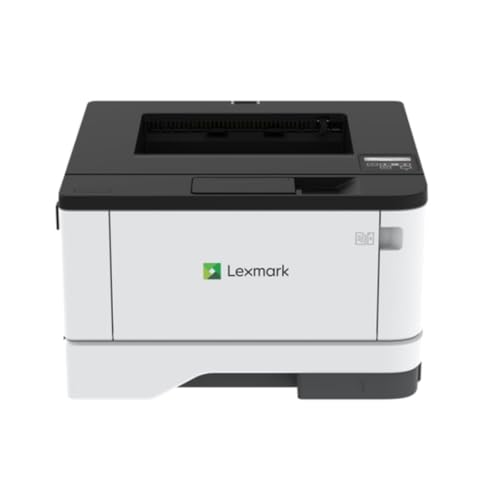
Lexmark Monochrome Duplex Laser Printer
Best for: Wired office environments needing speed
- Print Speed
- Up to 42 ppm (what this guide is about)
- Print Technology
- Laser
- Print Output
- Monochrome
- Connectivity
- Gigabit Ethernet
- Duplex Printing
- Automatic duplex print
- Print Resolution
- Up to 2400 dpi
View on Amazon: Lexmark Monochrome Duplex Laser Printer Affiliate link
The Lexmark MS431DN is a monochrome laser printer designed for plain paper tasks. It delivers up to 42 ppm print speed and 2400 dpi resolution. The unit supports automatic duplex printing and connects via Gigabit Ethernet. It weighs 22.8 pounds and measures 14.3 by 14.5 by 8.7 inches. This model suits offices needing reliable wired printing without wireless connectivity.
Pros
- Prints up to 42 pages per minute
- High resolution up to 2400 dpi
- Automatic duplex printing saves paper
- Stable Gigabit Ethernet connection
Cons
- No Wi-Fi or wireless connectivity
- No mobile app support mentioned
- Single 100-sheet input tray capacity
Good fit if
- You need a wired-only office printer
- You require fast monochrome output
- You want automatic double-sided printing
Skip if
- You need wireless printing capabilities
- You require mobile device support
- You need high-capacity paper trays
Verdict: Lexmark MS431DN Monochrome Laser Printer fits offices that prioritize wired stability and speed over wireless convenience. It is a solid choice for environments where Ethernet connections are standard and mobile printing is not required.
Specifications side by side
| Spec | Canon imageCLASS MF465dw Monochrome All-in-One | Canon imageCLASS LBP246dw II Duplex Printer | Canon imageCLASS LBP247dw II Duplex Laser Printer | KYOCERA ECOSYS Wireless Monochrome Multifunction Printer | Lexmark MX432adwe Monochrome Laser Printer | Lexmark Monochrome Duplex Laser Printer |
|---|---|---|---|---|---|---|
| Print Technology | Laser | Laser | Laser | Laser | Laser | Laser |
| Print Output | Monochrome | Monochrome | Monochrome | Monochrome | Monochrome | Monochrome |
| Printer Type | All-in-One | Single-function | Single-function | Multifunctional | not stated | not stated |
| Supported Functions | Print, scan, copy, fax | not stated | not stated | not stated | ||
| Print Speed | 42 ppm | 42 ppm | 42 ppm | Up to 42 ppm | Up to 42 ppm | 42 ppm |
| Connectivity | Wireless | Wireless | Wireless | Wireless | not stated | Gigabit Ethernet |
| Duplex Printing | Automatic 2-sided printing | Automatic 2-sided | Automatic 2-sided | not stated | Integrated Duplex | Automatic duplex print |
| First Page Out | Approximately 5 seconds | Approximately 5 seconds | Approximately 5 seconds | not stated | not stated | not stated |
| Ink/Toner System | Toner | Toner | Toner | not stated | not stated | not stated |
| Print Resolution | not stated | not stated | not stated | not stated | not stated | Up to 2400 dpi |
| Features | Duplex Printing, Mobile Printing, Automatic Document Feeder, Scanner, Copier, Fax | Duplex Printing | Duplex Printing | Mobile Printing, Scanner, Copier | Duplex Printing | Duplex Printing |
| Ideal For | Documents | not stated | not stated | Documents | not stated | not stated |
| Use Case | Office, Home | not stated | not stated | not stated | not stated | not stated |
| Scanner Type | Portable | not stated | not stated | Portable | not stated | not stated |
| Scanning | Auto Document Feeder | Wireless Scanning | Wireless Scanning | not stated | not stated | not stated |
| Duplex Scanning | Duplex | Duplex | Duplex | not stated | Duplex | Duplex |
| Auto Document Feeder | ADF | not stated | not stated | not stated | not stated | not stated |
| Dimensions | 18.1 × 16.6 × 14.8 inches | 14.7 × 15.7 × 9.8 inches | 14.7 × 15.7 × 9.8 inches | 16.2 × 18.7 × 17.2 inches | 14.2 × 16.2 × 13.9 inches | 14.3 × 14.5 × 8.7 inches |
| Weight | 34.4 pounds | not stated | 27 pounds | not stated | 30 pounds | 22.8 pounds |
| Size | One Size | Medium | Medium | MFP | 13.9 x 16.2 x 14.2 in. | 25lbs |
| Color | White | White | White | White & Black | White/Black/Gray | BLACK GREY |
| Model | 5951C005 | 7187C005 | 7187C004 | MA4000x | 29S8100 | MS431DN |
Frequently asked questions
Does 42 ppm mean 42 pages per minute?
Yes. Ppm stands for pages per minute. This metric indicates the maximum number of monochrome sheets the printer outputs in one minute under ideal conditions. Most models in this group, including the Canon imageCLASS MF465dw and the Kyocera ECOSYS MA4000x, share this specific speed rating for high-volume tasks.
Is 42 pages per minute fast enough for an office?
It is suitable for busy environments with high daily output demands. This speed helps reduce wait times for teams printing hundreds of pages daily. The Canon imageCLASS LBP246dw II and Lexmark MX432adwe offer this rate, supporting fast turnarounds for text-heavy documents without requiring multifunction capabilities.
How does duplex printing affect overall speed?
Duplex printing allows the device to print on both sides of the paper automatically. This feature saves paper but may slightly extend the total job time compared to single-sided output. Most 42 ppm models, such as the Canon imageCLASS LBP247dw II, include automatic duplexing to streamline workflows.
Can I print wirelessly at this speed?
Yes. Several printers in this category support wireless connectivity alongside their 42 ppm speed. The Canon imageCLASS MF465dw and Kyocera ECOSYS MA4000x both offer wireless options. This allows you to send jobs from mobile devices or laptops without needing a direct cable connection to the machine.
Do all 42 ppm printers have scanners?
No. Print speed does not determine multifunction capabilities. Some models are dedicated printers, while others are all-in-one devices. The Canon imageCLASS MF465dw includes scanning and faxing. In contrast, the Canon imageCLASS LBP247dw II focuses solely on printing, omitting scanning functions to prioritize speed and simplicity.
Is monochrome speed faster than color speed?
Yes. Monochrome printers like those listed here output black text faster than color printers handle color pages. Color printing involves more complex toner layering. Since these devices produce only black-and-white output, they achieve consistent 42 ppm speeds without the slowdowns associated with color processing.
What is the difference between Ethernet and wireless at 42 ppm?
The speed remains the same, but the connection method changes. Ethernet provides stable, wired stability for offices where mobile printing is not required. Wireless offers flexibility. The Lexmark MS431DN uses Ethernet for reliability, while the Canon imageCLASS MF465dw supports wireless for easier integration into modern office networks.