Plustek PS186 Desktop Document Scanner Review: Who It Fits and Who Should Skip It
As an Amazon Associate we earn from qualifying purchases. Links on this page are affiliate links.
This plustek ps186 desktop document scanner review focuses on a compact unit designed for efficient paper digitization. It features a 50-sheet automatic document feeder, allowing you to process multi-page batches without manual intervention. The device measures 10.4 inches in length, making it suitable for standard office desks. It supports Windows 7, 8, 10, and 11. The scanner includes OCR technology to create searchable PDFs. You can also customize up to 255 scan settings for quick access. This model prioritizes straightforward document handling over complex media scanning.
What stands out
- 50-sheet automatic document feeder for batch scanning
- OCR function converts scans to searchable PDFs
- Customizable scan presets with single-touch access
- Auto image adjustments including deskew and blank page removal
- Compact desktop footprint measuring 5.02 by 5.83 inches
Who it fits
Good fit for
This scanner suits home offices and small businesses that handle high volumes of text documents. The 50-sheet ADF helps users who need to digitize contracts, invoices, or reports quickly. The OCR feature is ideal for those who need to search or edit text within scanned files. Users who value quick access to common settings will appreciate the 255 customizable presets. It fits well in setups where space is limited but throughput matters. The desktop form factor keeps it stable during continuous scanning tasks.
Who should skip it
You should look elsewhere if you need to scan photos, magazines, or glossy materials. This device is optimized for standard paper documents, not high-resolution image capture. If you require mobile scanning or wireless connectivity, this desktop unit may not fit your workflow. The lack of a built-in display means you must manage settings via your computer screen. Users needing to scan books or large format items will find the flatbed-less design limiting. It is strictly for standard document workflows.
Verdict: The Plustek PS186 is a practical choice for users who prioritize speed and text recognition for standard documents. Its compact size and robust ADF make it a solid addition to busy workspaces.
Key specs explained for this scanner
ADF Capacity: 50 sheets
The automatic document feeder holds up to fifty pages. This allows you to load a stack and walk away while the scanner processes each sheet individually. You benefit from hands-free batch scanning for reports or contracts. When comparing office machines, check if the feeder capacity meets your typical job size to avoid frequent reloading.
Portability: Desktop
This unit is designed to sit stationary on a desk or table. It is not built for frequent transport or travel. You should place it in a dedicated workspace with power access. When shopping for office equipment, consider if your workflow requires a fixed location or if you need a lightweight, portable scanner for mobile use.
Weight: 3.66 pounds
The scanner weighs just over three and a half pounds. This light weight makes it easy to move between desks if needed, though it remains stable during operation. You can lift it with one hand. Compare this to heavier industrial scanners when deciding if portability or ruggedness is more important for your specific office environment.
Width: 5.02 inches
The device is approximately five inches wide. This narrow profile helps it fit into tight spaces on crowded workstations. You can place it next to monitors or keyboards without taking up excessive desk real estate. When evaluating office machines, measure your available surface area to ensure this compact footprint meets your spatial constraints.
Design and build overview
According to the listing, the Plustek PS186 is a desktop scanner with a compact footprint. Its dimensions are 10.4 inches in length, 5.02 inches in width, and 5.83 inches in height. This small size allows it to fit easily on standard office desks or home workspaces without consuming excessive room. The unit weighs 3.66 pounds, making it light enough to move if needed, yet stable enough for regular use. The finish is black, which helps it blend into most professional environments without drawing attention.
The device features a 50-sheet automatic document feeder (ADF). This layout prioritizes efficiency for batch scanning. You can load a stack of fifty pages and let the machine handle the rest. This design choice means you spend less time feeding sheets one by one. The scanner is intended for documents, as indicated by its attributes. It is not designed for books or fragile items, but rather for standard paper workflows.
Controls are managed through software settings rather than physical buttons. You can customize up to 255 favorite scan settings using the "Single Touch" feature. This digital approach keeps the hardware simple and clean. The lack of complex physical interfaces reduces the chance of button wear over time. Overall, the build focuses on utility and space-saving design. It suits users who need a reliable, unobtrusive tool for digitizing paper records.
Setup and daily operation guide
You install the software and driver from the Plustek website to begin. The listing confirms support for Windows 7, 8, 10, and 11. This ensures compatibility with most current office systems. You do not need to worry about older operating system limitations if you are running a modern Windows environment.
Daily use centers on the 50-sheet automatic document feeder. You load your stack of paper documents into the tray. The scanner processes each sheet individually. This allows you to handle multi-page reports without manual intervention. The device includes an OCR function. This feature turns your scanned images into searchable, editable files. You can save these outputs as searchable PDFs.
The scanner also includes an Info Barcode function. This tool automatically categorizes complicated documentation. It uses 1D or 2D barcodes on the pages to sort your data. This simplifies the organization of large batches of mixed documents.
Image quality is managed by Plustek Image Processing Technology. The software applies intelligent color and image adjustments. It automatically rotates, crops, and deskews your scans. It also removes blank pages from your final file. This reduces the need for manual cleanup after scanning.
You can send your scanned files directly to an FTP server or a personal NAS. The device supports PDF, JPEG, TIFF, and PNG formats. You can also use the "Single Touch" feature. This allows you to store up to 255 customized favorite scan settings. You press one button to recall your preferred configuration. This speeds up repetitive scanning tasks.
Before you buy this scanner
You should verify that your Windows system, whether 7, 8, 10, or 11, is fully updated before installing the driver. You can download the latest software directly from the Plustek website. This ensures smooth operation with the single-touch buttons and OCR features. Keep your workspace clear around the ten-inch footprint. The fifty-sheet feeder requires flat, uncreased paper for reliable feeding. You may need a dedicated FTP server or personal NAS if you plan to use the automatic file transfer features. The included OCR software turns scans into searchable PDFs, which saves time when organizing large archives. This unit sits alongside other office machines as a focused tool for document digitization. It does not replace a printer. You need to manage your own digital storage. Regularly clean the feeder rollers with a lint-free cloth to maintain consistent performance. Check your network settings if you intend to send files directly to a server.
Check before you buy
- Confirm your Windows version is 7, 8, 10, or 11.
- Download the driver from the Plustek website before setup.
- Ensure you have an FTP server or NAS for auto-sending.
- Check that your documents are flat and uncreased for the ADF.
The product at a glance
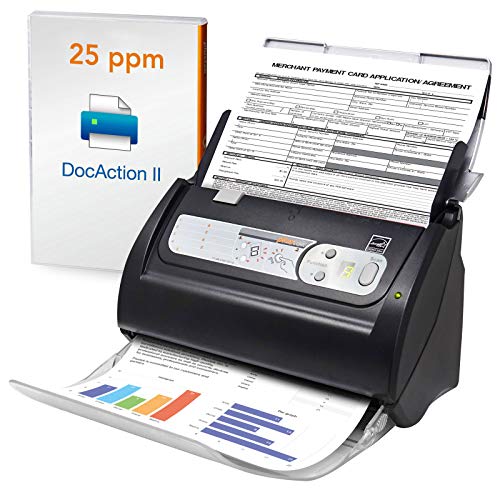
Plustek PS186 Desktop Scanner
Best for: High-volume desktop document scanning
- ADF Capacity
- 50 pages
- Portability
- Desktop
- Features
- Automatic Document Feeder, Scanner
- Scanning
- Auto Document Feeder
- Auto Document Feeder
- ADF
- Dimensions
- 10.4 × 5.02 × 5.83 inches
View on Amazon: Plustek PS186 Desktop Scanner Affiliate link
The Plustek PS186 is a desktop document scanner designed for high-volume office tasks. It features a 50-sheet auto document feeder and includes OCR technology to create searchable PDFs. The device supports Windows 7 through 11 and offers 255 customizable scan settings. Its compact dimensions and lightweight build make it suitable for standard office desks. You get automatic image adjustments and barcode recognition for efficient workflow management.
Pros
- 50-sheet auto document feeder for batch scanning
- OCR function converts scans to searchable PDFs
- 255 customizable scan settings via single touch
- Automatic image correction including deskew and blank page removal
- Supports sending files to FTP servers or NAS
Cons
- Desktop form factor limits portability
- No mention of wireless connectivity options
- Limited to Windows operating systems
Good fit if
- You need to scan large volumes of paper documents daily
- You require searchable PDF files for archiving
- You have a dedicated desktop workspace
Skip if
- You need a portable scanner for travel
- You require mobile app scanning capabilities
- You use macOS or Linux exclusively
Verdict: Plustek PS186 Desktop Scanner suits offices prioritizing volume scanning and document digitization over portability. It is ideal for users who need reliable batch processing and searchable output on Windows systems.
Specifications side by side
| Spec | Plustek PS186 Desktop Scanner |
|---|---|
| ADF Capacity | 50 pages |
| Portability | Desktop |
| Features | Automatic Document Feeder, Scanner |
| Ideal For | Documents |
| Scanner Type | Desktop |
| Scanning | Auto Document Feeder |
| Auto Document Feeder | ADF |
| Dimensions | 10.4 × 5.02 × 5.83 inches |
| Weight | 3.66 pounds |
| Color | black |
| Model | PS186 |
Frequently asked questions
Is the Plustek PS186 suitable for high-volume office scanning?
Yes, this device is built for high-volume desktop document scanning. It features an automatic document feeder that processes fifty sheets at once. This allows you to batch scan reports without manual intervention. The unit prioritizes reliable digitization over portability, making it a strong choice for busy office environments.
What operating systems does the Plustek PS186 support?
The scanner supports Windows 7, 8, 10, and 11. You must install the driver and software from the Plustek website to begin operation. This ensures compatibility with most current office systems. It is not designed for Mac or Linux environments based on the provided listing information.
How much desk space does the Plustek PS186 require?
The unit has a compact footprint measuring 10.4 inches in length. It is 5.02 inches wide and 5.83 inches high. This small size allows it to fit easily on standard desks. Weighing 3.66 pounds, it remains stable during operation without taking up excessive workspace.
Does the Plustek PS186 have an automatic document feeder?
Yes, it includes an automatic document feeder. This feature allows you to load a stack of papers and let the scanner process each sheet individually. You benefit from hands-free batch scanning for multi-page documents. This eliminates the need to lift and place each page manually.
Is the Plustek PS186 portable for travel?
No, it is designed as a desktop scanner. The listing states it suits offices prioritizing volume scanning over portability. Its fixed dimensions and weight suggest it is meant to stay in one location. It is ideal for users who need reliable batch processing at a dedicated workstation.
What color is the Plustek PS186 scanner?
The device is black. This neutral color helps it blend into most office environments. The compact design and dark finish keep it from drawing attention on your desk. It is built for functional document digitization rather than aesthetic display.
Can the Plustek PS186 scan photos?
The listing specifies it is ideal for documents. It is optimized for paper digitization and batch processing. While it may handle simple images, its primary design focuses on text-heavy documents. You should use it for reports, forms, and other standard office papers for best results.