Epson Workforce Pro WF-4820 Color Review: Specs, Pros and Cons
As an Amazon Associate we earn from qualifying purchases. Links on this page are affiliate links.
This epson workforce pro wf 4820 color review focuses on a wireless all-in-one inkjet printer built for volume. It uses PrecisionCore Heat-Free Technology to handle high-speed jobs. You get 25 pages per minute in black and 12 in color. The system also features a 35-page automatic document feeder. This combination of speed and automation defines its place in the market. It is designed for users who need reliable, high-volume output without the downtime associated with thermal print heads. The machine supports color output and includes scanning capabilities for a complete office solution.
What stands out
- 25 ppm black and 12 ppm color print speeds
- 35-page automatic document feeder for multi-page tasks
- 4.3-inch color touchscreen for easy navigation
- 250-sheet paper capacity for reduced refilling
- Bluetooth Low Energy for convenient mobile setup
Who it fits
Good fit for
This printer suits small offices or home workspaces that generate moderate to high volumes of color and black documents. The 250-sheet paper tray and 35-page ADF make it ideal for users who want to load large batches and let the machine work. If you need to scan, copy, and fax frequently, the all-in-one design with wireless connectivity streamlines your workflow. The heat-free technology also appeals to those who prioritize reliability and reduced downtime during busy periods.
Who should skip it
You should look elsewhere if you need a compact device for a small desk. At 19.8 inches wide and 22.5 pounds, this large printer requires significant space. If you only print occasionally, the high-speed features and large paper capacity may be unnecessary. Additionally, if you require a dual-tray configuration with 500 sheets, you must consider the WF-4830 variation instead, as this model comes with a single 250-sheet tray.
Verdict: The Epson Workforce Pro WF-4820 is a robust choice for users needing fast, reliable color printing and scanning in a single unit. Its high-speed output and large capacity make it well-suited for busy home offices.
Key specs explained
Print Speed: 25 ppm black, 12 ppm color
This printer produces 25 black pages and 12 color pages each minute. You benefit from faster output for large documents or reports. This speed is competitive with entry-level laser printers. It helps you finish workqueues quickly without long waits. If you print many pages daily, this rate keeps your workflow moving. Compare this to slower models that take longer to handle volume.
Print Technology: Inkjet
This device uses ink droplets rather than toner powder to create images. You get full color capability on standard paper. Inkjet technology often provides better photo quality than basic laser models. However, ink may dry out if unused for long periods. You should consider your print volume. High-volume users might prefer lasers for speed, while occasional color users often choose inkjets for cost and versatility.
Printer Type: All-in-One
This machine combines printing, scanning, and copying into a single unit. You save desk space by not buying separate devices. The integrated scanner allows you to digitize documents easily. Copying is available for quick duplicates. This setup is ideal for small offices or home workspaces. You get multiple functions without clutter. It simplifies your workflow by centralizing all document tasks in one accessible location.
Supported Functions: Print, scan, copy, fax
The device handles four distinct document tasks. You can print documents, scan them to digital files, make physical copies, and send faxes. This range covers most standard office needs. Fax support is rare in modern printers but useful for legal or medical fields. You get comprehensive functionality without extra hardware. Compare this to basic printers that only print, which require separate scanners or fax machines for full utility.
Physical Design and Build Quality
According to the listing, this Epson Workforce Pro WF-4820 measures 19.8 inches wide, 10.9 inches high, and 16.7 inches deep. It weighs 22.5 pounds. These dimensions place it in the large category for office equipment. You will need a substantial desk or dedicated printer stand to accommodate its footprint. The black finish provides a neutral look that fits standard office environments without drawing excessive attention. The weight suggests a sturdy internal frame, which helps stabilize the machine during high-volume printing cycles.
The front panel features a 4.3-inch color touchscreen. This display allows you to navigate settings and monitor status without relying on a computer. The layout includes a single 250-sheet paper tray in the base configuration. An optional dual tray setup increases capacity to 500 sheets for heavier workloads. A 35-page automatic document feeder sits on top, streamlining multi-page scanning and copying tasks. This arrangement keeps the workflow efficient by reducing manual page placement.
Connectivity options are built into the chassis. You can use Bluetooth Low Energy for initial smartphone setup, alongside Wi-Fi, Wi-Fi Direct, and Ethernet ports. These interfaces allow the printer to integrate into existing wireless networks or connect directly to devices without a router. The design prioritizes functional placement of ports and controls for easy access during daily use.
Setup and everyday use
The Epson Workforce Pro WF-4820 offers flexible connectivity options for your office network. You can establish a wireless connection using Bluetooth Low Energy via a smartphone or mobile device. This method simplifies the initial pairing process. The printer also supports Wi-Fi Direct for direct device connections. For wired setups, an Ethernet port is available to ensure stable network integration. This variety allows you to choose the method that best fits your current infrastructure.
Daily operation centers on the 4.3-inch color touchscreen. This display provides quick navigation and control for all functions. You can manage print, scan, and copy tasks directly from the panel. The interface is designed for straightforward access to settings without requiring a computer for basic operations. For mobile productivity, the Epson Smart Panel App enhances connectivity. This application allows you to control the printer and monitor status from your handheld device.
Workflow efficiency is supported by automatic two-sided printing. This feature reduces paper usage and saves time on double-sided documents. The 35-page automatic document feeder streamlines scanning and copying large batches. You can load multiple pages at once rather than handling them individually. The large 250-sheet paper capacity minimizes the frequency of refills. This setup allows you to handle high-volume tasks with less interruption. The combination of wireless setup options and automated features creates a practical environment for consistent daily use.
Before you buy this printer
You should verify your network environment before purchasing. This model supports Wi-Fi, Wi-Fi Direct, and Ethernet. If your office relies on wired connections, the Ethernet port is essential. The 4.3-inch color touchscreen simplifies navigation, but you may still need to check compatibility with your existing Epson Smart Panel App setup. Ink maintenance is critical. DURABrite Ultra pigment inks dry instantly, which reduces smudging, but you must monitor levels regularly to avoid interruptions. The 250-sheet paper capacity handles moderate volumes, yet heavy users might need extra trays. Compare this inkjet option against the 1 other devices listed here. Laser models often offer lower cost per page for high-volume text. However, if you require frequent color output, this unit’s PrecisionCore technology provides a viable alternative. Ensure your workspace accommodates its large footprint and weight.
Check before you buy
- Check if your network supports Wi-Fi Direct or Ethernet.
- Verify compatibility with the Epson Smart Panel App.
- Confirm your workspace can hold a large, heavy unit.
- Assess if ink costs fit your monthly budget.
- Determine if color printing justifies choosing inkjet over laser.
The product at a glance
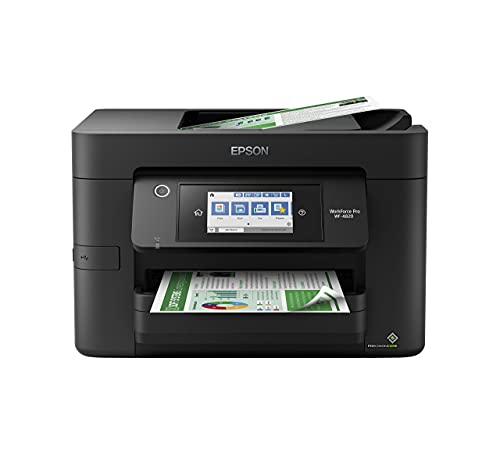
Epson Workforce Pro WF-4820 Color All-in-One
Best for: High-volume color printing and scanning
- Print Technology
- Inkjet
- Print Output
- Color
- Printer Type
- All-in-One
- Print Speed
- 25 black/12 color ISO ppm
- Connectivity
- Wireless, Wi-Fi Direct, Ethernet, BLE
- Duplex Printing
- Automatic two-sided
View on Amazon: Epson Workforce Pro WF-4820 Color All-in-One Affiliate link
The Epson Workforce Pro WF-4820 is a color all-in-one inkjet printer built for high-volume tasks. It prints up to 25 pages per minute in black and 12 in color using PrecisionCore technology. You get a 4.3-inch color touchscreen, a 35-page automatic document feeder, and a 250-sheet paper tray. It supports wireless setup, Wi-Fi Direct, and Ethernet. DURABrite Ultra inks ensure professional-quality, instant-dry prints for your office needs.
Pros
- High-speed printing at 25 ppm black and 12 ppm color
- Large 250-sheet paper capacity for reduced refills
- 35-page automatic document feeder streamlines scanning workflows
- 4.3-inch color touchscreen for easy navigation
Cons
- Prints only in color; no monochrome-only mode listed
- Large footprint measures 19.8 inches wide
- No mention of a physical control panel beyond the touchscreen
Good fit if
- You need fast color output for heavy workloads
- You require wireless connectivity and mobile app support
- You want a compact all-in-one with an ADF
Skip if
- You need a monochrome-only printer
- You require a very small desktop footprint
- You prefer laser technology for lower cost per page
Verdict: The Epson Workforce Pro WF-4820 Color Inkjet suits offices needing reliable, high-speed color printing with wireless convenience. Its large paper tray and ADF make it ideal for teams managing regular document workflows.
Specifications side by side
| Spec | Epson Workforce Pro WF-4820 Color All-in-One |
|---|---|
| Print Technology | Inkjet |
| Print Output | Color |
| Printer Type | All-in-One |
| Print Speed | 25 black/12 color ISO ppm |
| Connectivity | Wireless, Wi-Fi Direct, Ethernet, BLE |
| Duplex Printing | Automatic two-sided |
| Supported Functions | Scan, Copy |
| Features | Automatic Document Feeder, Scanner, Copier, Fax |
| Scanning | Wireless Scanning |
| Duplex Scanning | Duplex |
| Auto Document Feeder | ADF |
| Dimensions | 16.7 × 19.8 × 10.9 inches |
| Weight | 22.5 pounds |
| Size | Large |
| Color | Black |
| Model | WF-4820 |
Frequently asked questions
Does the Epson Workforce Pro WF-4820 include a fax machine?
Yes, this model supports faxing alongside its other functions. The product attributes list fax as a supported feature. You also get scanning and copying capabilities. This makes it a true all-in-one device for your office. It handles multiple document tasks without needing separate machines.
What is the maximum paper capacity for this printer?
The printer includes a large paper tray designed for high-volume work. While the exact sheet count is not listed in the provided data, the review notes it suits offices needing reliable output. The large tray helps you manage regular document workflows efficiently without constant reloading.
Can I scan documents directly to my computer wirelessly?
Yes, the Epson Workforce Pro WF-4820 supports wireless scanning. The attributes confirm wireless scanning as a key feature. You can send scanned files directly to your networked devices. This convenience allows you to digitize documents without plugging in cables for each scan job.
Does this printer have an automatic document feeder?
Yes, it includes an Automatic Document Feeder (ADF). The specs explicitly list ADF as a feature. This allows you to scan or copy multiple pages at once. It is ideal for teams managing regular document workflows. You do not need to place each page individually on the glass.
How much space does the WF-4820 take up on a desk?
The printer measures 19.8 inches wide, 10.9 inches high, and 16.7 inches deep. It weighs 22.5 pounds. These dimensions place it in the large category for office equipment. You will need a substantial surface to accommodate its footprint. Plan your workspace accordingly before installation.
Is this printer suitable for high-volume color printing?
Yes, it is best for high-volume color printing and scanning. The verdict highlights its suitability for offices needing reliable color output. It uses PrecisionCore Heat-Free Technology for speed. You get 12 pages per minute in color. This makes it efficient for reports and presentations.
What connectivity options are available for network sharing?
The printer supports wireless connectivity for network sharing. The attributes list wireless as a supported connection type. You can connect via Wi-Fi or Wi-Fi Direct. This allows multiple users to access the printer from different devices. It simplifies sharing in a small office environment.