Epson EcoTank ET-2980 Wireless Color Review: Who It Fits and Who Should Skip It
As an Amazon Associate we earn from qualifying purchases. Links on this page are affiliate links.
This epson ecotank et 2980 wireless color review focuses on a compact, all-in-one device that prioritizes high-yield ink efficiency over traditional cartridges. It is defined by its tank-based ink system and wireless connectivity. The printer measures 14.8 by 13.7 by 7.4 inches and weighs 11.5 pounds, making it a small footprint option for home offices. It supports color printing and scanning. The included ink supply is substantial, offering up to 6,600 black pages or 5,500 color pages. This setup aims to reduce the frequency of refills significantly for users who print regularly.
What stands out
- Includes enough ink for up to 6,600 black or 5,500 color pages
- Wireless printing and scanning from smartphones or devices
- Compact white design measuring 14.8 by 13.7 by 7.4 inches
- Tank system with EcoFit bottles for simple, drip-free refills
Who it fits
Good fit for
This printer suits home users who print moderate amounts of color documents and photos. The high-yield ink bottles are ideal for those tired of replacing individual cartridges frequently. If you need to scan wirelessly from your phone, the Epson Smart Panel app supports this workflow. The small size fits well in tight spaces like a desk corner. It is best for people who value long intervals between ink purchases and prefer a straightforward, cartridge-free setup.
Who should skip it
You should look elsewhere if you need to print double-sided pages automatically, as this model lacks an auto-duplexer. It also does not support faxing, so business users requiring that function will not find it useful. The device is limited to print and scan functions only. If you require a large paper capacity or a robust interface for a busy shared office, this small, basic all-in-one may not meet your volume or feature needs.
Verdict: The Epson EcoTank ET-2980 is a practical, compact choice for home users who want high-yield color printing and scanning without frequent cartridge changes. It fits well in small spaces and offers reliable wireless connectivity.
Epson ET-2980 Key Specs Explained
Printer Type: All-in-One
This device combines printing and scanning into a single unit. You do not need a separate scanner for document digitization. This saves desk space compared to buying two machines. It suits home offices where you need to copy files or scan receipts. Laser multifunction printers offer similar consolidation, but this model focuses on color output rather than monochrome speed.
Ink/Toner System: Tank
The printer uses refillable ink tanks instead of disposable cartridges. You pour ink from bottles into the reservoirs. This system is designed for high-volume printing with lower cost per page. It differs from laser printers that use toner powder. This approach benefits users who print many color documents regularly, reducing the frequency of supply changes.
Print Output: Color
This machine produces full-color prints, not just black and white. It is suitable for photos, charts, and colorful marketing materials. Laser printers often specialize in text or monochrome graphics. If you need vibrant images for personal projects or small business presentations, this color capability is essential. It distinguishes the device from basic monochrome laser models.
Connectivity: Wireless
The printer connects to your home network via Wi-Fi. You can send print jobs from smartphones, tablets, or computers without physical cables. This allows flexible placement of the device. Laser printers also use wireless connectivity, but this model emphasizes mobile app integration. It simplifies sharing the printer among multiple household devices.
Design and Build Overview
According to the listing, the Epson EcoTank ET-2980 features a white finish and a small footprint. The dimensions are 14.8 inches wide, 13.7 inches long, and 7.4 inches high. This compact size allows it to fit on most standard desks or shelves without dominating your workspace. The unit weighs 11.5 pounds, which suggests a solid build that remains stable during operation but is light enough to move if needed.
The device is an all-in-one printer, meaning it combines printing and scanning functions into a single chassis. This layout reduces the need for separate devices, keeping your office area organized. The listing notes that the printer is available in white or black, allowing you to match your existing equipment or decor. The white model shown here offers a clean, neutral look that blends into most home office environments.
While the listing does not detail specific control panel layouts or button types, the compact design implies a straightforward interface suitable for quick access. The tank-based ink system is housed within this small frame, eliminating the bulk of traditional cartridge slots. This design choice contributes to the printer's slim profile. You can place this unit in tight spaces where larger all-in-one models would not fit, making it a practical choice for smaller offices or dedicated printing corners.
Setup And Daily Use Guide
Setting up this Epson EcoTank ET-2980 begins with connecting the included ink bottles to the supersized internal tanks. The unique EcoFit bottle design simplifies this process, aiming to prevent spills and drying issues during the initial fill. You will install enough ink for up to 6,600 black pages or 5,500 color pages. This initial setup supports approximately three years of printing without needing replacement ink, reducing the frequency of maintenance tasks. Once the ink is loaded, you connect the device to your network via its wireless capability. The printer supports enhanced mobile printing through the Epson Smart Panel app, allowing you to send print and scan jobs directly from your smartphone or other compatible devices. This wireless scanning feature lets you digitize documents remotely without physically interacting with the machine. Daily use involves managing the tank levels rather than swapping small cartridges. The system is designed to minimize out-of-ink interruptions. You should use genuine Epson ink to ensure optimal print quality and performance, as non-genuine ink may cause damage not covered by the limited warranty. The all-in-one function allows you to print and scan documents efficiently. The compact white chassis fits easily on standard desks, keeping your workspace organized. You benefit from a streamlined workflow that combines connectivity with high-capacity ink storage, making it suitable for users who want to avoid frequent cartridge replacements.
Before You Buy This Printer
Before you buy this Epson EcoTank ET-2980, verify your wireless network supports the required connections. The listing notes enhanced mobile printing via the Epson Smart Panel app, so ensure your smartphone or device is compatible. You must use genuine Epson ink bottles to maintain optimal print quality and performance. Non-genuine ink may cause damage not covered under the limited warranty. This tank-based printer suits users who want to avoid frequent cartridge replacements. It includes enough ink for up to 6,600 black or 5,500 color pages. This high-yield system reduces out-of-ink frustrations. Consider how this all-in-one unit fits your desk space, as it measures 14.8 by 13.7 by 7.4 inches. It is a small, white device weighing 11.5 pounds. Compare this wireless color option against other laser printers in our guide if you prioritize speed over color versatility. Check your scanning needs, as this model supports wireless scanning.
Check before you buy
- Verify your wireless network compatibility for mobile printing.
- Check your smartphone for the Epson Smart Panel app.
- Confirm you have space for a 14.8-inch wide device.
- Ensure you can purchase genuine Epson ink bottles.
- Compare color tank options with laser printer alternatives.
The product at a glance
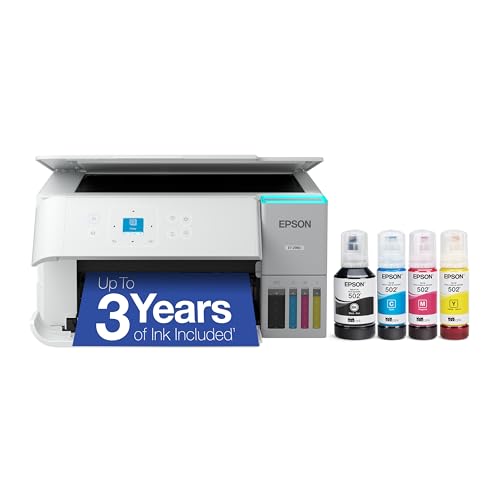
Epson EcoTank ET-2980 All-in-One Printer
Best for: home users wanting low ink costs
- Print Output
- Color
- Printer Type
- All-in-One
- Connectivity
- Wireless
- Ink/Toner System
- Tank
- Supported Functions
- Scan, Copy
- Features
- Scanner, Copier
View on Amazon: Epson EcoTank ET-2980 All-in-One Printer Affiliate link
The Epson EcoTank ET-2980 is a small, wireless color all-in-one printer. It uses a tank system rather than cartridges. The box includes ink for up to 6,600 black or 5,500 color pages. This covers about three years of typical use. You can print and scan from your phone. The unit measures 14.8 by 13.7 by 7.4 inches and weighs 11.5 pounds.
Pros
- Includes enough ink for up to 6,600 black or 5,500 color pages
- Wireless printing and scanning from smart devices
- Compact footprint with a small size
- Cartridge-free tank system for less frequent refills
Cons
- Print and scan only; no fax capability
- No automatic duplex printing mentioned in specs
- Manual ink refilling required
Good fit if
- You want to avoid buying individual ink cartridges
- You need wireless printing from your phone
- You have limited desk space for a small printer
Skip if
- You need to print double-sided pages automatically
- You require fax functionality
- You need high-volume heavy-duty office printing
Verdict: Epson EcoTank ET-2980 Wireless Color All-in-One suits home users who want low ink costs and wireless convenience. It fits small spaces and light to moderate color printing needs.
Specifications side by side
| Spec | Epson EcoTank ET-2980 All-in-One Printer |
|---|---|
| Print Output | Color |
| Printer Type | All-in-One |
| Connectivity | Wireless |
| Ink/Toner System | Tank |
| Supported Functions | Scan, Copy |
| Features | Scanner, Copier |
| Ideal For | Photos |
| Use Case | Home |
| Scanning | Wireless Scanning |
| Duplex Scanning | Duplex |
| Dimensions | 13.7 × 14.8 × 7.4 inches |
| Weight | 11.5 pounds |
| Size | Small |
| Color | White |
| Model | C11CL41202 |
Frequently asked questions
Does the Epson EcoTank ET-2980 support wireless scanning?
Yes, it supports wireless scanning. This feature allows you to digitize documents directly to your networked devices without needing a physical connection. It simplifies the workflow for home users who need to archive files or send scans via email from a distance.
What are the physical dimensions of this printer?
The Epson EcoTank ET-2980 measures 14.8 inches in width, 13.7 inches in length, and 7.4 inches in height. Its small size makes it suitable for tight spaces on standard desks or shelves. You can easily place it in a home office without taking up excessive room.
How much does the Epson ET-2980 weigh?
The device weighs 11.5 pounds. This moderate weight ensures stability during operation while remaining light enough to move if necessary. It is not designed to be a permanent fixture on a single spot, allowing for some flexibility in your workspace setup.
Is this printer suitable for color printing?
Yes, the Epson EcoTank ET-2980 is a color printer. It is built to handle light to moderate color printing tasks. This makes it a practical choice for home users who occasionally need to produce vibrant photos or colored documents without the high cost of traditional cartridges.
What is the model number for this unit?
The specific model number for this Epson EcoTank ET-2980 is C11CL41202. You can use this identifier to locate compatible ink bottles or check for firmware updates. It ensures you are referring to the exact all-in-one wireless color variant listed in the guide.
Who is the best target user for this device?
This printer is best for home users seeking low ink costs. It fits those who want wireless convenience and need to print in color. The compact design also suits individuals with limited desk space who require an all-in-one solution for basic office tasks.