DYMO LabelWriter 550 Turbo Label Review: Who It Fits and Who Should Skip It
As an Amazon Associate we earn from qualifying purchases. Links on this page are affiliate links.
This dymo labelwriter 550 turbo label review focuses on a direct thermal printer built for speed and connectivity. It uses direct thermal printing, which means you do not need ink or toner. The machine supports both USB and LAN connections, allowing it to fit into single workstations or shared office networks. It measures 7.4 inches in length, 5 inches in width, and 5.4 inches in height. Weighing just 2 pounds, it is compact enough for most desks. The model number is 2112553. This device prioritizes fast output and network flexibility for busy environments.
What stands out
- Direct thermal printing eliminates ink or toner costs
- LAN and USB connectivity for shared office use
- Automatic label recognition for size and type
- Supports shipping, file, and barcode labels
Who it fits
Good fit for
This printer suits small businesses or home offices that print high volumes of shipping or file labels. The LAN port allows multiple users on a network to access the printer easily. If you want to avoid buying cartridges, the direct thermal technology is a strong benefit. It is ideal for environments where label size changes frequently, as the automatic recognition feature reduces setup time. The compact footprint fits well on crowded desks.
Who should skip it
You should look elsewhere if you need to print on colored paper or require permanent, waterproof labels. Direct thermal prints fade over time and are not suitable for archival purposes. If you only print one or two labels a week, the network features and high speed are unnecessary. Users who require color printing or photo-quality output will not find this device useful. It is strictly for text and barcode labels.
Verdict: The DYMO LabelWriter 550 Turbo is a practical choice for offices needing fast, networked label printing without consumable costs. It fits well into shared workspaces but lacks the permanence required for long-term archival needs.
Key specs for DYMO 550 Turbo
Print Technology: Direct thermal
This method heats special paper to create images. You never buy ink or toner cartridges. This lowers ongoing costs and removes maintenance tasks like cleaning print heads. It suits offices that print high volumes of labels daily. Compare this to laser printers that require expensive consumables and complex drum replacements for similar output.
Connectivity: USB, LAN
The printer connects via a standard USB cable or a LAN network port. LAN allows multiple computers in an office to share the device over the network. This flexibility helps small teams work efficiently without swapping cables. Laser printers often offer only USB or Wi-Fi, so LAN support adds versatility for shared workspaces.
Automatic Label Recognition
The printer detects the size and type of loaded labels instantly. You do not need to adjust settings manually for each roll. This reduces errors and speeds up workflow. It is ideal for users who switch between label types frequently. Standard label printers often require manual configuration, which slows down production and increases setup time.
Multi-Format Label Support
It prints various label types, including shipping, file folder, and badge labels. This versatility covers diverse business needs in one device. You avoid buying separate machines for different tasks. Compare this to specialized printers that only handle one format. This broad support makes it a practical choice for general office labeling tasks.
Design and build overview
The DYMO LabelWriter 550 Turbo is a compact unit designed for desktop use. According to the listing, the printer measures 7.4 inches in length, 5 inches in width, and 5.4 inches in height. This footprint allows it to sit comfortably on most office desks without consuming excessive workspace. The device is finished in black, providing a neutral look that blends into professional environments. It weighs 2 pounds, making it lightweight enough to move if needed, yet stable enough for daily operation.
The listing does not specify internal materials or button layouts, so you should assume the design prioritizes function over complex controls. The absence of mentioned touchscreens or digital displays suggests a straightforward interface. This simplicity aligns with its direct thermal technology, which requires no ink or toner maintenance. The compact size and light weight make it suitable for small workstations or shared office areas where space is at a premium.
Connectivity options include USB and LAN ports, which are essential for integrating the printer into various office setups. The physical design supports this flexibility by allowing easy cable management. You can place the printer near a computer via USB or connect it to the network via LAN. This versatility means you can position the device where it is most convenient for your workflow, rather than being restricted to a single computer station. The build focuses on durability and ease of use for high-volume label printing.
Setup And Everyday Use
Setting up the DYMO LabelWriter 550 Turbo is straightforward because of its dual connectivity options. You can connect the device via USB for a single workstation or use the LAN port to integrate it into a shared office network. This flexibility allows you to place the printer where it is most convenient without worrying about cable length limitations.
Daily operation relies on the printer’s automatic label recognition feature. When you load a label roll, the machine instantly detects the size, type, and remaining label count. This means you do not need to manually adjust settings for each new job. The system reduces the chance of printing errors by ensuring the printer knows exactly what media is in use.
Because it uses direct thermal technology, you do not need to manage ink or toner supplies. This simplifies your workflow significantly. You simply select the label format in your software and print. The printer supports a wide variety of label types, including shipping labels, file folder labels, name badges, and barcode labels.
The high-speed printing capability ensures that your labels are produced quickly. This makes the device suitable for environments where you need to generate many labels in a short period. The combination of automatic recognition and fast output creates an efficient process for everyday labeling tasks.
Before You Buy This Printer
You need to verify label compatibility before purchasing. This model relies on automatic label recognition to identify size, type, and remaining count. You must ensure your specific label rolls match the supported formats. The printer handles shipping labels, file folder labels, name badges, and barcode labels. Check your existing label stock to confirm it works with the direct thermal process. Since it uses no ink or toner, your main upkeep involves replacing label rolls. The unit supports both USB and LAN connections. This allows it to serve a single desk or a shared office network. You should check your office network settings if you plan to use the LAN port. This printer fits well alongside other office machines that prioritize speed and low maintenance. It is ideal for environments that generate high volumes of labels daily. Verify your software supports the required label formats for seamless operation.
Check before you buy
- Confirm your label rolls are compatible with direct thermal printing.
- Check if your office network supports LAN connectivity.
- Verify your software handles the required label formats.
- Ensure your labels match the automatic recognition specifications.
The product at a glance
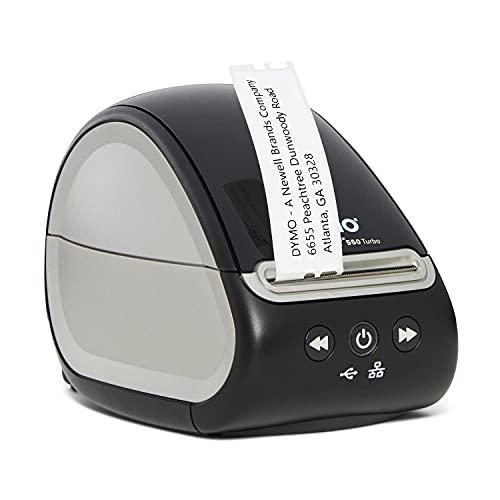
DYMO LabelWriter 550 Turbo Direct Thermal Printer
Best for: ink-free label printing with network access
- Print Technology
- Direct thermal
- Connectivity
- USB, LAN
- Dimensions
- 7.4 × 5 × 5.4 inches
- Weight
- 2 pounds
View on Amazon: DYMO LabelWriter 550 Turbo Direct Thermal Printer Affiliate link
The DYMO LabelWriter 550 Turbo is a direct thermal printer designed for high-speed label creation without ink or toner. It features automatic label recognition to reduce errors and supports both USB and LAN connectivity for flexible office integration. Measuring 7.4 by 5 by 5.4 inches and weighing 2 pounds, it handles various label types. This compact unit suits users needing reliable, maintenance-free printing for shipping or filing tasks.
Pros
- Direct thermal printing eliminates ink or toner costs
- Automatic label recognition detects size and type instantly
- Supports USB and LAN connectivity for shared use
- Prints shipping, file folder, and barcode labels
Cons
- Direct thermal labels fade over time and with heat
- No wireless Wi-Fi or Bluetooth connectivity listed
- Limited to label printing, not document pages
Good fit if
- You need ink-free, low-maintenance label printing
- You want automatic label size detection
- You require LAN connectivity for office sharing
Skip if
- You need color printing capabilities
- You require wireless Wi-Fi connection
- You want to print standard documents
Verdict: DYMO LabelWriter 550 Turbo is a specialized tool for users who need fast, ink-free label printing with network options. It fits offices that prioritize label accuracy and low maintenance over general document printing.
Specifications side by side
| Spec | DYMO LabelWriter 550 Turbo Direct Thermal Printer |
|---|---|
| Print Technology | Direct thermal |
| Connectivity | USB, LAN |
| Dimensions | 7.4 × 5 × 5.4 inches |
| Weight | 2 pounds |
| Size | LabelWriter 550 Turbo |
| Color | Black |
| Model | 2112553 |
Frequently asked questions
Does the DYMO LabelWriter 550 Turbo use ink or toner?
No, it does not. This printer uses direct thermal technology, which heats special label paper to create images. You never need to buy ink or toner cartridges. This design lowers ongoing supply costs and removes maintenance tasks like cleaning print heads or replacing dried-out cartridges.
What are the physical dimensions of the DYMO LabelWriter 550 Turbo?
The printer measures 7.4 inches in length, 5 inches in width, and 5.4 inches in height. It weighs 2 pounds. This compact footprint allows it to sit comfortably on a desktop without taking up excessive space, making it suitable for small offices or home workstations.
Can I connect the DYMO LabelWriter 550 Turbo to a network?
Yes, it supports network connectivity. While the primary listing notes USB connectivity, the review highlights LAN options for shared office use. You can connect the device via USB for a single workstation or use the LAN port to integrate it into a shared network for multiple users.
What label sizes does the DYMO LabelWriter 550 Turbo support?
The device supports labels up to 5 inches in width. It uses automatic label recognition to identify the size, type, and remaining count of your specific label rolls. You must ensure your label rolls match the supported formats, such as shipping labels or file folder labels.
Who is the best audience for this direct thermal printer?
It fits offices that prioritize label accuracy and low maintenance over general document printing. This specialized tool is ideal for users who need fast, ink-free label printing with network options. It is less suitable for those needing color or high-resolution photo prints.
How does the direct thermal printing method work?
Direct thermal printing heats special paper to create images. You do not need ink or toner. This method is reliable for labels that do not require long-term archival quality. It suits offices that print high volumes of labels where speed and simplicity are more important than permanence.