DYMO Label Printer LabelWriter 450 vs DYMO LabelWriter 550 Turbo Direct: Spec Comparison
As an Amazon Associate we earn from qualifying purchases. Links on this page are affiliate links.
This comparison looks at the dymo label printer labelwriter 450 vs labelwriter 550 turbo direct. Both machines use direct thermal printing, so you never need to buy ink or toner. They are designed for clear, precise labels for filing, shipping, and mailing. The main difference lies in speed and connectivity. The LabelWriter 450 is a standard USB model, while the 550 Turbo adds LAN support and faster output. You should choose based on your volume needs and network setup.
Key differences
| Aspect | DYMO LabelWriter 450 Direct Thermal Printer | DYMO LabelWriter 550 Turbo USB Label Printer |
|---|---|---|
| Print Speed | Up to 51 labels per minute | Up to 90 labels per minute |
| Connectivity | USB | USB, LAN |
| Label Management | Standard software integration | Automatic Label Recognition |
| Weight | 2.2 pounds | 1.41 pounds |
| Dimensions | 10.6 x 5.6 x 6.5 inches | 8.5 x 7.38 x 5.33 inches |
Which one should you choose?
Choose DYMO LabelWriter 450 Direct Thermal Printer if
- You need a compact, lightweight printer for a single desk.
- You only connect one computer via USB.
- You print moderate volumes up to 51 labels per minute.
Choose DYMO LabelWriter 550 Turbo USB Label Printer if
- You need to share the printer across multiple users on a network.
- You require the fastest output at up to 90 labels per minute.
- You want automatic detection of label size and remaining count.
Verdict: The LabelWriter 450 is a solid choice for single-user setups where space and weight matter. The LabelWriter 550 Turbo is better for busy offices that need network sharing and higher speed. Your decision depends on whether you prioritize connectivity and speed over a smaller footprint.
LabelWriter 450 vs 550 Turbo Specs
print speed
The DYMO LabelWriter 550 Turbo prints up to 90 labels per minute via USB. This high speed is based on 4-line address labels. The DYMO LabelWriter 450 prints up to 51 labels per minute using the included DYMO software. The 550 Turbo is significantly faster for bulk jobs. You will finish mailing or filing tasks much quicker with the Turbo model. The 450 is adequate for lighter daily workloads. Choose the 550 Turbo if speed is your priority.
connectivity
The DYMO LabelWriter 550 Turbo offers both USB and LAN network connectivity. This allows multiple users on a network to access the machine easily. The DYMO LabelWriter 450 data does not list network capabilities, implying it relies on a direct USB connection. If you need to share the printer across an office, the 550 Turbo is the better choice. The LAN port supports professional environments with multiple workstations. The 450 is suitable for single-computer setups.
label management
The DYMO LabelWriter 550 Turbo features unique Automatic Label Recognition. It identifies the size, type, and color of loaded labels. It also shows the remaining label count so you never run out mid-job. The DYMO LabelWriter 450 data does not mention this smart recognition feature. You must manually check label types with the 450. The 550 Turbo reduces errors and saves time during setup. This feature is valuable for busy offices handling various label sizes.
print technology
Both machines use direct thermal printing technology. This means you never need to buy ink or toner cartridges. The DYMO LabelWriter 450 eliminates the waste and hassle of sheet labels. The DYMO LabelWriter 550 Turbo also replaces costly ink needs while providing monochrome output. Both produce precise labels for filing, shipping, and mailing. They are compatible with authentic DYMO labels in various sizes. Neither works with DYMO stamps. The core printing method is identical for both models.
physical size
The DYMO LabelWriter 450 measures 10.6 x 5.6 x 6.5 inches and weighs 2.2 pounds. The DYMO LabelWriter 550 Turbo measures 7.38 x 8.5 x 5.33 inches and weighs 1.41 pounds. The 550 Turbo is shorter in height and lighter. The 450 is wider and heavier. Consider your desk space when choosing. The 550 Turbo has a smaller footprint for compact workspaces. The 450 is bulkier but stable. Both fit standard office desks without issue.
software compatibility
The DYMO LabelWriter 550 Turbo works with DYMO Connect for Desktop on Windows 8.1 or later and Mac 10.14 or later. The DYMO LabelWriter 450 allows you to create labels directly from text in Microsoft Word, Excel, Outlook, and Google Contacts. Both support essential labeling tasks. The 550 Turbo specifies modern OS requirements. The 450 highlights integration with common productivity apps. You can use either for address, file folder, and barcode labels. Check your operating system version for the 550 Turbo.
Which label printer suits your workflow
Users needing network sharing for multiple staff
The DYMO LabelWriter 550 Turbo supports LAN connectivity. This allows multiple users on the same network to access the machine. The 450 relies on USB connections. If your office requires shared access without switching cables, the 550 Turbo is the practical choice for your environment.
High volume shipping or mailing departments
Speed matters when printing hundreds of labels daily. The 550 Turbo prints up to 90 labels per minute via USB. The 450 maxes out at 51 labels per minute. For heavy workloads, the faster output of the 550 Turbo reduces waiting time significantly.
Desktop users with limited physical space
Size and weight impact desk space. The 450 measures 10.6 inches wide and weighs 2.2 pounds. The 550 Turbo is narrower at 8.5 inches and lighter at 1.41 pounds. If you need a compact footprint on a crowded desk, the 450 fits well.
The products compared
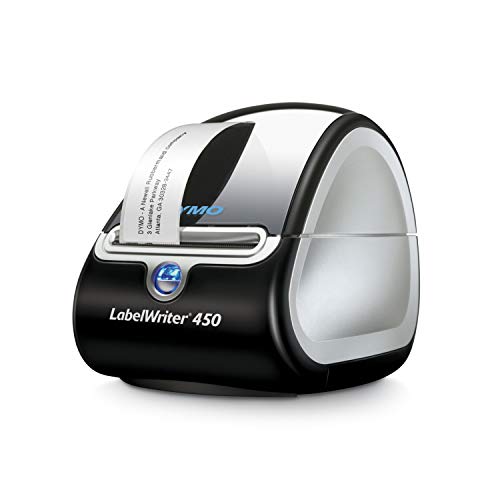
DYMO LabelWriter 450 Direct Thermal Printer
Best for: Single-user high-volume direct thermal labeling
- Print Technology
- Direct thermal
- Print Speed
- Up to 51 labels per minute
- Ink/Toner System
- Direct thermal, no ink or toner
- Dimensions
- 7.25 × 4.87 × 5.75 inches
- Weight
- 2.2 pounds
View on Amazon: DYMO LabelWriter 450 Direct Thermal Printer Affiliate link
The DYMO LabelWriter 450 is a direct thermal label printer designed for high-volume output. It prints up to 51 labels per minute, making it suitable for busy offices. The device uses direct thermal technology, so you never need to buy ink or toner. It measures 10.6 x 5.6 x 6.5 inches and weighs 2.2 pounds. You can create labels directly from Microsoft Word, Excel, and Outlook using the included software.
Pros
- Prints up to 51 labels per minute
- Direct thermal technology requires no ink or toner
- Prints labels up to 4.87 inches wide
- Compatible with Microsoft Word, Excel, and Outlook
Cons
- Lacks built-in network connectivity for LAN sharing
- Not compatible with Dymo stamps
- Requires specific DYMO LabelWriter labels for best performance
Good fit if
- You need fast label printing for shipping or filing
- You want to avoid ongoing ink or toner costs
- You primarily print labels from desktop office applications
Skip if
- You need to print labels over a network
- You want to use Dymo stamps
- You prefer ink-based printing for long-term label durability
Verdict: DYMO LabelWriter 450 Direct Thermal Printer is a solid choice for users who prioritize speed and low operating costs for single-computer labeling tasks. It fits well in environments where direct thermal printing and desktop software integration are the primary requirements.

DYMO LabelWriter 550 Turbo USB Label Printer
Best for: Networked office labeling tasks
- Print Output
- Monochrome
- Connectivity
- USB, LAN
- Print Technology
- Direct Thermal
- Dimensions
- 7.38 × 8.5 × 5.33 inches
- Weight
- 1.41 pounds
View on Amazon: DYMO LabelWriter 550 Turbo USB Label Printer Affiliate link
The DYMO LabelWriter 550 Turbo is a monochrome direct thermal label printer with USB and LAN connectivity. It prints up to 90 labels per minute and features automatic label recognition to track remaining stock. This compact unit measures 8.5 by 7.38 by 5.33 inches and weighs 1.41 pounds. It suits users needing network access for multiple people.
Pros
- Prints up to 90 labels per minute via USB
- LAN connectivity allows multiple users to access the machine
- Automatic label recognition tracks size, type, and remaining stock
- Direct thermal technology eliminates the need for ink or toner
Cons
- Monochrome print output only
- Limited to DYMO branded labels
- Requires Windows 8.1 or later, or Mac 10.14 or later
Good fit if
- You need network access for multiple users
- You want to avoid buying ink or toner
- You need fast printing speeds for mailing or shipping
Skip if
- You require color printing
- You use operating systems older than Windows 8.1 or Mac 10.14
- You prefer third-party label compatibility
Verdict: DYMO LabelWriter 550 Turbo fits offices that need fast, networked label printing without ink costs. It is ideal for teams sharing a single labeling station.
Specifications side by side
| Spec | DYMO LabelWriter 450 Direct Thermal Printer | DYMO LabelWriter 550 Turbo USB Label Printer |
|---|---|---|
| Print Technology | Direct thermal | not stated |
| Print Output | not stated | Monochrome |
| Print Speed | Up to 51 labels per minute | not stated |
| Connectivity | not stated | USB, LAN |
| Ink/Toner System | Direct thermal, no ink or toner | not stated |
| Dimensions | 7.25 × 4.87 × 5.75 inches | 7.38 × 8.5 × 5.33 inches |
| Weight | 2.2 pounds | 1.41 pounds |
| Size | 10.6 x 5.6 x 6.5 inches | not stated |
| Color | Black/Silver | Black |
| Model | 1752264 | 550 Turbo |
Frequently asked questions
Which DYMO printer is faster for high-volume labeling?
The DYMO LabelWriter 550 Turbo is faster. It prints up to 90 labels per minute via USB. The DYMO LabelWriter 450 prints up to 51 labels per minute. You should choose the 550 Turbo if speed is your priority. The 450 is suitable for lower volume tasks.
Can I connect both printers to a network?
Only the DYMO LabelWriter 550 Turbo supports network sharing. It allows multiple users on the same network to access the machine. The DYMO LabelWriter 450 relies on USB connections. You cannot share the 450 across a network directly. Choose the 550 Turbo for office teams.
Do these printers use ink or toner?
No, neither printer uses ink or toner. Both machines use direct thermal printing technology. This means you never need to buy ink cartridges or toner. You only need label rolls. This design keeps operating costs low for both the 450 and the 550 Turbo.
Which printer is lighter to move around?
The DYMO LabelWriter 550 Turbo is lighter. It weighs 1.41 pounds. The DYMO LabelWriter 450 weighs 2.2 pounds. If you need to move the printer frequently, the 550 Turbo is the better choice. Both are compact, but the 550 Turbo has a smaller footprint.
Is the DYMO LabelWriter 450 good for single users?
Yes, the DYMO LabelWriter 450 is ideal for single users. It is designed for single-computer labeling tasks. It fits well in environments where direct thermal printing is the primary requirement. You get reliable performance for personal or small office use without needing network capabilities.
What is the main difference in connectivity between the two?
The main difference is network capability. The DYMO LabelWriter 550 Turbo supports LAN connectivity for shared use. The DYMO LabelWriter 450 uses USB only. If you need to share the printer with multiple staff members, you must choose the 550 Turbo. The 450 is for direct connection.
Which printer is better for a shared office station?
The DYMO LabelWriter 550 Turbo is better for shared offices. It allows multiple users on the same network to access the machine. This setup is ideal for teams sharing a single labeling station. The 450 lacks this feature, making it less suitable for collaborative environments.