DYMO Label Printer LabelWriter 450 Review (2026): A Spec-Based Look
As an Amazon Associate we earn from qualifying purchases. Links on this page are affiliate links.
In this dymo label printer labelwriter 450 review, we look at the DYMO LabelWriter 450 Direct Thermal Label Printer. This device is built for straightforward labeling tasks like filing, shipping, and mailing. It defines itself through two key specifications: a print speed of up to 51 labels per minute and a direct thermal printing system. This technology means you never need to buy ink or toner. The printer connects to your computer to produce precise labels directly from text. It is a compact unit designed for efficiency. You get clear outputs without the hassle of sheet labels or consumable supplies. The specifications highlight a focus on speed and simplicity for your daily office needs.
What stands out
- Prints up to 51 labels per minute for speedy workflows
- Direct thermal technology eliminates the need for ink or toner
- Compact dimensions of 10.6 x 5.6 x 6.5 inches fit small spaces
- Weighs only 2.2 pounds for easy placement
- Works with DYMO software to create address and barcode labels
Who it fits
Good fit for
This printer suits users who need high-volume label output without managing consumables. The 51 labels per minute speed helps those with shipping or filing backlogs. The direct thermal system is ideal for buyers who want to avoid ongoing ink costs. It fits well in home offices or small businesses where space is limited, given its compact size. If you regularly create address, file folder, or barcode labels from Microsoft Word, Excel, or Outlook, this machine aligns with your workflow. It is best for those who prioritize speed and low maintenance over color printing.
Who should skip it
You should look elsewhere if you need color labels, as this device uses direct thermal technology which only produces black text. It is not suitable for users who require permanent, archival-quality prints that resist heat or light exposure over long periods. If you need to print on materials other than DYMO-compatible labels, this printer will not work for you. It is also not compatible with Dymo stamps. Buyers who want wireless connectivity or mobile app support will find this model lacking, as it relies on direct computer connection and specific desktop software.
Verdict: The DYMO LabelWriter 450 is a practical choice for users who need fast, ink-free labeling for shipping and filing. Its direct thermal system and high speed make it a reliable tool for routine office tasks.
Key specs for DYMO LabelWriter 450
Print Speed: Up to 51 labels per minute
This speed allows you to produce a high volume of labels quickly. It is suitable for busy offices or small businesses that need to label shipping boxes or file folders efficiently. When comparing to standard laser printers, this speed is specialized for label rolls rather than paper sheets. You benefit from reduced wait times during bulk labeling projects.
Ink/Toner System: Direct thermal, no ink or toner
This printer uses heat-sensitive paper instead of cartridges. You never need to buy ink or toner, which eliminates ongoing supply costs and storage for consumables. This system reduces maintenance tasks like replacing empty cartridges. It is ideal for users who want a simple, hassle-free labeling solution without managing printer supplies or dealing with dried-out printheads.
Print Technology: Direct thermal
Direct thermal printing creates images by heating special paper. This technology ensures clear, precise text and barcodes without additional materials. It is reliable for standard labeling needs like shipping, filing, and mailing. Unlike inkjet or laser methods, there is no risk of smudging from wet ink. This makes it a practical choice for straightforward, everyday office labeling tasks.
Weight: 2.2 pounds
This weight indicates a lightweight, compact device. It is easy to place on a desk or shelf without taking up much space. You can move it around if needed for different workstations. This portability is useful for small offices or home workspaces where counter space is limited. It sits comfortably alongside other small office machines.
DYMO LabelWriter 450 Physical Design
The DYMO LabelWriter 450 measures 10.6 by 5.6 by 6.5 inches according to the listing. This footprint allows the printer to fit comfortably on most desks or shelves. You do not need a large workspace to accommodate this device. The unit weighs 2.2 pounds, making it light enough to move if your layout changes. The color scheme is black and silver, which blends into standard office environments without drawing attention. The finish appears solid, designed for daily handling rather than heavy industrial use. This compact size supports its role as a dedicated labeling tool. You can place it near a packing station or filing cabinet without cluttering the area. The low weight ensures stability is not compromised by accidental bumps during normal office activity. The dimensions are optimized for direct thermal printing, keeping the mechanism close to the label roll. This proximity helps maintain print quality and reduces the chance of paper jams. The design prioritizes function over form. You get a straightforward machine that does not take up unnecessary space. The physical attributes align with the printer's purpose: quick, efficient labeling. You can rely on the size and weight to keep the device accessible. It is built for users who need a reliable tool that stays out of the way. The materials suggest durability for everyday tasks. You can trust the build to handle regular use without requiring extensive maintenance. The design supports the high-speed printing capabilities mentioned earlier. It is a practical choice for busy offices.
Setup And Everyday Use
You set up the DYMO LabelWriter 450 by connecting it to your computer. The device relies on included DYMO software to function. This software handles the creation and printing of your labels. You can generate address, file folder, and barcode labels directly from the application. The listing notes that you can also create labels from text in Microsoft Word, Excel, Outlook, and Google Contacts. This integration allows you to pull data from your existing files without switching programs. Daily use centers on direct thermal printing. This technology means you never need to buy ink or toner. The printer heats special label media to create images. This eliminates the waste and hassle associated with sheet labels or traditional cartridges. You simply load authentic DYMO labels into the unit. The device accepts labels in a variety of sizes to suit different needs. For best performance, you should use only DYMO LabelWriter compatible labels. The printer is not compatible with Dymo stamps, so you must stick to the label format. You can produce up to 51 labels per minute. This speed supports busy workflows where you need to label shipping boxes or organize files quickly. The process is straightforward. You design the label in the software, load the media, and print. The direct thermal method ensures consistent results without maintenance for ink levels. You focus on your labeling tasks rather than managing consumables. The setup is designed for efficiency, allowing you to start printing with minimal configuration.
Before You Buy DYMO LabelWriter 450
You should verify that your computer meets the system requirements for the included DYMO software before purchasing. This application is essential for creating and printing your labels from text, spreadsheets, or contact lists. You must use authentic DYMO LabelWriter labels for best performance. The listing notes it is not compatible with Dymo stamps, so check your specific labeling needs. Since this device uses direct thermal technology, you will never need to buy ink or toner. This eliminates ongoing supply costs but means labels may fade over time if exposed to heat or light. Keep this in mind for long-term archival filing. This printer is a dedicated labeling tool rather than a general office machine. It sits alongside other options in Laser Printers & Office Machines as a specialized device for high-volume, precise label work. It does not replace your main document printer. Ensure you have enough space for the label rolls, as the footprint is compact but requires clear access for loading media. This unit is ideal if your primary need is shipping, mailing, or file organization rather than multi-purpose printing.
Check before you buy
- Verify computer compatibility with DYMO software.
- Confirm you only need label printing.
- Ensure space for label roll loading.
- Check if labels need long-term permanence.
The product at a glance
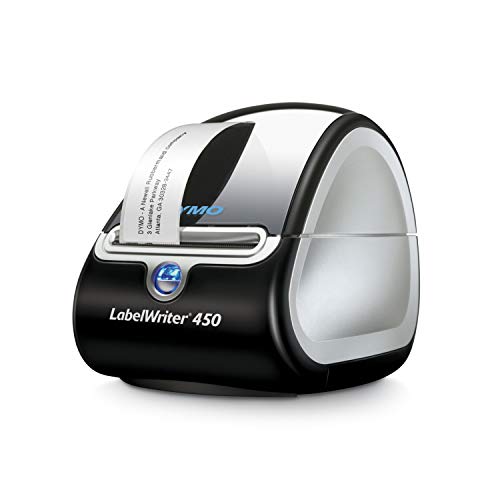
DYMO LabelWriter 450 Direct Thermal Printer
Best for: fast, ink-free label printing
- Print Technology
- Direct thermal
- Print Speed
- Up to 51 labels per minute
- Ink/Toner System
- Direct thermal, no ink or toner
- Dimensions
- 7.25 × 4.87 × 5.75 inches
- Weight
- 2.2 pounds
View on Amazon: DYMO LabelWriter 450 Direct Thermal Printer Affiliate link
The DYMO LabelWriter 450 uses direct thermal technology, so you never need to buy ink or toner. It prints up to 51 labels per minute, making it fast for daily tasks. The unit measures 10.6 x 5.6 x 6.5 inches and weighs 2.2 pounds. You can create address, file folder, and barcode labels directly from Microsoft Word, Excel, Outlook, and Google Contacts. It is a practical choice for home offices or small businesses that prioritize speed and low ongoing costs.
Pros
- Direct thermal printing eliminates the need for ink or toner cartridges
- Prints up to 51 labels per minute for speedy output
- Compatible with Microsoft Word, Excel, Outlook, and Google Contacts
- Compact footprint at 10.6 x 5.6 x 6.5 inches
Cons
- Direct thermal prints may fade over time or with heat exposure
- Requires authentic DYMO label rolls for best performance
- Not compatible with DYMO stamps
Good fit if
- You want to avoid the recurring cost of ink or toner
- You need to print address, filing, or barcode labels quickly
- You work primarily with Microsoft Office or Google Contacts
Skip if
- You need to print on standard paper sheets
- You require compatibility with third-party label brands
- You need to print on DYMO stamps
Verdict: DYMO LabelWriter 450 Direct Thermal Printer is a fast, ink-free solution for users who print labels frequently. It fits buyers who value speed and simplicity over permanent, archival-quality prints.
Specifications side by side
| Spec | DYMO LabelWriter 450 Direct Thermal Printer |
|---|---|
| Print Technology | Direct thermal |
| Print Speed | Up to 51 labels per minute |
| Ink/Toner System | Direct thermal, no ink or toner |
| Dimensions | 7.25 × 4.87 × 5.75 inches |
| Weight | 2.2 pounds |
| Size | 10.6 x 5.6 x 6.5 inches |
| Color | Black/Silver |
| Model | 1752264 |
Frequently asked questions
Is the DYMO LabelWriter 450 suitable for permanent archival labeling?
No, this printer uses direct thermal technology, which is not designed for long-term archival storage. The labels fade over time when exposed to heat or light. This device is best for fast, temporary, or semi-permanent labeling tasks like shipping boxes or file folders rather than documents requiring decades of preservation.
What is the maximum label width this printer supports?
The DYMO LabelWriter 450 supports a maximum label width of 4.87 inches. This allows you to print wide labels for large shipping boxes or bulk packaging. You can create clear, legible labels for various package sizes without needing a wider industrial-grade machine.
How heavy is the DYMO LabelWriter 450 unit?
The printer weighs 2.2 pounds. This lightweight design makes it easy to move or store when not in use. You can place it on a desk or shelf without it taking up too much space or requiring a sturdy mounting surface.
Does the DYMO LabelWriter 450 use ink or toner?
No, it does not use ink or toner. It uses direct thermal printing technology, which heats special paper to create images. This means you only need to purchase compatible thermal label rolls. You save money and time by avoiding cartridge replacements or toner refills.
What are the physical dimensions of the DYMO LabelWriter 450?
The unit measures 10.6 inches in length, 5.6 inches in width, and 6.5 inches in height. These compact dimensions allow it to fit on most standard desks or office shelves. You do not need a large workspace to accommodate this device alongside other office equipment.
Can I print barcode labels with this printer?
Yes, the included DYMO software allows you to generate barcode labels. You can create various label types, including address, file folder, and barcode labels. This functionality supports inventory management and shipping needs by allowing you to encode product or package data directly into the label.