6 Best Alternatives to the Canon imageFORMULA R40II Receipt Edition (2026)
As an Amazon Associate we earn from qualifying purchases. Links on this page are affiliate links.
The Canon imageFORMULA R40II Receipt Edition is a high-speed scanner designed for users who need to process large volumes of receipts and invoices quickly. It connects via USB-C and scans at up to 45 pages per minute with a 60-sheet automatic feeder. This model is optimized for QuickBooks Online users, though it requires specific software and does not support standard TWAIN or ISIS drivers. You might look for Canon imageFORMULA R40II Receipt Edition alternatives if you need broader driver compatibility, a smaller footprint, or portability.
The alternatives listed here were chosen because their specifications overlap with the original scanner’s core functions. These options include duplex scanning, automatic document feeders, and USB connectivity. Some models offer different physical dimensions or weights, which may suit tighter desk spaces. Others provide general-purpose document scanning capabilities beyond just receipts. Each alternative shares key traits like speed or duplexing, ensuring you can find a device that matches your specific office workflow and hardware requirements.
How each alternative compares
Canon imageFORMULA DR-C225 II Upright Scanner
The Canon imageFORMULA DR-C225 II Scanner offers a significantly smaller footprint, measuring 6.1 by 8.7 by 11.8 inches, compared to the R40II Receipt Edition’s 12 by 9.3 by 14.9 inches. This makes it ideal for space-constrained offices. However, it lacks the dedicated QuickBooks integration and the 60-sheet ADF capacity of the original. You lose the specialized receipt handling software, but gain a more compact design for general document scanning. Choose this if desk space is tighter than scanning volume.
Doxie Pro Compact Duplex Scanner
The Doxie Pro DX400 is a compact duplex scanner weighing just 3 pounds, making it highly portable compared to the 7.05-pound R40II Receipt Edition. Its dimensions are 3.94 by 2.95 by 12 inches, fitting easily into bags. You give up the high-speed 45 pages per minute output and the 60-sheet automatic feeder. This model is best for occasional receipt scanning in small spaces or for users who need to move the scanner frequently. It sacrifices volume for mobility and a smaller physical presence.
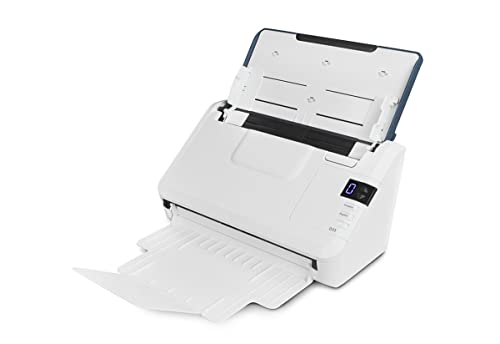
Xerox D35 Office Document Scanner
The Xerox D35 Scanner matches the R40II Receipt Edition’s speed at 45 pages per minute but uses a standard USB connection instead of USB-C. It is lighter at 5.1 pounds and has a narrower profile at 6.7 inches wide. You lose the dedicated QuickBooks plugin and the 60-sheet ADF capacity. This scanner is better for moderate office document scanning where general compatibility matters more than specialized receipt software. It offers similar speed in a more traditional, wired setup without the proprietary software lock-in.
HP Compact Duplex Mobile Document Scanner
The HP HPPS200 Compact Mobile Scanner is designed for portability, weighing 3.14 pounds and measuring only 2.9 inches high. It supports duplex scanning but lacks the high-speed volume and 60-sheet ADF of the R40II Receipt Edition. You trade speed and capacity for a lightweight, easy-to-carry device suitable for travel or small media types. This is a practical choice if you prioritize mobility and occasional receipt scanning over processing large batches of documents quickly in a fixed office location.
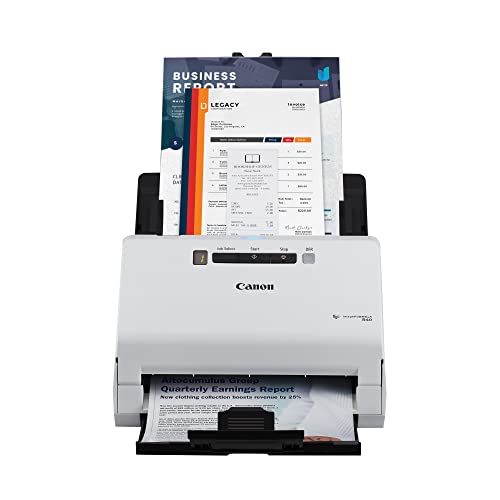
Canon imageFORMULA R40 Duplex Scanner
The Canon imageFORMULA R40 Receipt Scanner provides high-volume receipt scanning with QuickBooks integration, similar to the R40II Receipt Edition. However, it is slightly lighter at 6.17 pounds and has different dimensions at 15 by 12.5 by 9.5 inches. It lacks the specific USB-C connectivity and the 60-sheet ADF capacity of the newer model. This version is suitable for users who want dedicated receipt processing but prefer a standard setup. It offers comparable speed for accountants but with a different physical form factor and connection type.
Fujitsu Duplex Desktop Document Scanner
The Fujitsu FI-7160 60ppm Desktop Scanner offers higher speed at 60 pages per minute compared to the R40II Receipt Edition’s 45 pages per minute. It is heavier at 10.5 pounds and has a footprint of 10.4 by 9.5 by 12.4 inches. You gain significant throughput for high-volume administrative work but lose the dedicated QuickBooks integration and specific receipt-focused software. This scanner is better for busy offices needing to process large batches of general documents quickly, prioritizing raw speed and capacity over specialized receipt handling features.
Quick picks
Our 7 picks

Canon imageFORMULA R40II Receipt Edition
Best for: QuickBooks users scanning high volumes of receipts
- Scan Speed
- Up to 45 ppm
- ADF Capacity
- 60 sheets
- Connectivity
- USB-C
- Media Types
- Receipts, invoices, business cards
- Features
- Scanner
- Ideal For
- Documents
View on Amazon: Canon imageFORMULA R40II Receipt Edition Affiliate link
This Canon scanner handles receipts, invoices, and business cards at up to 45 pages per minute. It features a 60-sheet automatic feeder and scans both sides simultaneously in color. The device connects via USB-C and is designed exclusively for the included Canon CaptureOnTouch software. It includes a plugin for QuickBooks Online, making it a practical option for office users who need fast, reliable document digitization without driver complexity.
Pros
- Scans up to 45 pages per minute
- 60-sheet automatic document feeder
- Simultaneous duplex scanning in color
- Includes QuickBooks Online plugin
Cons
- Does not support TWAIN or ISIS drivers
- Requires exclusive use of Canon CaptureOnTouch software
- Connects only via USB-C cable
Good fit if
- You need to scan receipts and invoices quickly
- You use QuickBooks Online for accounting
- You prefer a simple USB-C connection
Skip if
- You require TWAIN or ISIS driver support
- You need to use third-party scanning software
- You require wireless connectivity options
Verdict: The Canon imageFORMULA R40II Receipt Edition is a fast, dedicated scanner for high-volume receipt processing. It fits users who rely on QuickBooks Online and want a straightforward USB-C setup without complex driver installations.

Canon imageFORMULA DR-C225 II Upright Scanner
Best for: Space-constrained offices needing cloud scanning
- Scan Speed
- Up to 25 ppm
- ADF Capacity
- 30 sheets
- Media Types
- Receipts, photos, cards, long documents
- Driver Support
- TWAIN
- Features
- Duplex Printing, Automatic Document Feeder, Scanner
- Use Case
- Office
View on Amazon: Canon imageFORMULA DR-C225 II Upright Scanner Affiliate link
The Canon imageFORMULA DR-C225 II is an upright office document scanner designed for space efficiency. It scans at 25 pages per minute with a 30-sheet automatic document feeder. You get duplex scanning and cloud connectivity to services like Dropbox and OneDrive. The unit measures 8.7 by 11.8 inches and weighs 5.95 pounds. It supports Windows and Mac systems with TWAIN drivers. This model suits users needing reliable, fast digitization of mixed document types.
Pros
- Scans up to 25 pages per minute
- 30-sheet automatic document feeder capacity
- Dual-sided scanning capability
- Direct cloud scanning to Dropbox and OneDrive
- Upright design saves desk space
Cons
- 30-sheet feeder is smaller than 50-sheet competitors
- No built-in display for navigation
- Limited to TWAIN driver support
Good fit if
- You need fast duplex scanning for mixed document types
- You want direct cloud integration without extra software
- You have limited desk space for an upright scanner
Skip if
- You require high-volume batch scanning over 30 sheets
- You need a built-in touchscreen interface
- You prefer a flatbed scanner for photos
Verdict: The Canon imageFORMULA DR-C225 II Scanner fits small offices needing reliable, space-saving duplex scanning with cloud connectivity. It is ideal for users prioritizing speed and footprint over high-capacity feeding.

Doxie Pro Compact Duplex Scanner
Best for: small spaces and receipt scanning
- Portability
- Compact wired
- Features
- Duplex Printing, Scanner
- Ideal For
- Documents
- Use Case
- Office, Home
- Scanner Type
- Receipt
- Dimensions
- 12 × 3.94 × 2.95 inches
View on Amazon: Doxie Pro Compact Duplex Scanner Affiliate link
The Doxie Pro DX400 is a compact wired duplex scanner designed for home and office use. It measures 12 by 3.94 by 2.95 inches and weighs 3 pounds. The device scans documents, receipts, and photos with automatic cropping and text recognition. It connects via USB and integrates with apps like Dropbox and iCloud. This scanner suits users who need a small footprint for portable or desktop scanning.
Pros
- Duplex scanning for two-sided paper
- Compact dimensions of 12 x 3.94 x 2.95 inches
- Lightweight build at 3 pounds
- Includes direct feed slot for thick paper
Cons
- Wired connection only
- No wireless connectivity options listed
- Limited to single-speed scanning performance
Good fit if
- You need a scanner that fits in small spaces
- You primarily scan receipts and standard documents
- You prefer a lightweight device for easy storage
Skip if
- You require wireless scanning capabilities
- You need high-volume continuous scanning
- You prefer a larger flatbed scanner
Verdict: The Doxie Pro DX400 Compact Scanner fits users who value portability and duplex scanning in a small footprint. It is ideal for occasional receipt and document scanning where space is limited.
Xerox D35 Office Document Scanner
Best for: moderate volume office document scanning
- Scan Speed
- Up to 45 ppm / 90 ipm
- ADF Capacity
- 50 pages
- Connectivity
- USB
- Media Types
- Photos, documents, receipts, cards
- Daily Duty Cycle
- 8,000 pages/day
- Features
- Automatic Document Feeder, Scanner
View on Amazon: Xerox D35 Office Document Scanner Affiliate link
The Xerox D35 is a duplex office scanner with a 50-page automatic document feeder. It delivers up to 45 pages per minute at 200 to 300 dpi. The unit supports a daily duty cycle of 8,000 pages. You get USB connectivity for PC and Mac. Visioneer Acuity technology enhances image clarity. This model suits busy offices needing fast, reliable document processing.
Pros
- Scans up to 45 ppm and 90 ipm
- 50-page automatic document feeder
- 8,000 pages per day duty cycle
- Visioneer Acuity image enhancement technology
Cons
- Limited to USB connectivity only
- No mention of wireless or network options
- Duty cycle may be low for high-volume departments
Good fit if
- You need fast duplex scanning for paper documents
- You require a dedicated USB connection for your office PC
- You scan up to 8,000 pages daily
Skip if
- You need wireless or Ethernet connectivity
- You scan more than 8,000 pages per day
- You want a compact scanner under 6 inches wide
Verdict: Xerox D35 High-Speed USB Scanner offers strong speed for its class, making it a solid fit for offices with moderate daily volume and wired setups.

HP Compact Duplex Mobile Document Scanner
Best for: portable duplex scanning of receipts and photos
- Scan Speed
- 25 ppm
- Connectivity
- USB
- Portability
- Mobile, desktop, portable
- Media Types
- Cards, photos, invoices, contracts
- Power Source
- AC wall adapter
- Features
- Duplex Printing, Mobile Printing, Scanner
View on Amazon: HP Compact Duplex Mobile Document Scanner Affiliate link
The HP HPPS200 is a lightweight mobile scanner designed for portability and speed. It scans at 25 pages per minute with automatic duplex capability. The device connects via USB and supports media from 2x2.9 inches up to 8.5x14 inches. You get 1200 dpi resolution for clear images. It includes HP WorkScan software for easy setup. This unit suits travelers and small offices needing quick digital conversion of receipts and photos.
Pros
- 25 ppm scan speed for efficient batch processing
- Automatic duplex scanning captures both sides in one pass
- Compact dimensions (11.8 x 4.1 x 2.9 inches) fit in a briefcase
- Supports small media sizes down to 2x2.9 inches
Cons
- USB-only connectivity lacks wireless or mobile printing options
- 25 ppm speed is slower than high-volume office scanners
- Requires a separate AC wall adapter for power
Good fit if
- You need a portable scanner for travel or remote work
- You frequently scan small items like receipts or photos
- You prefer a compact device that fits in a bag
Skip if
- You require wireless or mobile printing capabilities
- You need to scan large volumes of documents quickly
- You want a scanner with built-in battery power
Verdict: HP HPPS200 Compact Mobile Scanner is a practical choice for individuals who prioritize portability and duplex scanning over high-speed volume. It fits users who travel with documents or handle small media types.
Canon imageFORMULA R40 Duplex Scanner
Best for: High-volume receipt scanning with QuickBooks
- Scan Speed
- Up to 40 ppm
- Media Types
- Receipts, invoices
- Print Output
- Color
- Supported Functions
- Scan
- Features
- Duplex Printing, Automatic Document Feeder, Scanner
- Use Case
- Office, Home
View on Amazon: Canon imageFORMULA R40 Duplex Scanner Affiliate link
The Canon imageFORMULA R40 is a duplex receipt scanner designed for office and home use. It scans up to 40 pages per minute through its automatic document feeder. The device supports color output and extracts data for QuickBooks Online. It measures 15 by 9.5 by 12.5 inches and weighs 6.17 pounds. You should use this scanner if you need to digitize receipts and invoices quickly.
Pros
- Scans at up to 40 pages per minute
- Duplex scanning capability
- Extracts data for QuickBooks Online
- Supports color output
Cons
- Limited to receipts and invoices
- No mention of network connectivity
- Requires PC or Mac
Good fit if
- You need to scan high volumes of receipts
- You use QuickBooks Online for accounting
- You require duplex scanning for double-sided documents
Skip if
- You need to scan general office documents
- You require wireless connectivity
- You need a scanner for photos
Verdict: The Canon imageFORMULA R40 Receipt Scanner is a practical tool for accountants and small business owners who process many receipts. It fits users who prioritize speed and direct QuickBooks integration over general document scanning.

Fujitsu Duplex Desktop Document Scanner
Best for: High-volume office document scanning
- Scan Speed
- 60 ppm
- ADF Capacity
- 80 sheets
- Connectivity
- USB 3.0
- Daily Duty Cycle
- 4000 scans per day
- Power Source
- Power adapter
- Features
- Duplex Printing, Automatic Document Feeder, Scanner
View on Amazon: Fujitsu Duplex Desktop Document Scanner Affiliate link
The Fujitsu FI-7160 is a desktop document scanner built for high-volume workflows. It scans up to 60 pages per minute with duplex capability, processing both sides in a single pass. The 80-sheet automatic document feeder reduces manual intervention, while the 600 DPI resolution captures clear text. With a daily duty cycle of 4,000 scans, it suits busy offices needing reliable, fast output via USB 3.0.
Pros
- Scans up to 60 pages per minute in mono and color
- 80-sheet automatic document feeder for high-volume tasks
- Duplex scanning handles both sides in one pass
- 600 DPI resolution for sharp text and details
Cons
- Heavier at 10.5 pounds, less portable than compact units
- Limited to USB 3.0 connectivity without wireless options
- Requires external power adapter for operation
Good fit if
- You need to process large batches of documents daily
- You require fast duplex scanning to save time
- You want a durable scanner for consistent office use
Skip if
- You need wireless or mobile connectivity
- You require a lightweight, portable scanner for travel
- You primarily scan small volumes of paper
Verdict: The Fujitsu FI-7160 60ppm Desktop Scanner fits busy offices that need to process large batches of documents quickly and reliably. Its speed and capacity make it a solid choice for high-volume administrative work.
Specifications side by side
| Spec | Canon imageFORMULA R40II Receipt Edition | Canon imageFORMULA DR-C225 II Upright Scanner | Doxie Pro Compact Duplex Scanner | Xerox D35 Office Document Scanner | HP Compact Duplex Mobile Document Scanner | Canon imageFORMULA R40 Duplex Scanner | Fujitsu Duplex Desktop Document Scanner |
|---|---|---|---|---|---|---|---|
| Scan Speed | Up to 45 ppm | Up to 25 ppm | not stated | Up to 45 ppm / 90 ipm | 25 ppm | Up to 40 ppm | 60 ppm |
| ADF Capacity | 60 sheets | 30 sheets | not stated | 50 pages | not stated | not stated | 80 sheets |
| Connectivity | USB-C | not stated | not stated | USB | USB | not stated | USB 3.0 |
| Portability | not stated | not stated | Compact wired | not stated | Mobile, desktop, portable | not stated | not stated |
| Media Types | Receipts, invoices, business cards | Receipts, photos, cards, long documents | not stated | Photos, documents, receipts, cards | Cards, photos, invoices, contracts | Receipts, invoices | not stated |
| Daily Duty Cycle | not stated | not stated | not stated | 8,000 pages/day | not stated | not stated | 4000 scans per day |
| Power Source | not stated | not stated | not stated | not stated | AC wall adapter | not stated | Power adapter |
| Driver Support | not stated | TWAIN | not stated | not stated | not stated | not stated | not stated |
| Print Output | not stated | not stated | not stated | not stated | not stated | Color | not stated |
| Supported Functions | not stated | not stated | not stated | not stated | not stated | Scan | not stated |
| Features | Scanner | Duplex Printing, Automatic Document Feeder, Scanner | Duplex Printing, Scanner | Automatic Document Feeder, Scanner | Duplex Printing, Mobile Printing, Scanner | Duplex Printing, Automatic Document Feeder, Scanner | Duplex Printing, Automatic Document Feeder, Scanner |
| Ideal For | Documents | Documents | Documents | Documents | Documents | Documents | Documents |
| Use Case | Office | Office | Office, Home | Office | Office, Home | Office, Home | not stated |
| Scanner Type | Receipt | not stated | Receipt | not stated | Portable | Receipt | not stated |
| Scanning | not stated | Auto Document Feeder | not stated | Auto Document Feeder | not stated | Auto Document Feeder | Auto Document Feeder |
| Duplex Scanning | not stated | Duplex | Duplex | not stated | Duplex | Duplex | Duplex |
| Auto Document Feeder | not stated | ADF | not stated | ADF | not stated | ADF | ADF |
| Dimensions | 14.9 × 12 × 9.3 inches | 11.8 × 6.1 × 8.7 inches | 12 × 3.94 × 2.95 inches | 11.2 × 6.7 × 6.5 inches | 4.1 × 11.8 × 2.9 inches | 9.5 × 15 × 12.5 inches | 12.4 × 10.4 × 9.5 inches |
| Weight | 7.05 pounds | 5.95 pounds | 3 pounds | 5.1 pounds | 3.14 pounds | 6.17 pounds | 10.5 pounds |
| Size | Small | 8.7" x 11.8" x 6.1" | Doxie Pro | not stated | not stated | One Size | not stated |
| Color | White | Black | White | White | white | White | not stated |
| Model | 7292C009 | 3258C002 | DX400 | XD35-U | HPPS200 | 4229C009 | not stated |
Readers of this guide also look at canon powershot v1 alternatives.
Frequently asked questions
What is the smallest scanner alternative to the Canon imageFORMULA R40II?
The Doxie Pro DX400 is the most compact option listed. It measures 3.94 inches wide and weighs only 3 pounds. This small footprint makes it ideal for users who need to scan receipts in tight spaces or on the go. It supports duplex scanning for two-sided documents.
Which alternative offers the fastest scan speed?
The Xerox D35 and Fujitsu FI-7160 are the fastest options available. The Xerox D35 scans at 45 pages per minute. The Fujitsu FI-7160 handles 60 pages per minute. These speeds suit offices that process moderate to high volumes of documents daily without waiting for long queues.
Can I use these scanners with QuickBooks like the R40II?
The Canon imageFORMULA R40 and the R40II Receipt Edition are specifically noted for QuickBooks integration. Other models like the Doxie Pro or HP HPPS200 focus on general document or portable scanning. You should verify specific software compatibility for those models if QuickBooks automation is your primary requirement.
Which scanner is best for mobile or portable use?
The HP HPPS200 is designed as a compact mobile scanner. It weighs 3.14 pounds and fits easily into a bag. The Doxie Pro DX400 is also highly portable at 3 pounds. Both support duplex scanning, making them practical for travelers who need to scan receipts or photos away from the office.
Do these alternatives support duplex scanning?
Yes, most listed models support duplex scanning. The Doxie Pro DX400, HP HPPS200, and Canon imageFORMULA R40 all feature duplex capabilities. The Xerox D35 includes an automatic document feeder for efficient two-sided processing. This allows you to scan both sides of a document in a single pass.
Which alternative has the best color output?
The Canon imageFORMULA R40 is highlighted for its color print output capabilities. It is a practical tool for users who need to process many receipts with color fidelity. Other models focus on standard document scanning. If color reproduction is critical for your receipts, the R40 is the designated choice here.
How does the size of the DR-C225 II compare to the R40II?
The DR-C225 II is significantly smaller than the R40II. It measures 6.1 by 8.7 by 11.8 inches, while the R40II is 12 by 9.3 by 14.9 inches. The DR-C225 II also weighs less at 5.95 pounds compared to 7.05 pounds. This makes it a better fit for small desks.
Which scanner is best for high-volume office document scanning?
The Fujitsu FI-7160 is built for high-volume administrative work. It processes 60 pages per minute and weighs 10.5 pounds, indicating a robust desktop design. The Xerox D35 is also suitable for moderate daily volumes at 45 pages per minute. These models handle large batches more efficiently than compact portable units.