Brother Mobile Color Page Scanner Review (2026): A Spec-Based Look
As an Amazon Associate we earn from qualifying purchases. Links on this page are affiliate links.
This brother mobile color page scanner review examines the Brother DS-620, a portable device built for mobile professionals. It offers scan speeds of up to 8 ppm for both color and black-and-white documents. The unit is highly compact, measuring under 12 inches in length and weighing less than 1 pound. It draws power directly from your computer via USB, so you do not need a separate wall outlet. This design makes it easy to carry in a laptop bag. The scanner handles single sheets up to 8.5 by 32 inches, making it practical for quick digitization tasks while traveling or working remotely.
What stands out
- Scan speeds reach 8 ppm for color and black/white documents
- Compact dimensions keep the length under 12 inches
- Lightweight build weighs less than 1 pound for easy transport
- USB bus power eliminates the need for a wall outlet
Who it fits
Good fit for
This scanner suits travelers and remote workers who need to digitize single sheets quickly. Its lightweight design fits easily into laptop bags. The USB power requirement means you can use it with any computer that provides sufficient power. It is ideal for scanning receipts, tickets, or small documents while on the move. If you frequently travel and need a small footprint, this model aligns with your workflow. The 8 ppm speed helps you process documents efficiently during short breaks.
Who should skip it
You should look elsewhere if you scan high volumes daily. The daily duty cycle is listed at 100 pages, which is low for office use. It does not support automatic document feeding for stacks of paper. If you need to scan multiple pages at once, this portable unit is not suitable. The single-sheet limitation restricts its utility for bulk tasks. Users requiring higher throughput or network connectivity will find this model insufficient for their needs.
Verdict: The Brother DS-620 is a practical, lightweight scanner for travelers needing to digitize single sheets on the go. It is not suitable for high-volume office environments.
Brother DS-620 Key Specs Explained
Scan Speed: 8 ppm
This scanner processes eight pages per minute for both color and black-and-white documents. This speed is suitable for light office tasks or occasional scanning needs. It allows you to digitize small batches of documents quickly without significant delays. If you handle large volumes daily, you might need a faster model. This rate ensures efficiency for mobile professionals who need to scan receipts or contracts on the go.
Connectivity: USB
The device connects directly to your computer via a USB cable. This standard interface ensures compatibility with most laptops and desktops without requiring additional adapters. You do not need to worry about Wi-Fi configuration or Bluetooth pairing issues. Simply plug it in and install the drivers. This direct connection provides a stable data transfer link for reliable scanning performance.
Power Source: USB bus power
The scanner draws power directly from your computer's USB port. You do not need a separate power adapter or a nearby wall outlet. This feature enhances portability, allowing you to use the device anywhere you have a computer. It reduces cable clutter and simplifies setup. This design is ideal for travelers and remote workers who value a minimalist and convenient workspace setup.
Daily Duty Cycle: 100 pages
This rating indicates the maximum number of pages the scanner can handle in a single day. A limit of 100 pages suggests the device is designed for light, occasional use rather than heavy continuous operation. It is well-suited for individuals who scan a few documents daily. If you need to scan hundreds of pages every day, this model may not withstand the workload. Consider higher-duty-cycle models for high-volume environments.
Brother DS-620 Physical Design
According to the listing, the Brother DS-620 measures 11.4 inches in width, 2.1 inches in length, and 1.4 inches in height. It weighs 14.1 ounces. This compact footprint allows you to carry the device easily in a laptop bag or briefcase. The lightweight construction supports its classification as a portable scanner. You can place it on any flat surface without needing a dedicated desk space. The unit draws power directly from a USB port. This means you do not need a separate wall outlet or power brick. The included USB cable provides both data transfer and electrical power. This setup reduces cable clutter when you are working in a hotel room or a co-working space. The exterior finish is black. The design prioritizes functionality over aesthetics. You get a simple, no-frills interface that focuses on scanning documents. The compact size does not sacrifice the ability to handle standard letter-size paper. The device supports single sheets up to 8.5 by 32 inches. This flexibility lets you scan receipts, business cards, or long forms. The physical dimensions ensure it fits in tight spaces. You can store it under a monitor or in a drawer when not in use. The build quality appears sturdy for a mobile device. It is designed to withstand the rigors of travel. The lack of a battery means you must stay near a USB source. This trade-off keeps the device light and affordable. You should plan your scanning sessions around available power outlets.
Setup and Daily Use Guide
Setting up the Brother DS-620 is straightforward. The device draws power directly from your computer via USB bus power. You do not need a separate wall outlet or power adapter. This makes it easy to connect to laptops or desktops in various locations. The listing notes that the included CD ROM drivers are not compatible with Windows 10 or newer systems. You must download the latest drivers and utilities from Brother’s website to ensure proper operation. This step is essential for modern compatibility.
In daily use, the scanner handles single sheets of paper. It supports media weights between 16 and 28 pounds per ream. The maximum paper size is 8.5 inches wide by 32 inches long. This flexibility allows you to scan standard letters or longer documents. The daily duty cycle is rated for 100 pages. This limit suggests the device is best suited for light office tasks or occasional personal use rather than high-volume commercial printing environments.
Operating temperatures range from 41°F to 95°F. You should keep the device within this range for reliable performance. The compact size and lightweight design, weighing under 1 pound, allow you to carry it in a briefcase. You can scan documents while traveling or in small workspaces. The USB connection provides a simple plug-and-play experience once the software is installed. Focus on managing your page count to stay within the duty cycle limits for longevity.
Before You Buy This Scanner
You should verify your operating system compatibility before purchasing. The bundled CD drivers do not support Windows 10 or later. You must download the latest utilities from Brother’s website for full functionality. This step is critical for seamless integration with your computer.
Consider your scanning volume carefully. The daily duty cycle is listed at only 100 pages. If you frequently scan large batches, this limit may restrict your workflow. The lightweight design suits mobile professionals who need portability over high-volume capacity.
When comparing it to other options in Laser Printers & Office Machines, note that this is a dedicated scanner, not a multifunction printer. You will need a separate printing solution. Ensure you have the necessary USB ports on your devices, as it relies on USB bus power without a separate adapter. Keep the device dry, as the operating temperature range is 41°F to 95°F.
Check before you buy
- Download Windows 10 drivers from Brother’s website before setup.
- Check if your daily scanning exceeds the 100-page duty cycle.
- Ensure your laptop has an available USB port.
- Confirm the device fits in your travel bag.
- Verify ambient temperatures stay within 41°F to 95°F.
The product at a glance
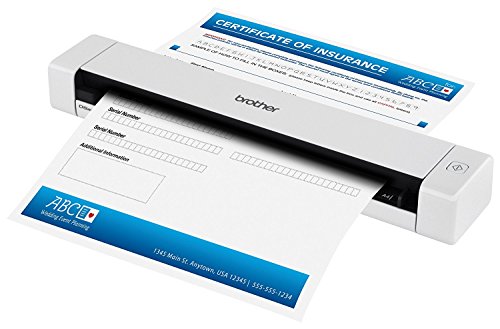
Brother DS-620 Compact Color Scanner
Best for: Lightweight mobile document scanning
- Scan Speed
- 8 ppm
- Connectivity
- USB
- Daily Duty Cycle
- 100 pages
- Power Source
- USB bus power
- Print Output
- Color
- Features
- Mobile Printing, Scanner
View on Amazon: Brother DS-620 Compact Color Scanner Affiliate link
The Brother DS-620 is a portable scanner designed for on-the-go use. It scans color and black/white documents at speeds up to 8 ppm. The unit is compact, measuring under 12 inches in length and weighing less than one pound. It draws power directly from your computer via USB, so you do not need a wall outlet. This makes it a practical option for travelers who need to digitize single sheets of paper quickly.
Pros
- Scans at speeds up to 8 ppm
- Weighs less than one pound
- Powered via USB bus power
- Compact length under 12 inches
Cons
- Low daily duty cycle of 100 pages
- Limited to single sheet media only
- Requires downloading drivers for Windows 10
Good fit if
- You need a lightweight scanner for travel
- You want to avoid carrying a power adapter
- You scan small batches of single sheets
Skip if
- You scan more than 100 pages daily
- You need to scan multiple pages at once
- You prefer a device with a built-in display
Verdict: Brother DS-620 Mobile Scanner fits users who prioritize portability and USB power over high-volume scanning capabilities.
Specifications side by side
| Spec | Brother DS-620 Compact Color Scanner |
|---|---|
| Scan Speed | 8 ppm |
| Connectivity | USB |
| Daily Duty Cycle | 100 pages |
| Power Source | USB bus power |
| Print Output | Color |
| Features | Mobile Printing, Scanner |
| Scanner Type | Portable |
| Dimensions | 2.1 × 11.4 × 1.4 inches |
| Weight | 14.1 ounces |
| Color | Black |
| Model | DS-620 |
Frequently asked questions
Is the Brother DS-620 compatible with Mac computers?
Yes, it works with macOS. The device relies on USB bus power for operation. You must download the latest utilities from Brother’s website because the bundled CD drivers do not support modern operating systems. This ensures full functionality on your Mac without needing a separate power adapter.
Does this scanner require a separate power cable?
No, it does not. The Brother DS-620 draws power directly from your computer via USB bus power. You do not need a separate wall outlet or power adapter. This design allows you to connect it easily to laptops or desktops while traveling or working in small spaces.
How fast does the Brother DS-620 scan documents?
It scans at speeds of up to 8 pages per minute. This speed applies to both color and black-and-white documents. The rate is suitable for light office tasks or occasional scanning needs. It allows you to digitize small batches of documents quickly without significant delays.
Can I carry the Brother DS-620 in a laptop bag?
Yes, it is designed for portability. The unit weighs 14.1 ounces and measures 11.4 inches in width, 2.1 inches in length, and 1.4 inches in height. This compact footprint allows you to carry the device easily in a laptop bag or briefcase for use on the go.
What type of scanner is the Brother DS-620?
It is a portable scanner. The device is built for mobile professionals who prioritize portability. It features color output capabilities. This makes it ideal for users who need to digitize documents while traveling or working outside a traditional office environment.
Do I need to install drivers from the included CD?
You should avoid using the bundled CD drivers. They do not support Windows 10 or later versions. You must download the latest utilities from Brother’s website for full functionality. This step is critical for seamless integration with your operating system.