Brother INKvestment Tank 980 Wireless Review: Who It Fits and Who Should Skip It
As an Amazon Associate we earn from qualifying purchases. Links on this page are affiliate links.
This brother inkvestment tank 980 wireless review covers a compact all-in-one color inkjet printer designed for small offices. It combines print, copy, scan, and fax functions in a single unit. The device features a refillable ink tank system that uses no-spill bottles for quick refills. It also offers fast print speeds of up to 17 pages per minute for black text and 16.5 pages per minute for color. These two specs define its utility for everyday business tasks. The machine connects via wireless, Ethernet, or USB, making it flexible for various office layouts. Its design prioritizes productivity with automatic duplex printing and a multi-purpose tray.
What stands out
- Refillable ink tank system with included up to 3 years of ink
- Print speeds up to 17 ppm black and 16.5 ppm color
- Supports print, copy, scan, and fax functions
- Automatic duplex printing for two-sided documents
- Connectivity includes wireless, Ethernet, and USB options
Who it fits
Good fit for
This printer suits small offices and home businesses that need a versatile all-in-one device. If you print color documents regularly and want to avoid frequent cartridge replacements, the refillable ink tank is a strong benefit. The inclusion of fax and scanning capabilities makes it ideal for teams that handle mixed media. Users who value fast black-and-white output will appreciate the 17 ppm speed. The wireless and Ethernet options ensure easy integration into existing network setups without complex cabling.
Who should skip it
You should look elsewhere if you require high-volume industrial printing or need a dedicated scanner only. This is an inkjet device, so it may not suit users who prefer laser technology for crisp text on glossy media. The 150-sheet paper tray might feel limiting for heavy users who do not want to refill paper often. Additionally, if you need a large display for complex settings, the 1.8-inch color screen is quite basic. Users seeking advanced mobile app features beyond basic printing and scanning may find the functionality limited.
Verdict: The Brother INKvestment Tank 980 is a practical all-in-one for small offices needing color printing and faxing. Its refillable tank and fast speeds make it a solid choice for moderate volume workloads.
Key specs explained for this printer
Print Speed: 17 ppm black / 16.5 ppm color
This rating shows how many pages the machine prints in one minute. You get 17 pages per minute for black text and 16.5 pages for color. This speed suits small offices with moderate daily volume. It is slower than most laser printers, which often exceed 30 pages per minute. You should consider this if you print mostly documents and do not need high-speed bulk output.
Connectivity: Wireless, Ethernet, USB
You can connect this printer to your network via Wi-Fi or a wired Ethernet cable. A USB port allows direct connection to a single computer. Wireless and Ethernet options let multiple devices share the printer easily. This setup is practical for small teams. Laser printers often offer similar network options, but wired Ethernet provides a stable connection for busy offices.
Printer Type: All-in-One
This device combines printing, copying, scanning, and faxing into one unit. You save desk space by not buying separate machines. The scanner and copier functions allow you to digitize documents or make physical copies quickly. Many laser all-in-one printers offer the same bundle. You benefit from this if you need versatile office tools without cluttering your workspace with multiple devices.
Ink/Toner System: Refillable ink tank
This system uses large tanks you refill with bottles instead of traditional cartridges. It reduces the frequency of replacements and lowers long-term costs. You can refill the color tank in 30 seconds and the black tank in 65 seconds. Laser printers use toner cartridges, which are pre-filled and swapped out. You should choose this if you want to manage ink levels yourself and avoid frequent cartridge purchases.
Physical design and build details
According to the listing, this Brother unit measures 19.1 inches wide, 21.1 inches deep, and 10.1 inches tall. It weighs 21.8 pounds. The finish is black, and the model is listed as standard size. These dimensions indicate a footprint that fits on most office desks without overwhelming the workspace. The weight suggests a stable base, which reduces vibration during high-speed operations. You do not need to bolt it down for normal use.
The printer integrates print, copy, scan, and fax functions into one chassis. This consolidation saves floor space compared to buying separate devices. The design prioritizes connectivity options, including wireless, Ethernet, and USB ports. A front USB port allows you to print directly from a drive without a computer. This layout supports flexible placement in shared office areas where multiple users may need access.
Controls are managed via a 1.8-inch color display and the Brother Mobile Connect app. The display provides onscreen menu navigation for basic tasks. The app extends control to mobile devices, allowing you to manage the printer remotely. This combination of physical and digital controls means you can handle most jobs without constantly reaching for the machine. The compact form factor ensures it remains unobtrusive while still offering robust functionality for small business needs.
Setup and Everyday Use Guide
You connect this printer via wireless, Ethernet, or USB. The front USB port lets you print from or scan to a drive directly. You also use the Brother Mobile Connect app for onscreen menu navigation. This app handles printing, copying, scanning, and device management from your mobile device. The 1.8-inch color display shows cloud app connections for Google Drive, Dropbox, Box, and OneDrive. You can print from and scan to these services easily.
Daily use involves loading paper into the 150-sheet main tray or the 80-sheet multi-purpose tray. The 20-page single-sided automatic document feeder handles multi-page scanning and copying jobs. You get automatic duplex printing for two-sided documents without manual intervention. This saves paper and time during regular office tasks.
Refilling ink is straightforward with the refillable tank system. Brother Genuine no-spill bottles refill the color tank in 30 seconds and the black tank in 65 seconds. The design prevents inserting incorrect bottles for each color. You do not need to handle loose cartridges. The system includes up to 3 years of ink in-box for initial setup.
The printer supports faxing alongside print, copy, and scan functions. This all-in-one capability keeps your workspace compact. You rely on Brother Genuine BTD180 Ink bottles for reliable performance. The machine is built for small office and small business environments. It produces vibrant color prints suitable for professional documents.
Things To Check Before Buying
Before you buy, consider how this inkjet fits your workflow. This Brother model uses a refillable ink tank system, which differs from the laser printers you may already own. You will need to ensure you have space for the included ink bottles and plan for regular refills to prevent drying. Check that your network supports the required wireless and Ethernet connections for seamless scanning to cloud apps like Google Drive. Verify that your mobile devices are compatible with the Brother Mobile Connect app for easy management. Unlike monochrome laser units, this all-in-one handles color documents and faxing, making it ideal for small offices needing versatility. However, if you primarily print large volumes of black text, a dedicated laser printer might be more efficient for speed and cost per page. Keep a supply of genuine Brother BTD180 ink bottles on hand to maintain print quality and avoid nozzle clogs. This device serves best as a secondary color solution or a primary unit for low-to-medium volume color printing tasks in a small business environment.
Check before you buy
- Verify network compatibility for wireless and Ethernet connections.
- Ensure space for ink bottle storage and refills.
- Confirm mobile app support for your devices.
- Check if color printing meets your volume needs.
- Stock genuine Brother BTD180 ink bottles.
The product at a glance
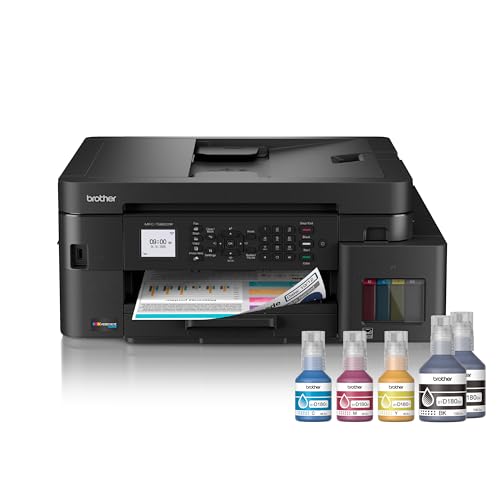
Brother INKvestment Tank All-in-One Color Printer
Best for: Small offices needing low-cost color printing
- Print Technology
- Inkjet
- Print Output
- Color
- Printer Type
- All-in-One
- Supported Functions
- Print, copy, scan, fax
- Print Speed
- Up to 17 ppm black / 16.5 ppm color
- Connectivity
- Wireless, Ethernet, USB
View on Amazon: Brother INKvestment Tank All-in-One Color Printer Affiliate link
The Brother INKvestment Tank 980 is a color inkjet all-in-one printer with wireless and Ethernet connectivity. It supports print, copy, scan, and fax functions. The device features a refillable ink tank system and includes up to 3 years of ink. Print speeds reach 17 ppm in black and 16.5 ppm in color. It includes automatic duplex printing and a 20-page automatic document feeder. This unit suits small offices needing reliable color output and network flexibility.
Pros
- Refillable ink tank system with included 3-year ink supply
- Fast print speeds up to 17 ppm black and 16.5 ppm color
- Supports print, copy, scan, and fax functions
- Automatic duplex printing and 20-page ADF included
- Connects via wireless, Ethernet, or USB
Cons
- Print speeds are slower than many laser printers
- Inkjet technology may not suit high-volume text printing
- Physical footprint is larger than compact desktop models
Good fit if
- You need reliable color printing for small business documents
- You want to reduce ink costs with a refillable tank system
- You require fax capabilities alongside printing and scanning
Skip if
- You primarily print high volumes of black text documents
- You need the fastest possible print speeds for large jobs
- You require a compact printer for a very small workspace
Verdict: The Brother INKvestment Tank 980 Color Inkjet fits small offices that need versatile color printing and faxing without frequent cartridge replacements. It is a practical choice for users prioritizing low ink costs over maximum speed.
Specifications side by side
| Spec | Brother INKvestment Tank All-in-One Color Printer |
|---|---|
| Print Technology | Inkjet |
| Print Output | Color |
| Printer Type | All-in-One |
| Supported Functions | Print, copy, scan, fax |
| Print Speed | Up to 17 ppm black / 16.5 ppm color |
| Connectivity | Wireless, Ethernet, USB |
| Duplex Printing | Automatic |
| Ink/Toner System | Refillable ink tank |
| Scanning | Wireless Scanning |
| Dimensions | 21.1 × 19.1 × 10.1 inches |
| Weight | 21.8 pounds |
| Size | Printer |
| Color | Black |
| Model | MFCT980DW |
Frequently asked questions
Is the Brother INKvestment Tank 980 good for small offices?
Yes, it fits small offices needing low-cost color printing. The unit combines print, copy, scan, and fax functions in one compact device. Its refillable ink tank system reduces the need for frequent cartridge replacements, making it practical for users who prioritize cost efficiency over maximum speed.
What connectivity options does this printer support?
The printer supports wireless, Ethernet, and USB connections. You can connect via wireless or Ethernet for network sharing. A front USB port also allows direct printing from or scanning to a drive. This flexibility ensures easy integration into various office setups without complex cabling.
How large is the Brother INKvestment Tank 980?
The device measures 19.1 inches wide, 21.1 inches deep, and 10.1 inches tall. It weighs 21.8 pounds. These dimensions indicate a standard footprint suitable for typical office desks or shelves. The black finish helps it blend into professional environments while maintaining a compact physical presence.
Does this model handle color printing?
Yes, it produces color output. The printer is designed as an all-in-one color inkjet, making it suitable for documents requiring color graphics or photos. It combines this capability with scanning and faxing functions, offering versatile output options for small business needs without requiring separate devices.
Can you scan documents wirelessly?
Yes, the printer features wireless scanning capabilities. You can use the Brother Mobile Connect app for onscreen menu navigation to manage scanning tasks. This allows you to send scanned documents directly to connected devices or cloud services without needing physical cables for the transfer process.
What is the model number for this printer?
The model number is MFCT980DW. This identifier distinguishes it within the Brother lineup. It corresponds to the INKvestment Tank series, which emphasizes refillable ink tanks over traditional cartridges. Knowing the model number helps you find compatible supplies and drivers for your specific hardware version.
Is this printer suitable for faxing?
Yes, it includes fax functionality. The all-in-one design integrates faxing with print, copy, and scan operations. This makes it a practical choice for small offices that still require traditional fax capabilities alongside modern digital workflows, all within a single compact unit.