Brother DCP-L2550DWB All-in-One Wireless Monochrome Laser Printer Review: Who It Fits and Who Should Skip It
As an Amazon Associate we earn from qualifying purchases. Links on this page are affiliate links.
The brother dcp l2550dwb all in one wireless monochrome laser printer is a compact office machine designed for speed and utility. It delivers print speeds of up to 36 pages per minute, handling high-volume text jobs quickly. The unit also offers a maximum print resolution of 2400 x 600 dpi, ensuring sharp text output for documents. As an all-in-one device, it combines printing, scanning, and copying functions into a single footprint. This model is built for users who need reliable, monochrome output without the complexity of color systems. Its wireless connectivity and automatic duplex printing further streamline daily workflows in small offices.
What stands out
- 36 ppm print speed for fast text output
- Automatic duplex printing saves paper
- 50-sheet automatic document feeder for batch scanning
- Wi-Fi, Ethernet, and USB connectivity options
Who it fits
Good fit for
This printer suits small offices or home workspaces that prioritize speed and paper efficiency. The 36 ppm print rate helps teams meet tight deadlines. Automatic duplex printing reduces paper waste and costs. The 50-sheet ADF makes scanning multi-page documents easy. Wireless and Ethernet connections allow multiple users to print from various devices. If you mainly print black-and-white text and need a reliable, fast machine with minimal setup, this model fits your needs.
Who should skip it
You should look elsewhere if you need color printing. This model is strictly monochrome and cannot produce color documents. It also lacks duplex scanning capabilities, meaning you must scan each side of a document manually. If you frequently handle two-sided documents and want to avoid flipping pages, this feature gap will slow you down. Additionally, users requiring high-resolution photo printing may find the 2400 x 600 dpi limit insufficient for detailed images.
Verdict: The Brother DCP-L2550DWB is a practical choice for text-heavy environments that value speed and automatic two-sided printing. Its limited scanning features and monochrome output restrict its use to specific office tasks.
Key specs explained
Print Speed: 36 ppm
This rating indicates the printer can output up to 36 pages per minute. This speed is suitable for busy small offices or home workspaces where documents need to be produced quickly. You will benefit from reduced wait times during high-volume print jobs, such as reports or bulk mailings. When comparing laser printers, look for similar or higher ppm ratings to ensure your workflow is not bottlenecked by slow output speeds.
Print Resolution: 2400 x 600 dpi
This specification defines the sharpness of the printed text and images. A maximum resolution of 2400 by 600 dots per inch ensures that black-and-white documents appear crisp and clear. This level of detail is sufficient for professional correspondence, legal documents, and standard office materials. If you prioritize legibility over graphic intensity, this resolution meets typical office standards without unnecessary data overhead.
Connectivity: Wireless, Ethernet, USB
These options allow the printer to connect to your network and devices in multiple ways. Wireless and Ethernet support enable shared access for multiple computers and mobile devices on the same network. USB provides a direct link for local printing without network setup. This flexibility ensures you can integrate the machine into various office layouts, whether you rely on wired stability or wireless convenience for your daily tasks.
Printer Type: All-in-One
This designation means the device combines printing, scanning, and copying functions into a single unit. You save space and simplify management by handling multiple document tasks without needing separate machines. This configuration is ideal for small offices or home workstations where floor space is limited. When shopping, consider whether you need scanning and copying capabilities to justify the all-in-one form factor over a basic printer.
Duplex Printing: Automatic
Automatic duplex printing allows the printer to print on both sides of the paper without manual intervention. This feature reduces paper consumption by half for two-sided documents, which is cost-effective and environmentally friendly. It also produces more professional-looking reports and booklets. When comparing models, ensure this feature is automatic rather than manual to avoid the extra step of flipping pages yourself during large print batches.
Design and build overview
The Brother DCP-L2550DWB is a compact all-in-one unit designed for space-conscious environments. According to the listing, its dimensions are 16.1 inches wide, 15.7 inches deep, and 12.5 inches tall. This footprint allows it to fit comfortably on standard desks or in small office corners without overwhelming the workspace. The black finish provides a neutral look that blends into most professional settings.
Operation is managed via a two-line monochrome LCD screen. This display offers direct access to printing and scanning options, allowing you to navigate basic tasks without needing a computer connection. The layout includes a 250-sheet input tray for standard paper and a single-sheet manual feed slot for thicker media. A 50-sheet automatic document feeder sits on top, enabling batch scanning and copying.
The machine supports documents up to 8.5 x 14 inches, making it versatile for letter and legal sizes. While it lacks color, the monochrome design keeps the internal components streamlined. The absence of a color mechanism reduces potential points of failure and simplifies maintenance. You get a straightforward interface that prioritizes function over flair, ensuring reliable daily use in busy environments.
Setup and daily operation details
Setting up the Brother DCP-L2550DWB involves connecting it to your network or computer. The listing specifies it includes Wi-Fi, Ethernet, and USB 2.0 ports. This variety allows you to choose the connection method that best fits your office infrastructure. Wireless setup enables direct printing from mobile devices, which simplifies workflows for users who prefer not to manage cables. Once connected, the machine uses a two-line monochrome LCD screen for navigation. This display lets you access direct printing and scanning options without needing to rely solely on a computer interface.
In daily use, the printer handles standard document tasks efficiently. It supports paper sizes up to 8.5 by 14 inches. You can load up to 250 sheets into the main input tray or use the single-sheet manual feed slot for thicker media. The automatic duplex printing feature saves paper by printing on both sides of the sheet without manual intervention. This is particularly useful for producing double-sided reports or contracts.
Scanning and copying are handled by a flatbed and a 50-sheet automatic document feeder. The flatbed offers an optical resolution of 1200 by 1200 dpi, while the ADF provides 600 dpi. These specifications ensure that text documents and simple graphics are captured with clarity. Since the device is monochrome, all outputs will be in black and white. The combination of high-speed printing and wireless connectivity makes this unit suitable for small offices that prioritize speed and paper conservation over color capabilities.
Before you buy this printer
You should verify that your network supports the required Wi-Fi standards before installation. The listing confirms wireless, Ethernet, and USB 2.0 connectivity, but older routers may need firmware updates for stable performance. Since this is a monochrome device, it cannot produce color documents. You must ensure black-and-white output meets all your business needs. Maintenance involves replacing toner cartridges when empty. The automatic duplex feature reduces paper waste, but you should monitor supply levels regularly. This model fits well among the 1 options on Laser Printers & Office Machines for users prioritizing speed over color. It suits small offices needing reliable text processing. Check that your mobile devices support direct printing protocols. The two-line LCD offers limited feedback, so rely on your computer interface for detailed status updates. Regular cleaning of the flatbed glass ensures consistent scan quality. This machine demands a steady power supply and adequate ventilation to prevent overheating during long print jobs.
Check before you buy
- Confirm your Wi-Fi router supports the printer's wireless standards.
- Verify black-and-white output is sufficient for all your documents.
- Check that your mobile devices support direct printing protocols.
- Ensure adequate ventilation space around the unit for cooling.
The product at a glance
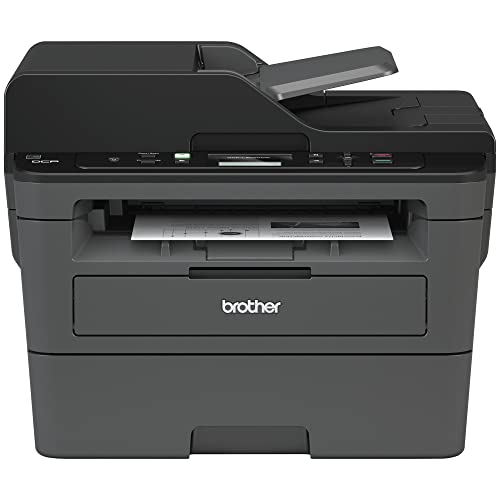
Brother DCP-L2550DWB Monochrome AIO
Best for: Small offices needing fast black-and-white printing
- Print Technology
- Laser
- Print Output
- Monochrome
- Printer Type
- All-in-One
- Supported Functions
- Print, scan, copy
- Print Speed
- 36 ppm
- Connectivity
- Wireless, Ethernet, USB
View on Amazon: Brother DCP-L2550DWB Monochrome AIO Affiliate link
The Brother DCP-L2550DWB is a compact all-in-one monochrome laser printer. It prints up to 36 pages per minute with 2400 x 600 dpi resolution. You get automatic duplex printing, a 250-sheet tray, and a 50-sheet ADF. Wireless, Ethernet, and USB connectivity support mobile and network printing. This unit suits small offices needing fast, space-saving black-and-white output.
Pros
- Prints up to 36 ppm
- 2400 x 600 dpi print resolution
- Automatic duplex printing
- 50-sheet automatic document feeder
- Wi-Fi, Ethernet, and USB connectivity
Cons
- One-sided scanning only
- Flatbed scan resolution limited to 1200 x 1200 dpi
- ADF scan resolution limited to 600 dpi
Good fit if
- You need fast monochrome printing for documents
- You require automatic two-sided printing
- You want wireless and network connectivity
Skip if
- You need color printing capability
- You require two-sided scanning
- You need high-resolution color scanning
Verdict: Brother DCP-L2550DWB Wireless Monochrome AIO is a practical choice for users who prioritize speed and automatic duplexing in a compact footprint. It fits small offices that primarily handle text documents and need reliable wireless printing.
Specifications side by side
| Spec | Brother DCP-L2550DWB Monochrome AIO |
|---|---|
| Print Technology | Laser |
| Print Output | Monochrome |
| Printer Type | All-in-One |
| Supported Functions | Print, scan, copy |
| Print Speed | 36 ppm |
| Connectivity | Wireless, Ethernet, USB |
| Duplex Printing | Automatic |
| Print Resolution | Up to 2400 dpi |
| Features | Duplex Printing, Automatic Document Feeder, Scanner, Copier |
| Scanning | Wireless Scanning |
| Duplex Scanning | Duplex |
| Auto Document Feeder | ADF |
| Dimensions | 15.7 × 16.1 × 12.5 inches |
| Color | Black |
| Model | L2550DWB |
Frequently asked questions
Does the Brother DCP-L2550DWB support automatic two-sided printing?
Yes, it includes automatic duplex printing. This feature allows you to print on both sides of the paper without manual intervention. It helps save paper and reduces clutter in your workspace. You do not need to flip sheets by hand, which speeds up your workflow for multi-page documents.
Can I scan double-sided documents with this printer?
Yes, the device features a duplex scanner. It comes equipped with an automatic document feeder (ADF) that handles two-sided scanning. This means you can load a stack of papers, and the machine will capture both sides of each page automatically. This is useful for archiving contracts or forms.
What is the maximum print resolution for black and white text?
The printer offers a maximum print resolution of up to 2400 dpi. This high resolution ensures that text and line graphics appear sharp and clear. It is suitable for professional documents where legibility is important. The monochrome output focuses on clarity for text-heavy jobs rather than color gradients.
Is this printer suitable for a small home office?
Yes, it is designed for small offices needing fast black-and-white printing. Its compact footprint measures 16.1 inches wide, 15.7 inches deep, and 12.5 inches tall. This size allows it to fit comfortably on standard desks. It provides essential functions like scanning and copying without taking up excessive space.
How do I connect the printer to my computer or network?
You can connect via wireless, Ethernet, or USB 2.0. The listing confirms it includes Wi-Fi and Ethernet ports for network sharing. USB 2.0 is also available for direct computer connection. This variety lets you choose the method that best fits your current office infrastructure and security needs.
Does the Brother DCP-L2550DWB print in color?
No, this is a monochrome laser printer. It only produces black-and-white output. It is not designed for color graphics or photos. If you require color printing, you would need a different device. This model focuses on efficient, high-quality text and line art reproduction.