Arkscan USB Direct Thermal Label vs Arkscan 2054A-LAN Ethernet Label Printer: Spec Comparison
As an Amazon Associate we earn from qualifying purchases. Links on this page are affiliate links.
This comparison looks at the arkscan USB direct thermal label vs 2054a lan ethernet label printer. Both models share the same direct thermal print technology and five inches per second speed. They also support identical label sizes and width limits. The main difference lies in connectivity. One uses a USB link for single-device use. The other adds Ethernet for network sharing and iOS support. You need to decide which connection method fits your workflow.
Key differences
| Aspect | Arkscan USB Direct Thermal Label Printer | Arkscan 2054A-LAN Ethernet Label Printer |
|---|---|---|
| Connectivity | USB only | USB and Ethernet |
| iOS Support | Not listed | Supports iOS/iPhone/iPad |
| Physical Size | 6 x 4 x 4 inches | 6.5 x 5.75 x 8 inches |
| Weight | 3.34 pounds | 2.94 pounds |
| Color | Ivory white | Beige |
Which one should you choose?
Choose Arkscan USB Direct Thermal Label Printer if
- You print from a single computer via USB.
- You prefer a more compact footprint.
- You do not need to share the printer across a network.
Choose Arkscan 2054A-LAN Ethernet Label Printer if
- You need to connect the printer to a local area network.
- You want to print from an iPhone or iPad.
- You need a lighter device for your workspace.
Verdict: Choose the USB model if you connect to one computer and want a smaller device. The Ethernet version is better for office environments where multiple users need access or where mobile iOS printing is required. Both handle the same labels at the same speed.
Arkscan Printer Connectivity and Build
Connectivity options
You need to check how each printer connects to your devices. The Arkscan 2054A USB model relies solely on a USB link. This means you must plug it directly into a computer, laptop, or compatible device. The Arkscan 2054A-LAN Ethernet model adds an Ethernet port to its USB connection. This allows you to connect the printer to your local network. You can then print from multiple computers or mobile devices without swapping cables. The Ethernet option offers more flexibility for shared workspaces. The USB-only model is simpler but limits you to direct attachment. Both support Windows, Mac, Chromebook, and Android systems.
Physical dimensions
The physical size of the printer matters for your desk or shelf space. The Arkscan 2054A USB measures six inches in width, four inches in height, and four inches in length. It has a compact footprint that fits easily on smaller workstations. The Arkscan 2054A-LAN Ethernet model is larger, measuring six and a half inches in width, five and three-quarter inches in height, and eight inches in length. This extra bulk accommodates the internal network hardware. You will need more surface area for the Ethernet version. Consider your available space before choosing. The USB model is more compact for tight spots.
Print speed
Both printers operate at the same print speed. The specifications list five inches per second for each model. This speed applies to direct thermal printing of shipping labels. You will get consistent output rates regardless of which model you choose. The speed is sufficient for most small to medium shipping volumes. Neither printer offers a faster mode in the provided data. Your workflow speed will depend on label design complexity and paper loading rather than the engine speed. Both models handle standard 4x6 inch labels efficiently at this rate.
Print technology
Both units use direct thermal print technology. This method uses heat-sensitive paper to create images and text. You do not need ink cartridges or toner drums for either model. This reduces ongoing supply costs and maintenance tasks. The thermal heads wear out over time but require no regular refilling. Both printers support the same label types, including Arkscan, Zebra compatible, and standard shipping labels. You can use roll paper loaded inside or fanfold paper from the back. The printing mechanism is identical in function and output quality.
Label size support
Label compatibility is identical for both printers. They support widths from zero point seven five inches to four point two five inches. The length can range from zero point four inches up to ninety inches. Common shipping labels like 4x6, 4x8.25, and 4x6.75 inches are supported. You can print product labels, barcode labels, and warehouse tags with either device. The software included, BarTender UltraLite, works with both models. There is no difference in the range of label sizes you can produce. Your choice should not depend on label dimensions.
Which Arkscan model fits your workflow
Single computer users needing direct links
You connect this printer directly via USB to one device. This model lacks network ports, so it suits a single workstation setup. The USB link ensures a stable, dedicated connection for your specific computer without requiring network configuration. You get the same print speed and label support as the network version, but with a simpler, direct hardware interface.
Teams needing shared network access
This model adds Ethernet connectivity, allowing multiple devices to share the printer over your local network. You can connect via Wi-Fi or wired LAN, supporting iOS and Android devices natively. This setup is ideal for offices where several computers or tablets need to send print jobs without swapping USB cables between different machines.
Users wanting mobile printing support
The Ethernet version explicitly supports network printing from iOS and Android devices. You can send labels directly from your phone or tablet without needing a direct USB cable. This flexibility is crucial if you manage inventory or shipping from a mobile device. The USB-only model does not list this network-based mobile capability in its specifications.
The products compared
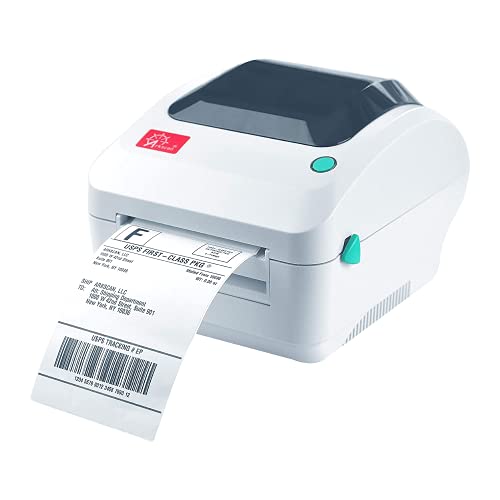
Arkscan USB Direct Thermal Label Printer
Best for: Single-user portable label printing
- Print Technology
- Direct thermal
- Printer Type
- Single-function
- Print Speed
- 5 inches per second
- Connectivity
- USB
- Ink/Toner System
- Direct thermal
- Dimensions
- 4 × 6 × 4 inches
View on Amazon: Arkscan USB Direct Thermal Label Printer Affiliate link
The Arkscan 2054A is a single-function USB label printer using direct thermal technology. It prints at 5 inches per second and supports label widths from 0.75 to 4.25 inches. The device connects via USB to Windows, Mac, Chromebook, and Android systems. It includes BarTender UltraLite software for design. This model suits users needing basic, portable label printing without network requirements.
Pros
- Direct thermal printing eliminates ink or toner costs
- Print speed reaches 5 inches per second
- Compatible with Windows, Mac, Chromebook, and Android via USB
- Includes free BarTender UltraLite label design software
Cons
- Limited to USB connectivity without Ethernet or Wi-Fi
- Single-function design restricts printing to labels only
- Software included is for Windows only
Good fit if
- You need a portable printer for occasional label tasks
- You print from multiple device types like Mac or Android
- You want to avoid ink or toner refills
Skip if
- You require network sharing across multiple computers
- You need to print documents or photos alongside labels
- You need native software support for Linux systems
Verdict: Arkscan 2054A USB Direct Thermal Label Printer is a compact, ink-free solution for users who print labels from a single computer or mobile device. It fits those who prioritize portability and cross-platform USB compatibility over network connectivity.
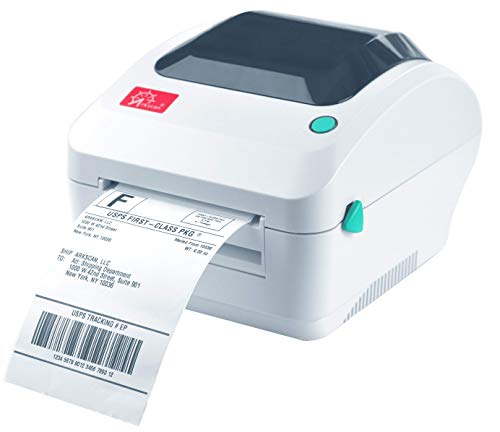
Arkscan 2054A-LAN Ethernet Label Printer
Best for: Shared office shipping workflows
- Connectivity
- Ethernet, USB
- Print Technology
- Direct Thermal
- Dimensions
- 8 × 6.5 × 5.75 inches
- Weight
- 2.94 pounds
View on Amazon: Arkscan 2054A-LAN Ethernet Label Printer Affiliate link
This Arkscan 2054A-LAN is a direct thermal shipping label printer with Ethernet and USB connectivity. It prints at 5 inches per second and handles labels from 0.75 to 4.25 inches wide. The unit supports roll and fanfold paper and includes BarTender UltraLite software for Windows. It fits offices needing network integration for shipping workflows on Windows, Mac, or Chromebook.
Pros
- Ethernet and USB connectivity for network or direct connection
- Prints up to 5 inches per second
- Supports roll and fanfold paper loading
- Includes BarTender UltraLite software for Windows
Cons
- BarTender software is Windows only
- Beige color may not match modern office aesthetics
- No mention of mobile app control for iOS
Good fit if
- You need Ethernet network printing for a shared office
- You print high volumes of shipping labels daily
- You use Windows computers for label design
Skip if
- You require native macOS label design software
- You need a compact printer under 6 inches wide
- You want a printer without any included software
Verdict: Arkscan 2054A-LAN Ethernet Label Printer is a solid choice for businesses that need reliable network printing and fast output speeds for shipping labels.
Specifications side by side
| Spec | Arkscan USB Direct Thermal Label Printer | Arkscan 2054A-LAN Ethernet Label Printer |
|---|---|---|
| Print Technology | Direct thermal | not stated |
| Printer Type | Single-function | not stated |
| Print Speed | 5 inches per second | not stated |
| Connectivity | USB | Ethernet, USB |
| Ink/Toner System | Direct thermal | not stated |
| Dimensions | 4 × 6 × 4 inches | 8 × 6.5 × 5.75 inches |
| Weight | 3.34 pounds | 2.94 pounds |
| Size | USB Shipping Label Printer | USB + Ethernet Shipping Label Printer |
| Color | Ivory white | Beige |
| Model | 2054A | 2054A-LAN |
Frequently asked questions
Which Arkscan printer is better for a shared office?
The Arkscan 2054A-LAN Ethernet model suits shared spaces. It connects via Ethernet, allowing multiple users on the network to send print jobs. The USB-only version requires a direct link to a single computer, making it less ideal for team environments.
Do both models use ink cartridges?
No, neither model uses ink. Both the Arkscan USB Direct Thermal Label and the 2054A-LAN use direct thermal print technology. This method uses heat-sensitive paper to create images, eliminating the need for ink, toner, or ribbons entirely.
Can I print shipping labels with these printers?
Yes, both devices are designed for shipping labels. The Arkscan 2054A is described as a USB Shipping Label Printer. The 2054A-LAN is also labeled as a USB + Ethernet Shipping Label Printer, confirming their primary function for logistics and mailing tasks.
What is the maximum label width for these devices?
The USB model supports labels up to 6 inches wide. The Ethernet version handles labels up to 6.5 inches wide. Both use direct thermal technology, but the Ethernet model offers slightly more width capacity for larger shipping labels.
How do the physical sizes compare?
The USB model is smaller, measuring 4 inches in length and 4 inches in height. The Ethernet version is larger at 8 inches long and 5.75 inches high. The Ethernet unit is also lighter, weighing 2.94 pounds compared to 3.34 pounds for the USB model.
Is the Ethernet printer faster than the USB one?
No, they share the same print speed. Both models operate at five inches per second. The difference lies in connectivity rather than speed, as both utilize the same underlying direct thermal print mechanism for consistent output rates.
Which model is lighter to move around?
The Arkscan 2054A-LAN Ethernet printer is lighter. It weighs 2.94 pounds, while the USB Direct Thermal Label Printer weighs 3.34 pounds. The Ethernet model is also slightly wider and longer, but its reduced weight may benefit users who need to relocate it occasionally.
Do I need a network cable for the USB model?
No, the USB model does not use a network cable. It connects directly via USB to a computer or compatible device. You do not need an Ethernet port or network infrastructure for this model, unlike the 2054A-LAN which requires an Ethernet connection.