Best Document Scanners with Auto Document Feeder: 13 Spec-Based Picks
As an Amazon Associate we earn from qualifying purchases. Links on this page are affiliate links.
You need the best document scanners with auto document feeder to process paper efficiently. The Epson WorkForce Portable Duplex Scanner leads this list because its compact 1.08-pound weight fits mobile professionals scanning small batches. We compared 13 models strictly using the specifications published on the listings. This guide helps you decide which scanner matches your office size and duty cycle requirements.
Quick picks
The best fit for you
- You need a portable scanner for mobile work Epson WorkForce Portable Duplex Scanner The Epson ES-200 weighs 1.08 pounds and fits in small spaces for mobile professionals.
- You require high-volume duplex scanning in an office Fujitsu Color Duplex Document Scanner The Fujitsu Fi-7160 handles large batches with its high-speed duplex scanning capabilities.
- You want a budget-friendly wired desktop scanner Plustek PS186 Desktop Scanner The Plustek PS186 offers reliable wired connectivity and batch processing for daily document scanning.
- You need wireless color duplex scanning from mobile devices Epson Wireless Desktop Duplex Document Scanner The Epson ES-500W provides wireless connectivity and color duplex scanning without a computer.
- You need to scan receipts and invoices quickly Canon imageFORMULA R40 Duplex Scanner The Canon R40 is designed for high-speed receipt digitization in accounting workflows.
Our 13 picks

Epson WorkForce Portable Duplex Scanner
Best for: mobile professionals scanning small batches
- Scanning
- Auto Document Feeder (what this guide is about)
- Scan Speed
- 25 ppm/50 ipm
- ADF Capacity
- 20 sheets
- Connectivity
- USB
- Portability
- Portable
- Power Source
- AC power or USB power
The Epson ES-200 is a portable color document scanner designed for mobility. It features a 20-page auto document feeder and duplex scanning capability. You get scan speeds of 25 pages per minute. It connects via USB and supports both AC and USB power. This compact unit suits users who need to scan receipts, business cards, and documents on the go without a fixed desk setup.
Pros
- 25 ppm scan speed for fast batch processing
- 20-sheet ADF for single-step duplex scanning
- Portable design with USB power support
- Includes Epson ScanSmart software for easy setup
Cons
- 20-sheet ADF capacity is smaller than many desktop competitors
- USB-only connectivity lacks wireless options
- No built-in battery requires external power source
Good fit if
- You need a lightweight scanner for travel
- You primarily scan small batches of paper
- You require duplex scanning in a compact form factor
Skip if
- You need to scan large volumes of documents daily
- You require wireless connectivity for your workflow
- You need a high-capacity feeder for unattended operation
Verdict: Epson ES-200 Portable Color Scanner is a compact solution for mobile professionals who need duplex scanning without a dedicated workspace. It fits users who prioritize portability and USB power over high-volume capacity.

Fujitsu Color Duplex Document Scanner
Best for: high-volume duplex scanning tasks
- Scanning
- Auto Document Feeder (what this guide is about)
- Scan Speed
- 60 ppm
- ADF Capacity
- 80 sheets
- Connectivity
- USB 3.0
- Daily Duty Cycle
- 4,000 scans
- Print Output
- Color
The Fujitsu Fi-7160 is a duplex document scanner designed for high-volume office environments. It features an 80-sheet automatic document feeder and scans at 60 pages per minute. The device supports USB 3.0 connectivity and handles a daily duty cycle of 4,000 scans. It produces color output at up to 600 dpi resolution. This model suits teams needing fast, two-sided scanning for standard paper sizes.
Pros
- 80-sheet automatic document feeder capacity
- 60 pages per minute scan speed
- 4,000 scans daily duty cycle
- Duplex scanning for two-sided documents
- USB 3.0 connectivity
Cons
- Maximum scan resolution limited to 600 dpi
- Requires USB connection without wireless options
- Heavier build at 9.3 pounds
Good fit if
- You need to process large batches of two-sided documents quickly
- You require a high daily duty cycle for busy offices
- You prefer a wired USB connection for stability
Skip if
- You need high-resolution scanning above 600 dpi
- You require wireless or network connectivity
- You need a compact portable scanner under 10 pounds
Verdict: The Fujitsu Fi-7160 Duplex Scanner is a high-speed workhorse for offices processing large volumes of standard documents. It fits teams that prioritize speed and duty cycle over wireless convenience or ultra-high resolution.

Plustek PS186 Desktop Scanner
Best for: Wired desktop batch document scanning
- Scanning
- Auto Document Feeder (what this guide is about)
- ADF Capacity
- 50 sheets
- Portability
- Desktop
- Features
- Automatic Document Feeder, Scanner
- Auto Document Feeder
- ADF
- Dimensions
- 10.4 × 5.02 × 5.83 inches
The Plustek PS186 is a desktop scanner designed for high-volume document processing. It features a 50-sheet auto document feeder to handle stacks quickly. The unit includes OCR software to create searchable PDFs and intelligent image adjustments like auto-rotate and deskew. You can save scans as PDF, JPEG, TIFF, or PNG files. Its compact footprint measures 10.4 inches in length. This model suits users who need reliable batch scanning without wireless connectivity.
Pros
- 50-sheet auto document feeder capacity
- Built-in OCR for searchable PDFs
- Supports FTP and NAS transfer
- Intelligent image correction features
Cons
- Desktop form factor limits portability
- No wireless or Wi-Fi connectivity
- No flatbed for books or photos
Good fit if
- You need a dedicated desktop scanner for paper documents
- You prefer wired connections over wireless setup
- You require OCR for searchable archives
Skip if
- You need to scan books or flat items
- You require wireless scanning from mobile devices
- You need a portable scanner for travel
Verdict: The Plustek PS186 Desktop Document Scanner is a solid choice for offices that prioritize wired reliability and batch processing over mobility. It fits users who scan paper documents daily and need OCR without the complexity of network configuration.

Ambir ImageScan Pro 830ix Compact 30ppm Scanner
Best for: compact spaces needing fast duplex scanning
- Scanning
- Auto Document Feeder (what this guide is about)
- Scan Speed
- 30 ppm
- Media Types
- Business, ID & insurance cards
- Driver Support
- TWAIN
- Print Speed
- Up to 30 ppm
- Features
- Automatic Document Feeder, Scanner
View on Amazon: Ambir ImageScan Pro 830ix Compact 30ppm Scanner
The Ambir ImageScan Pro 830ix is a compact duplex scanner with a 30 ppm automatic document feeder. It handles bulk documents and cards in a single pass. The TWAIN driver supports thousands of software applications. Its small footprint fits tight workspaces. This unit suits users needing high-speed scanning in a small area.
Pros
- 30 ppm scan speed
- Duplex scanning in one pass
- Compact size comparable to a toaster
- Handles business and ID cards
Cons
- Limited to TWAIN driver support
- No wireless connectivity listed
- No software bundle mentioned
Good fit if
- You need a small footprint for a crowded desk
- You scan both sides of documents frequently
- You use standard TWAIN-compatible software
Skip if
- You require wireless scanning capabilities
- You need proprietary scanning software
- You prefer a larger paper capacity
Verdict: Ambir ImageScan Pro 830ix Compact 30ppm Scanner fits busy offices with limited desk space. It delivers fast duplex scanning for standard document workflows without requiring extra room.

Xerox DocuMate 3125 Desktop Scanner
Best for: Standard letter-size duplex scanning
- Scanning
- Auto Document Feeder (what this guide is about)
- Scan Speed
- 40 ppm / 70 ipm
- ADF Capacity
- 50 sheets
- Portability
- Desktop
- Features
- Duplex Printing, Automatic Document Feeder, Scanner
- Auto Document Feeder
- ADF
The Xerox DocuMate 3125 is a duplex desktop scanner with a 50-sheet auto document feeder. It scans up to 40 pages per minute at 200 dpi. You get color, grayscale, and black-and-white options. It creates searchable PDFs. This compact unit measures 11.2 by 6.5 by 6.7 inches. It suits small offices needing reliable duplex scanning.
Pros
- Duplex scanning capability
- 50-sheet ADF capacity
- 40 ppm scan speed
- Creates searchable PDFs
Cons
- Desktop form factor limits portability
- Maximum ADF paper width is only 8.5 inches
- No wireless connectivity listed
Good fit if
- You need to scan double-sided documents
- You have a dedicated desk space
- You require searchable PDF output
Skip if
- You need to scan legal-sized paper
- You require wireless scanning
- You need high-speed scanning over 40 ppm
Verdict: The Xerox DocuMate 3125 Desktop Scanner fits small offices that need reliable duplex scanning on standard letter-size paper. It offers a solid 50-sheet feeder and searchable PDFs for desk-bound workflows.

HP ScanJet Pro 3000 s4 Document Scanner
Best for: small business high-volume duplex scanning
- Scanning
- Auto Document Feeder (what this guide is about)
- Scan Speed
- 40 ppm, 80 ipm
- ADF Capacity
- 50 sheets
- Connectivity
- USB 3.0
- Media Types
- Business cards, A4-size documents
- Daily Duty Cycle
- 4,000 pages
The HP ScanJet Pro 3000 s4 is a small, light grey scanner designed for small business offices. It features a 50-page auto document feeder and delivers up to 40 pages per minute. You get one-pass duplex scanning and a 4,000-page daily duty cycle. Connectivity is via USB 3.0, with TWAIN and ISIS driver support. It handles documents from business cards to A4 size.
Pros
- 40 ppm scan speed with one-pass duplex
- 50-page auto document feeder capacity
- 4,000-page daily duty cycle
- Built-in OCR for data extraction
- Supports TWAIN and ISIS drivers
Cons
- USB 3.0 connectivity only
- No wireless capability
- No flatbed scanning option
Good fit if
- You need fast, high-volume duplex scanning
- You prefer a compact desktop footprint
- You rely on TWAIN or ISIS drivers
Skip if
- You require wireless or network scanning
- You need to scan photos or books
- You want a flatbed scanner
Verdict: HP ScanJet Pro 3000 s4 is a solid choice for small offices that need high-speed, high-volume scanning via USB. It suits teams prioritizing throughput over wireless convenience.

Epson WorkForce Desktop Duplex Scanner
Best for: USB-connected color duplex scanning
- Scanning
- Auto Document Feeder (what this guide is about)
- Scan Speed
- Up to 35 ppm / 70 ipm
- ADF Capacity
- 50 sheets
- Connectivity
- USB 3.0
- Media Types
- Business/ID cards, receipts
- Driver Support
- TWAIN
The Epson ES-400 is a color duplex document scanner with a 50-sheet auto document feeder. It scans up to 35 pages per minute and supports USB 3.0 connectivity. Built-in OCR creates searchable files. It handles business cards and receipts. This model suits users needing reliable two-sided scanning without network hardware.
Pros
- Scans up to 35 ppm and 70 ipm
- 50-sheet auto document feeder
- Built-in Nuance OCR for searchable PDFs
- Ultrasonic double feed detection
Cons
- No built-in network interface (RJ-45)
- Maximum resolution is 1200 dpi interpolated
- Connectivity limited to USB 3.0
Good fit if
- You need fast color duplex scanning
- You prefer direct USB connection to a computer
- You scan business cards and receipts
Skip if
- You require wireless scanning without adapters
- You need native Ethernet networking
- You require higher than 1200 dpi resolution
Verdict: The Epson ES-400 Color Duplex Scanner delivers solid 35 ppm duplex performance for desktop use. It fits offices that prioritize color accuracy and OCR over wireless convenience.

Fujitsu fi-7180 Duplex Document Scanner
Best for: High-volume professional color scanning
- Scanning
- Auto Document Feeder (what this guide is about)
- Scan Speed
- 80 ppm
- ADF Capacity
- 80 sheets
- Driver Support
- TWAIN, ISIS
- Print Output
- Color
- Features
- Duplex Printing, Automatic Document Feeder, Scanner
The Fujitsu fi-7180 is a compact, professional color duplex scanner designed for high-volume environments. It scans at 80 pages per minute and holds 80 sheets in its auto document feeder. This speed and capacity suit busy offices needing reliable daily performance. It integrates with ECM solutions via TWAIN and ISIS drivers. The included PaperStream ClickScan software simplifies one-touch scanning to email or folders.
Pros
- 80 ppm scan speed
- 80-sheet ADF capacity
- Color duplex scanning
- Compact footprint
Cons
- No wireless connectivity
- No built-in display
- Desktop-only placement
Good fit if
- You need high-volume daily scanning
- You require color duplex output
- You want a compact desktop unit
Skip if
- You need wireless scanning
- You require portable use
- You prefer simple plug-and-play without software
Verdict: The Fujitsu fi-7180 High-Speed Color Scanner fits busy offices that need fast, reliable color duplex scanning in a small footprint. It is ideal for teams processing large document batches daily.

HP ScanJet Pro 2000 s2 Duplex ADF Scanner
Best for: small offices needing fast USB desktop scanning
- Scanning
- Auto Document Feeder (what this guide is about)
- Scan Speed
- Up to 35 ppm / 70 ipm
- ADF Capacity
- 50 pages
- Connectivity
- USB 3.0
- Media Types
- Business cards, A4 documents
- Daily Duty Cycle
- 3,500 pages
The HP ScanJet Desktop Duplex ADF Scanner handles routine office scanning through a 50-page automatic document feeder. It captures single-pass two-sided documents at up to 35 pages per minute or 70 images per minute. Built for daily workloads up to 3,500 pages, this USB 3.0 desktop scanner suits small offices that need reliable batch document processing.
Pros
- Single-pass duplex scanning up to 35 ppm or 70 ipm
- 50-sheet automatic document feeder capacity
- Daily duty cycle rated up to 3,500 pages
- Supports TWAIN and ISIS drivers for software compatibility
- Built-in OCR capability for data extraction
Cons
- Connects only via USB 3.0 with no network or Wi-Fi support listed
- Maximum media width limited to A4 paper sizes
Good fit if
- You need single-pass two-sided scanning at up to 35 pages per minute.
- You process document batches up to 50 sheets at your desk.
- You require TWAIN or ISIS drivers to scan directly into business applications.
Skip if
- You need wireless scanning or a shared Ethernet network connection.
- You frequently scan paper sizes larger than A4.
- You require a flatbed platen for bound books or delicate records.
Verdict: HP ScanJet Desktop Duplex ADF Scanner delivers fast double-sided capture and a 3,500-page daily rating for small offices connected to a single USB workstation.

Canon imageFORMULA R40 Duplex Scanner
Best for: high-volume receipt digitization
- Scanning
- Auto Document Feeder (what this guide is about)
- Scan Speed
- Up to 40 ppm
- Media Types
- Receipts, invoices
- Print Output
- Color
- Supported Functions
- Scan
- Features
- Duplex Printing, Automatic Document Feeder, Scanner
The Canon R40 is a dedicated receipt scanner with an auto document feeder. It scans duplex documents at 40 pages per minute. The device includes software to extract data like payee and amount directly to QuickBooks Online. It handles receipts and invoices efficiently. This unit suits offices processing high volumes of financial paperwork. It creates searchable files for easy organization.
Pros
- Scans at up to 40 pages per minute
- Supports duplex scanning for two-sided documents
- Includes CaptureOnTouch plugin for QuickBooks Online
- Single-button operation for quick scanning
Cons
- Limited to receipts and invoices
- No wireless connectivity listed
- Requires PC or Mac for operation
Good fit if
- You process large batches of receipts daily
- You use QuickBooks Online for accounting
- You need fast duplex scanning for financial docs
Skip if
- You need to scan standard letter-sized documents
- You require wireless scanning capabilities
- You need to scan photos or cards
Verdict: Canon R40 Receipt Scanner is a high-speed tool for accounting workflows. It fits teams that digitize receipts and invoices into QuickBooks Online.

Epson Wireless Desktop Duplex Document Scanner
Best for: wireless color duplex scanning
- Scanning
- Auto Document Feeder (what this guide is about)
- Scan Speed
- Up to 35 ppm / 70 ipm
- ADF Capacity
- 50 sheets
- Connectivity
- Wireless
- Media Types
- Business cards, ID cards
- Driver Support
- TWAIN
View on Amazon: Epson Wireless Desktop Duplex Document Scanner
This is the Epson ES-500W, a wireless color duplex scanner with a 50-sheet auto document feeder. It scans up to 35 pages per minute. You can scan directly to smartphones, tablets, or computers. The unit includes built-in OCR for searchable PDFs and supports cloud storage uploads. It handles business cards and long documents. This model suits users who need portable wireless scanning without a wired connection.
Pros
- Wireless connectivity for mobile devices
- 50-sheet auto document feeder
- 35 ppm scan speed
- Built-in OCR software
Cons
- No USB or Ethernet port listed
- No flatbed scanning surface
- No mobile app mentioned in data
Good fit if
- You need wireless scanning from a phone or tablet
- You scan color documents regularly
- You want to upload directly to cloud services
Skip if
- You require a flatbed for photos or books
- You prefer wired USB or network connections
- You need to scan ID cards on a glass bed
Verdict: Epson ES-500W Wireless Color Scanner is a solid pick for users who prioritize wireless mobility and color duplex scanning. It fits those who scan from mobile devices and want direct cloud integration without a computer.

ScanSnap iX1400 Desktop Color Scanner
Best for: Compact color scanning via USB
- Scanning
- Auto Document Feeder (what this guide is about)
- Connectivity
- USB
- Print Output
- Color
- Features
- Automatic Document Feeder, Scanner
- Scanner Type
- Receipt
- Auto Document Feeder
- ADF
The ScanSnap iX1400 is a compact USB scanner designed for color documents, photos, and receipts. It features an automatic document feeder and a one-touch button for simple operation. The device automatically detects size, removes streaks, and de-skews pages. It includes ScanSnap Home software for organizing data. This model suits users who prioritize a small footprint and straightforward, wired connectivity for their office or home desk.
Pros
- Automatic document feeder handles mixed media
- Compact dimensions: 6.3 x 6 x 11.5 inches
- One-touch scanning with Quick Menu
- Automatic image cleanup and skew correction
Cons
- USB only connection lacks wireless flexibility
- Simplex scanning only, no duplex capability
- No mobile app support mentioned
Good fit if
- You need a small desktop scanner
- You prefer wired USB reliability
- You scan receipts and photos
Skip if
- You require double-sided scanning
- You need wireless connectivity
- You scan large format documents
Verdict: The ScanSnap iX1400 USB Color Document Scanner fits users who value a compact, wired setup for simple color scanning tasks. It is ideal for desks with limited space.
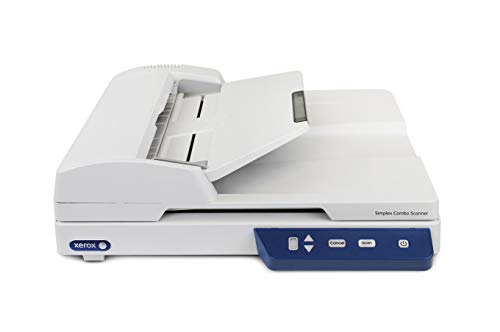
Xerox XS-Combo 25ppm Simplex Scanner
Best for: Mixed media scanning with flatbed access
- Scanning
- Auto Document Feeder (what this guide is about)
- Scan Speed
- 25 ppm
- Connectivity
- USB
- Media Types
- Business cards
- Features
- Automatic Document Feeder, Scanner
- Auto Document Feeder
- ADF
The Xerox XS-Combo combines a flatbed and a 25 ppm automatic document feeder in one unit. It connects via USB and handles business cards. This setup suits users who need to scan both loose papers and bound documents. It is a practical option for offices requiring mixed-media scanning without wireless features.
Pros
- 25 ppm scan speed
- Flatbed and ADF combo
- Handles business cards
Cons
- Simplex scanning only
- USB connectivity only
- Heavier build at 9.55 lbs
Good fit if
- You need to scan bound books or photos
- You require business card scanning
- You prefer a wired USB connection
Skip if
- You need double-sided scanning
- You require wireless connectivity
- You want a lightweight portable device
Verdict: The Xerox XS-Combo 25ppm Simplex Scanner is a specialized tool for users who must scan both loose sheets and fragile items. It fits offices with mixed document types and wired setups.
Specifications side by side
| Spec | Epson WorkForce Portable Duplex Scanner | Fujitsu Color Duplex Document Scanner | Plustek PS186 Desktop Scanner | Ambir ImageScan Pro 830ix Compact 30ppm Scanner | Xerox DocuMate 3125 Desktop Scanner | HP ScanJet Pro 3000 s4 Document Scanner | Epson WorkForce Desktop Duplex Scanner | Fujitsu fi-7180 Duplex Document Scanner | HP ScanJet Pro 2000 s2 Duplex ADF Scanner | Canon imageFORMULA R40 Duplex Scanner | Epson Wireless Desktop Duplex Document Scanner | ScanSnap iX1400 Desktop Color Scanner | Xerox XS-Combo 25ppm Simplex Scanner |
|---|---|---|---|---|---|---|---|---|---|---|---|---|---|
| Scan Speed | 25 ppm/50 ipm | 60 ppm | not specified | 30 ppm | 40 ppm / 70 ipm | 40 ppm, 80 ipm | Up to 35 ppm / 70 ipm | 80 ppm | Up to 35 ppm / 70 ipm | Up to 40 ppm | Up to 35 ppm / 70 ipm | not specified | 25 ppm |
| ADF Capacity | 20 sheets | 80 sheets | 50 sheets | not specified | 50 sheets | 50 sheets | 50 sheets | 80 sheets | 50 pages | not specified | 50 sheets | not specified | not specified |
| Connectivity | USB | USB 3.0 | not specified | not specified | not specified | USB 3.0 | USB 3.0 | not specified | USB 3.0 | not specified | Wireless | USB | USB |
| Portability | Portable | not specified | Desktop | not specified | Desktop | not specified | not specified | not specified | not specified | not specified | not specified | not specified | not specified |
| Media Types | not specified | not specified | not specified | Business, ID & insurance cards | not specified | Business cards, A4-size documents | Business/ID cards, receipts | not specified | Business cards, A4 documents | Receipts, invoices | Business cards, ID cards | not specified | Business cards |
| Daily Duty Cycle | not specified | 4,000 scans | not specified | not specified | not specified | 4,000 pages | not specified | not specified | 3,500 pages | not specified | not specified | not specified | not specified |
| Power Source | AC power or USB power | not specified | not specified | not specified | not specified | not specified | not specified | not specified | not specified | not specified | not specified | not specified | not specified |
| Driver Support | not specified | not specified | not specified | TWAIN | not specified | TWAIN, ISIS | TWAIN | TWAIN, ISIS | TWAIN, ISIS | not specified | TWAIN | not specified | not specified |
| Print Output | Color | Color | not specified | not specified | not specified | not specified | Color | Color | not specified | Color | Color | Color | not specified |
| Print Speed | not specified | not specified | not specified | Up to 30 ppm | not specified | not specified | not specified | not specified | not specified | not specified | not specified | not specified | not specified |
| Supported Functions | not specified | not specified | not specified | not specified | not specified | not specified | not specified | not specified | not specified | Scan | not specified | not specified | not specified |
| Print Resolution | not specified | Up to 600 dpi | not specified | not specified | not specified | not specified | not specified | not specified | not specified | not specified | not specified | not specified | not specified |
| Features | Duplex Printing, Automatic Document Feeder, Scanner | Duplex Printing, Automatic Document Feeder, Scanner | Automatic Document Feeder, Scanner | Automatic Document Feeder, Scanner | Duplex Printing, Automatic Document Feeder, Scanner | Duplex Printing, Automatic Document Feeder, Scanner | Duplex Printing, Automatic Document Feeder, Scanner | Duplex Printing, Automatic Document Feeder, Scanner | Duplex Printing, Automatic Document Feeder, Scanner | Duplex Printing, Automatic Document Feeder, Scanner | Duplex Printing, Automatic Document Feeder, Scanner | Automatic Document Feeder, Scanner | Automatic Document Feeder, Scanner |
| Ideal For | Documents | Documents | Documents | not specified | Documents | Documents | Documents | Documents | Documents | Documents | Documents | Documents | not specified |
| Use Case | not specified | not specified | not specified | not specified | not specified | Office | not specified | not specified | Office | Office, Home | not specified | not specified | not specified |
| Scanner Type | Portable | not specified | Desktop | not specified | not specified | not specified | not specified | not specified | not specified | Receipt | not specified | Receipt | not specified |
| Scanning | Auto Document Feeder | Auto Document Feeder | Auto Document Feeder | Auto Document Feeder | Auto Document Feeder | Auto Document Feeder | Auto Document Feeder | Auto Document Feeder | Auto Document Feeder | Auto Document Feeder | Auto Document Feeder | Auto Document Feeder | Auto Document Feeder |
| Duplex Scanning | Duplex | Duplex | not specified | not specified | Duplex | Duplex | Duplex | Duplex | Duplex | Duplex | Duplex | not specified | not specified |
| Auto Document Feeder | ADF | ADF | ADF | ADF | ADF | ADF | ADF | ADF | ADF | ADF | ADF | ADF | ADF |
| Dimensions | 11.3 × 3.5 × 2 inches | 12 × 10 × 9 inches | 10.4 × 5.02 × 5.83 inches | 10.4 × 5.02 × 5.83 inches | 6.5 × 11.2 × 6.7 inches | 16.2 × 12.2 × 11.8 inches | 11.6 × 6.6 × 6.3 inches | 11.8 × 6.7 × 6.4 inches | 16 × 10 × 10 inches | 9.5 × 15 × 12.5 inches | 11.6 × 6.9 × 6.6 inches | 6.3 × 11.5 × 6 inches | 13 × 16 × 5.6 inches |
| Weight | 1.08 pounds | 9.3 pounds | 3.66 pounds | 3.66 pounds | 5.41 pounds | 6 pounds | 8.09 pounds | 9.3 pounds | 6 pounds | 6.17 pounds | 8.16 pounds | 7.1 pounds | 5.94 pounds |
| Color | Black | not specified | black | Black/Grey | Black | Light Grey | not specified | Black/White | Light Grey | White | not specified | Black | not specified |
| Model | ES-200 | Fi-7160 | PS186 | 830ix | XDM31255M-WU | Pro 3000 s4 | ES-400 | PA03670-B005 | Pro 2000 s2 | 4229C009 | ES-500W | PA03820-B235 | XS-Combo |
| Size | not specified | not specified | not specified | not specified | not specified | Small | not specified | not specified | Small | One Size | not specified | not specified | not specified |
For shop hardware comparisons, you can evaluate the best welding systems with auto wire feeder by duty cycle specs.
How to choose the right scanner
-
Check duplex scanning needs
Determine if you need to scan both sides of a page automatically. The Epson ES-200 and Fujitsu Fi-7160 both support duplex scanning, which saves time by processing two sides in one pass. If you only handle single-sided documents, a simplex model like the Xerox XS-Combo may suffice. Verify the duplex capability in the specifications to ensure the hardware matches your daily workflow requirements without manual intervention.
-
Verify print output type
Identify whether you require color or black-and-white scanning. The Epson ES-200 and Fujitsu Fi-7160 provide color output, which is essential for preserving original document details. If you only need text extraction, a monochrome scanner like the Plustek PS186 may be sufficient. Check the print output spec to avoid paying for color capabilities you do not use, ensuring the hardware aligns with your specific document types.
-
Assess connectivity options
Select the connection type that fits your workspace. The Epson ES-500W offers wireless connectivity, allowing scanning from mobile devices without a direct cable. Most other models, including the HP ScanJet Pro 3000 s4, rely on USB connections for stable, high-speed data transfer. Choose wireless for flexibility or USB for consistent performance in a fixed desktop setup, depending on your office infrastructure.
-
Evaluate scanner form factor
Consider the physical size and weight for your available space. The Epson ES-200 is a portable unit weighing just 1.08 pounds, ideal for travel. In contrast, the HP ScanJet Pro 3000 s4 is a larger desktop unit designed for stationary use. Measure your desk or bag space before purchasing. A compact design suits mobile professionals, while a heavier desktop model offers stability for high-volume office environments.
-
Match speed to volume
Align the scan speed with your daily document volume. The Ambir ImageScan Pro 830ix delivers up to 30 pages per minute, handling busy workflows efficiently. The Epson ES-400 offers 35 ppm for even higher throughput. If you process fewer documents, speed may be less critical. Check the print speed spec to ensure the scanner can keep up with your team’s demands without creating bottlenecks in your daily operations.
Frequently asked questions
Which scanner is best for mobile professionals?
The Epson ES-200 is the top choice for mobile use. It weighs just 1.08 pounds and measures 11.3 inches in length. This compact size fits easily into bags. It supports duplex scanning and connects via USB. You get color output without needing a dedicated workspace. It is ideal for scanning small batches on the go.
What is the fastest scanner for high-volume offices?
The Ambir ImageScan Pro 830ix is rated at 30 pages per minute. It is designed for busy offices with limited desk space. The unit measures 10.4 inches in length and 5.83 inches in height. It supports duplex scanning to process both sides of documents quickly. It connects via USB for reliable wired performance.
Does the Epson WorkForce Portable Duplex Scanner support duplex scanning?
Yes, the Epson ES-200 supports automatic duplex scanning. This feature allows you to scan both sides of a page in a single pass. It includes an automatic document feeder for batch processing. The device is portable and weighs 1.08 pounds. It connects via USB and produces color output.
Which scanner is best for small offices needing fast USB desktop scanning?
The HP ScanJet Pro 2000 s2 is a strong option for small offices. It delivers fast double-sided capture via a USB connection. The unit has a 3,500-page daily duty rating. It measures 16 inches in length and weighs 6 pounds. It supports duplex scanning and includes an automatic document feeder for standard letter-size paper.
Is there a wireless scanner with color duplex capabilities?
The Epson ES-500W supports wireless connectivity and color duplex scanning. It is designed for users who need mobility without a direct computer connection. The device weighs 8.16 pounds and measures 11.6 inches in length. It includes an automatic document feeder. You can send scans directly to the cloud from mobile devices.
What scanner is recommended for receipt digitization?
The Canon imageFORMULA R40 is specialized for receipt digitization. It is designed for accounting workflows and integrates with QuickBooks Online. The scanner supports duplex scanning and includes an automatic document feeder. It measures 9.5 inches in length and weighs 6.17 pounds. It produces color output for accurate record keeping.
Which scanner offers the best budget option for desktop batch scanning?
The Plustek PS186 is a solid budget choice for desktop batch scanning. It connects via USB for reliable wired performance. The unit weighs 3.66 pounds and measures 10.4 inches in length. It includes an automatic document feeder for daily paper document scanning. It supports OCR functionality for searchable files without complex network configuration.
Can the Xerox DocuMate 3125 scan both sides of a document?
Yes, the Xerox DocuMate 3125 supports duplex scanning. It features a 50-sheet automatic document feeder for batch processing. The scanner is designed for standard letter-size paper. It produces searchable PDFs for desk-bound workflows. The unit weighs 5.41 pounds and connects via USB for small office use.