15 Best Document Scanners for Documents, Compared
As an Amazon Associate we earn from qualifying purchases. Links on this page are affiliate links.
Choosing the best document scanners for documents requires matching your workflow to specific hardware capabilities. We compared 15 models based strictly on the specifications published on their listings. The ScanSnap iX1600 Wireless Document Scanner leads because it offers 40 ppm duplex capture for shared desktop scanning across small office teams. This guide helps you decide which scanner fits your volume and connectivity needs.
Quick picks
The best fit for you
- You need the best overall desktop scanner ScanSnap iX1600 Wireless Document Scanner It offers 40 ppm duplex capture and wireless connectivity for shared office use.
- You want the most compact model on the list Brother Compact Mobile Document Scanner Weighing just 1.03 pounds, it is the lightest portable scanner for travel.
- You need high-volume daily desktop document scanning Fujitsu Duplex Desktop Document Scanner It delivers 60 ppm speeds and a 4,000-scan daily duty cycle.
- You require a touchscreen for desktop scanning Fujitsu ScanSnap Touchscreen Document Scanner It features a 4.3-inch touch screen for direct duplex scanning control.
Our 15 picks

ScanSnap iX1600 Wireless Document Scanner
Best for: shared desktop scanning across small office teams
- Ideal For
- Documents (what this guide is about)
- Scan Speed
- 40 ppm
- Connectivity
- Wi-Fi, USB
- Media Types
- Receipts, business cards, photos
- Touchscreen
- Large color touchscreen
- Features
- Automatic Document Feeder, Touch Screen, Scanner
The ScanSnap iX1600 is a dedicated desktop scanner designed to handle large paperwork workloads. It scans duplex documents at 40 pages per minute and connects via Wi-Fi or USB. A built-in color touchscreen lets you switch between up to 30 custom user profiles to route files directly to computers, smart devices, or cloud services. This model suits shared home offices or small teams needing fast, organized sheet feeding.
Pros
- Fast 40 ppm duplex scanning speed
- Color touchscreen with support for up to 30 scanning profiles
- Wi-Fi and USB connectivity for PC, Mac, mobile, and cloud destinations
- ScanSnap Home software manages documents, receipts, business cards, and photos
Cons
- Weighs 7.5 pounds, making it intended strictly for desktop use
- No Ethernet connectivity listed for hardwired local networks
Good fit if
- You need 40 ppm duplex scanning for multi-page document batches.
- You share a scanner among team members who need individual touchscreen shortcuts.
- You want wireless scanning directly to smart devices or cloud services without a computer.
Skip if
- You need a compact, lightweight mobile scanner to take on trips.
- You require a hardwired Ethernet network port rather than Wi-Fi.
Verdict: ScanSnap iX1600 Wireless Document Scanner offers rapid 40 ppm duplex capture and dedicated touchscreen profiles for multi-user document routing. It serves busy workstations that require dependable desktop paper processing across computers and cloud destinations.

ScanSnap iX1300 Wireless Color Document Scanner
Best for: compact desktop wireless document and card scanning
- Ideal For
- Documents (what this guide is about)
- Scan Speed
- Up to 30 ppm
- Connectivity
- USB, Wi-Fi
- Media Types
- Documents, photos, receipts, cards
- Print Output
- Color
- Features
- Automatic Document Feeder, Scanner
View on Amazon: ScanSnap iX1300 Wireless Color Document Scanner
The ScanSnap iX1300 is a compact desktop document scanner built for everyday paperwork. It scans double-sided pages at up to 30 ppm and handles standard paper, photos, and plastic cards. Measuring 11.7 by 4.5 by 3.3 inches and weighing 4.4 pounds, it fits small workspaces. With both Wi-Fi and USB connectivity, you can scan directly to computers, mobile devices, or cloud services without needing driver setup.
Pros
- 30 ppm double-sided scanning speed
- Dual Wi-Fi and USB connectivity
- Scans standard documents, photos, and plastic cards
- Compact footprint measuring 11.7 by 4.5 by 3.3 inches
Cons
- No built-in touchscreen display
- Scanning speed capped at 30 ppm
Good fit if
- You need 30 ppm duplex scanning over Wi-Fi or USB.
- You have limited desk space and want a 4.4-pound compact unit.
- You scan mixed media including thick items and plastic cards.
Skip if
- You require scan speeds higher than 30 ppm.
- You want an integrated touchscreen to control jobs directly on the device.
Verdict: ScanSnap iX1300 Wireless Document Scanner delivers 30 ppm duplex scanning in a space-saving 4.4-pound footprint. It provides flexible Wi-Fi and USB operation for offices scanning mixed paper and plastic cards.

Fujitsu Duplex Desktop Document Scanner
Best for: high-volume daily desktop document scanning
- Ideal For
- Documents (what this guide is about)
- Scan Speed
- 60 ppm
- ADF Capacity
- 80 sheets
- Connectivity
- USB 3.0
- Daily Duty Cycle
- 4000 scans per day
- Power Source
- Power adapter
This renewed Fujitsu scanner is built for handling heavy daily paperwork at your desk. It processes up to 60 pages per minute in color and monochrome, and its automatic document feeder holds 80 sheets at a time. With single-pass duplex scanning and a rated duty cycle of up to 4,000 scans per day, it suits you if you need rapid batch processing via USB 3.0.
Pros
- Scans up to 60 pages per minute in color and monochrome
- 80-sheet automatic document feeder
- Single-pass automatic duplex scanning
- Duty cycle of up to 4,000 scans per day
Cons
- No wireless connectivity listed
- Requires a dedicated power adapter
- Desktop footprint weighing 10.5 pounds
Good fit if
- You need to digitize large stacks using an 80-sheet document feeder.
- You require fast scanning speeds up to 60 pages per minute.
- You handle heavy workloads reaching up to 4,000 scans per day.
Skip if
- You need wireless or mobile network connectivity.
- You prefer a lightweight, portable scanner that runs without an AC outlet.
Verdict: Fujitsu Duplex Desktop Document Scanner delivers fast 60 ppm speeds and a 4,000-scan daily duty cycle for demanding office paperwork. It is an efficient desktop workhorse for wired single-pass duplex batch processing.

Fujitsu ScanSnap iX500 Document Scanner
Best for: reliable everyday multi-page document scanning
- Ideal For
- Documents (what this guide is about)
- Scan Speed
- Up to 25 ppm
- ADF Capacity
- 50 sheets
- Connectivity
- Wi-Fi, USB
- Features
- Scanner
- Dimensions
- 5.5 × 5.6 × 10.4 inches
The Fujitsu ScanSnap iX500 Document Scanner is a desktop sheet-fed scanner built for managing multi-page paperwork. It feeds stacks using a 50-page automatic document feeder and scans color, grayscale, or monochrome duplex pages at up to 25 pages per minute. Wi-Fi and USB options allow you to send documents to computers, mobile devices, or directly to cloud services. It suits you if you need steady, everyday document digitization.
Pros
- Scans up to 25 double-sided pages per minute in color, grayscale, or monochrome
- 50-sheet automatic document feeder handles multi-page batches
- Wireless scanning to Mac, PC, iOS, Android, or directly to cloud
- One-button creation of searchable PDFs
Cons
- Renewed condition rather than factory-new hardware
- Desktop footprint weighing 5.6 pounds limits portability
Good fit if
- You scan multi-page document batches up to 50 sheets at once.
- You need double-sided scanning at speeds up to 25 pages per minute.
- You want to route scans directly to cloud storage without a computer.
Skip if
- You require brand-new equipment instead of a renewed model.
- You need an ultra-compact portable scanner to carry on the road.
Verdict: Fujitsu ScanSnap iX500 Document Scanner combines a 50-sheet ADF with 25 ppm duplex speeds for reliable document workflows over Wi-Fi or USB.

Fujitsu Duplex Sheet-Fed Document Scanner
Best for: mixed paperwork and embossed plastic cards
- Ideal For
- Documents (what this guide is about)
- Features
- Duplex Printing, Scanner
- Dimensions
- 18.3 × 11.1 × 12.1 inches
This renewed sheet-fed duplex document scanner is built for organized paper management. It processes embossed cards up to 1.4mm thick and uses an ultrasonic sensor to prevent double feeds. You can scan overlapping papers like taped receipts with the intelligent multi-feed function. One-touch operation includes ScanSnap mode and automatic job separation. It suits you if you need reliable document and card digitizing on a full-size desktop footprint.
Pros
- Scans hard and embossed cards up to 1.4mm thick
- Ultrasonic double-feed detection sensor prevents missed pages
- Intelligent multi-feed function handles taped receipts and overlapping sheets
- One-touch operation with ScanSnap mode and automatic job separation
- Duplex scanning captures two-sided paperwork in a single pass
Cons
- Large desktop footprint measuring 18.3 inches long by 11.1 inches wide
- No wireless connectivity options listed in specifications
Good fit if
- You need to scan thick embossed plastic cards up to 1.4mm.
- You frequently process taped receipts or overlapping documents.
- You want duplex paper handling with double-feed detection.
Skip if
- You have limited workspace for an 18.3-inch long machine.
- You need wireless connectivity for cable-free scanning.
Verdict: Fujitsu Duplex Sheet-Fed Document Scanner provides dependable two-sided scanning with dedicated multi-feed sensors for mixed batches. It is a solid desktop choice when you handle varied paperwork and embossed cards.

Epson WorkForce Desktop Duplex Scanner
Best for: desktop batch document archiving and TWAIN workflows
- Ideal For
- Documents (what this guide is about)
- ADF Capacity
- 50 sheets
- Portability
- Desktop
- Driver Support
- TWAIN
- Print Output
- Color
- Features
- Duplex Printing, Automatic Document Feeder, Scanner
The Epson WorkForce Desktop Duplex Document Scanner is a dedicated desktop unit designed for digitizing paper files. It features a 50-sheet auto document feeder for two-sided color scanning in a single pass. With included TWAIN driver integration and built-in optical character recognition, you can send scans directly to business software or export searchable PDFs. It suits standard office desks handling routine multi-page document workflows.
Pros
- 50-sheet auto document feeder
- Single-pass two-sided duplex scanning
- TWAIN driver support for document management integration
- Ultrasonic double feed detection and skew correction
Cons
- Requires desktop space at 8.16 pounds
- No wireless networking listed in specifications
Good fit if
- You scan multi-page document batches up to 50 sheets at once.
- You need TWAIN driver compatibility for office software integration.
- You export scans directly into searchable PDF, Word, or Excel formats.
Skip if
- You need a lightweight mobile scanner for travel use.
- You require wireless connectivity for cable-free operation.
Verdict: Epson WorkForce Desktop Duplex Document Scanner handles routine office digitization with its 50-sheet automatic feeder and standard TWAIN integration.

Epson WorkForce Mobile Document Scanner
Best for: on-the-go single-sheet and receipt scanning
- Ideal For
- Documents (what this guide is about)
- Scan Speed
- 5.5 seconds per page
- Connectivity
- USB 2.0
- Portability
- Mobile, portable
- Media Types
- Receipts, ID cards, long documents
- Power Source
- USB-powered
This is a single-sheet mobile document scanner designed for travel and small workspaces. Weighing 9.44 ounces and measuring 10.7 inches wide, it runs entirely on USB 2.0 bus power without batteries or an AC adapter. It digitizes a single page in 5.5 seconds and accommodates sheets up to 8.5 by 72 inches. You get a portable unit suited for digitizing receipts, ID cards, and individual documents on Windows or Mac computers.
Pros
- Weighs 9.44 ounces for easy portability
- Scans a single page in 5.5 seconds
- Powered directly via USB 2.0 without an AC adapter
- Handles media up to 8.5 by 72 inches plus ID cards
Cons
- Feeds only one sheet at a time with no multi-page paper tray
- Lacks wireless connectivity and requires a USB cable
- Does not include an internal battery for untethered operation
Good fit if
- You need a lightweight 9.44-ounce scanner powered entirely via USB
- You scan individual sheets, long pages up to 72 inches, receipts, or ID cards
Skip if
- You need a multi-page automatic document feeder for high-volume jobs
- You want wireless connectivity or battery-powered operation without cables
Verdict: Epson WorkForce Mobile Document Scanner provides a compact, USB-powered setup for digitizing single pages, receipts, and ID cards on the move. Its 5.5-second scan speed and lightweight design make it a practical fit for basic mobile document capture.

Canon imageFORMULA R10 Portable Duplex Scanner
Best for: Portable duplex scanning on USB power
- Ideal For
- Documents (what this guide is about)
- Scan Speed
- 12 ppm
- ADF Capacity
- 20 sheets
- Connectivity
- USB
- Portability
- Portable
- Daily Duty Cycle
- 500 scans
View on Amazon: Canon imageFORMULA R10 Portable Duplex Scanner
The Canon imageFORMULA R10 is a compact, USB-powered portable duplex document scanner built for mobile work and small desks. It weighs 2.2 pounds and feeds up to 20 sheets at a time through its automatic document feeder. With a scan speed of 12 pages per minute and duplex scanning, you can process double-sided paperwork without an AC outlet. It suits you if you need travel-friendly document digitizing.
Pros
- Runs entirely on USB power without an external power cord
- Automatic document feeder holds up to 20 sheets
- Scans both sides of a page at 12 pages per minute
- Built-in scanning software requires no driver installation
- Weighs 2.2 pounds with an 11.2 by 3.75-inch footprint
Cons
- Scan speed maxes out at 12 pages per minute
- Suggested daily duty cycle is limited to 500 scans
- Relies on a physical USB cable with no wireless option
Good fit if
- You need a travel-friendly scanner that operates purely on USB power.
- You scan double-sided multipage contracts up to 20 sheets at a time.
- You digitize varied media including plastic cards, receipts, and legal forms.
Skip if
- You process heavy office workloads exceeding 500 pages per day.
- You require scanning speeds faster than 12 pages per minute.
- You need wireless scanning to untether from your computer.
Verdict: Canon imageFORMULA R10 Portable Document Scanner provides reliable mobile duplex scanning powered directly from your laptop USB port. Its compact 20-sheet feeder handles daily multi-page digitizing without needing a wall outlet.

Brother Compact Mobile Document Scanner
Best for: USB-powered portable document scanning on the go
- Ideal For
- Documents (what this guide is about)
- Scan Speed
- 16 ppm
- Portability
- Mobile, compact
- Power Source
- USB bus power
- Driver Support
- TWAIN, WIA, ICA, SANE
- Features
- Mobile Printing, Scanner
The Brother Compact Mobile Document Scanner is a lightweight portable scanner built for digitizing paperwork on the move. It measures 11.9 inches long and weighs 1.03 pounds, fitting easily into a work bag. It scans color and monochrome pages at up to 16 pages per minute. The unit draws power directly from your computer via an included micro USB 3.0 cable, making it ideal if you need portable document capture without wall outlets.
Pros
- Scans color and monochrome pages at up to 16 ppm
- Weighs 1.03 pounds and measures under 12 inches long
- Powered via micro USB 3.0 without requiring a wall outlet
- Broad driver support covering TWAIN, WIA, ICA, and SANE
Cons
- Image rotation software feature is limited to PC
- No built-in wireless connectivity
- Uses a micro USB connection rather than USB-C
Good fit if
- You need a compact scanner powered directly by your laptop.
- You travel frequently and want equipment weighing close to one pound.
- You work across multiple operating systems including Windows, Mac, or Linux.
Skip if
- You need wireless scanning capability without a physical cable.
- You require automatic image rotation while using macOS or Linux.
Verdict: Brother Compact Mobile Document Scanner delivers 16 ppm scanning in a bus-powered frame under 12 inches long. It gives you dependable document digitizing anywhere your laptop goes.
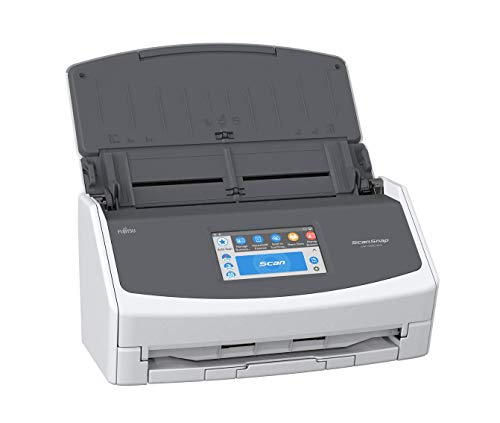
Fujitsu ScanSnap Touchscreen Document Scanner
Best for: touchscreen-directed desktop document scanning
- Ideal For
- Documents (what this guide is about)
- Scan Speed
- 30 ppm
- ADF Capacity
- 50 sheets
- Connectivity
- USB, Wi-Fi (2.4 and 5 GHz), Bluetooth
- Portability
- Desktop
- Touchscreen
- 4.3-inch touch screen
View on Amazon: Fujitsu ScanSnap Touchscreen Document Scanner
The Fujitsu ScanSnap iX1500 is a desktop duplex document scanner with a 4.3-inch touch screen. It feeds up to 50 sheets through the automatic document feeder at scan speeds up to 30 pages per minute. Dual-band Wi-Fi and USB let you route scans directly to cloud services, computers, or mobile devices. This unit suits you if you need fast batch document scanning managed directly from a built-in display.
Pros
- 4.3-inch touch screen for selecting scan destinations
- 30 ppm duplex scanning with 50-sheet ADF
- Dual-band Wi-Fi (2.4 and 5 GHz) plus USB connectivity
- Optical resolution up to 600 dpi
Cons
- Requires AC wall power with no battery operation
- Desktop dimensions require dedicated desk space
Good fit if
- You want to route scans directly via a 4.3-inch touch screen.
- You process stacks of paperwork up to 50 sheets at 30 ppm.
- You need dual-band Wi-Fi to scan to mobile devices and cloud storage.
Skip if
- You need a battery-powered portable scanner for mobile use.
- You require scanning speeds faster than 30 pages per minute.
Verdict: Fujitsu ScanSnap iX1500 Touch Screen Scanner provides fast 30 ppm duplex scanning managed directly from its 4.3-inch touch screen. It delivers flexible 50-sheet document handling across dual-band Wi-Fi and USB connections.

Epson WorkForce Wireless Touchscreen Scanner
Best for: PC-free wireless scanning of large paper batches
- Ideal For
- Documents (what this guide is about)
- Scan Speed
- 35 ppm
- ADF Capacity
- 100 sheets
- Connectivity
- Wireless, USB
- Portability
- Desktop
- Touchscreen
- 4.3-inch touchscreen
View on Amazon: Epson WorkForce Wireless Touchscreen Scanner
This desktop document scanner gives you standalone digitization with a 4.3-inch color touchscreen and built-in wireless connectivity. It features a 100-sheet auto document feeder and scans both sides of a page in a single pass at up to 35 pages per minute. You can send files directly to cloud storage, USB drives, or email without connecting to a computer, making it suitable for shared office desks handling multi-page documents.
Pros
- 100-sheet automatic document feeder capacity
- 4.3-inch color touchscreen for standalone operation
- Scans directly to cloud services, email, or USB without a computer
- Single-step duplex scanning at up to 35 pages per minute
Cons
- Desktop footprint weighing 8.16 pounds limits portability
- Scan speed is limited to 35 pages per minute
Good fit if
- You need to scan batches of up to 100 sheets in a single session.
- You want to route scans directly to cloud storage or USB without turning on a computer.
- You prefer managing scanner settings via a built-in 4.3-inch touchscreen.
Skip if
- You need a lightweight mobile scanner to travel with.
- You require scanning speeds faster than 35 pages per minute.
Verdict: Epson WorkForce Wireless Touchscreen Document Scanner combines a 100-sheet feeder with standalone cloud routing to handle daily office paperwork without a computer. Its 35 ppm duplex scanning and dedicated touchscreen simplify document organization across shared workspaces.

Epson WorkForce Portable Duplex Scanner
Best for: mobile workers needing two-sided batch document scanning
- Ideal For
- Documents (what this guide is about)
- Scan Speed
- 25 ppm/50 ipm
- ADF Capacity
- 20 sheets
- Connectivity
- USB
- Portability
- Portable
- Power Source
- AC power or USB power
The Epson WorkForce Portable Duplex Scanner is a mobile sheet-fed scanner built for travel and compact desks. It captures both sides of a page in a single pass at speeds up to 25 ppm or 50 ipm. You get a 20-sheet automatic document feeder and dual powering via AC or USB. It suits you if you need fast document capture on the go.
Pros
- Scans up to 25 ppm or 50 ipm with single-pass duplex
- Runs on either AC power or computer USB power
- Compact 1.08-pound weight fits mobile work setups
- Handles business cards, plastic IDs, receipts, and documents
Cons
- Feeder capacity capped at 20 sheets
- Lacks built-in wireless connectivity
Good fit if
- You need portable duplex scanning speeds up to 25 ppm.
- You want power options for both wall outlets and computer USB ports.
- You scan smaller batches of up to 20 pages alongside ID cards.
Skip if
- You require wireless connectivity instead of a USB cable.
- You regularly scan document batches larger than 20 sheets.
Verdict: Epson WorkForce Portable Duplex Scanner delivers fast 25 ppm two-sided scanning in a 1.08-pound portable chassis. Its 20-sheet feeder and dual AC or USB power make it a capable mobile document tool.

HP Portable USB Document Scanner
Best for: traveling users scanning single-sided papers
- Ideal For
- Documents (what this guide is about)
- Scan Speed
- 15 ppm
- Connectivity
- USB 2.0
- Portability
- Portable
- Power Source
- USB bus power
- Features
- Scanner
The HP HPPS100 is a lightweight, portable document scanner designed for home and small office use. It connects via USB 2.0 and operates at 15 pages per minute. The device supports simplex scanning with a resolution of 1200 dpi. It handles paper sizes from 2 x 2.9 inches to 8.5 x 14 inches. This model suits users who need to digitize single-sided documents on the go.
Pros
- Weighs only 3 ounces for high portability
- Scans at 15 pages per minute
- Supports 1200 dpi resolution
- Powers directly via USB bus power
Cons
- Supports only single-sided (simplex) scanning
- Connects via USB 2.0 only
- Requires separate software installation for advanced features
Good fit if
- You need a lightweight scanner for travel
- You primarily scan single-sided documents
- You want a compact device for home use
Skip if
- You need to scan double-sided documents
- You require wireless connectivity
- You need high-volume office scanning
Verdict: HP HPPS100 Portable Single-Sided Scanner is a compact option for individuals who need to digitize single-sided papers while traveling. It fits users who prioritize portability over duplex scanning capabilities.

Canon imageFormula Upright Document Scanner
Best for: cramped desks needing upright document capture
- Ideal For
- Documents (what this guide is about)
- Portability
- Desktop, upright design
- Driver Support
- ISIS, TWAIN
- Features
- Scanner
- Dimensions
- 12.2 × 15.3 × 9.6 inches
This renewed Canon imageFormula upright document scanner fits tight workspaces with top-feed and top-eject paper paths that sit flush against a wall. It measures 8.7 by 11.8 by 6.1 inches and uses under 12.8 watts during active scanning. With included ISIS and TWAIN driver support alongside optical character recognition, it suits you if you need a dedicated desktop scanner for processing mixed batches of text pages and photos without sacrificing desk space.
Pros
- Upright top-feed and top-eject design allows flush placement against walls
- Supports ISIS and TWAIN drivers on Windows alongside Mac TWAIN support
- Built-in optical character recognition, auto color detection, and deskewing
- Low power consumption rated at 12.8W or less during scanning
Cons
- No wireless network connectivity listed
- Mac driver support limited to TWAIN without ISIS
- Hardware is supplied as a renewed unit
Good fit if
- You need a compact desktop scanner that operates flush against a wall.
- You rely on ISIS or TWAIN drivers to link directly with office software.
- You scan mixed batches containing text pages and photographs.
Skip if
- You need a wireless document scanner for untethered network use.
- You require ISIS driver compatibility on Apple Mac computers.
- You want brand-new rather than renewed scanning hardware.
Verdict: Canon imageFormula Upright Document Scanner delivers batch processing and versatile driver compatibility in a compact vertical profile. It is a practical fit if you need automated image adjustment and upright document handling in tight spaces.

Canon imageFORMULA DR-C225 II Upright Scanner
Best for: High-volume office document scanning
- Ideal For
- Documents (what this guide is about)
- Scan Speed
- Up to 25 ppm
- ADF Capacity
- 30 sheets
- Media Types
- Receipts, photos, cards, long documents
- Driver Support
- TWAIN
- Features
- Duplex Printing, Automatic Document Feeder, Scanner
View on Amazon: Canon imageFORMULA DR-C225 II Upright Scanner
The Canon imageFORMULA DR-C225 II is a desktop document scanner designed for office environments. It scans at 25 pages per minute with a 30-sheet automatic feeder. The upright design saves space, while top feed and eject simplify handling. It supports color duplex scanning and connects via USB. You get broad compatibility with Windows and Mac, plus bundled software for PDF and business card management. This unit is built for reliable, high-volume document digitization.
Pros
- Scans at 25 pages per minute
- 30-sheet automatic document feeder
- Color duplex scanning capability
- Upright space-saving design
- Supports Windows and Mac
Cons
- USB connection only, no wireless option
- No built-in touch screen
- Single-sided physical footprint limits portability
Good fit if
- You need fast, high-volume office scanning
- You prefer a compact upright footprint
- You scan mixed document types like receipts and cards
Skip if
- You require wireless connectivity
- You need a portable mobile scanner
- You want a touch screen interface
Verdict: The Canon DR-C225 II Office Scanner fits users who need a reliable, space-saving desktop solution for high-speed document digitization. It is ideal for offices handling mixed media where USB connectivity is sufficient.
Specifications side by side
| Spec | ScanSnap iX1600 Wireless Document Scanner | ScanSnap iX1300 Wireless Color Document Scanner | Fujitsu Duplex Desktop Document Scanner | Fujitsu ScanSnap iX500 Document Scanner | Fujitsu Duplex Sheet-Fed Document Scanner | Epson WorkForce Desktop Duplex Scanner | Epson WorkForce Mobile Document Scanner | Canon imageFORMULA R10 Portable Duplex Scanner | Brother Compact Mobile Document Scanner | Fujitsu ScanSnap Touchscreen Document Scanner | Epson WorkForce Wireless Touchscreen Scanner | Epson WorkForce Portable Duplex Scanner | HP Portable USB Document Scanner | Canon imageFormula Upright Document Scanner | Canon imageFORMULA DR-C225 II Upright Scanner |
|---|---|---|---|---|---|---|---|---|---|---|---|---|---|---|---|
| Scan Speed | 40 ppm | Up to 30 ppm | 60 ppm | Up to 25 ppm | not specified | not specified | 5.5 seconds per page | 12 ppm | 16 ppm | 30 ppm | 35 ppm | 25 ppm/50 ipm | 15 ppm | not specified | Up to 25 ppm |
| ADF Capacity | not specified | not specified | 80 sheets | 50 sheets | not specified | 50 sheets | not specified | 20 sheets | not specified | 50 sheets | 100 sheets | 20 sheets | not specified | not specified | 30 sheets |
| Connectivity | Wi-Fi, USB | USB, Wi-Fi | USB 3.0 | Wi-Fi, USB | not specified | not specified | USB 2.0 | USB | not specified | USB, Wi-Fi (2.4 and 5 GHz), Bluetooth | Wireless, USB | USB | USB 2.0 | not specified | not specified |
| Portability | not specified | not specified | not specified | not specified | not specified | Desktop | Mobile, portable | Portable | Mobile, compact | Desktop | Desktop | Portable | Portable | Desktop, upright design | not specified |
| Media Types | Receipts, business cards, photos | Documents, photos, receipts, cards | not specified | not specified | not specified | not specified | Receipts, ID cards, long documents | not specified | not specified | not specified | not specified | not specified | not specified | not specified | Receipts, photos, cards, long documents |
| Touchscreen | Large color touchscreen | not specified | not specified | not specified | not specified | not specified | not specified | not specified | not specified | 4.3-inch touch screen | 4.3-inch touchscreen | not specified | not specified | not specified | not specified |
| Daily Duty Cycle | not specified | not specified | 4000 scans per day | not specified | not specified | not specified | not specified | 500 scans | not specified | not specified | not specified | not specified | not specified | not specified | not specified |
| Power Source | not specified | not specified | Power adapter | not specified | not specified | not specified | USB-powered | USB powered | USB bus power | AC 100 to 240 V, 50/60 Hz | not specified | AC power or USB power | USB bus power | not specified | not specified |
| Driver Support | not specified | not specified | not specified | not specified | not specified | TWAIN | TWAIN | not specified | TWAIN, WIA, ICA, SANE | not specified | not specified | not specified | not specified | ISIS, TWAIN | TWAIN |
| Print Output | not specified | Color | not specified | not specified | not specified | Color | not specified | not specified | not specified | Color | Color | Color | not specified | not specified | not specified |
| Features | Automatic Document Feeder, Touch Screen, Scanner | Automatic Document Feeder, Scanner | Duplex Printing, Automatic Document Feeder, Scanner | Scanner | Duplex Printing, Scanner | Duplex Printing, Automatic Document Feeder, Scanner | Mobile Printing, Scanner | Duplex Printing, Mobile Printing, Scanner | Mobile Printing, Scanner | Duplex Printing, Touch Screen, Scanner | Duplex Printing, Automatic Document Feeder, Touch Screen, Scanner | Duplex Printing, Automatic Document Feeder, Scanner | Scanner | Scanner | Duplex Printing, Automatic Document Feeder, Scanner |
| Ideal For | Documents | Documents | Documents | Documents | Documents | Documents | Documents | Documents | Documents | Documents | Documents | Documents | Documents | Documents | Documents |
| Use Case | not specified | not specified | not specified | not specified | not specified | not specified | not specified | not specified | not specified | not specified | not specified | not specified | Office, Home | not specified | Office |
| Scanner Type | not specified | not specified | not specified | not specified | not specified | Desktop | Receipt | Portable | Portable | not specified | Desktop | Portable | Portable | not specified | not specified |
| Scanning | Auto Document Feeder | Auto Document Feeder | Auto Document Feeder | not specified | not specified | Auto Document Feeder | not specified | not specified | not specified | not specified | Wireless Scanning | Auto Document Feeder | not specified | not specified | Auto Document Feeder |
| Duplex Scanning | not specified | not specified | Duplex | not specified | Duplex | Duplex | not specified | Duplex | not specified | Duplex | Duplex | Duplex | not specified | not specified | Duplex |
| Auto Document Feeder | ADF | ADF | ADF | not specified | not specified | ADF | not specified | not specified | not specified | not specified | ADF | ADF | not specified | not specified | ADF |
| Dimensions | 6.3 × 11.5 × 6 inches | 11.7 × 4.5 × 3.3 inches | 12.4 × 10.4 × 9.5 inches | 5.5 × 5.6 × 10.4 inches | 18.3 × 11.1 × 12.1 inches | 6.6 × 11.6 × 6.9 inches | 1.8 × 10.7 × 1.3 inches | 3.75 × 11.2 × 1.57 inches | 11.9 × 2.2 × 1.4 inches | 11.5 × 6 × 6.3 inches | 11.6 × 11.6 × 6.6 inches | 11.3 × 3.5 × 2 inches | 2 × 11.6 × 1.4 inches | 12.2 × 15.3 × 9.6 inches | 11.8 × 6.1 × 8.7 inches |
| Weight | 7.5 pounds | 4.4 pounds | 10.5 pounds | 5.6 pounds | not specified | 8.16 pounds | 9.44 ounces | 2.2 pounds | 1.03 pounds | not specified | 8.16 pounds | 1.08 pounds | 3 ounces | not specified | 5.95 pounds |
| Size | ScanSnap iX1600 Black Photos & Documents | not specified | not specified | not specified | not specified | not specified | not specified | Compact | New DS640 | not specified | not specified | not specified | not specified | not specified | 8.7" x 11.8" x 6.1" |
| Color | ScanSnap iX1600 Black Photos & Documents | ScanSnap iX1300 White | not specified | Black | Gary | Black | Black-30 | White | white | WHITE | Black | Black | White | not specified | Black |
| Model | PA03770-B635 | PA03805-B005 | not specified | PA03656-B305-R | PA03630-B055-cr | ES-400 II | ES-50 | 4861C001 | DS640 | not specified | ES-580W | ES-200 | HPPS100 | not specified | 3258C002 |
If you also manage fabrication equipment alongside office hardware, you can evaluate elegoo pla 3d printer alternatives for your workspace.
How to choose the right one
-
Check duplex scanning needs
Decide if you need to scan both sides of a page in one pass. Duplex models like the Fujitsu Duplex Desktop Document Scanner handle two-sided batches efficiently, saving time on multi-page documents. If you only scan single-sided papers, a simpler unit like the HP Portable USB Document Scanner may suffice. Check the specifications for duplex capabilities. This feature is critical for offices processing contracts or forms where both sides contain important information. Avoid manual flipping to maintain workflow speed.
-
Match scan speed to volume
Look at the pages per minute rating to ensure the scanner handles your daily workload. High-volume offices should consider the Fujitsu Duplex Desktop Document Scanner, which offers 60 ppm for rapid batch processing. For moderate use, the ScanSnap iX1600 provides 40 ppm duplex capture. The Canon imageFORMULA R10 offers 20 ppm in a portable form factor. Match the speed to your typical daily scan count. Faster models reduce wait times during peak hours. Slower models are sufficient for occasional personal use.
-
Select the right connectivity
Choose between wireless and USB connections based on your workspace setup. Wireless models like the ScanSnap iX1600 and Epson WorkForce Wireless Touchscreen Scanner allow scanning from multiple computers without cables. USB models like the Brother Compact Mobile Document Scanner offer direct, stable connections for single machines. Consider if you need to share the device across a team. Wireless scanning simplifies access for shared desktops. USB connections are often preferred for portable units to ensure consistent power and data transfer.
-
Consider portability and size
Determine if you need a desktop unit or a portable device for travel. Portable scanners like the Brother Compact Mobile Document Scanner weigh just 1.03 pounds and fit in a bag. The Epson WorkForce Portable Duplex Scanner weighs 1.08 pounds and offers duplex scanning on the go. Desktop units like the Fujitsu Duplex Desktop Document Scanner are larger and heavier but offer higher duty cycles. Choose based on whether you work at a fixed desk or move between locations frequently.
-
Review automatic feeder capacity
Check the automatic document feeder size if you process multiple pages at once. Larger feeders reduce the need to reload paper frequently. The Epson WorkForce Wireless Touchscreen Scanner features a 100-sheet feeder for large batches. The ScanSnap iX1600 and iX1300 offer 50-sheet capacity for standard office loads. Smaller portable units like the Canon imageFORMULA R10 have a 20-sheet feeder. Match the feeder size to your typical batch volume to minimize interruptions during scanning.
Frequently asked questions
Which document scanner is best for small office teams?
The ScanSnap iX1600 Wireless Document Scanner is ideal for shared desktop scanning across small office teams. It offers rapid 40 ppm duplex capture and dedicated touchscreen profiles for multi-user document routing. This makes it suitable for busy workstations that require dependable desktop paper processing across computers and cloud destinations.
What is the fastest desktop document scanner on this list?
The Fujitsu Duplex Desktop Document Scanner delivers the fastest speed at 60 ppm. It also features a 4,000-scan daily duty cycle for demanding office paperwork. This efficient desktop workhorse is designed for wired single-pass duplex batch processing, making it the top choice for high-volume daily tasks.
Are there portable scanners that support duplex scanning?
Yes, several portable models support two-sided scanning. The Canon imageFORMULA R10 Portable Duplex Scanner provides reliable mobile duplex scanning powered directly from your laptop USB port. Its compact 20-sheet feeder handles daily multi-page digitizing without needing a wall outlet. The Epson WorkForce Portable Duplex Scanner also offers 25 ppm two-sided scanning in a lightweight chassis.
Which scanner is best for scanning plastic cards?
The ScanSnap iX1300 Wireless Color Document Scanner is best for compact desktop wireless document and card scanning. It provides flexible Wi-Fi and USB operation for offices scanning mixed paper and plastic cards. The Fujitsu Duplex Sheet-Fed Document Scanner is also a solid choice when you handle varied paperwork and embossed cards with dedicated multi-feed sensors.
Do any scanners work without a computer?
The Epson WorkForce Wireless Touchscreen Scanner allows for PC-free wireless scanning of large paper batches. It combines a 100-sheet feeder with standalone cloud routing to handle daily office paperwork without a computer. Its 35 ppm duplex scanning and dedicated touchscreen simplify document organization across shared workspaces.
What is the lightest portable document scanner?
The Brother Compact Mobile Document Scanner is the lightest option, weighing just 1.03 pounds. It delivers 16 ppm scanning in a bus-powered frame under 12 inches long. This makes it a dependable choice for document digitizing anywhere your laptop goes, offering portability without sacrificing basic speed.
Which scanner has a touchscreen for direct control?
The Fujitsu ScanSnap iX1500 Touch Screen Scanner features a 4.3-inch touch screen for direct management. It provides fast 30 ppm duplex scanning managed directly from this interface. You can also use the Epson WorkForce Wireless Touchscreen Scanner, which uses its touchscreen to simplify document organization and cloud routing without a PC.
Which scanner is best for upright document capture?
The Canon imageFormula Upright Document Scanner is best for cramped desks needing upright document capture. It delivers batch processing and versatile driver compatibility in a compact vertical profile. It is a practical fit if you need automated image adjustment and upright document handling in tight spaces.